Lenovo is aiming the Legion 5a 2026 at people who want a capable gaming laptop without paying Legion 7a money. The design is practical and the specification copes with everyday work, heavy tasks and gaming alike, even if cooling and audio leave something to be desired.
Design and display
Tidy design, build quality above its price
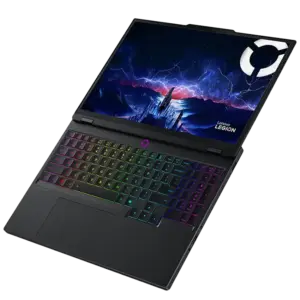
The Legion 5a 2026 shares a lot with the Legion 7a, although the body is a little thicker and heavier. It is still fairly compact for a 15-inch machine and comes in under 2kg, so carrying it to class or the office is no hardship.
The lid and frame are aluminium with a soft-touch finish; the base is plastic but solid, with no creak to it. It comes in Glacier White or Cosmic Black. The white one is the better choice. It is less common on a gaming laptop and fingerprints do not show on it, whereas the black picks up every smudge and needs a wipe most days, which gets old. The paint over the aluminium is soft too, so a zip in your bag or a knock against a desk edge will mark it.
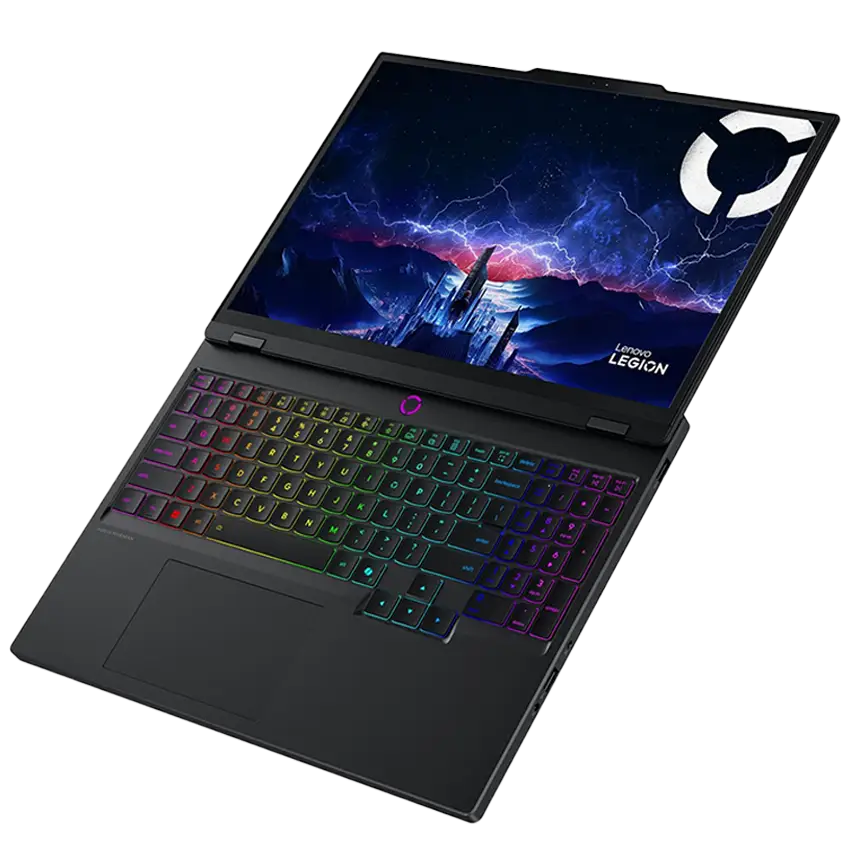
The overall look is restrained, with a dark chrome LEGION logo in the middle of the lid. The hinge is on the stiff side but opens flat to 180 degrees, and the edges are kind to your wrists. One annoyance: the power button below the screen is always lit, which is distracting if you watch films in a dark room. At an expected price of around USD 1,500, the build quality is one of the Legion 5a’s strong points.
Plenty of ports, but not the best placement
Connectivity is well covered. The left side has RJ-45 and two USB-C 4.0 ports; the right has a USB-A 3.2 Gen 1 port with always-on charging, the audio jack and the eShutter camera kill switch.
Round the back sit DC-in, HDMI 2.1 and two more USB-A 3.2 Gen 1 ports. Routing the power cable, the display and some peripherals back there keeps the space on either side of the laptop clearer.
Despite the decent port count, there is no card reader, unlike on the Legion 7a. Both USB-C ports are on the left and sit quite far forward; moving one to the back would make for neater, more convenient connections.
Good keyboard, responsive touchpad
The keyboard includes a number pad and full-size arrow keys, with 1.6mm of travel and good feedback, although it is somewhat loud. The RGB backlight is single-zone, contrast is poor on the white model, and a fair amount of light spills out from under the keycaps.
The touchpad has a smooth plastic surface, supports PTP and works reliably. It is smaller than the one on the Legion 7a but still big enough, and it rarely picks up accidental input when the laptop is on your lap.
Sharp OLED screen at 165Hz
The Legion 5a 2026 has a 15.3-inch 16:10 OLED panel at 2.5K, 165Hz and under 1ms response time. The 10-bit Samsung panel reaches around 500 nits, peaking at 1,000 nits in HDR, with deep blacks and a crisp image.
Coverage comes to 100% sRGB, 94.3% Adobe RGB and 99.9% DCI-P3, so colour is vivid. The glossy surface picks up reflections easily, though, and PWM shows up at brightness levels below 100%, which anyone sensitive to flicker should keep in mind.
Lenovo Legion 5a 15.3″ WQXGA 165Hz Laptop AMD Ryzen 7 250 16GB RAM 1TB SSD NVIDIA GeForce RTX 5060 8GB Windows 11 Home Black 83Q70003US: Check Availability on Amazon
Lenovo Legion 5a 2026 Gaming Laptop, Ryzen 7 250, NVIDIA GeForce RTX 5060: Check Availability on Amazon
Lenovo Legion 5a – 2026 – Gaming Laptop – NVIDIA GeForce RTX 5060-15.3″ OLED WQXGA Display – 165Hz Refresh Rate – Ryzen 7 250-32GB Memory – 1TB Storage – Eclipse Black: Check Availability on Amazon
Lenovo Legion 5a Gaming Laptop, AMD Ryzen 7 250(Up to 5.1GHz) | GeForce RTX 5060 | 15.3″ WQXGA (2560×1600) OLED 165Hz Display | 32GB DDR5 RAM, 1TB SSD | Wi-Fi 7, RJ-45 | RGB Backlit | Win 11: Check Availability on Amazon
Lenovo Legion 5a Gaming Laptop • AMD Ryzen 7 250 • GeForce RTX 5060: Check Availability on Amazon
Lenovo Legion 5a 2026 Gaming Laptop, Ryzen 7 250, NVIDIA GeForce RTX 5060: Check Availability on Amazon
Configuration and performance
The Ryzen AI 7 450 and RTX 5060 combination handles heavy workloads and gaming without much trouble.
Specifications and upgradability
Component | Specification |
| Processor | AMD Ryzen AI 7 450, 4 performance cores + 4 efficiency cores, 16 threads, up to 5.1GHz |
| Integrated graphics | AMD Radeon 860M |
| Graphics card | NVIDIA GeForce RTX 5060 8GB, up to 115W with Dynamic Boost, MUX, Advanced Optimus and G-Sync |
| Memory | 32GB DDR5-5600, two slots, 32GB maximum |
| Storage | 1TB SK Hynix SSD; one M.2 PCIe 4.0 x4 slot and one M.2 PCIe 4.0 x2 slot |
| Display | 15.3-inch OLED, 16:10, 2,560 x 1,600, 165Hz, 1ms response, 500 nits SDR, 1,000 nits HDR, 100% DCI-P3 |
| Ports | 2 x USB-C 4.0, 3 x USB-A 3.2 Gen 1, HDMI 2.1, RJ-45, audio jack, DC-in |
| Battery | 80Wh, 245W charger, USB-C charging up to 140W |
| Dimensions | 344 x 244 x 18.95–19.95mm |
| Weight | 1.91kg |
The Ryzen AI 7 450 and the RTX 5060 cover games and work fine, and 32GB of RAM is more than most people are going to touch. The number to keep an eye on is the 8GB of VRAM, which is where you will run into a wall first, not the CPU and not the memory.
Benchmark | Multi-core | Single-core |
| Cinebench R15 | 2,689 | 299 |
| Cinebench R23 | 18,116 | 1,972 |
| Cinebench 2024 | 958 | 117 |
| Geekbench 6.6 | 13,799 | 2,900 |
The Ryzen AI 7 450 performs well in both single- and multi-core tests. In Cinebench R15, Performance mode returned roughly 2,650 points with sustained power at 85W. Balance landed in the same territory, while Quiet dropped to about 2,150 points at 45W. Worth noting: on a PD power supply, Balance still managed 2,350 points while drawing only 40W, a good trade-off between speed and consumption.
In long multi-threaded work the Ryzen AI 7 450 trails the Ryzen AI 9 HX 470 by roughly 15–20%, and the Ryzen AI 9 465 by about 10%, which comes down to its lower core and thread count. Single-core performance and IPC are on a par, however, and that is plenty for general use, multitasking, study and resource-hungry work.
Gaming was measured at the native 2,560 x 1,600 resolution, on the discrete GPU, with Game Ready drivers and the laptop raised off the desk.
Game and settings | Performance | Balance | Quiet |
| Black Myth: Wukong, Cinematic, ray tracing off | 34 FPS | – | – |
| Black Myth: Wukong, Ray Tracing Very High, DLSS 4, MFG 4x | 68 FPS | 60 FPS | 56 FPS |
| Cyberpunk 2077, Ultra, ray tracing off | 37 FPS | – | – |
| Cyberpunk 2077, Ray Tracing Overdrive, DLSS 4, MFG 4x | 104 FPS | 92 FPS | 82 FPS |
| Horizon Forbidden West, Very High, TAA | 48 FPS | 38 FPS | 32 FPS |
| Horizon Forbidden West, Very High, DLSS Balanced, Frame Generation | 102 FPS | 90 FPS | 80 FPS |
| Red Dead Redemption 2, Ultra Optimized | 78 FPS | 73 FPS | 67 FPS |
| Shadow of the Tomb Raider, Highest | 100 FPS | 85 FPS | 76 FPS |
The Legion 5a 2026 copes with most games at 2.5K and high settings, running roughly 5–10% faster than the Legion 7a. DLSS and Multi Frame Generation take Cyberpunk 2077 from 37 to 104 FPS, and Black Myth: Wukong reaches 68 FPS with ray tracing on. The 8GB of VRAM can become a ceiling, though, and some games will require turning settings down.
Balance mode holds about 80–85% of Performance output while staying under 38dBA, and Quiet delivers roughly 70–75% at around 30dBA. For gaming it is worth propping the laptop up to improve airflow and keep the GPU from throttling.
Cooling works, but raise the machine
Cooling comes from two fans, two heatsinks and three heat pipes. Raised off the desk, component temperatures sit in the mid-70s °C through long mixed workloads. With the CPU drawing around 80W in Performance mode, that climbs to the mid-80s °C. Fan noise measures roughly 52dBA in Custom, 45dBA in Performance, 38dBA in Auto and under 30dBA in Quiet.
Surface temperatures are reasonably well controlled, but the hot spot to the right of the keyboard, near the arrow keys, can pass 40°C under load. The WASD area and the palm rest range from the mid-30s to the low 40s °C. Component temperatures rise sharply when the laptop sits flat on a desk, so raise it for gaming or long stretches of heavy work.
Fast SSD with two M.2 slots
Storage is a 1TB SK Hynix PCIe 4.0 SSD. CrystalDiskMark gave 6,511.36MB/s sequential read, 5,599.89MB/s sequential write. AS SSD read came in at 4,537.33MB/s with a total score of 5,286, but write fell to 1,258.96MB/s. That gap between the two tests is worth knowing about if you move large files regularly.
There are two M.2 slots. One runs at PCIe 4.0 x4, the other at x2, so a second drive will be slower unless you take the full-speed slot.
Who is the Legion 5a 2026 for?
Its strengths are a solid build under 2kg, the 2.5K 165Hz OLED panel and good performance from the Ryzen AI 7 450 and the 8GB RTX 5060 Laptop GPU. It handles work, multitasking and 2.5K gaming well, particularly with DLSS 4 in play. Against that, 8GB of VRAM will limit you in some games, the screen surface reflects a lot, and the laptop needs raising to cool properly under load.
USD 1,500 buys a 15-inch gaming laptop light enough to actually carry, with an OLED panel you would not expect at this price. Whether to buy it depends entirely on what the Legion 7a costs on the day. The 7a holds up better in long multi-threaded work, and if the two end up fifty dollars apart there is no reason to take the 5a. Open up a real gap and the maths changes, particularly if your heavy workloads are short bursts rather than hour-long renders.
Related Posts