
Design
At 1.36 kg and roughly 302 x 201 x 23 mm, the Q200 isn’t thin enough to earn the “ultrabook” label, but it’s compact enough that carrying it around isn’t a hassle.
Stack it up against the competition: the similarly sized 11.6-inch Acer Aspire V5-171-6867 weighs about the same, while the 11-inch MacBook Air undercuts both at 1.08 kg.
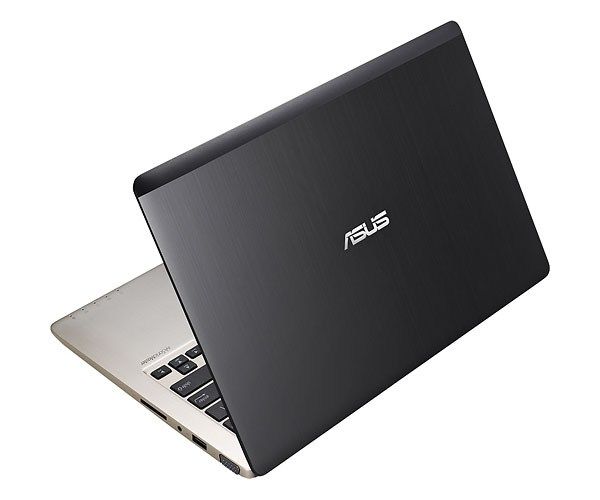
Asus Q200 essentially design is not much different than the Asus VivoBook X202E-DH31T. The casing of the machine are designed by the same series aluminum alloy material is gray, highlight the center Asus logo.
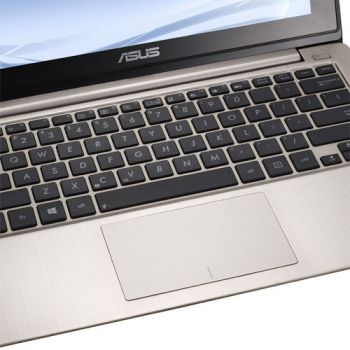
The entire area inside the well designed keyboard aluminum silver, 11.6-inch screen of the phone is covered with a black plastic edging, the power button is designed above and right of keyboard.
For a laptop with 11.6-inch size as the Asus Q200, the machine has plenty of connectors, to meet the needs of many users.
The right side of the machine includes an SD card reader, audio jacks input / output, 2 USB ports and VGA connection.
The left side of the machine includes an Ethernet port, HDMI port, USB 2, USB 3.0 and Kensington lock slot. It is noteworthy that many laptops now have no Ethernet port or VGA equipped, so Asus Q200 there are certain advantages.
Keyboard and Touchpad
Asus Q200 keyboard is designed with suitable, uniform distance from the key and spacious, large key size of the input operation quite easy. However the bounce of the keys are not really good, so sometimes still stick manipulation error is something that users should be concerned.
In contrast to the keyboard, touchpad integrated machine is capable of extremely accurate navigation in desktop mode. The multi-touch manipulation and gestures like two finger operation on the touchscreen to zoom in, zoom out (Pinch-to-zoom), twist and manipulate moving two fingers working perfectly . Operations with Windows 8 gestures, such as swiping your hands from the edge of the far-right of the touchpad to launch the Charms bar or swipe left hand from the outer edge to switch between tasks improving work very well.
Screen and webcam
Glossy screen size of 11.6-inch machine with a resolution of 1366 x 768 pixels standards, capable of displaying sharp images, in full color with a reasonable perspective.
Real test when watching 1080p video trailer with MP4 format of the movie “The Avengers” and “Skyfall”, the details of the film displayed very good, even can see the pores on face Robert Downey Jr.’s face, the color display is also very easy to distinguish, as blue in the eyes of Daniel Craig or red on the armor of Iron Man, seems particularly vibrant. Still showing good color when switching to angle left / right 45 degrees, but the colors are washed out in a wider perspective.
The screen does not look as bright. Its light level is about 116 lux. That is below the usual average of 224 lux. Other ultraportable laptops do better. For example, the Acer Aspire V5-171-6867 is around 223 lux. The Sony Vaio E Series 11 is about 165 lux.
Asus Q200 touchscreen also supports 10 touch points. Whether we draw with 10 fingers at once in Windows Paint, or perform multiple tasks simultaneously touch with Windows 8.
720p webcam taking pictures with precise colors even in low light conditions. Still image noise ratios remain high, even if the photo in full light conditions.
ASUS 11-Inch Q200E Laptop [OLD VERSION]: Buy it now
Holy apple Laptop Keyboard For ASUS Q200 Q200E black UK United Kingdom: Buy it now
Sound
Speaker of the machine is designed in the upper keyboard and built-in SonicMaster audio technology, thereby significantly interfere with the sound quality. When listening to music, the sound is very sharp and clear with better quality when compared to other types notebook segment. Asus also installed Audio Wizard software that allows users to switch between music configured presets suitable for the needs such as listening to music, watching movies, playing games or audio chat. Sound quality is also significantly reduced the Audio Wizard software is not activated.
Efficiency
With processor second generation Intel Core i3-2365M 1.4 GHz speed, integrated Intel HD Graphics 3000 and drive 5400 rpm hard speed, performance Asus Q200 provides a modest but consistent with a machine Laptops with the same price. Basically, users can fully use the machine for everyday tasks such as HD video playback, surfing the web, running office applications … but not for gaming or video editing.
Evaluate the overall performance of the machine in PCMark 7, Asus Q200 only 1567 points, less than half (3436 points) compared to the average level of the type laptop ultraportable and dropped far behind the CPU Core i5 of Acer Aspire V5-171-6867 (2427 points) and Asus VivoBook X202E with CPU Core i3 (2040 points).
HDD Drive 500GB speed 5400 rpm, boot time in Windows 8 in 23 seconds, faster than the average of 30 seconds and only 2 seconds slower than Asus VivoBook X202E (21 seconds).
However, the drive needs 58 seconds to 3 minutes to complete the exam Laptop File Transfer 4,97GB when copying data including multimedia files (photos, music and video), with data transfer speeds only 21.4 MBps, much slower than the category average (82.9 MBps) of the type of laptop ultraportable, but still faster than the Acer AspireV5-171-6867 (14.9 MBps ) and nearly equal to the VivoBook X202 (25 Mbps).
The ability to transcode video, Asus Q200 only normal working against time to transfer a HD video file formats have time to prepare a 5-minute video for iPod touch by Cyberlink Media Espresso in time is 1 minute. While these types of laptops ultraportable just 41.1 seconds to complete the same tests, the Acer Aspire V5-171-6878 only 18 seconds.
Asus Q200 absolutely can play 1080p videos smoothly without any phenomenon completely and can handle any game that is downloaded from the Windows Store. However, users should not expect the machine can play newer games.
Battery life
Although Asus Q200 is very light, but shorter battery life makes the portability of the machine becomes very much limited. Machines can operate continuously for 4 hours 19 minutes when continuous surfing over Wi-Fi connections and checked via Laptop Battery Test. Time on the 1 hour 43 minutes shorter than the average level of the type of laptop ultraportable (6:02), but on par with the Acer Aspire V5-171-6867 (4:05) and Asus VivoBook X202 (4:20).
Connectivity
Ports are what you’d expect at this price: two USB 2.0, one USB 3.0, HDMI, an SD reader, and a combo headphone/mic jack. The USB 3.0 port’s the one that actually matters — noticeably faster transfers than the 2.0 ports.
Wireless is 802.11b/g/n Wi-Fi plus Bluetooth 4.0. Gets the job done for browsing and email, but it’ll feel slow next to anything running current Wi-Fi standards.
It came with Windows 8 out of the box, which was current when this launched. The touch-first interface with live tiles was a big departure at the time — some people liked it, plenty found it confusing after years of the old Start menu. Upgrading to Windows 10 is painless, and the hardware handles it without issue, plus you get better security and a more familiar interface.
Price is really the whole pitch here. It’s not going to impress anyone on specs, but for students or casual users who just need something for browsing, writing, and the occasional video, it does the job without draining the wallet.
What it gets right: cheap, light, easy to carry around without a second thought. Brushed aluminum build looks better than the price tag suggests. Keyboard’s comfortable too — full-sized, chiclet-style, holds up fine over long typing sessions.
What it doesn’t get right: the Celeron processor and 4GB RAM mean multitasking is rough, and anything demanding just isn’t happening. The screen looks shiny, so the glare can get bad outside or in strong lights. The battery only runs about 4 to 5 hours. That is not enough for a whole day when you are away from a charger. There is also no backlit keyboard. In a dark room you end up leaning in and trying to see the keys.
Bottom line: this is a laptop for basic stuff browsing, writing, casual video and it’s honest about not being more than that. Not for power users, but for everyday tasks, it gets there.
Related Posts


Tech Reviewer & Product Analyst
Định Bia has spent over 10 years testing consumer electronics with a focus on smart technology. He work as a product advisor at Biareview where he helped customers find the right devices for their needs. He personally tests every product featured on this site using a consistent evaluation framework covering quality, durability, and value. All reviews are based on experience, not influenced by the manufacturer.