Hardware and Design
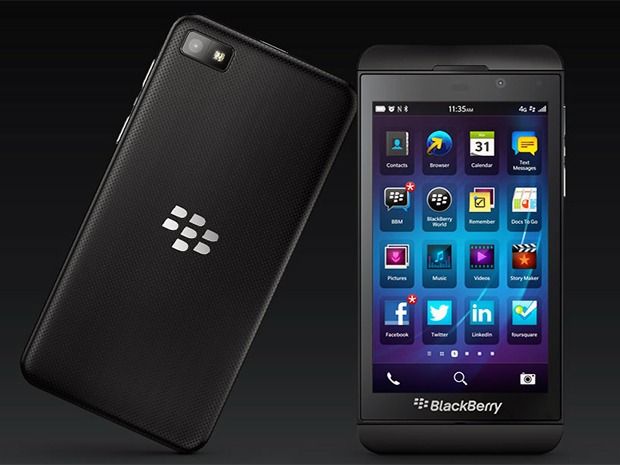
BlackBerry Z10 is a smartphone brings a completely new design, is somewhat alien to the followers of the Black Mulberry, but this is probably a change should have if BlackBerry wants to adapt to the trend of “touch phone” now. Unlike the phone using the Windows Phone platform HTC or Nokia’s colorful, Z10 appearance owns a simple and somewhat cautious in the design stage. Perhaps many people would have commented that Z10 has the same design an Apple iPhone 5 with many more lines, but at least the majority of current touch smartphone has different design akin to the touchscreen enabled large covered almost the entire front section. BlackBerry Z10 is no exception when it is equipped with 4.2-inch screen resolution 768 x 1280 pixels for a pixel density of 355 ppi.
In order to see this design as “totally new” BlackBerry has left the staging as well as the hard keys on the familiar Trackpad previous BlackBerrys. However, they still retain a placement of the power button, a volume up, mute as on devices using the BlackBerry 7 operating system, such as the BlackBerry Bold 9900. Typical Instead microUSB charging port down to the bottom, do not understand what the Z10 reason being “crammed” this connection with microHDMI slot to the left edge. Perhaps this arrangement will cause users trouble finding ways to plug two cables simultaneously on the machine.
Unlike the trend of “monolithic” today, Z10 section detachable back cover to replace the battery, micro-SIM and microSD cards. This back surface layer caro quite familiar with BlackBerry Torch users before, can increase resistance to abrasions (or reduce the ability to see the scratched) but does not seem to fit in with the front end of device.
In general, the BlackBerry Z10 is still a beautiful device, user-friendly, robust feeling when holding. Machines are manufactured in Mexico and Canada should promise durable quality than rivals are made in China. Anyway, in terms of design, Z10 has yet to make a breakthrough compared to other smartphones.
Display
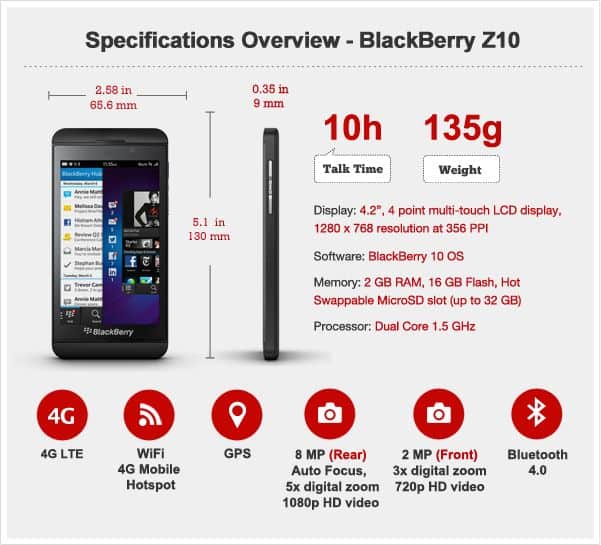
The BlackBerry Z10 comes with a 4.2-inch LCD display, and the resolution lands at 1280 x 768 pixels. That works out to a pixel density of roughly 355 PPI , so overall you get sharp, clean visuals where text and images look really crisp and detailed. Back then, this was definitely above the average , especially if you compare it to a lot of other phones in the same period.
The panel uses IPS (In-Plane Switching) technology, which basically means solid viewing angles and fairly accurate color. The colors feel lively but not overly pushed, you know, not that “too much” look. At the same time the color balance stays neutral enough, which helps a lot for reading, plus general web browsing. Contrast is also pretty strong, with deep blacks and bright whites, so the display looks usable both indoors and outside, even when the lighting isn’t exactly friendly.
Another thing people noticed is the 15:9 aspect ratio. It’s a bit wider than the more common 16:9 aspect ratio most phones used at the time. With that wider shape, along with the high resolution, the screen feels more open… kind of roomy, and it supports multitasking nicely. You can fit more content on screen at once, without everything feeling cramped.
Touch responsiveness is another strong point, gestures glide along in a way that matters when you’re navigating the BlackBerry 10 OS. And the on-screen keyboard? It’s honestly among the better ones. It adapts to your input, and it gives a comfortable typing experience, partly because the layout has space, and partly thanks to predictive text.
Overall, when you look at the display quality, the BlackBerry Z10 still kind of holds its own versus its contemporaries, giving you a sharp, bright, and very responsive screen that makes daily use feel smoother, for work or even play .
Configuration
Inside, there’s a dual-core processor running at 1.5 Ghz, 2GB RAM together with 16GB of built in storage, and you can expand it further up to 48GB, thanks to microSD support (up to 32GB). Also, it includes the sort of “must-have” stuff you really need if you want to survive in today’s smartphone market: 4G LTE connectivity, Wi-Fi, Bluetooth 4.0, NFC, plus accelerometers, a child gyroscope, and a light sensor.
BlackBerry Z10 Unlocked Cellphone, 16GB, Black: Buy it now
BlackBerry Z10 16Gb White WiFi Touchscreen Unlocked GSM QuadBand Cell Phone: Buy it now
Blackberry Z10 STL100-3 16GB 4G LTE Unlocked GSM Dual-Core OS 10 Smartphone – Black: Buy it now
Blackberry Z10 16GB OS 10 GSM Unlocked Smartphone – Black: Buy it now
Camera
BlackBerry Z10 owns two cameras, one in the back has a resolution of 8 MP with full HD 1080p video recording capability, and the rest on the front with only lower resolution 2MP, 720p video recording. Through experimentation, both this camera for sharp images, colors and much more progress if compared with the previous generation BlackBerry. BlackBerry this time brought a lot of improvements on the Z10 trendy camera, a feature of which is the TimeShift help us choose the best moments throughout in a series of photographs taken in succession.
Performance
Not unexpected, voice quality and sound quality (both from speakers and headphones) of the Z10. Clear sound output and loudly, not being shy. Z10 loudspeaker’s sound reproduction is quite stable, sound level of detail sufficient for a smartphone speakerphone. Likelihood stable network connections including Wi-Fi waves or 4G LTE connectivity. Anyway, BlackBerry is still the number one choice of users put the stability of the device first.
In contrast, the Z10 battery life is not good for much. Since the BlackBerry 7 launch, the smartphone was the beginning to “lose quality” in the category of usage. And with BlackBerry 10, they again made only disappointed users can use between 10 to 11 hours on 3G Wifi status continuously. With a device that uses LTE, this figure is modest results.
Software and BlackBerry 10 OS
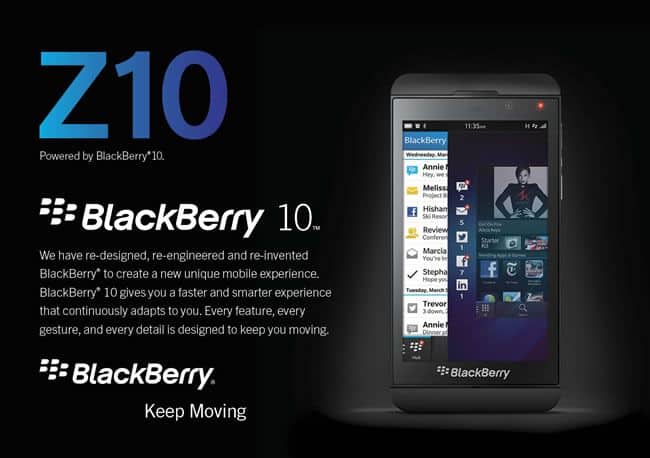
The BlackBerry Z10 was kind of the first device to come with BlackBerry 10 OS, which was basically a brand new operating system, built from the ground up, meant to feel modern and competitive as a smartphone experience. BlackBerry 10 OS really was a bold shift from the company’s older operating systems , it leaned hard into gesture based navigation, multitasking , and that smooth integration with communication tools.
A big part of BlackBerry 10 OS is the BlackBerry Hub, which acts like a unified inbox, pulling together the user’s messages, emails, SMS, social media notifications, and more. The Hub shows up all over the OS, just with a simple swipe, so users can stay in touch and handle their comms without having to leave what they were doing. That ends up being pretty useful for business users, you know the people who have to juggle multiple accounts and different channels.
Then there’s the gesture based navigation itself, it feels intuitive and fluid, so you can move around the device without constantly using physical buttons or even relying on lots of on-screen controls. For instance, swiping up from the bottom of the display minimizes the current app and brings you to the home screen. Swiping left or right switches between the open apps . Overall it encourages multitasking, and it makes it easier to jump between tasks, fast and without fuss.
Another standout thing about BlackBerry 10 OS is the virtual keyboard, and yeah it’s pretty much always mentioned as one of the best on any touchscreen device. The keyboard uses predictive text tech, it sort of picks up on the user’s typing habits and then suggests words above the letters so you can tap-to choose them with a quick flick gesture. That ends up making typing feel faster, and also more precise, especially if someone is coming over from BlackBerry’s old physical keyboards, where everything was more tangible.
Also, BlackBerry 10 OS has a bunch of built in apps and tools aimed at productivity and security. Those are two places where BlackBerry has, historically, done well. You get a full set of office apps , like a document editor, a spreadsheet editor, and a presentation viewer, and they’re compatible with Microsoft Office formats. On top of that there’s BlackBerry Balance, which lets users split work vs personal data on the device. So, sensitive business stuff stays more protected, at least in theory it stays more controlled.
That said, one major headache for BlackBerry 10 OS was the app support situation, especially when you compare it to iOS and Android. BlackBerry World, which was the company’s app store, did have apps to download, but the selection was pretty limited next to the giant ecosystems of the competitors. To help with that, BlackBerry 10 OS offered the option to sideload Android apps. It did widen the app menu, but it also asked for extra steps, and those steps weren’t exactly smooth or friendly, not for most people.
Even with all the innovative features and the clear productivity mindset, BlackBerry 10 OS still had trouble getting broad adoption. A big reason was just how dominant iOS and Android became, and stayed. Still, if a user really cares about communication, multitasking, and security, then BlackBerry 10 OS could feel like a strong alternative, and in several ways it was ahead of its time.






Tech Reviewer & Product Analyst
Định Bia has spent over 10 years testing consumer electronics with a focus on smart technology. He work as a product advisor at Biareview where he helped customers find the right devices for their needs. He personally tests every product featured on this site using a consistent evaluation framework covering quality, durability, and value. All reviews are based on experience, not influenced by the manufacturer.