
Overview
As you know, the Cr-48 laptops are in the process of testing Google, help it figure out the weaknesses and improve Chrome OS.
First, the Cr-48 laptop is operating on the operating system platform cloud computing Chrome with special features such as ultra-fast boot and access the Internet almost instantly. Accordingly, the system is not adequate computer equipment that fond of sharing and connecting through 3G and Wi-Fi built-in.
Configuration parameters and connection
Google’s laptop is equipped with 12.1-inch screen resolution of 1280 x 800 pixels with a webcam at the front. Besides, the Cr-48 is equipped with USB 2.0 ports, VGA signal output, SD card reader, headphone jack, Wi-Fi 802.11a / b / g / n and 3G CDMA connectivity is provided by the Verizon network.
Besides, the battery life is very impressive machine with 8 hours of continuous operation and 8 days standby.
Design and Build Quality
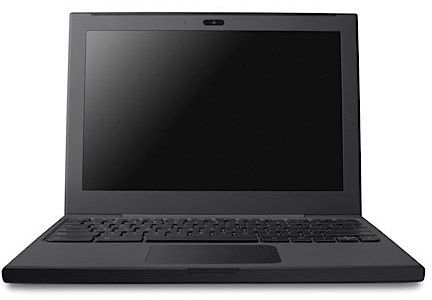
The Cr-48 looks like what it actually was: a prototype Google handed out, not a product it was trying to sell you. Matte black, rubberized, not a single logo on it anywhere. That rubber coating isn’t just for looks either — it grips your hands, so you’re less likely to drop the thing. Build quality feels solid enough that you’d believe it could survive a few years of backpacks and coffee shops.
It comes in at 11.8 x 8.6 x 0.9 inches, about 3.8 pounds — light enough that you forget it’s in the bag. The hinge doesn’t wobble, opens and closes cleanly. No branding anywhere gives it this slightly unfinished, engineering-sample feel, which honestly suits it.
Keyboard and Trackpad
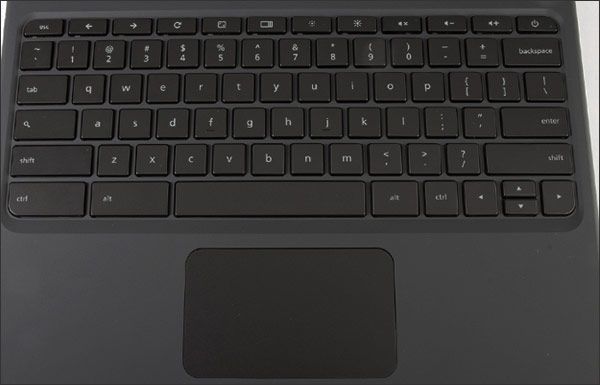
The keyboard is full-sized, chiclet keys, properly spaced, with enough travel that a long typing session doesn’t wear on your hands. The trackpad is big and tracks multi-touch gestures — scroll, zoom, switch tabs — without any lag or jumpiness. Cursor control feels precise, which isn’t something you can say about every trackpad from this era.
Display
12.1 inches, 1280×800, matte. Low-res by today’s standards, sure, but back then it did the job for browsing, writing, watching video. Images come through clear and sharp enough that you don’t think twice about it.
The matte coating earns its keep glare stays under control even near a window. Angles hold up okay, though push them too far and colors start to shift. Brightness is good enough across most rooms you’d actually use this in. Where it falls short is anything color-critical, if you’re editing photos or video for work, this screen just isn’t built for that.
Performance
When tested, since the startup button, the connection to the wireless network at the coffee shop, log into Gmail, and snap a photo, all in less than 1 minute – figures awfully impressive.
The Cr-48 boots so fast, even when “waking up” from the regime of “sleep”, this laptop also only takes 1.12 seconds (as Google announced). To switch to standby mode, the user simply close the lid, and the lid when the system is almost ready to work.
On the screen layout, the top right of the Cr-48 is a clock, status bar wireless connection Wi-Fi and battery (on Windows is the lower right corner). You can check the network connection or switch the touchpad to move the position.
In addition, the F function keys (F1 to F12) and Caps Lock also disappear and you will have to use other ways to capitalize. But in return, Google Cr-48 equipped with a magnifying glass shortcut for quick access to the search engine of its popularity. Start Menu and Task Bar taskbar is not supported. And instead of traditional desktop, you will start working on the Cr-48 Chrome browser.
Users will see a list of web-based applications have been preinstalled and two menus:Most Visited and the Recently Closed Sites like version of Chrome for PC. You can list the applications that have been built as Getting Start, Entanglement game, popit game, Gmail, Youtube, Google Maps, Google Talk, and Google Chrome App Store to download more other things.
Every action of the Cr-48 is almost all based on cloud computing platform instead of memory inside the machine. More specifically, everything you do is almost as online. Furthermore, instead of using multiple browser windows, the system will use the card. Pop-up windows still exist, but the user can move the position of the arbitrary window but still can not minimize the window, as well as each card on Chrome.
Google Chromebook Cr-48 Collector’s Item From Google’s Pilot Program: Buy it now
Finally the Alt + Tab key combination to help you switch between the windows is working on Chrome.
Add a bit of experience, if you frequently visit a website, to “pin” the address. Thus, you will not struggle to find what they want. Nevertheless, it should be noted that the chat feature through Gmail will display pop-up windows even if you are in any card, this is the interesting improvements but also easy to make you lose focus.
However, based on cloud computing platform to make the storage capacity of the Cr-48 somewhat limited with only a 16GB SSD and 2GB of RAM. So users will have to use online tools such as Picasa to store photos or personal videos. Google Laptop compatible with most cameras, but sadly that does not have an iPod or other Apple devices.
In the aspect of implementation of tasks, the system worked quite well with Atom N450 processor single core. But sometimes Google’s laptops are still having problems delayed or interrupted picture when watching Flash videos and clips from YouTube HD resolution. It should be noted that we will only have a single browser, so please bye Firefox or IE.
And with the configuration like this, the Cr-48 is difficult to do the work “hard” as video transcoding. In turn, by relying mainly on cloud computing, the system has the advantage of being protected very well before the attacks of malicious code or viruses.
Battery Life
Battery life might be the best thing about the Cr-48: 63Wh, rated around 8 hours. Working from a café or a plane without hunting for an outlet is exactly the kind of thing this laptop is built for.
Real-world runtime moves depending on what you’re doing — video streaming and a pile of open tabs will chew through it faster, while dimming the screen and killing radios you’re not using buys you extra time. Either way, you’re not tethered to a wall outlet most days.
Software and User Experience
Chrome OS lives in the browser. Your files, your apps, mostly your whole workflow — it’s all in the cloud, which means less to install and less to manage locally.
It boots in seconds, the interface doesn’t need explaining, and if you already spend your day in a browser tab, the whole thing just feels fast. Docs, Sheets, and Slides cover basic work, and Drive backs everything up automatically — you’re not going to lose a file to a dead hard drive here.
Security mostly happens without you noticing — auto-updates, sandboxing, verified boot running quietly in the background. Add the Chrome Web Store on top and you can extend it however you need.
Connectivity and Ports
One USB 2.0 port, HDMI, VGA, Ethernet, a combo headphone/mic jack. Decent spread for the era — enough to hook up an external display, plug in a mouse, or go wired if Wi-Fi’s being unreliable.
Wi-Fi is 802.11n, and there’s built-in 3G too, so a dead Wi-Fi signal doesn’t necessarily mean a dead internet connection. HDMI’s genuinely useful if you want to throw something up on a TV or projector; VGA’s there for the older gear you might still be dealing with.
One nice touch: the battery is removable. Carry a spare, or swap it once it starts wearing out — small thing, but it adds years to how long you can realistically keep using this laptop.
Keyboard and Trackpad
Full-sized chiclet keyboard, well-spaced, plenty of key travel — you can type on this for a while without your hands complaining. Function keys are swapped for volume and brightness controls, which makes sense for how you’d actually use it.
Trackpad’s big, tracks gestures cleanly, and the physical click on the buttons actually feels good instead of mushy. Cursor control is precise enough that you stop thinking about it.
Audio and Webcam
Speakers above the keyboard sound clear enough for calls and casual listening — not something you’d choose over headphones, but fine day to day.
The webcam’s 1 megapixel: fine in good light, rough once it gets dim, which was basically the standard for the time. Mic’s clear enough for calls. Nothing here is impressive, but it’s enough.
Impact on Chrome OS Development
The Cr-48 was never for sale. It was a test unit Google handed to a small group of people specifically to find out what broke before shipping Chrome OS for real.
Early User Feedback
People liked the speed — fast boot, updates happening quietly in the background. The complaints were just as consistent: no offline mode, barely any local storage, not enough apps that actually worked well.
Google fixed some of it directly — offline Docs, a bigger app catalog, general stability work. A lot of what changed in the interface after this came straight from watching how people used this specific machine.
Evolution of Chrome OS
Everything that came after built on what the Cr-48 exposed. Android app support eventually closed the app gap people kept complaining about. Cloud sync got smoother, security tightened up, and eventually Samsung, Acer, HP, and others started shipping their own Chromebooks on the same foundation this prototype laid down.
Legacy of the Cr-48
This was the first Chromebook, before Chromebooks were a category anyone took seriously. It proved a browser-only, cloud-first laptop could actually work an idea that later took over classrooms and offices where cheap and low-maintenance mattered more than raw horsepower. Chrome OS is still shipping updates over a decade later. This is where all of it started.
Conclude
This is obviously just a test unit — built around mobility and connectivity, not much else. But picture it actually shipping at scale, and it’s not hard to see the appeal, especially for anyone whose whole day is video calls and email and not much more demanding than that.
The real threat is tablets, which by this point were everywhere and eating into exactly the casual-use space this thing was aiming for. What the Cr-48 has that most tablets don’t: a real keyboard, battery life that actually lasts, fast connections, and a boot time that’s borderline embarrassing for how quick it is in a good way.
Related Posts

Tech Reviewer & Product Analyst
Định Bia has spent over 10 years testing consumer electronics with a focus on smart technology. He work as a product advisor at Biareview where he helped customers find the right devices for their needs. He personally tests every product featured on this site using a consistent evaluation framework covering quality, durability, and value. All reviews are based on experience, not influenced by the manufacturer.