Where most gaming laptops fit a separate GPU, the TUF Gaming A14 leans on a new generation of integrated graphics instead. ASUS is aiming it at people who want something small and flexible that still holds up for gaming and daily work.
Design and display
Thin, light and understated
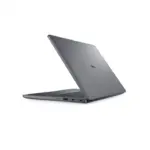
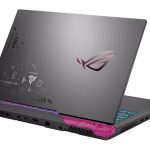
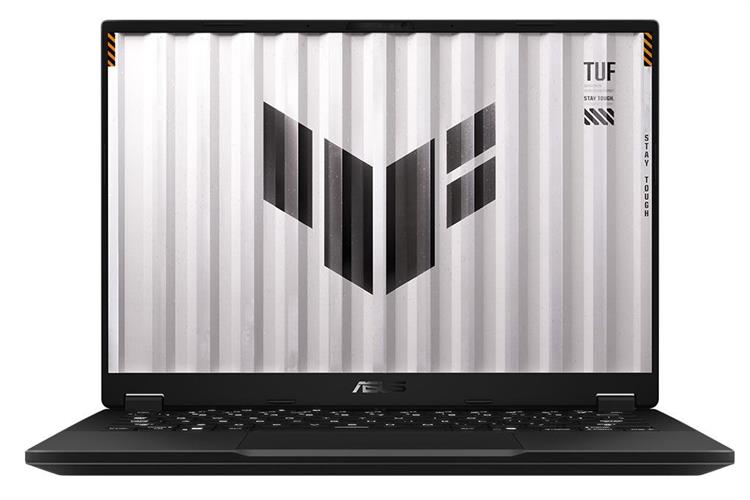
The A14 comes in a dark grey shell with a plain shape to it. Cover up the model name and you would struggle to pick it out as a gaming laptop; from the outside it looks closer to a work machine.
It is 17mm thick and around 1.48kg, which is what you get when there is no discrete GPU taking up room inside. That makes it thinner than the Acer Predator Triton 14 AI and lighter than the Razer Blade 14, so it goes into a backpack easily.
A good spread of ports, sensibly placed
The left side carries the power connector, HDMI, a USB-C port with DisplayPort 2.1 and Power Delivery 3.0, a USB-A port and the 3.5mm audio jack.
On the right there is another USB-A port, a second USB-C and a microSD reader. You can have a mouse, keyboard, headset and external monitor plugged in at once and still have something free.
Comfortable keyboard
The keyboard works for typing and for gaming. Key travel is 1.7mm, which gives it a comfortable feel and clear feedback.
The white backlight is bright enough to read the keys in a dark room, and the lighting effects are set in ASUS Armoury Crate.
The screen is the weak point; speakers and webcam get by
The A14 has a 14-inch IPS panel at 2,560 x 1,600 and 165Hz. Those are the right numbers for gaming, but what the panel actually shows is one of this laptop’s real shortcomings.
Even at full brightness it looks a little dim, and colours come out washed. On the default wallpaper the pinks, reds and yellows blur into one another instead of separating. You notice it looking at photos, watching video and playing games, which is hard to forgive at this price.
The speakers sound easy on the ear and reasonably balanced for music or games. The 1080p webcam and built-in mic cover ordinary video calls, though for anything where your voice needs to come through cleanly, use a headset mic.
Configuration and performance
The A14 runs an AMD Ryzen AI Max+ 392 with Radeon 8060S integrated graphics.
Specifications and upgradability
Component | Specification |
| Processor | AMD Ryzen AI Max+ 392 |
| Integrated graphics | AMD Radeon 8060S Graphics |
| Memory | 32GB |
| Storage | 1TB SSD |
| Display | 14-inch IPS, 2,560 x 1,600, 165Hz |
| Ports | 2 x USB-C, 2 x USB-A, HDMI, 3.5mm audio jack, microSD card reader |
| Wireless | Wi-Fi 6E, Bluetooth 5.3 |
| Dimensions | 309.9 x 226.1 x 17mm |
| Weight | Around 1.48kg |
| Operating system | Windows 11 Home |
The point of this configuration is what is missing from it. There is no discrete GPU, and the Radeon 8060S is being asked to do the job one would normally do.
Multi-core performance is the standout
Cinebench 2024 gave the A14 1,208 multi-core and 110 single-core. Only the Lenovo Legion 5i Gen 10 beat it on multi-core, at 1,366, and Geekbench Pro 6.3 put the two in the same order again: 17,320 against 18,018.
The rest of the field is not close. In Geekbench the Razer Blade 14 (2025) managed 15,006, the TUF Gaming F16 (2026) 12,565 and the Predator Triton 14 AI 11,205, so the A14 is doing roughly 55% more work than the Acer.
Single-core is where it gives ground. 2,804 in Geekbench sits behind several machines it comfortably beats on multi-core, though still above the TUF Gaming F16 (2026) on 2,389. For rendering or compiling that trade is worth taking. For the things you notice second to second in Windows, less so.
Radeon 8060S tops the graphics results
In 3DMark Wild Life the Radeon 8060S scored 58,973, the highest in the comparison group. For a machine with no discrete card, that is the number worth dwelling on.
The Lenovo Legion 5i Gen 10 and the ASUS TUF Gaming F16 (2026) both land around 53,500, close enough that you would never feel it. The Acer Predator Triton 14 AI and the Razer Blade 14 (2025) are stuck near 39,800, roughly a third behind, and both of those have a discrete graphics card the A14 does not.
TUF Gaming A14 Copilot+ PC Gaming Laptop, 14” WQXGA 16:10 165Hz Display, AMD Ryzen™ AI Max+ 392 Processor, 32GB LPDDR5X, 1TB PCIe® Gen 4.0 SSD, Wi-Fi 6E, Windows 11 Home, FA401, Jaegar Gray: Check Availability on Amazon
Games run well until you turn on ray tracing
Cyberpunk 2077 at 1080p or 1200p on Ultra ran at 50 FPS. Switch on Ray Tracing Overdrive and that collapses to 5 FPS.
Call of Duty: Modern Warfare 3 is where the A14 led the group outright, with 192 FPS on Minimum and 110 FPS on Extreme against the Razer Blade 14 (2025) on 160 and 109.
F1 2024 managed 44 FPS at Ultra High with upscaling off. Turning upscaling on took it to 162 FPS, within a frame of the TUF Gaming F16 (2026) on 161.
The Radeon 8060S handles plenty of games at 1080p or 1200p provided you pick your settings sensibly. Heavy ray tracing is where it runs out, and the Cyberpunk figure shows how abruptly.
Who is the TUF Gaming A14 (2026) for?
What it does well: a thin, light body, quiet operation, a comfortable keyboard, and multi-core and integrated graphics performance that beat machines with discrete cards. The Radeon 8060S will run most games at 1080p or 1200p. Ray tracing is beyond it, and the screen, dim and short on colour, is the thing most likely to put buyers off.
It lists at USD 2,199, the A14 makes sense for anyone who needs a 14-inch gaming laptop they can carry around, who does demanding work as well as gaming, and who can live without ray tracing and a first-rate display.
Related Posts