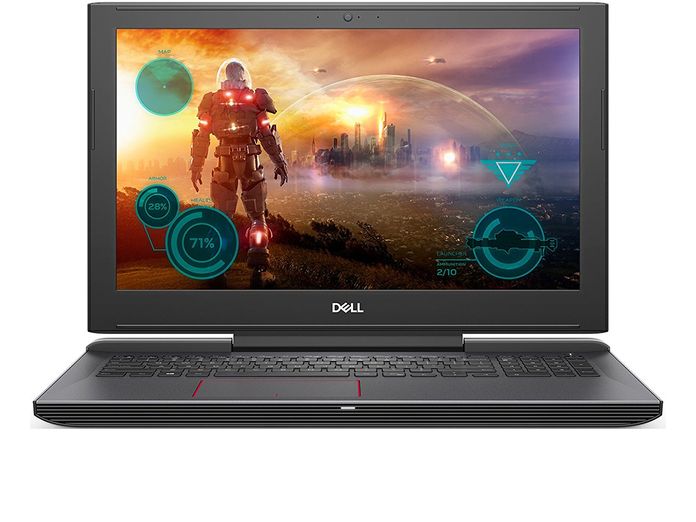
Configuration analysis
The new “flagship” of the Dell 15 7000 gaming product line has enhanced the visual experience for users with an IPS screen. This change improves the viewing angle of the gaming laptop screen, not only wider but also significantly minimizes anti-glare compared to the TN panel used for Dell Inspiron 15 7559 laptops.
USB Type-C with Thunderbolt 3 technology can transfer data up to 40Gbps, 8 times more than the popular USB 3.0 standard today! What’s more, four built-in PCIe streams allow the Dell Inspiron 15 7577 to maximize the bandwidth of USB type-C ports and allow up to 100W of power supply. In a nutshell, retrofitting the “spacecraft”, which already has the most advanced “firepower”, is now more powerful with eGPU such as GTX 1070, 1070Ti, 1080 … is completely possible.
In terms of hardware, the Core i7-7700HQ processor is the second-highest performance/ cost ratio in the entire laptop CPU, with automatic overclocking up to 35%, up to 3.8GHz thanks to Intel Turbo Boost technology, approaching the performance of the desktop Core i7-7700 chip.
In addition, the presence of the GTX 1050Ti 4GB VRAM graphics card allows this Dell Inspiron gaming laptop to achieve the power it deserves for the money that customers need to spend to own. Specifically, with Esport games that are very popular today such as CS: GO, DotA2 or LoL, the frame rate can be up to 100-120fps at Ultra Settings thanks to the good performance of the GPU.
Among the laptops in the same segment that the Dell Inspiron 15 7577 has to compete with, it can be said that Dell has done a very good job of optimizing the hardware. Indeed, next to talents such as HP Omen, Lenovo Y520, MSI GP62 (insert hyperlink here) …, our products lagged on top with 6711 Firestrike points, CPU and GPU only reached the temperature threshold of 61-62C.
Display
The laptop comes with a 15.6-inch Full HD (1920×1080) IPS screen, it gives vivid tones and pretty solid viewing angles, even when you’re not sitting perfectly straight. There’s also anti-glare tech , so reflections are less annoying, which makes it fairly usable for gaming and multimedia when the lighting isn’t ideal. The panel has a 60Hz refresh rate, which is basically the usual kind of thing you’ll see in this price bracket for gaming machines.
Performance
Under the hood, you get an Intel Core i7-7700HQ CPU along with NVIDIA GeForce GTX 1060 Max-Q graphics, and that combo tends to handle a lot of stuff well. For gaming it stays lively, and for heavy workflows like video editing, or 3D rendering, it doesn’t feel too underpowered. It includes 16GB of DDR4 RAM, plus you can choose storage setups with either SSD, HDD, or a mix, so there’s room for games, apps, and all those media files. The GTX 1060 Max-Q is designed to keep things smooth in most current games, especially when you’re playing around with high settings, so it fits people who want a nice middle ground between raw speed and something that’s still portable.
Keyboard and Trackpad
The Inspiron 15 7577 comes with a full size keyboard and backlit keys, it feels pretty responsive with a decent amount of key travel. So overall it does well for quick gaming actions, and also for daily typing stuff. The WASD region gets its own kind of highlighting for gamers, which makes things easier during those intense runs where you don’t want to mentally track where your fingers are at, all the time. The trackpad is fairly precise and supports multi-touch gestures, and the cursor control is accurate enough, although serious gamers will probably still rather use a dedicated gaming mouse for the extra exactness.
Battery Life
Gaming laptops usually come with that battery life issue you can sort of expect , and the Inspiron 15 7577 does not really escape it. It comes with a 56Whr battery, so in practice it’ll run about 4-5 hours on a typical day. Think web browsing and simple document editing, nothing too heavy. Once you start more demanding games, the runtime drops a lot , and you end up needing to plug in pretty often if you want long sessions.
Connectivity and ports
For connections, this model gives you a pretty solid mix. You get USB 3.0, USB 3.1 Type-C HDMI Ethernet, plus an SD card reader or thing like that. The USB Type-C port also bundles in Thunderbolt 3 with it, which helps for high speed data transfers and makes supporting an external monitor a lot more straightforward. Overall, it feels more flexible for both gamers and people into media stuff too.
Audio
The audio on the Inspiron 15 7577 is honestly fine. You have dual front-firing speakers , and they’re supported by Waves MaxxAudio Pro. The sound comes out clear, and the volume is enough for games and everyday multimedia. Still, if you’re chasing a more immersive vibe, using headphones or external speakers is the better move.
Soft ware and system operating, sort of, because it already arrives with Windows 10 Home or Pro on the laptop, so it feels familiar right away, and it plays nicely with a lot of gaming plus productivity programs. Dell also slips in its own utility tools for system management and tuning, meaning you can adjust how things run depending on what you want, or how you work.
Build quality and how long it lasts
Even with mostly plastic in the build, the Inspiron 15 7577 still comes off as sturdy , like it can take the usual daily handling and the occasional trips. The hinge part feels strong, and the lid opens and closes smoothly, no wobble, no awkward instability, for the most part.
User experience
Designed with the rough contact surface, good grip and solid feel when holding Dell Inspiron 15 7577. Also thanks to the plastic material structure and “rough” surface of the laptop shell, fingerprints are difficult if you don’t have a lot of problems with hand perspiration.
The latch between the laptop screen and the camera body is quite unusual when it is just a horizontal bar connecting two parts, instead of two rotating mounts placed on the sides like the design of other laptops. As a result, opening the laptop has a slight problem as you can only flip the lid at the center of the screen.
The keyboard of the Dell Inspiron 15 7577 Gaming Laptop has a relatively attractive red backlight, soft and subtle like the dim lights of a classic jazz bar, in the writer’s opinion. However, the distance between the keys compared to the chassis is relatively short, making the feeling when using it is not “compact” and a bit superficial, easily causing fatigue if used in continuous time.
Compensating for the shortcomings of the keyboard, the quality of the trackpad is quite impressive with good elasticity, a rough surface that feels very real and accurate. Plus, the touchpad locks automatically when you start using the keyboard for a program that requires more attention on the keyboard like Word or Excel or playing games, without any interruptions. However, gamers should still buy a mechanical keyboard and computer mouse, for the most seamless and complete game.
Dell Inspiron 15 7577 Laptop: Core i5-7300HQ, 256GB SSD, NVidia GTX 1060 6GB, 8GB RAM, 15.6inch Full HD Display: Buy it now
Dell Inspiron 15 7577 Gaming Laptop with Windows VR (15.6 Inch FHD Display, Intel Core i5-7300HQ 2.5GHz, 8GB RAM, 256GB SSD + 1TB HDD, NVIDIA GTX 1060 6GB, Windows 10): Buy it now
2018 Flagship Dell Inspiron 15 Gaming Edition 7577 Laptop Computer (15.6 Inch FHD Display, Intel Core i5-7300HQ 2.5GHz, 16GB RAM, 256GB SSD + 1TB HDD, NVIDIA GTX 1060 6GB, Windows 10): Buy it now
Related Posts


Tech Reviewer & Product Analyst
Định Bia has spent over 10 years testing consumer electronics with a focus on smart technology. He work as a product advisor at Biareview where he helped customers find the right devices for their needs. He personally tests every product featured on this site using a consistent evaluation framework covering quality, durability, and value. All reviews are based on experience, not influenced by the manufacturer.