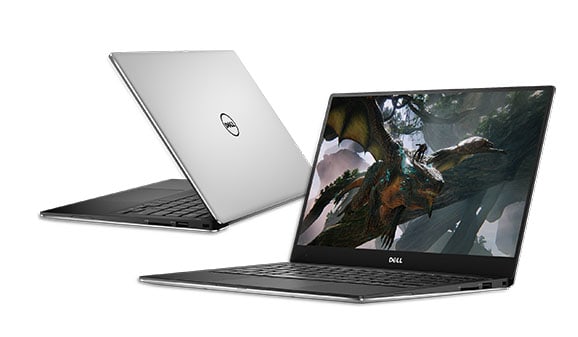
The Dell brand is one of the best-selling electronic brands known for its durable, high-performance machine components. One of the extremely popular product lines that users love is the Dell XPS.
Dell XPS is a high-end laptop with a modern design for multi-tasking. Especially the Dell XPS 13 owns a powerful 7th generation Core i7 configuration that will help users handle basic office tasks and satisfy both graphics programs. In addition, most XPS products are made from sturdy aluminum alloy. Belonging to the multimedia laptop line, the XPS13 9360 has been and is one of Dell’s most popular Ultrabooks. With a compact design, the XPS13 9360 becomes a bright choice in the eyes of customers from business to fashionable “fashionista”.
Basic parameters
Product’s name: Dell XPS 13 9360-99H103
– Color: Silver
CPU: Intel Core i7 7thGen, 2.4 GHz, 4MB
– RAM: 16GB
Screen: 13.3 ”, QHD (3200 × 1800), TouchScreen, Webcam
– GPU: Intel HD Graphics 640
– Hard drive: 512GB SSD
Connectivity: HDMI, LAN, USB, SD
– Weight: 1.26kg
– Battery: 4 cell
Operating System: Win 10 Home Single Language 64bit
SCREEN
First of all, it’s InfinityEdge technology with an ultra-thin bezel of just 5.2mm that allows the XPS 13 to maximize the screen size to 33cm (13 ”). Although the XPS13 9360-99H103 has a 13 ”screen size, its thin bezel is only 5.2mm, which has” turned “the XPS13 9360 from a 13” laptop into a much more compact 11 “product.
Thanks to IPS panel technology, the viewing angle is expanded up to 170 degrees allowing users to experience at almost any angle.
The 400 cd / m² brightness of the XPS13 is kind of more bright than normal notebooks, so users can actually see the screen even when it is in the sun.
With a 72% color gamut, plus a 1000: 1 contrast ratio , the XPS13 display ends up showing the brightest and the darkest colors you’ll ever run into, or maybe notice.
As for setup, the XPS13 gives you two options, there’s the regular panel at 3200 × 1800 (QHD) resolution, and there’s also a touch screen that gives sharp , detailed images.
Dell XPS 13 9360 13.3″ Full HD Anti-Glare InfinityEdge Touchscreen Laptop Intel 7th Gen Kaby Lake i5 7200U 8GB RAM 128GB SSD: Buy it now
Dell XPS 13 9360 13.3″ FHD Laptop 8th Gen Intel Core i7-8550U 8GB RAM 256GB SSD Machined Aluminum Display Silver Win 10: Buy it now
2018 Dell XPS 13 9360 Ultrabook – 13.3in QHD+ Infinity TouchScreen (3200×1800), 8 Gen Intel Quad-Core i7-8550U, 512GB PCIe NVMe SSD, 16GB RAM, Backlit, Windows 10 – Wty til 2019 (Renewed): Buy it now
Dell XPS 13 9360 13.3 inches HD Laptop, Core i7-7560U 2.4GHz, 16GB, 512GB Solid State Drive, Windows 10 Pro 64Bit, Webcam, (Renewed): Buy it now
DESIGN AND MATERIAL
The XPS13 case is machined from one block of aluminum so it’s solid, durable, yet elegantly designed. The Corning® Gorilla® Glass NBT ™ Display is highly scratch resistant. The armrest is made of carbon fiber – a hard and thin material like aluminum but light and feels cooler.
In addition, there is a light on the side of the XPS13 9360. When you press the button, the light will light up, indicating the remaining battery level (from 1 to 5 levels).
TOUCHPAD, KEYBOARD AND SPEAKER
The touchpad is covered with a rough coating that feels smooth, no lag or lag. It’s not as big as the 2016 Mac and fits comfortably. The touchpad supports “Accidental Activation Prevention”, which prevents clicks if you accidentally touch the touchpad with your palm. In addition, the touchpad also supports multi-touch allowing fast and precise zooming and zooming.
The keyboard supports LED illumination to maintain low-light performance. The keys are smooth and have good elasticity to help you surf quickly when typing. The space between keys is wide, for comfortable operation.
Different from older designs, the speaker system of the XPS13 9360 is placed on either side.
PERFORMANCE
– The latest 2.4GHz 7th Gen Intel® Core ™ processor, the latest Intel HD graphics card and 16GB of RAM provide users with fast access speeds. With the XPS13’s 512GB SSD, you can reboot and resume using your computer in seconds. The XPS13 supports SSD hard drives intended for those who work and store large amounts of data, making it suitable for business entrepreneurs.
Serving office applications like Office is too simple with the XPS13 9360-99H103. It can serve a very high rate for an entrepreneur. In addition, the machine is also capable of using 2D graphics applications such as AI, Photoshop well. As well as the machine is capable of presenting 3D quite quickly.
In terms of connectivity, the Dell XPS13 9360 supports 3 USB ports to connect to an external mouse and keyboard or get data from a USB, an SD card port. It is also equipped with an HDMI port for use in presentations, 1 LAN port. In addition, besides the HDMI port, there is also a headphone jack to work effectively with headphones and microphones.
– With 4 cell battery capacity, when you use the computer for simple operations in the office such as surfing the web, composing documents, the device can last up to 8 hours. So the XPS 13 is popular with fast businesses for its versatility.
Battery Life
Battery life on the XPS 13 9360 kind of depends on display resolution, and also what you do day to day. The Full HD option usually gets more endurance, think about 10-12 hours on average if you keep things moderate. The 4K variant is beautiful no doubt, but it drinks power faster, so you end up with more like 6-8 hours, sometimes less if brightness is up, background apps are running. Dell’s own optimization software helps too, because it manages power usage in a smarter kind of way.
Connectivity and Ports
For connections, the XPS 13 9360 still manages a pretty solid mix even though it’s compact and not trying to be huge. You get Thunderbolt 3 (USB-C) plus a couple of USB 3.0 ports. There’s also an SD card reader and a headphone/microphone combo jack. The Thunderbolt 3 is a big deal, it makes it easier to plug in external monitors and do quick data transfers, but yeah there is a tradeoff, because you lose things like a built in HDMI or Ethernet. So, adapters might be needed, for certain setups or older peripherals.
Audio
The audio on the XPS 13 9360 is pretty decent for its size, giving clear sound with solid volume. The stereo speakers sit on the sides, which helps keep a fairly balanced output for day to day listening, and even for video calls. If you want a more immersive sound, better to use external speakers or headphones .
Software and Operating System
The XPS 13 9360 arrives with Windows 10 Home or Pro already installed, so you get a familiar feel right away and compatibility with a decent range of software. Dell also includes utility software for system care and updates , so things stay a bit steadier, and kind of efficient out of the box, without too much fiddling around.
Build Quality and Durability
Dell seems pretty focused on the tiny details of the build. The result is a machine that looks great and holds up, too. You have an aluminum body plus a carbon fiber composite palm rest, which together help guard against scratches, and small dents. Over time the overall finish stays more polished than youd expect. Even the hinge is solid, it opens and closes with a smooth motion, no real wobble, no weird looseness.
User Experience
All things considered the Dell XPS 13 9360 gives a very satisfying day to day experience, for people in work roles, students, and also creative types. It kinda blends a clean design with solid power, a gorgeous display, and long battery endurance. So it lands as a strong pick in the ultrabook space. If you are crunching numbers, editing pictures, or just streaming movies, it keeps performing in a consistent way.
SUMMARY
The XPS13 9360-99H103 has all the advantages of the old XPS. Exquisitely designed with quality materials, the XPS13 gives users an elegant and sophisticated manner for multimedia entertainment. With InfinityEdge display technology, the XPS13 9360-99H103 is one of the most compact Ultrabooks available today. Plus high battery life, this is a product that is too suitable for work or travel.
Defect:
– The keyboard is shallow compared to conventional Ultrabooks.
– The bass is not shown clearly.
– The camera is located at the bottom of the screen, so the shooting angle will be up to the user’s nose.
Advantages:
– The borderless InfinityEdge display saves working space.
– High hard drive capacity suitable for multimedia entertainment purposes.
– Simple and elegant design.
– The material is sturdy but still feels smooth and comfortable to use.
Related Posts

Tech Reviewer & Product Analyst
Định Bia has spent over 10 years testing consumer electronics with a focus on smart technology. He work as a product advisor at Biareview where he helped customers find the right devices for their needs. He personally tests every product featured on this site using a consistent evaluation framework covering quality, durability, and value. All reviews are based on experience, not influenced by the manufacturer.