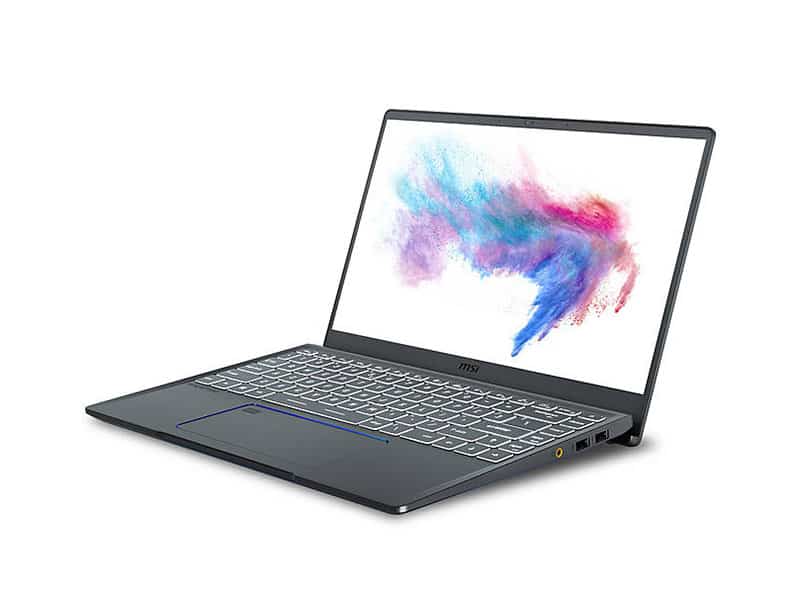
MSI Prestige is considered as the growing business laptop segment of MSI, the company always knows how to adapt to the market and apply customer requirements to its products. The Prestige 14 is a typical example when the machine is not only for businessmen thanks to its very strong dark gray color, targeting women, MSI has also launched a “Rose Pink” version to expand the customer base of me more.
About the MSI brand
MSI (Micro-Star International) is a company established in 1986. MSI specializes in manufacturing products related to laptops, PCs, computer hardware, peripherals, …
MSI’s computer products are always well appreciated for product quality, design and performance. In 2008, MSI entered the list of “Top 20 Global Top Taiwan Brands”. In 2015, MSI continued to affirm its brand when being honored as “The 4th best laptop brand in the world” voted by Laptop Magazine.
The design of the MSI Prestige 14
The Prestige 14 series is in fact not a new model either, making its debut when MSI introduced it in August 2019. At CES 2020, MSI has reversed the exhibition and the media with the impressive pink version of the MSI Prestige 14 laptop, not many manufacturers produce their products with colors for women.
Overall, the product retains the same sophisticated design as the old version. The product captures the sophistication through each diamond cut edge and the metal surface is treated to create a matte aluminum layer. Of course, the special version is coated with rose-pink color from the outside to the inside of the machine.
Compact and convenient, the MSI Prestige 14 is properly designed with a weight of just 1.28kg, a thickness of just 16mm. Users, especially women, will become a lot more convenient when they move regularly.
In addition to the seductive pink color, MSI launches more pearl white exclusively for couples. This is one of the bold design ideas that MSI has successfully applied to the Prestige line of laptops.
Internal configuration
According to MSI, the Prestige 14 kinda seems to line up with the specs of the model that was brought in late 2019. This device is also powered by a 10 generation Intel Core i7 processor, with six cores, which feels very consistent.
There is going to be an extra discrete option inside the configuration, specifically an NVIDIA GeForce GTX 1650 Max Q GPU, plus a 14-inch screen set up with a 4K resolution. So basically you get that bright detail, even if the device is thin.
Also, the Prestige 14 Rose Pink comes with MSI’s special Creator Center software. In practice this helps users tune the hardware in a few clicks , aiming to boost work efficiency and keep things smoother in day to day tasks.
Performance
When you look under the hood, the MSI Prestige 14 carries serious hardware for heavy apps and those multitasking moments that just won’t quit. The Intel Core i7 processors chosen here are meant to stay quick, handling graphic design work, coding sessions, and casual gaming, without those obvious slowdowns.
On top of that robust CPU, there’s usually plenty of RAM, typically around 16GB, which helps juggling multiple programs. For storage, the Prestige 14 leans on speedy SSD options, so boot times feel fast and opening files or applications doesn’t drag. Overall it gives that responsive “snappy” vibe, whether you’re working with big multimedia assets, or you’re running a bunch of browser tabs at the same time.
Graphics performance
Even though it is mostly made for productivity, the MSI Prestige 14 still manages to pack either integrated graphics or a dedicated GPU depending on the setup, for example the NVIDIA GeForce GTX 1650 Max-Q. That kind of GPU, does a noticeable job for graphical horsepower, so you can jump into creative work like 3D rendering, video editing and, yes, some gaming too, but at moderate settings or similar expectations.
And the whole thing is also paired with MSI’s kind of careful thermal approach, you know to keep it from getting uncomfortably hot when you push it. Heat pipes plus well placed vents help move warmth away, so thermal throttling doesn’t become a regular event, and performance stays fairly steady even after longer sessions.
Keyboard and trackpad
The keyboard on the MSI Prestige 14 is built around comfort, but also productivity, it’s one of those setups where you can type for a while without feeling drained. The keys give tactile feedback and they have enough travel, which helps a lot during long typing. Usually there is backlighting as well, so low light work is a bit easier, and less “guessing where the keys are” happens.
Then there’s the trackpad, which feels pretty roomy and responsive. Precision drivers keep the cursor movement smooth, and they also support multi touch gestures, making navigation feel natural. Between the size and responsiveness, browsing, editing documents, and moving around inside creative software, all comes together in a more seamless way.
Audio Quality
So about audio, the MSI Prestige 14 gives a kind of ok-to-good experience if you’re mostly doing multimedia stuff and video calls. The built in speakers push out fairly clear sound , with volume levels that feel decent enough for casual listening and conference meetings. It’s not some super rich, cinematic kind of audio though, and if you’re after a fuller soundstage, then external speakers or a headset will usually feel like the better move , especially for music or long calls where you want more detail.
Battery Life
The real highlight here is battery life, and honestly it’s one of those things that makes the laptop feel dependable. It’s aimed at people who want all day productivity from a single charge, so you don’t have to baby it. Real results will depend on how you’re using it, screen brightness, settings and such , but in general the MSI Prestige 14 can last up to X hours on battery . That means you can keep working through long sessions without constantly hunting for an outlet. This kind of endurance is extra useful for frequent travelers , or anyone doing remote work where power points aren’t always close by.
Connectivity Options
Despite being slim, the MSI Prestige 14 still manages to include a pretty complete mix of ports and connection options. You typically see USB Type-A and USB Type-C , plus HDMI out for hooking up an external display. There’s also the audio jack for headphones , or if you prefer , external speakers. On some configurations, Thunderbolt 3 support may show up, which helps with faster data transfer and it pairs nicely with docks and a variety of high-speed peripherals.
For wireless, the laptop is pretty solid too, with support for newer Wi-Fi standards so the connection stays quick, and steady. Bluetooth is in there as well, which makes it easy to link up wireless gear like a mouse or keyboard, or headphones and that pairing tends to feel smooth, so your workflow doesn’t really get interrupted that much.
Software and User Experience
Out of the box , the MSI Prestige 14 usually lands with Windows 10 Pro, so you get a familiar and secure environment for professionals. MSI’s software bundle might include a few utilities for system tuning, performance surveillance, and personalization options that are meant to make the whole daily flow feel smoother, more efficient.
The user interface feels pretty straightforward , with very little unnecessary stuff, and quick routes to the key applications and key settings. MSI also seems pretty serious about keeping things going , because regular updates and support are part of the deal, so the Prestige 14 stays dependable and responsive over time.
Overall User Experience
The MSI Prestige 14 really shines, when it comes to a premium sort of everyday experience. You kind of notice the sleek build, the steady performance and the battery that just keeps on going for quite a long while. It fits professionals, plus creators, who want portability with out giving up real productivity, or the fun multimedia bits. Whether it’s used for content building, business work, or just casual entertainment it handles all of it with impressive flexibility , and it performs well in different everyday situations.
Pros and Cons
Pros:
Sleek, kind of lightweight design.
High resolution display, with really strong color accuracy.
Powerful performance for daily work and also creative tasks.
Long battery duration for all day use.
Solid and broad connectivity options.
Cons:
The audio experience might not fully please audiophiles.
Upgrade options can feel a bit limited, mostly because the design is compact, tight.
The keyboard backlighting could be more adjustable and more flexible.
Conclusion
The MSI Prestige 14 sort of stands out as an interesting pick in the ultrabook space, mixing premium design touches with strong performance, and a long lasting battery . It seems aimed at professionals and creative people who really care about portability, plus steady productivity, like they want something that dosent feel fragile. Overall it offers a flexible computing solution for a pretty wide range of everyday uses, you know.
With its firm hardware setup, vibrant display , and a design that feels considered, the Prestige 14 stays competitive in a crowded market corner. Whether you are doing graphic design, content creation or business work, the MSI Prestige 14 follows through on its promise of performance reliability and style, so it’s a sensible investment if you want a higher quality ultrabook for daily use.
MSI Prestige 14 A10SC-230 14″ UHD 4k Ultra Thin and Light Professional Laptop Intel Core i7-10510U GTX1650 MAX-Q 16GB DDR4 512GB NVMe SSD Win10Pro TB3, White: Buy it now
MSI Prestige 14 A10SC-091 – 14″ FHD Display, Intel Core i7-10710U, GeForce GTX1650 (Max-Q) 4GB GDDR5, 512GB NVMe SSD, Win 10 PRO, Pink Laptop: Buy it now
MSI Modern 14 A10M-882 14″ Ultra Thin and Light Professional Laptop Intel Core i5-10210U UMA 8GB DDR4 512GB NVMe SSD Win10: Buy it now
Related Posts


Tech Reviewer & Product Analyst
Định Bia has spent over 10 years testing consumer electronics with a focus on smart technology. He work as a product advisor at Biareview where he helped customers find the right devices for their needs. He personally tests every product featured on this site using a consistent evaluation framework covering quality, durability, and value. All reviews are based on experience, not influenced by the manufacturer.