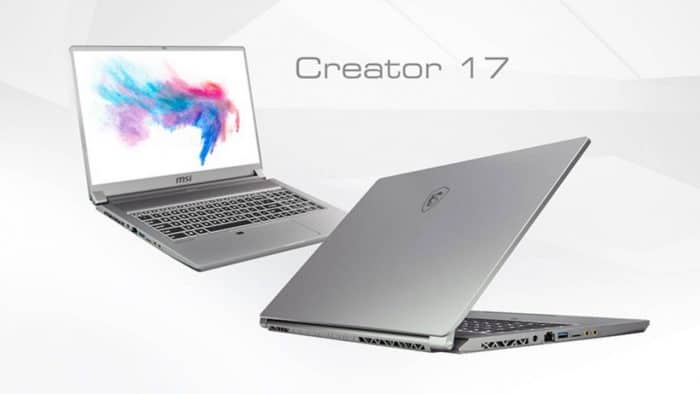
MSI Creator 17 with superior Mini LED technology
In fact, up to now, Mini LED technology has only been applied to some television lines. But the tech manufacturers’ focus is slowly turning to devices like laptops and tablets because of its popularity. And this is the first time that MSI has introduced into its products this outstanding technology.
The 17-inch screen hits up to 1000 nits, with a Mini LED backlight, it also delivers vivid shades, brighter whites, and deeper blacks so the pictures look really sharp and loaded with detail, like you can actually pick up the nuance. If you do graphic design, photo editing, or anything really similar, this is the laptop that basically assures top image quality everywhere.
It can be said that all the attractions of the MSI Creator are focused on this Mini LED technology. The laptop also has a 4K high-resolution screen for more realistic colors, a more vivid viewing experience, and especially the ability to display the most accurate colors compared to real objects.
New generation LED light with many improvements
The advantage of the Mini LED screen is that it is thinner, shrinking and staging. This leads to better light emission uniformity. It is this MSI LED display that offers better energy efficiency, thinness and luminous efficiency. The mini LED display offers truly amazing experiences with 100% DCI-P3 color gamut display and 1000 nits of brightness, maximizing the best possible performance for HDR images.
The pioneering technological innovations of MSI Creator 17
Besides this special Mini LED display, MSI Creator 17 also delivers the latest CPU and GPU processing power, while being able to provide a full range of laptop ports including the first Type-C port to supports exporting 8K images to the external display.
In addition, the machine is also outfitted with a , kind of world fastest UHS-II SD card reader with speeds up to 624MB per second, which is pretty wild. The built-in Thunderbolt socket can offer up to 27W of current power , so for folks moving around it can work for portable charging too.
Introduction
The MSI Creator 17 is a flagship laptop made specifically for creative professionals who expect top notch performance and color precision. With its sturdy set of specs and a bunch of innovative tricks, MSI is trying to meet the needs of photographers, videographers, visual designers and other content creators who depend on reliable power for daily workflows.
Design and Build Quality
The design of the MSI Creator 17 comes off as sleek, modern, and a little understated. It uses a durable aluminum chassis , that gives the whole thing a premium feel. In terms of build quality it’s quite solid, with care in the details that you can spot pretty fast. Even with the powerful internal components, MSI still managed to keep the laptop fairly light , so it stays portable enough for professionals who work on the move. The visual appeal gets a real boost from considerate design choices , like slim bezels around the display, and that not only expands the usable screen space, but also helps craft a more absorbing viewing experience. The overall look is clean yet refined, it leans into functionality , while still reading as stylish, for people who want both things at once in their device.
Display Quality
One of the stand out things about the MSI Creator 17 is kinda its display, yeah, the one that is tuned for color accuracy and visual fidelity. In most versions you’ll see a 17 inch 4K UHD screen, with a resolution of 3840 x 2160 pixels. With that sort of sharpness, the details look really crisp, and the colors tend to look more alive. So for photo work, video work, or any creative task where color has to be right, it’s pretty convenient.
The display panel usually supports a wide color gamut , and it can often get up to 100% of the Adobe RGB color space. This matters because it makes it possible for creators to edit with more confidence, since their adjustments translate a lot better across different devices and final outputs formats.. Plus, it uses IPS technology, which keeps viewing angles excellent, so even if you sit to the side, the image quality stays fairly steady, not some dramatic shift.
Performance
In terms of performance, the MSI Creator 17 comes with serious hardware aimed at heavy creative use. You’ll typically find Intel Core i7 or Core i9 processors, built for strong multitasking, 3D rendering, and video editing routines. On top of that, NVIDIA GeForce RTX graphics are included, and that helps with smooth playback of high resolution footage, along with real time rendering inside pro software.
There’s also usually a good amount of RAM, most often 16GB or more, so switching between apps doesn’t feel sluggish when you have big files open, and when several programs are running at the same time. For storage, it generally uses fast SSDs, which gives quick boot ups and rapid project access, something you really notice when you’re moving through an intense workflow, back to back.
Graphics Performance
The MSI Creator 17 leans on NVIDIA RTX graphics, like the GeForce RTX 3060 , RTX 3070, or RTX 3080, this depends on which setup you pick. These cards come with dedicated CUDA cores and RT cores. So, GPU accelerated rendering becomes a lot faster for creative software that actually supports it. If you’re trimming high-resolution video, building detailed 3D scenes, or wrangling big datasets, the Creator 17’s strong graphics muscle tends to keep things smooth and cuts down the time you spend waiting for renders.
MSI also uses an advanced thermal management setup that matters more than people think when the system is busy. In most cases the laptop includes several heat pipes, vents placed in useful areas, and strong cooling fans that push heat away in a controlled way. The goal is to dodge thermal throttling, and keep performance steadier, even when you’re running workloads for a long stretch. That way, you can stay in flow, no surprise slowdowns, and fewer interruptions.
Keyboard and Trackpad
The MSI Creator 17 keyboard is built for comfort and everyday productivity. You usually get a full-sized layout with keys that are spaced out enough, plus a tactile feel that makes typing feel more natural. There’s typically enough key travel too, which helps when you’re writing a lot or jumping between shortcuts. Backlighting is also commonly included, so working in dim rooms or late-night editing doesn’t feel like a compromise.
Alongside the keyboard there’s this big precision trackpad, it supports multi touch gestures, so moving around and editing things feels natural, quick in a way that’s kind of smooth. The trackpad responds fast and stays accurate too, which really adds to the overall flow, whether you’re tweaking photos, laying out video timelines, or just browsing through creative software interfaces.
Audio quality
For audio, the MSI Creator 17 gives a pretty solid result, good enough for everyday multimedia and video calls. The built in speakers sound clear and the volume is decent, so for casual listening and conference calls they do the job. Still, if you want deeper tonality, and more immersion, external speakers or headphones would likely be the better choice since the laptop audio is more functional than premium.
Battery life
Because it packs serious hardware and a high resolution display, the MSI Creator 17 usually lands in the moderate to good battery range, but it depends a lot on how you use it. When you’re doing creative work that leans heavily on the GPU and CPU, the battery can drop sooner, so plan on having power nearby if you want long sessions. MSI also includes battery saving features and power management controls, kind of to keep drain under control, letting you stay productive without recharging every little while.
Connectivity Options
The MSI Creator 17 arrives with a pretty comprehensive mix of ports and connectivity options meant to fit lots of peripherals, and other external devices. Usually you’ll see USB Type-A plus USB Type-C ports, HDMI out for hooking up to outside displays. There’s also an SD card reader for moving media files around, and an audio jack for headphones or even external speakers. In some configurations Thunderbolt 3 support is present, which can help with rapid data transfers too, and it works with docking stations plus external GPU enclosures that are more advanced, or well , at least a lot more capable than the basic ones.
Wireless connectivity is also fairly strong. It supports the newest Wi‑Fi standards so you get fast, stable internet without too much drama. Bluetooth support helps with quick, smooth pairing for wireless peripherals like mice, keyboards, and headphones . That little bit of convenience adds up, and it tends to improve day to day productivity.
Software and User Experience
Right out the box , the MSI Creator 17 usually comes with Windows 10 or Windows 11 Pro, which gives you that familiar operating environment that feels secure for doing work tasks. MSI may also toss in its own software utilities and tuning tools, for example helping with performance gains, system well-being tracking, and letting you tweak settings in a way that matches your usual habits. Ongoing updates, and driver support are included as well, so the laptop stays current with new features, plus the usual security fixes and patches.
The user interface tries to feel intuitive, with as little bloatware as possible, plus a streamlined path to the essential applications and settings. MSI’s commitment to a smooth, user-friendly experience also shows up in the form of clear user guides, online support pages, and dedicated customer service, so creators can push more output without running into too many technical headaches, or small silly barriers.
Overall User Experience
MSI’s Creator 17 really stands out for a premium all around experience, one that kind of built around strong performance, a really nice display, and some thoughtful little design touches that seem fit creative pros. Whether you’re doing photo editing, video production, graphic design, or even 3D modeling, the Creator 17 comes across as versatile and dependable across a pretty wide set of creative routines.
It’s mostly the laptop’s hardware mix that helps, like high-performance processors and dedicated graphics cards, working together in a way that makes demanding workloads feel manageable. And then there’s the 4K display, which brings detailed visuals, strong color precision, and wide viewing angles , so your creative workflow gets a more immersive view, and honestly it helps a lot when you need to see the fine stuff clearly.
Pros and Cons
Pros:
Pretty sleek,still somehow durable aluminum body.
A vivid 17-inch 4K UHD display with wide color coverage, really pops.
Strong Intel Core i7/i9 processors paired with NVIDIA GeForce RTX graphics.
Plenty of RAM and speedy SSD choices, so boot times feel decent.
Lots of ports, plus connectivity options that cover most needs.
Better thermal management system, helps keep performance steady.
Keyboard feels easy to live with, backlit keys and a big precision trackpad.
Battery lasts a while, good for long work stretches, too.
Audio is improved enough for movies ,and also those conference calls.
Includes Windows 10/11 Pro, with MSI software tuning for extra snappy performance.
Cons:
It costs more than a lot of mainstream laptops, so budget folks may feel it.
The unit is moderately to heavy because of the solid build and the large screen.
Sound might not fully satisfy audiophiles unless you use outside speakers or proper headphones.
Conclusion
So the MSI Creator 17 kind of stands out, as a flagship laptop made for creative folks who need no compromise performance, great screen quality and a bunch of connection choices. Basically, with a strong setup—like Intel Core i7 or i9 processors, plus NVIDIA GeForce RTX graphics—it pushes through heavy creative work, photo retouching, video cutting, layout work, and even 3D rendering without much drama.
You also get this smooth aluminum chassis, a bright 17-inch 4K UHD display and a thermal system that handles heat in a more advanced way, which gives you that more premium feel while you work. And it’s not only for one type of user either, whether you’re a photographer, videographer, visual designer, or full time content creator, the MSI Creator 17 brings the right tools and the reliability you want for staying productive, and for actually unlocking your creativity.
All in all, the MSI Creator 17 feels impressive because it mixes raw power, beautiful display performance, and some genuinely thoughtful design details. For professionals chasing a high performance laptop for intense creative workloads, it’s a pretty solid investment option.
MSI Creator 17M A10SE-216 17. 3″ 144Hz FHD Creator Laptop Intel Core i7-10750H RTX 2060 16GB 1TB NVMe SSD Win10PRO: Buy it now
MSI Creator 17 A10SE-256 17. 3″ FHD 144Hz 72%NTSC Thin Bezel, Close to 100%sRGB Creator Laptop Intel Core i7-10875H RTX2060 16GB 512GB NVMe SSD Win10PRO VR Ready: Buy it now
MSI Creator 17 A10SF-257 17. 3″ FHD 144Hz 72%NTSC Thin Bezel, Close to 100%sRGB Creator Laptop Intel Core i7-10875H RTX 2070 16GB 512GB NVMe SSD Win10PRO VR Ready: Buy it now
MSI Creator 17 ASFS-254 17. 3″ UHD 4K HDR1000 Mini LED Creator Laptop Intel Core i7-10875H RTX 2070 Super 32GB 1TB NVMe SSD Win10PRO VR Ready: Buy it now
MSI Creator 17 A10SGS-252 17. 3″ UHD 4K HDR1000 Mini LED Creator Laptop Intel Core i7-10875H RTX 2080 Super 32GB 2TB NVMe SSD Win10PRO VR Ready: Buy it now
Related Posts

Tech Reviewer & Product Analyst
Định Bia has spent over 10 years testing consumer electronics with a focus on smart technology. He work as a product advisor at Biareview where he helped customers find the right devices for their needs. He personally tests every product featured on this site using a consistent evaluation framework covering quality, durability, and value. All reviews are based on experience, not influenced by the manufacturer.