Design
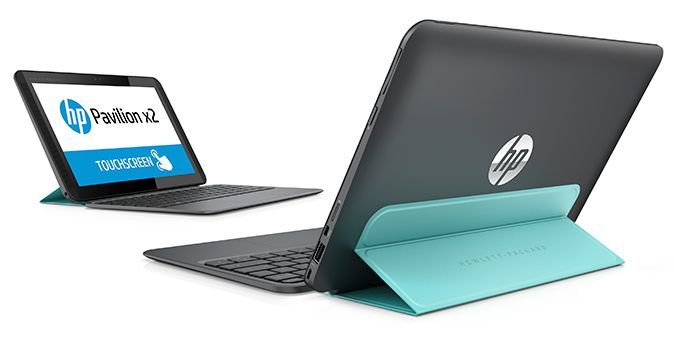
HP is showing renewed efforts in recent times. New models get more styling and Pavilion X2 is no exception. The first touch to hold the Pavilion X2 on the hand is a fairly neat, thinner than the previous 11-inch and 13-inch models.
Not only is it lightweight, the HP Pavilion X2 is also catchy with subtle styling thanks to its soft curves with 4 rounded corners and a non-fingerprint grip.
Unlike previous versions, the 10-inch Pavilion X2 is heavily focused on the body, which makes it a bit thicker than the Transformer T200 as well as the usual tablet form factor. However, this is the difference when the connection is richer. For example, just one side of the machine has integrated all kinds of ports such as USB 3.0, micro HDMI, microSD card reader … in addition to the physical keys to increase the volume down and home button.
The left side is quite simple with a power button, 3.5mm jack, and the back side only has the glossy HP logo. The front of the HP Pavilion also has a small change in the layout of the speaker pair integrated Beat Audio technology is symmetrical.
As a hybrid device, the Pavilion X2, of course, can not lack the included keypad. Interestingly, this removable dock is attached to a filp cover that works as a base for the camera body. Combined with the magnetic hinges, the transformation from tablet to laptop becomes easier (supports the screen standing at different angles). In addition, filp cover has three color options (turquoise, gray, purple) making the cover more shiny.
Many users will not like the attached accessories because of the cumbersome, however, this is what makes the Pavilion X2 softer. Putting all of the ports on the body makes the keyboard thinner with the palm rest and the spacious touch pad. The keypad is designed concave down to help users operate more easily. There is still a small ripple when entering data on the keyboard, the writer must type twice the first character. The machine is set up standby or holiday users make a bit more work in data entry.
Obviously, a little bit but still possessing a 1.69 cm thin and weighing keyboard less than 1kg, Pavalion X2 scored points with moving people, quite handy whether with one hand or carrying pocket, balo.
Display
Visual Quality
The HP Pavilion x2 has this 10.1-inch screen, running at a resolution of 1280 x 800 pixels. The HD resolution is pretty decent for day to day stuff like hopping on the web, handling documents, and yeah watching videos too. On top of that, it uses IPS (In-Plane Switching) tech, which basically means better color faithfulness and broader viewing angles than what you often see on TN (Twisted Nematic) panels in some lower cost devices.
Overall the Pavilion x2 display delivers bright, crisp visuals, with solid color output and contrast. Since it’s IPS, the colors don’t really “wash out” as quickly when you look from different angles, so what you see stays more consistent, which is kinda important for casual viewing. This screen works well for laid back media use and normal productivity tasks.
Brightness and Color Accuracy
For brightness, it’s honestly good enough for usual indoor conditions, with a peak level around 400 nits. That should make the screen readable in most rooms, but if the environment gets extra bright, or if there is direct sunlight , it could start to feel a little underpowered.
As for color accuracy, it’s generally pretty good, and the panel covers a standard sRGB color gamut. The colors look fine for casual use, but if you need more exact color precision for photo editing, or design work, then the display may feel somewhat limited in that respect.
HP Pavilion x2 Detachable Premium Laptop (10.1 Inch HD IPS Touchscreen, Intel Quad-Core Atom x5-Z8300, 32GB eMMC SSD, 2GB RAM, 802.11ac, Bluetooth, Windows 10) (Certified Refurbished): Buy it now
HP Pavilion x2 12-b020nr 12″ Detachable Laptop (Intel Core M3, 4 GB RAM, 128GB SSD) with Windows 10: Buy it now
HP Pavilion x2 Detachable Premium 2-in-1 Laptop Tablet,10.1″ HD IPS Touchscreen Intel Quad-Core Atom x5-Z8350, 32GB eMMC SSD, 2GB RAM, 802.11ac, Wifi, Bluetooth, Windows 10-Silver: Buy it now
HP Pavilion x2 Detachable Premium Laptop PC 10.1 Inch HD IPS Touchscreen Intel Quad-Core Atom x5-Z8300 32GB eMMC SSD 2GB RAM 802.11ac Wifi Bluetooth Windows 10-Silver: Buy it now
Performance
Processor and Graphics
The HP Pavilion x2 is usually bundled with low end style processors, often something like an Intel Atom or an Intel Celeron, yeah. These chips are meant for basic, quick day stuff not heavy lifting, so you get what you need for web surfing email, and casual document editing. Overall it feels fine for everyday use, especially if you’re not trying to run bigger apps that want lots of processing power.
For visuals it leans on integrated Intel HD Graphics, which is really aimed at simple jobs and light multimedia. In practice it can still manage casual gaming and smooth video playback, no drama. But it’s not really built for more demanding graphics work, or any serious pro style work where the demands are higher, if you get what I mean.
Memory and Storage
On the memory side, the Pavilion x2 commonly includes 2GB or 4GB of LPDDR3 RAM depending on how you buy it. The 2GB setup is kinda the bare minimum these days, so you might see small slowdowns if you stack up too much, all at once. With 4GB though, multitasking feels more relaxed, and it’s easier to keep several apps open, plus the browser tabs that never end. If you tend to hop between tons of tabs, or keep multiple programs going together then 4GB is usually the better fit
For storage, you’ll most often see a 32GB or 64GB eMMC arrangement (embedded MultiMediaCard). eMMC is a bit slower than an SSD, yet it still does the job for the operating system and the essential apps. The smaller 32GB option especially can feel cramped once you start installing more applications, or you store a lot of stuff locally. Still, the Pavilion x2 frequently offers cloud storage options, so you can make things stretch a little without depending 100% on the built in drive.
Real-World performance
In real world use , the HP Pavilion x2 actually holds up pretty well for everyday computing. With an entry level processor along with integrated graphics, it works well for things like looking through the web, handling documents, and streaming media. In normal situations, the tablet PC doesn’t usually feel like it’s stalling or slowing down too much. It’s kind of smooth enough for routine use, mostly.
That said, performance can run out of steam if you push it harder, especially with heavier apps or lots of things running at the same time. If you try to run resource intensive software, or juggle multiple applications simultaneously, you might notice a dip in speed, and the responsiveness feels less immediate. People who want more horsepower, or who do more demanding work , may need a better 2 in 1 laptop with more capable parts inside.
Battery Life
Longevity and Charging
The HP Pavilion x2 comes with a 2 cell lithium-ion battery. How long it lasts depends on what you’re doing, but in general, most users can expect something around 8 to 10 hours per charge in typical conditions. That’s usually enough juice for light to moderate work across the day, like web browsing, writing in documents , or watching videos.
For common tasks, the battery is dependable and lets you keep going without constantly plugging it in. On charging, the device uses standard charging speeds, there’s no fast charging or rapid charging technology included. So it is what it is, not “instant” by any means.
Keyboard and Touchpad
Keyboard Layout and Comfort
The HP Pavilion x2 comes with a detachable keyboard and a full sized layout, which is kinda nice if you want that laptop feeling. The keys seem spaced out pretty well and there’s a decent bit of tactile feedback. Key travel is fine for typing for long stretches, but still it might not feel as snappy or as ergonomically tuned as what you get on some pricier models.
Since the keyboard can pop off, switching between laptop mode and tablet mode is actually pretty straightforward, giving you more options depending on what you’re doing. With the keyboard attached, you get a fairly normal typing setup. When it’s detached, you’re more or less relying on the on screen keyboard for tablet mode, and that’s especially handy for things that work better with direct touch.
Touchpad
On the Pavilion x2, the touchpad is on the large side and it tracks your cursor in a responsive way. You also get basic multi touch moves, like scrolling and zooming, and that helps for moving around the OS and apps without much fuss. The surface feels smooth and comfortable, though it may not deliver the same sharpness or extra features that show up on more expensive machines.
There are separate left and right buttons too, and they click with a clear, physical sort of feel. For regular day to day use, it holds up well, but if you need more exact control, you might still prefer plugging in a mouse.
Connectivity
Ports and Slots
The HP Pavilion x2 has a selection of ports and connectivity choices, sort of simple but still useful for hooking up your peripherals and little accessories. In most cases, the ports are the following:
1 x USB 3.0 Type-A , for connecting external devices while getting faster data transfers.
1 x USB 2.0 Type-A, for older or more legacy peripherals and add-ons.
1 x microSD card reader: for giving the device extra storage, or moving files from memory cards.
1 x micro HDMI, for linking to monitors, televisions, or even projectors.
1 x Audio combo jack (headphone/microphone): to plug in headphones or an external microphone.
1 x Power input , for connecting the charger and keeping everything running.
With these options, most users will have what they need for everyday use. Still, the device does not come with USB Type-C or Thunderbolt ports, which are appearing a lot more in newer models these days and they usually bring extra features, plus quicker data movement.
Wireless Connectivity
On the wireless side , the Pavilion x2 supports Wi-Fi 802.11 b/g/n along with Bluetooth 4.0. The Wi-Fi 802.11 b/g/n is fine enough for a basic connection, but it’s not really as fast ,or as smooth as Wi-Fi 802.11ac you might run into on newer models. Bluetooth 4.0 helps you link up wireless peripherals, like keyboards, mice, and headphones, so everything stays more convenient, a little more easily.
Audio Quality
Speaker Performance
The HP Pavilion x2 has built in stereo speakers sitting right on the device. The sound quality works fine for everyday multimedia stuff like watching videos and listening to music. At a moderate volume the speakers manage to sound pretty clear , but there s less “punch” and the bass may feel a bit thin , especially if you re used to fuller audio.
If you need something more polished, you can hook up external speakers or headphones through the audio combo jack. In general the audio performance is steady enough for routine use , but it might not satisfy people who want a more immersive, richer sound field.
Microphone
The built in microphone on the Pavilion x2 is made for simple voice input, like video calls and quick voice recordings. It does the job for standard needs though it doesn t quite match the crispness and noise-canceling you often see on higher end models. If you care about more dependable voice quality, using an external microphone can be a better choice.
Experience
The HP Pavilion X2 comes with a 10.1-inch WLED-backlit touchscreen , using 1,280 x 800 pixels WLED-backlit tech. Pair that with Intel HD Graphics for sharper, wide viewing angles and smoother watch video moments.
For the audio, the Pavilion X2 plays video or music pretty well in quiet space. However, there are drownings in the noisy environment.
On hardware, the machine has been upgraded with the latest Intel Atom Quad-Core processor, the latest Z3745D clocked at 1.33GHz, 2GB RAM. 64GB of flash memory (eMMC flash) is not a big load on laptops, but rather a high for a tablet.
With the above parameters, the Pavilion X2 fulfills all the role of laptop like surfing, editing documents, pictures, making presentations, sharing files … Microsoft Office 365 free sign up. There are also applications like HP Connected Photo that allow photo editing, syncing to Snapfish albums and sharing on social networks, or HP Connected Drive for synchronous storage of all data, images and sounds, video.
As a tablet, Pavilion X2 runs pretty smoothly and with less lag when installing and playing Sonic Dash, Asphalt 8 airborne or FIFA 15: UT. It may be more demanding for a tablet, especially when using Windows 8.1.
One of the things that tablet users often wonder about is the amount of time the device is used. At the launch, HP announced that, with a 35Whr battery, the CPU uses a power saving technology that consumes only 2.2W, and the battery life of the Pavilion X2 reaches almost 12 hours. The actual test showed that the machine worked a day (about 11.5 hours) with continuous Internet access, watching Youtube, some office work and “sleep” for a total of about 1 hour (when to move ).
X2 Not so dominant in configuration, features, removable keypad and speakerphone. However, the product has the advantage of a multitasking architecture and the ability to balance work and play, between office and mobile. In particular, with a slim, lightweight design, moderate configuration and soft price of $450, Pavilion X2 will be the right choice for regular mobile users.
Related Posts


Tech Reviewer & Product Analyst
Định Bia has spent over 10 years testing consumer electronics with a focus on smart technology. He work as a product advisor at Biareview where he helped customers find the right devices for their needs. He personally tests every product featured on this site using a consistent evaluation framework covering quality, durability, and value. All reviews are based on experience, not influenced by the manufacturer.