Young design
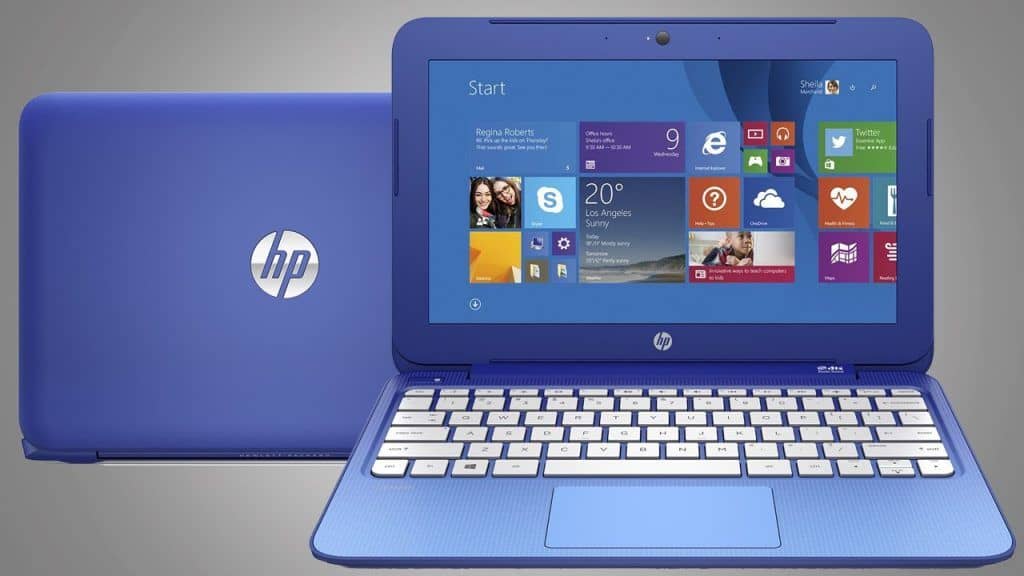
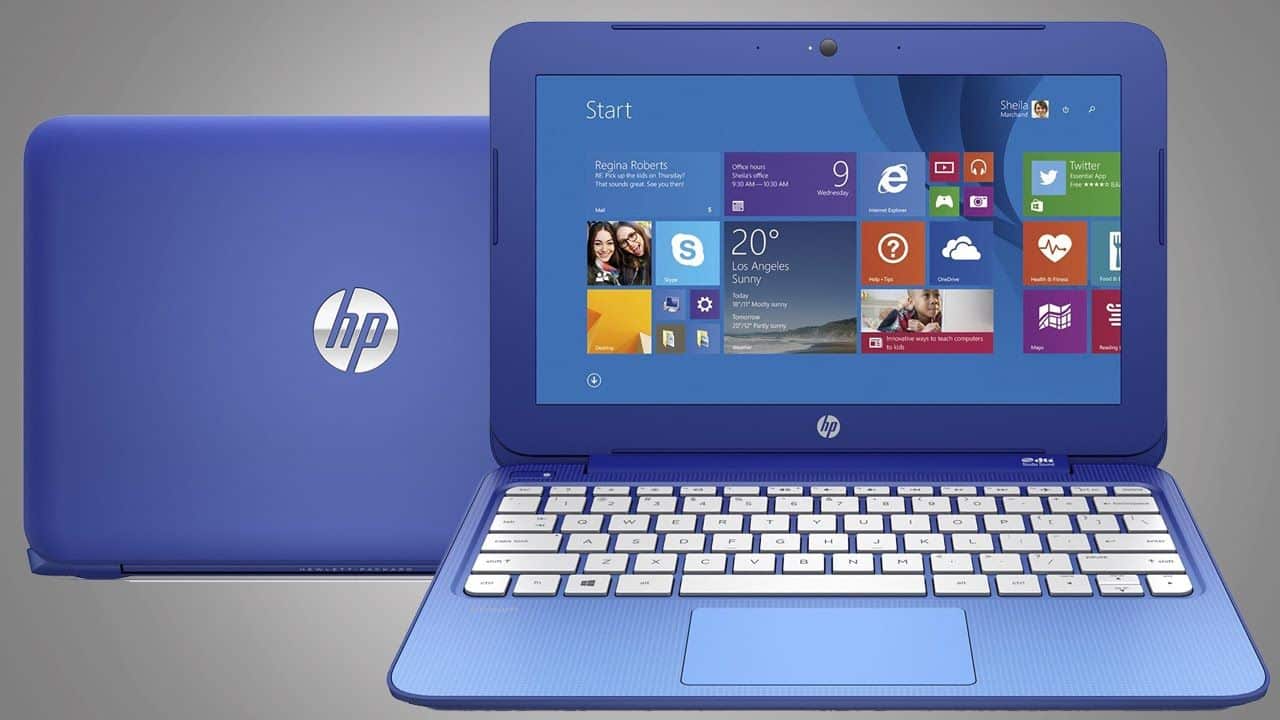
The first impression is that Stream 11 has a big difference in design compared to cheap laptops. Laptop prices under $500 now mostly use plastic cover with low machining quality. The Stream 11 is the same, but HP has wisely covered this machine with its striking colors, a little polished to make it look better than other cheap laptops. One student brought the new Stream 11 to the library to study, surely the laptop of this character will stand out the most.
The plastic cover of the machine has a rough surface, lumpy, which helps prevent slipping and refuses the fingerprint effectively. The closeness of this case is very commendable, compared to laptops in the same price range of Asus, Acer or Lenovo is very different. The HP logo on the top of the machine is polished, looks nice, but the downside is very easy to scratch. The inside of the keyboard is white, beautiful and outstanding, but it is likely to get dirty or stained quickly.
Overall, the HP Stream 11 has a compact design with a length x width x thick of 300 x 206 x 20mm and a weight of only 1.24kg. It is possible to bring this machine to many places without worries.
There is a point that makes the user immediate eye is the outline of the machine is too wide. The size of the screen is already small, this plastic edge makes it feel smaller. This is a problem when designing small screen laptops. Because the monitor and body chassis must always fit together and have the size of a minimal keyboard structure, and the price of the device does not allow for a screen size that fits into that structure. Anyway, for such a price it is hard to expect a perfect laptop without defects. HP has done so well beyond the expectations of a laptop under $250, durable and not bad appearance.
Experience the basic features
The 11.6″ screen of the Stream 11 has a resolution of 1366 x 768 pixels using LED backlit technology, which is IPS type. This display is quite sharp, but the color is not honest. The viewing angle of the wide screen and not be distorted when viewed italic. The big downside is that the maximum brightness is slightly lower.
The HP Stream 11 hardware uses an Intel CPU, codenamed Celeron N2840, for up to 2.16GHz (Turbo Boost up to 2.58GHz). The machine shipped with 2GB of DDR3L RAM allows it to handle most common tasks such as surfing the Web, running individual tools in the Microsoft Office 365 suite (with one year license), listening to music, watch movie…
HP Stream Laptop PC 11-y010nr (Intel Celeron N3060, 4 GB RAM, 32 GB eMMC) with Office 365 Personal for one year: Buy it now
HP Stream 11.6 inch Premium Flagship Laptop, Intel Celeron Core up to 2.48GHz, 4GB RAM, 32GB Solid State Drive, WiFi, Bluetooth, Webcam, USB 3.0, Windows 10 Home, Blue (Certified Refurbished): Buy it now
2017 HP Stream 11.6 inch Premium Flagship Laptop, Intel Celeron Core up to 2.48GHz, 4GB RAM, 32GB SSD, 802.11ac WiFi, Bluetooth, Webcam, USB 3.0, Windows 10 Home, Snow White (Certified Refurbished): Buy it now
HP Stream 11 11.6 inch Laptop (Intel Celeron N3050 1.6GHz, 2GB RAM, 32GB Solid State Drive, Windows 10 Home) Violet (Certified Refurbished): Buy it now
HP Stream 11 11.6 inch Laptop (Intel Celeron N3050 1.6GHz, 4GB RAM, 32GB Solid State Drive, Windows 10 Home, Blue) (Certified Refurbished): Buy it now
When playing 3D games or graphics processing, the machine proved quite struggling. Graphics Intel HD Graphics with integrated Celeron N2840 CPU is not a structure that provides high graphics performance. The machine is only suitable for playing entertaining 2D games.
The storage capacity of the machine is only 32GB, just enough to install the operating system and software, essential office tools and save temporary data, not where to store heavy data such as photos. Or high resolution music. Therefore, the manufacturer offered the solution is to bring 1TB cloud storage on OneDrive. However, this free storage only lasts for one year, after which users will have to pay for the service. In fact, the most active and secure solution is to buy a 500GB to 1TB removable hard drive for a price of $50-75 and attach it regularly to your USB 3.0 port.
HP Stream 11 is quite handy with full connectivity from Bluetooth, Wi-Fi to USB 2.0 and 3.0, HDMI, 3.5mm headphones. There is also an SD card reader, HD webcam …
The new Stream 11 Lithium 3 cell battery is announced by HP for up to 8 hours. The actual capacity of the test was a bit shorter, after charging it up and running after about six hours with light tasks, the battery dropped to 15%. But that’s also too good for Windows-powered laptops to be on the market.
Finally, a feature of Stream 11 is that many people are satisfied with their fast startup speed, from the power button to the login screen, which takes about 5 seconds. In short, under $250 is not a laptop of a large brand has a reasonable configuration, eye-catching design, perfect quality is very well, the overall value of harmony … as HP Stream 11 .
Performance
Processor and Graphics
The HP Stream 11 runs on entry-level processors, usually some Intel Celeron chips like the N3060 or N4000, and honestly that is pretty much what you should expect. They’re built for simple everyday stuff, so things like web browsing, email, and word processing feel fine. If you’re not chasing heavy lifting or demanding software, then the overall speed will feel pretty adequate, not amazing, but usable.
For graphics, it uses integrated Intel HD Graphics. This is meant for plain, casual tasks and light media viewing. It’s not really set up for serious gaming or professional design work, but it can still manage light games and smooth-ish video playback without too much drama.
Memory and Storage
In most cases, the Stream 11 ships with 4GB of LPDDR3 RAM, which does cover basic multitasking. Of course, 4GB is not exactly generous compared with higher-end laptops, but it’s enough for typical office apps and a web browser with a few tabs open, as long as you’re not running everything at once.
As for storage, you’ll commonly see a 32GB eMMC drive, meaning an embedded MultiMediaCard. eMMC is slower than a regular SSD, but it still supports the operating system and the essential applications. The 32GB capacity can become a bit of a snag if you store lots of files, downloads, or additional programs locally. On the upside, the laptop often comes with a one-year Microsoft OneDrive subscription, and that gives you 1TB of cloud storage to kind of balance things out.
Real world performance
In day to day use , the HP Stream 11 seems to do ok for simple computing needs. With an entry level processor paired with integrated graphics it’s pretty enough for everyday stuff like web browsing, document work, and video viewing. It manages those tasks without too much stutter, or at least not enough to feel constantly annoying.
That said, things can get a bit less comfy when the workload starts getting heavy . If you try to run more demanding apps , or keep several programs open at the same time, you might notice a dip in speed, or that the responsiveness feels a little more sluggish , like everything is just moving slower than it should. For people who want more horsepower, or use software that’s “resource hungry,” a higher tier laptop with stronger components is likely the better match.
Battery life
How long it lasts, and how it charges
The HP Stream 11 includes a 2 cell 37WH lithium ion battery. Of course battery time depends on what you’re doing, but in normal use most people can expect something in the 8-10 hours range. That’s a fair amount of runtime for light to moderate use across the day, like browsing sites, writing or editing documents, or streaming media.
In other words the battery is enough for typical tasks, so you can keep using it without always hunting for an outlet. Charging is also pretty standard, there’s no rapid charging feature here, so plan on using regular charging speeds instead of expecting quick top ups.
Keyboard and Touchpad
Keyboard Layout and Comfort
There is no backlighting. That’s a small thing but, for people who work in darker rooms, it can be kinda annoying. No backlight is pretty normal on budget laptops but it can really hurt usability when light is limited.
Touchpad
The touchpad on the Stream 11 is on the larger side and it does move the cursor in a responsive way. It supports the usual multi touch gestures, like scrolling , and zooming, so navigating the operating system and apps feels straightforward. The surface is smooth and comfortable during longer sessions, though it may not match the precision or the more advanced features you get on pricier units.
It also has separate left and right buttons, so clicking gives clear tactile feedback, rather than being vague. Overall it works well enough for day to day tasks. Still, if you need more accurate pointing, an external mouse might be the better choice , especially for fine work.
Connectivity
Ports and Slots
The HP Stream 11 comes with a decent set of ports and connectivity options, kind of enough for everyday things when you need to hook up some peripherals and those accessories that you tend to forget until later. In general, you’ll see ports like
1 x USB 3.0 Type-A, for plugging in external devices and getting quicker transfer speeds compared with older standards
1 x USB 2.0 Type-A, for the more legacy peripherals, things that don’t need extra speed
1 x HDMI, to connect out to an external monitor or projector
1 x SD card reader, for moving photos and documents off memory cards
1 x audio combo jack (headphone/microphone), which works for headsets or an outside mic
1 x power input, so you can connect the charger and keep it going
With these, most people can manage basic connections without too much hassle. Still, the Stream 11 doesn’t have USB Type-C or Thunderbolt ports, and that matters because these interfaces are more common now. They also tend to bring extra functions, plus faster data movement, depending on what you connect.
Wireless Connectivity
For wireless, the Stream 11 uses Wi‑Fi 802.11 b/g/n , along with Bluetooth 4.0. The Wi‑Fi b/g/n standard gives you that usual baseline connection for browsing and streaming , but it’s not quite in the same class as Wi‑Fi 802.11ac you see on newer laptops, when you look at speed and overall steadiness. At the same time Bluetooth 4.0 helps you pair up wireless gear like a keyboard mouse, or headphones, without much drama once everything’s already set.
Audio Quality
Speaker Performance
The HP Stream 11 comes with built in stereo speakers, they are placed on the lower side of the laptop. In day to day use the sound is fine for simple multimedia stuff like watching videos, and listening to music. At medium volume the speakers sound pretty clear but overall they feel a bit thin, so there’s not much in the way of richness and low end.
If you really want a fuller audio feel then you can plug in external speakers or headphones through that audio combo jack, kinda makes it more present. Overall the audio performance works for normal routines but if you are one of those people seeking a deeper soundstage, it may feel a bit limited , you know.
Microphone
The microphone that’s built into the Stream 11 is meant for plain voice tasks, like video calls, and quick voice recordings. It handles typical needs okay, but it doesn’t quite match the crispness or the noise control you’ll see in more premium models. If you’re after better speech quality, using an external microphone is a better idea, seriously.
Related Posts

Tech Reviewer & Product Analyst
Định Bia has spent over 10 years testing consumer electronics with a focus on smart technology. He work as a product advisor at Biareview where he helped customers find the right devices for their needs. He personally tests every product featured on this site using a consistent evaluation framework covering quality, durability, and value. All reviews are based on experience, not influenced by the manufacturer.