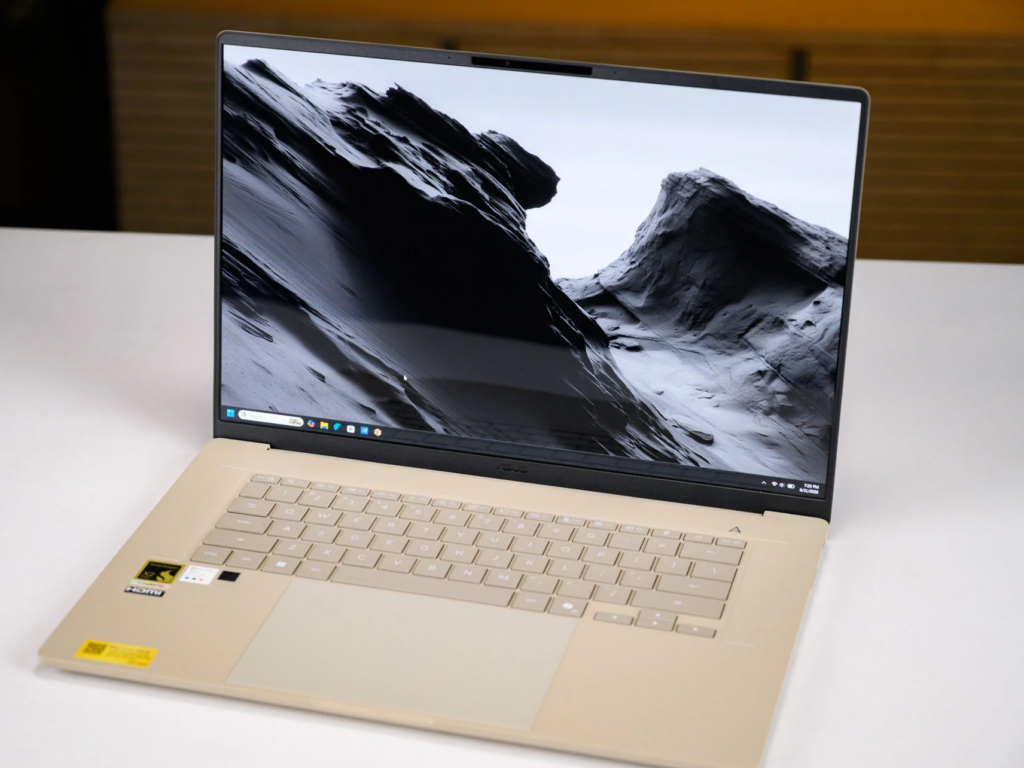
With a 16-inch OLED display, Qualcomm’s top-tier Snapdragon X2 Elite Extreme chip and a huge amount of RAM, the Zenbook A16 is a front-runner for anyone looking for a premium laptop with a large screen and impressive power for work.
Design
The Asus Zenbook A16 has an extremely light magnesium alloy shell finished with an extra layer of Asus’s “Ceraluminum” material, creating a ceramic-like surface that increases the rigidity and durability of the chassis while keeping the weight at just about 1.3 kg — far lighter than rivals in the same segment such as the Samsung Galaxy Book6 Pro (1.59 kg) or the Acer Swift 16 AI 2026 (1.54 kg). The coating really does feel like genuine ceramic; to the touch it is much closer to glazed tile than to metal.
According to Asus, this coating is not only attractive but also resists abrasion, scratches and fingerprints, as well as light knocks and drops, making the machine more durable. The rigid chassis also keeps the keyboard from flexing, a common complaint on ultra-thin 16-inch laptops. That said, I still noticed slight flex in the lid when lifting it open from one corner, so you should use both hands to avoid any potential problems with the display.
As for size, this 16-inch laptop measures roughly 35.6 x 25.4 cm, giving it a fairly compact footprint for its screen size. It is also only 1.65 cm thick — slim enough to carry in your hand or slip into a bag easily.
Specifications and software
The Zenbook A16 comes in a fairly limited number of configurations. The unit tested is equipped with the Snapdragon X2 Elite Extreme X2E-94-100, part of Qualcomm’s flagship laptop CPU line, and a touchscreen OLED panel at 2880 x 1800 pixels. If you need maximum performance, you can opt for the version with the slightly higher-end Snapdragon X2 Elite Extreme X2E-96-100, which comes with the more expensive Windows 11 Pro licence. That version has the same 3K OLED panel but no touch support.
Specification | Touchscreen model | Non-touch model |
| Processor (CPU) | Qualcomm Snapdragon X2 Elite Extreme X2E-94-100 | Qualcomm Snapdragon X2 Elite Extreme X2E-96-100 |
| Display | 3K OLED (2880 x 1800 pixels), touch | 3K OLED (2880 x 1800 pixels), non-touch |
| Memory (RAM) | 48GB LPDDR5X (dual channel) | 48GB LPDDR5X (dual channel) |
| Storage | 1TB SSD | 1TB SSD |
| Battery & charging | 70Wh battery / 130W charger | 70Wh battery / 130W charger |
| Operating system (OS) | Windows 11 Home / Standard | Windows 11 Pro |
Either version gets you a 1TB SSD and 48GB of dual channel LPDDR5X. 48GB is unusual in a machine this thin, and together with the NPU it explains the Copilot+ PC badge: Asus is aiming this at people running AI workloads locally. One catch, and it’s a real one. The RAM is soldered to the board, so there’s no upgrading it later.
Software is Windows 11 Home with the usual Asus bundle preloaded: GlideX, ScreenXpert, MyAsus, StoryCube and Asus Recovery. On security you get Microsoft’s Pluton chip and TPM 2.0 at firmware level.
Connectivity
Two USB4 Type-C ports sit on the left edge, handling 40Gbps transfers, DisplayPort output and charging. HDMI is right beside them, so an external monitor is a single cable, and there’s a 3.5mm headphone jack as well. On the right you get a USB 3.2 Gen 2 Type-A port at 10Gbps and a full size SD reader.
Having both USB-C ports on one side is mildly annoying once you’re running cables or juggling peripherals. The Type-A port on the right takes some of the sting out of it, since that’s where most wireless dongles end up anyway. Wi-Fi 7 and Bluetooth 5.4 cover the wireless side.
Display, speakers and webcam
The screen is genuinely high end. 16 inch Lumina OLED, 16:10, bezels thin enough that the panel covers about 90% of the lid. At native 3K and 120Hz it looks sharp and moves smoothly, with the saturated colour and deep blacks OLED does well.
The display is also well suited to HDR content, holding VESA DisplayHDR True Black 1000 certification and peak HDR brightness of up to 1,100 nits. The test unit is the touchscreen version with a glossy glass surface, so pointing and tapping feel very intuitive, but the downside is that it is prone to glare and fingerprints. It also fully supports active styluses such as the Asus Pen 2.0, the Microsoft Surface Pen and many other models, though you will have to buy one separately.
When calibrated with a Datacolor SpyderX Elite colour calibration sensor and its accompanying software, the 3K OLED panel achieved top-tier colour gamut coverage and brightness in testing. The combination of rich colour saturation and high brightness compensates for the low-brightness issue OLED displays sometimes suffer from, delivering one of the most vivid viewing experiences in this price bracket.
Above the screen is a Full HD webcam with infrared support for Windows Hello facial recognition. The chassis lacks a physical privacy shutter, however. While not strictly essential, a physical cover always brings greater peace of mind when using a webcam.
ASUS Zenbook A16 16″ Laptop, Snapdragon X2 Elite Extreme, 48GB LPDDR5X: Check Availability on Amazon
ASUS Zenbook A16 16″ Laptop, Snapdragon X2 Elite Extreme, 48GB LPDDR5X: Check Availability on Amazon
ASUS Zenbook A16 AI Laptop, 16″ 3K OLED Touchscreen Laptop, Snapdragon X2 Elite Extreme 2026(up to 80 Tops NPU), 48GB LPDDR5x 2TB SSD, Backlit KB, Copilot+ PC, Windows 11 Pro, Zabriskie Beige: Check Availability on Amazon
Keyboard and trackpad
To match the Ceraluminum chassis, the keys have their own ceramic-like coating, which Asus says resists fingerprints and oil through 50,000 “rubbing” cycles — essentially the entire lifespan of the machine.
The keys have 1.3mm of travel, giving decent depth and responsive tactile feedback, and the backlight makes the keyboard easy to see in a dark room while remaining legible in daylight. The machine has no number pad, though, and the arrow keys are only half the height of a normal key, which will annoy anyone who relies on them.
The laptop has an enormous glass trackpad measuring 15 x 9.4 cm. The touch surface extends all the way to the edges of the palm rest and feels smooth to swipe across, although the mechanical click mechanism felt somewhat stiff in testing. The sheer size has a drawback, too: the trackpad is prone to registering accidental input from your palms.
CPU performance in benchmarks
In this review we will compare the Zenbook A16 against several rivals in the large-screen ultraportable segment, including the Asus Vivobook S 15, the Acer Swift 16 AI, the 14-inch MacBook Pro M5 (2025) and the Samsung Galaxy Book6 Pro.
The Vivobook S 15 uses the previous-generation Snapdragon X Elite chip paired with a modest 16GB of RAM and a 512GB SSD, so it is certain to fall behind on performance — though it makes up for that with a lower price.
The Acer Swift 16 AI and the Samsung Galaxy Book6 Pro run Intel chips; the MacBook Pro uses Apple’s M5, and all three come with 32GB of RAM and a 1TB SSD.
What really makes the Zenbook A16 stand out in this premium segment is the hardware gap: the machine packs 48GB of RAM along with Qualcomm’s flagship Snapdragon X2 Elite Extreme chip, and still weighs less than its 14-inch rival.
In benchmarks designed for ARM chips, the Snapdragon X2 Elite Extreme performs very well: 151 points single-core in Cinebench 2024 and nearly 1,500 points multi-core, while its rivals struggle to pass the 1,000-point mark.
The Zenbook keeps its lead in Geekbench Pro, clearing 22,000 points while competing laptops cannot reach 18,000. Overall, Qualcomm’s flagship chip is very powerful provided the applications you use either run natively on the platform or emulate well on it.
GPU performance
We put the graphics capability to the test with UL’s 3DMark suite. No discrete GPU here, just integrated graphics, so AAA games are out. The 3DMark synthetic scores were better than I expected for an integrated chip, though. Lighter games will be fine.
The machine finished near the top of the table in several tests, losing out mainly to Apple’s MacBook Pro M5. Apple’s unified architecture gives it an edge in GPU-heavy workloads, but the Zenbook still performs very well for an ultra-thin integrated system.
Battery life
Our laptop battery test plays a 720p video file stored on the drive with Wi-Fi switched off, the keyboard backlight off, screen brightness at 50% and volume at 100%. While rival systems outperform it on total runtime, the Zenbook’s result is still very solid, as you can see below:
Where machines like the MacBook Pro and the Galaxy Book6 Pro pass the 24-hour mark, the Zenbook A16 reached 18.5 hours enough to get comfortably through a full working day without plugging in. The bundled 130W charger is also very compact, so you will not be turned into an unwilling weightlifter carrying it around. The machine can charge to 50% in just 30 minutes.
Verdict: the Asus Zenbook A16 is well worth buying
The Asus Zenbook A16 delivers an ultraportable laptop for mobile office workers, business users and content creators who want a large screen without hauling around a brick weighing more than 2 kg. It looks luxurious, it is light, and it has enough power and battery life to see you through. The gorgeous 3K OLED display also makes shortcomings such as the missing numpad and the oversized trackpad much easier to accept.
Get the Zenbook A16 for the screen and the multicore performance. The battery lasting a full working day is the other reason, and that matters more if your work now leans on AI tools. It’s the wrong machine if you need a discrete GPU for serious 3D gaming, or if you want a chassis that feels like metal rather than ceramic. The bigger catch is older x86 software: if you depend on it, emulation on ARM still isn’t smooth.
Related Posts