Design
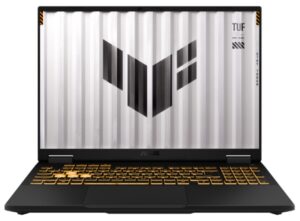
The TUF Gaming F16 comes in the Jaeger Gray finish familiar from the TUF line. It looks sturdy without going as hard on the “warrior” styling as the ROG models do. The keyboard deck (the C surface) is aluminium, which gives the chassis a solid feel, while the lid and bottom panel are textured plastic to keep costs down while still holding up well enough.
The laptop also carries MIL-STD-810H military certification, so it tolerates vibration, minor knocks and harsh temperatures. That matters to me, since I move the machine between home and the office constantly.
It measures 35.4 x 26.9 x 1.79-2.73 cm and weighs around 2.2 kg, which is reasonable for a 16-inch gaming laptop. The Chiclet keyboard has single-zone RGB backlighting and a moderate key travel that feels firm to type on, plus a full number pad on the right and a dedicated Copilot key for calling up the AI assistant.
Underneath sit twin fans and a generous set of exhaust vents, and those are what drive the temperature results I’ll get to further down.
Display
The 16-inch panel runs at WUXGA (1,920 x 1,200) in a 16:10 aspect ratio, a shape that is quickly becoming standard on modern gaming laptops because the extra vertical space helps as much with work as it does with games and entertainment.
On image quality, ASUS lists an anti-glare IPS panel rated at 300 nits, 1000:1 contrast, 100% sRGB, 72% NTSC and 100% DCI-P3. With that colour coverage, I found the machine handles more than films and casual viewing. Basic photo editing and video work are well within reach, so it isn’t purely a gaming screen.
The 144 Hz refresh rate works alongside G-Sync to keep motion smooth and to cut down on tearing in fast-paced titles. I put that to the test in the gaming section below.
Performance
This is where I spent most of my time, running benchmarks, playing actual games and measuring temperatures. First, a quick look at the configuration.
Component | Specification |
| CPU | Intel Core i5-14450HX (10 cores, 16 threads, up to 4.8 GHz Turbo, 20 MB cache) |
| GPU | NVIDIA GeForce RTX 5050 8 GB GDDR7 |
| RAM | 16 GB DDR5-5600 SO-DIMM (2 slots), expandable to 64 GB |
| Storage (SSD) | 512 GB M.2 NVMe PCIe 4.0 SSD (2 slots) |
| Display | 16-inch WUXGA (1,920 x 1,200), 16:10, IPS, 144 Hz, 300 nits, 100% sRGB, G-Sync |
| Wireless | Wi-Fi 6E, Bluetooth 5.4 |
| Ports | 1x RJ45 LAN; 1x HDMI 2.1; 1x USB 3.2 Gen 2 Type-C (DisplayPort / Power Delivery); 3x USB 3.2 Gen 2 Type-A; 1x 3.5 mm combo jack |
| Battery | 70 Wh, 4-cell Li-ion (4S1P) |
| Dimensions, weight | 35.4 x 26.9 x 1.79-2.73 cm, 2.2 kg |
| Operating system | Windows 11 Home |
One detail worth flagging: when I checked the hardware during benchmarking, my review unit shipped with a single 16 GB stick running in single-channel mode, even though it has two SO-DIMM slots and supports up to 64 GB. If you plan to add a second stick and run dual-channel, I’d expect a lift in workloads and games that are sensitive to memory bandwidth.
CPU performance
Cinebench 2024 put the Core i5-14450HX at 884 multi-core and 107 single-core. In Cinebench 2026, which runs a newer engine, it managed 3,699 multi-thread, 573 single-core and 435 single-thread.
The power draw during that multi-core run was the interesting part. It touched 106 W for a second or two, then dropped back to around 80 W and sat there for the rest of the test. The CPU doesn’t get to run flat out for long.
In Geekbench 6 the CPU hit 2,482 single-core and 10,947 multi-core. Those are solid numbers for this segment, enough for office work, engineering coursework and light content editing.
GPU performance
The RTX 5050 with 8 GB of GDDR7 turns in a strong showing for the price. In 3DMark Night Raid it managed 54,448 on the Graphics score and 14,442 on the CPU score. In Steel Nomad Light (DX12, Legendary preset), a heavier test built for mid-range GPUs, it scored 10,137 with an average graphics frame rate of 75.09 fps.
The other 3DMark runs land in the same place: 10,083 in Time Spy and 2,548 in Speedway. Medium settings in a current AAA game, no drama.
Geekbench 6 GPU Compute (OpenCL) came back at 105,206. Games aren’t the only thing this card is good for; GPU-accelerated exports and render previews will lean on it too.
Put the i5-14450HX and the RTX 5050 together and you get most AAA games at medium to high, with DLSS in reserve if you want more frames.
SSD performance
The machine ships with a 512 GB PCIe 4.0 NVMe SSD. In the 3DMark Storage Benchmark, which simulates real tasks such as loading games, installing them and saving files, it scored 1,638 with game load speeds ranging from roughly 280 to 660 MB/s depending on the title being simulated. That is a dependable level of storage performance for this class, and it keeps Windows boots, app launches and game loads brisk.
In CrystalDiskMark, sequential read and write speeds reached 7,020 and 5,791 MB/s, with 4K random speeds of 411 and 674 MB/s. In daily use, booting, loading games and working with large files all felt fast.
I also like that one M.2 slot is still free, so you can add a second SSD later if 512 GB runs short, which it will if you keep several large AAA games installed.
Real-world gaming
After the benchmarks, I played five games at the panel’s native 1,920 x 1,200 to see whether in-game performance matched the scores.
League of Legends
At maximum graphics settings the TUF Gaming F16 averaged 267 fps with 1% lows at 177 fps. Throughout the session the CPU hovered around 73 degrees C and the GPU around 57 degrees C, so the machine is barely working in this MOBA.
Valorant
On high settings the laptop averaged 238 fps across a session of more than 26 minutes, with 1% lows of 140 fps and 0.1% lows of 133 fps, well beyond what the 144 Hz panel can display. Average CPU and GPU temperatures stopped at 70 and 61 degrees C.
Counter-Strike 2
At High settings and 1,920 x 1,200, my frame rate during firefights moved between roughly 180 and 240 fps depending on how much was happening on screen, averaging around 195 fps. The CPU sat near 74 degrees C and the GPU near 71 degrees C with GPU load pushed to 85%.
PUBG: BATTLEGROUNDS
At High settings, 1,920 x 1,200 and no frame cap, the machine averaged 148 fps over a session of more than 13 minutes, with 1% lows of 78 fps. The GPU ran at about 93% load while CPU and GPU temperatures held around 74 and 71 degrees C. For a heavy survival shooter with this many effects, I consider that close to ideal.
Black Myth: Wukong
With this blockbuster the TUF Gaming F16 can run at the highest graphics preset, but the RTX 5050 has to work flat out to do it, so the experience lands at playable rather than genuinely smooth. To get the best out of Black Myth: Wukong, you are better off dialling the settings down.
At low settings the game ran smoothly at an average of 253 fps, and the RTX 5050 stayed below 75 degrees C, which keeps the machine cool and comfortable over long sessions.
Overall, in esports titles such as League of Legends and Valorant, the RTX 5050 has more than enough in reserve to make full use of the 144 Hz panel. In CS2, PUBG and Black Myth: Wukong it has to work harder but still holds a smooth frame rate. To my mind the configuration strikes a good balance between esports and AAA games at sensible settings.
Cooling
Running Cinebench multi-core back to back as a CPU stress test, package temperature briefly touched 96 degrees C before settling around 80 degrees C under sustained load. That is typical of high-performance HX chips at full tilt, and I saw no sign of an abrupt clock drop.
In 3DMark Night Raid, with the RTX 5050 at close to 100% load, the average temperature was only about 55 degrees C and the peak about 77 degrees C. In actual games, CPU and GPU temperatures generally moved between 57 and 77 degrees C depending on the title, noticeably cooler than during sustained heavy benchmarks.
Credit for those numbers goes largely to the twin fans, the heat pipes and the exhaust vents on the underside that I mentioned in the design section. Cooling has been a strength of the TUF Gaming line for several generations now.
Battery life
The TUF Gaming F16 carries a 70 Wh four-cell Li-ion battery. In the PCMark 10 battery test using the Video Conferencing scenario, which mixes video calls, web browsing and document work, the machine ran continuously from 96% down to 3% in roughly 2 hours and 50 minutes.
That is a middling result, and fairly typical of a gaming laptop with a discrete GPU like the RTX 5050. This is not a machine built to compete on endurance. If you plan to work or study away from a desk all day, bring the charger. On the plus side, it supports USB-C charging with Power Delivery up to 100 W, which gives you more flexibility when you’d rather leave the bulky original adapter at home.
Is the ASUS TUF Gaming F16 worth buying?
After spending time with the TUF Gaming F16, I think it is a sensible pick in the mid-range gaming laptop segment. The Core i5-14450HX and RTX 5050 8 GB GDDR7 combination delivers balanced performance that covers both esports and AAA games at appropriate settings, while the dual-fan cooling keeps the machine running fairly cool even at full load over long stretches.
The 144 Hz display with good colour coverage, MIL-STD-810H durability and the room to upgrade RAM and storage are all worth noting in its favour. Against that, it ships with a single RAM stick in single-channel mode, battery life is only adequate and there is no Thunderbolt port. Weigh those up if any of them matter to you.
If you are after a durable gaming laptop with performance balanced between esports and AAA titles, and battery life is not high on your list, I’d say the ASUS TUF Gaming F16 deserves a place on your shortlist.
ASUS TUF Gaming F16 (2025) Gaming Laptop, 16” FHD+ 165Hz 16:10 Display, Intel® Core™ i5 Processor 13450HX, NVIDIA® GeForce RTX™ 5050, 16GB DDR5, 512GB PCIe Gen4 SSD, Wi-Fi 6E, Win 11 Home: Check Availability on Amazon
ASUS TUF Gaming F16 Gaming Laptop, 16” FHD+ 144Hz IPS-Level 16:10 Display, Intel® Core™ 5 210H, NVIDIA® GeForce RTX™ 4050, 16GB DDR5, 512GB PCIe Gen4 SSD, Wi-Fi 6, Win11 Home, FX607VU-SS53: Check Availability on Amazon
ASUS TUF Gaming F16 Laptop 16″ WUXGA IPS 144Hz Intel 8-core Core 5 210H 32GB RAM 1TB SSD GeForce RTX 4050 RGB Backlit Thunderbolt Win11Pro ICP Acc: Check Availability on Amazon
ASUS TUF Gaming F16 Laptop 16″ WUXGA IPS 144Hz Intel 8-core Core 5 210H 16GB RAM 512GB SSD GeForce RTX 4050 RGB Backlit Thunderbolt Win11 ICP Acc: Check Availability on Amazon
Related Posts