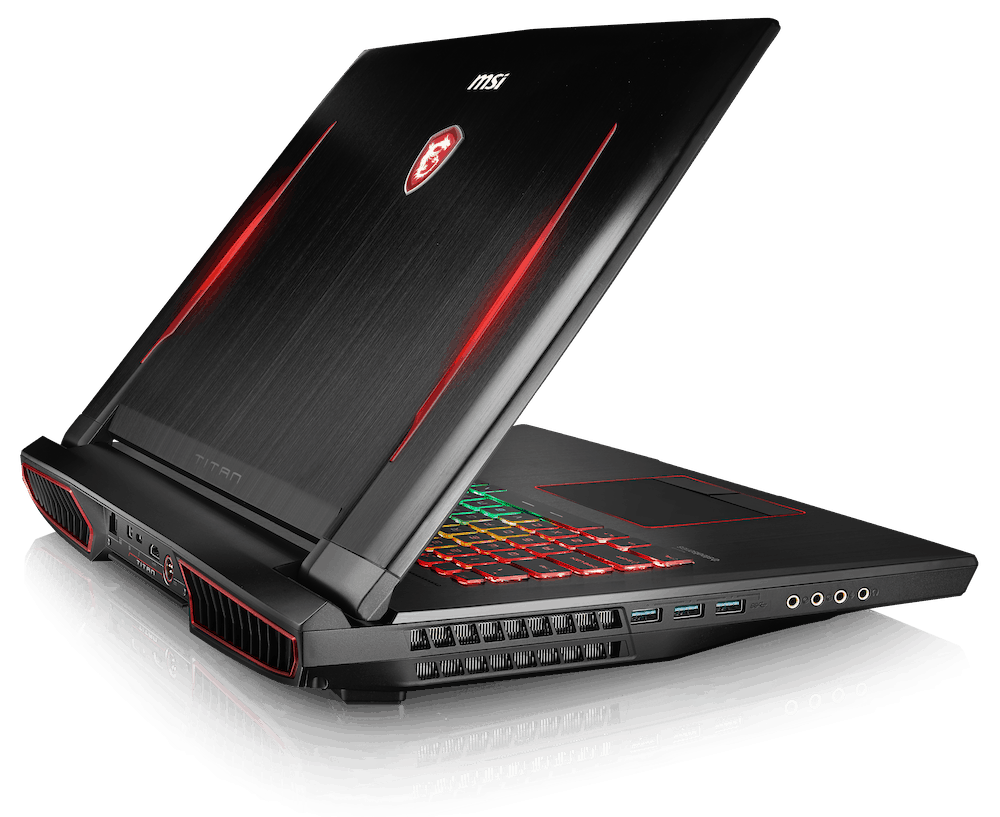
Intel Kaby Lake officially launched, and MSI is also very fast equipped for the 17″ gaming laptop, GT73VR, which is even worse with the latest generation Kaby Lake laptop model, i7-7820HK. In this article, we will send our readers the most intuitive experience of this change for the MSI GT73VR gaming laptop.
As mentioned above, the biggest change of gaming laptop GT73VR is in the “brain” Core i7, upgraded from i7-6820HK to the latest chip Kaby Lake is i7-7820HK. Although the performance that Intel brings through each upgrade is negligible, gamers are still looking forward to a gaming laptop using Kaby Lake as a habit for a new item, despite the p/p of previous machines is a lot better.
And our gaming laptop today, with the full name of the MSI GT73VR 7RF-296, MSI’s most powerful, latest, slim gaming laptop at the moment. If we just sum up the gaming laptop configuration it is pretty good, with the GTX1080, 32GB of DDR4 RAM and two 256GB SSD drives set up in RAID mode, plus a 1TB HDD, also there is a 120Hz G-sync screen, feels as decent as the desktop. But, the display resolution is still sitting at the FullHD 1080p level, and honestly we kinda expected it to be a little more polished in the next round of upgrades, you know.
New feature
Compared with the predecessor, the form of the latest GT73VR this is not very similar, almost all the same, mainly the difference in performance, only the only High-performance wireless and high-performance SD ports outperform their predecessors, as well as their direct competitors with the GT73VR.
Software and screen
The GT73VR still uses the MSI-branding software Dragon Center, the i7-7820HK overclocked to 4.0GHz by default compared to the original 3.5GHz. Everything else is quite similar to the previous GT73VR 6RE, from fine tuning fan system, keyboard and LED effects are not much change.
The 120Hz G-sync monitor is similar to its predecessor with extremely good contrast, standard color quality and just a few screens designed for the graphics, not too much. Even so, the 7ms response rate would be a pretty weak point if compared to IPS-based monitors, but with a gaming laptop and a gamer, the G- The sync and 120Hz refresh rate will be a plus point higher than IPS.
Keyboard and Touchpad
The keyboard on the MSI GT73VR is kind of one of its standout parts. It’s basically a full-sized SteelSeries-engineered keyboard with customizable RGB backlighting and honestly it just feels solid. The keys give you good travel, plus a tactile kind of feedback, so typing and gaming stay comfortable. The layout too seems well thought out, with bigger arrow keys, dedicated macro keys, and that full numeric keypad.
As for the backlighting, you can tweak it through the SteelSeries Engine 3 software, so you can make your own lighting profiles and those little effects. Also the WASD keys are emphasized, which is nice for gamers who need movement controls right away, no messing around.
Now the touchpad on the GT73VR is responsive and accurate, and it supports Windows Precision drivers too. The surface is pretty smooth, and tracking is reliable. For everyday use it’s totally fine, but during gaming, most people will probably use an external mouse anyway, since it can give better control and more precision when things get intense.
Audio
The MSI GT73VR audio quality is, honestly , pretty impressive. You get Dynaudio speakers plus Nahimic 2 audio enhancement, and somehow it all stays clear even when things get loud. The setup uses dual 3W speakers along with a 3W subwoofer, so you’re getting a full, rich sound with solid low end… the bass response feels good enough for games, movies, and even regular music sessions.
With the Nahimic 2 software in place, you can tweak the audio in a bunch of ways. There are different presets and an equalizer, which makes it easier to fine tune the experience depending on what you’re listening to. Also , the built-in microphone doesn’t disappoint either , it captures voice pretty cleanly, so in-game chat and video calls come through without too much trouble.
Connectivity
For ports, the MSI GT73VR is loaded. On the left side, there’s an Ethernet port, two USB 3.0 ports, and a USB 3.1 Type-C port that comes with Thunderbolt 3 support. You also get an SD card reader, and separate headphone, microphone jacks. On the right side, you’ll find three additional USB 3.0 ports, an HDMI port, a mini DisplayPort, and the power connector.
Having that Thunderbolt 3 connection is a big deal. It means fast data transfer, external GPU support, and you can hook up multiple 4K displays at once, which is pretty useful if you want a more “workstation” style setup not only a gaming one.
Wireless connectivity is managed by a Killer DoubleShot Pro network card. It delivers stable Wi‑Fi performance and it includes Bluetooth 4.1 support. There’s also Killer Networking software, so you can prioritize gaming traffic , and reduce latency so online play feels smoother and more responsive overall.
Performance
Through tests with specialized software used to “measure” the chip from the past such as Cinebench R15 and Cinebench R11.5 at 4.0GHz, the i7-7820HK (Kaby Lake) faster than about 3 % compared to i7-6820HK (Skylake). The difference is not very much, but we said above, the generation of Intel processors usually do not have a strong breakthrough. The key to the title is the graphics card, but to be exact, microprocessors like the i7-6700HQ are still running smoothly in the next few years.
Overall performance
With most hardware not much different from the predecessor, the overall score of the new GT73VR gaming laptop is 7635 points and just 9% higher than the Skylake GT73VR gaming laptop (7024 points).
In addition, a super-slim gaming laptop, such as the MSI, is equipped with two M.2 SSDs. NVMe runs on RAID mode to ensure faster speeds than the “son of wind” But with the current technology, it seems that the speed of SSDs is “near peak”, as most of the speed tests show that gaming laptops equipped with M.2 SSDs have NVMe. The speed is approximately the same, the difference is not much.
Graphics performance
Equipped with a very powerful graphics card, the GTX 1080 with 8GB of VRAM, so most of the graphics card’s test scores are good, smooth and make sure that All current games on the market, users can set max setting. The only difficulty is that the tests at 4K resolution, FPS can sometimes drop below 50FPS.
Compared to competitors competing with the GT73VR 7RF, in all performance tests, this gaming laptop is “broken”, only the MSI GT83VR gaming laptop, SLI or Crossfire system is appreciated because of driver errors, jerks, … the constant clinging that the two graphics card developers There is almost nothing to do to save, so the GT73VR 7RF still has its own advantages to the “king” GTX 1080.
MSI GT73VR TITAN-427 17.3″ 120Hz 5ms Display Extreme Gaming Laptop Core i7-7820HK GTX 1070 16GB 1TB VR Ready: Buy it now
MSI Computer GT73VR TITAN PRO-003 17.3″ Core I7-6820Hk 16GB 128GB SSDs + 1TB HDD Win10 Notebook: Buy it now
MSI VR Ready GT73VR Titan SLI-058 17.3″ Extreme Gaming Laptop Dual Geforce GTX 1070 [SLI] i7-6820HK 64GB 512GB SSD + 1TB Win 10: Buy it now
MSI GT73VR TITAN Pro-425 17.3″ 120Hz 5ms Display Extreme Gaming Laptop Core i7-7820HK GTX 1080 16GB 256GB NVMe SSD + 1TB VR Ready: Buy it now
MSI GT73VR TITAN PRO 4K-858 17.3″ 4K Display Extreme Gaming Laptop i7-7820HK GTX1080 8G 32GB 1TBSSD+1TB W10 Pro: Buy it now
Noise and machine temperature
Speaking of noise levels, we make quite a bit of controversy because each person’s point of view about what noise. But after a few tests and some titles, while the GT73VR’s cooling fans ran at full power, it seemed like the noise was not too bad at 56 dB (A).
When the machine is idle, everything is quiet and you can rest assured that you will not hear any sound coming from your beloved gaming laptop. Anyway, get a good headset to play the game and avoid having to hear annoying noises from the fans that will always be the right choice for any gamer.
The highest temperature measured during the fullload of the GT73VR gaming laptop was 48 degrees Celsius, which was quite high but could not blame the MSI manufacturer when the i7-7820HK processor was in the 90 degrees Celsius range, and the Exhaust heat is essential. In addition, GTX 1080 using the latest technology of Nvidia Pascal, the good news is that even with fullload, the highest measured temperature is just 73 degrees Celsius, quite good compared to a card. The graphics are embedded inside a gaming laptop like the GT73VR.
Battery life
Two hours, this is the number to talk about the battery life of the GT73VR even when streaming video as well as just surfing on the web. With a battery running at 75Wh, this is nothing to say, but most other gaming laptops are equipped with “mobile gaming machines” with a battery running at 90Wh.
Upgradability
One of the things that’s pretty great about the MSI GT73VR is that it’s easy to , upgrade. The bottom panel on the laptop can be taken off so you can reach the inside parts which means users can swap the RAM , upgrade storage, and even change the Wi‑Fi card too. That kind of flexibility helps the GT73VR stay current with newer hardware over time, so the lifespan feels longer, and the system stays sort of relevant for upcoming gaming situations
Value Proposition
The MSI GT73VR also has a strong value angle for people looking for top tier speed and features. It kind of hits a nice balance between raw power, the overall design , and build sturdiness , so it feels like a premium gaming laptop that really does justify the higher price. Sure, it might not be the cheapest option you can find, but it pays you back through solid performance plus features that fit both serious gamers and professional use cases
On the hardware side, the Intel Core i7-7820HK plus the NVIDIA GTX 1080 together make sure it can run newer games and demanding applications without too much trouble. Add in the fact that it supports upgrades, it can come with high quality screen choices, and the keyboard feels comfortable enough, and that’s why the GT73VR keeps standing out to a lot of buyers.
Conclusion
MSI GT73VR is, honestly a pretty high end gaming laptop that brings impressive performance along with a lot of useful features. There is this distinctive style to it, the build feels solid, and the keyboard is comfortable enough that you end up wanting to type and game without thinking too much about it. It’s kind of enjoyable for both gaming sessions and everyday stuff. Still, the battery life is only so-so, and the noise levels could be calmer, but those are small tradeoffs when you look at the overall value.
If you’re a gamer or a professional who wants a powerful machine with lots of options, then the MSI GT73VR becomes a top pick. Also, its upgradability— that really helps, because the laptop can stay in step with future gaming needs, so it feels like a purchase that lasts longer than expected, not just a short term fling.
In short, the MSI GT73VR is a capable premium gaming laptop, and the gaming experience feels genuinely satisfying. It might not be the easiest thing to carry around, nor the cheapest choice, but it does shine when it comes to delivering top tier performance and solid value for the money. Whether you are a serious gamer, or you need heavy hardware for work, the GT73VR can handle what you throw at it, and usually does more than you expect.
Related Posts



Tech Reviewer & Product Analyst
Định Bia has spent over 10 years testing consumer electronics with a focus on smart technology. He work as a product advisor at Biareview where he helped customers find the right devices for their needs. He personally tests every product featured on this site using a consistent evaluation framework covering quality, durability, and value. All reviews are based on experience, not influenced by the manufacturer.