A familiar design with two material options
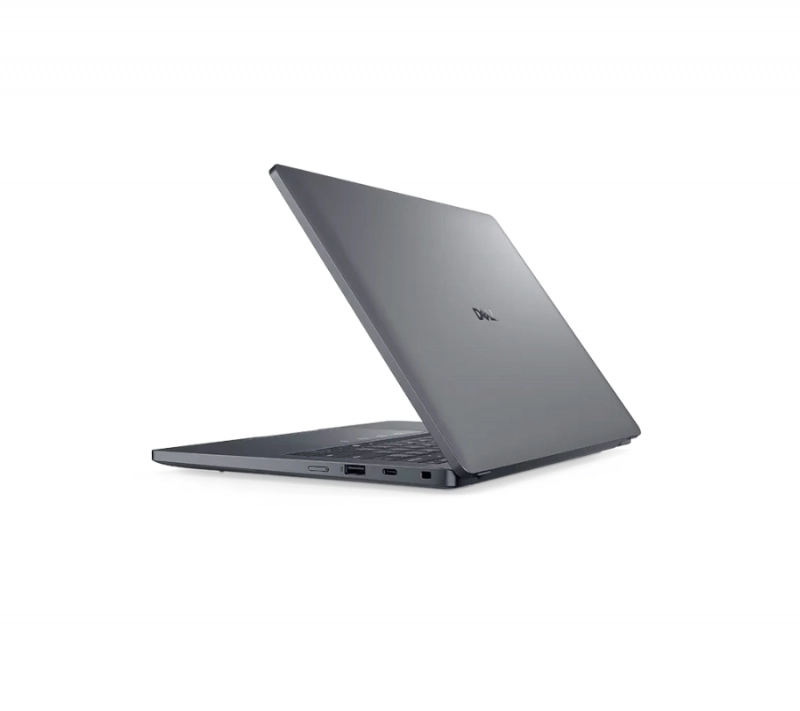
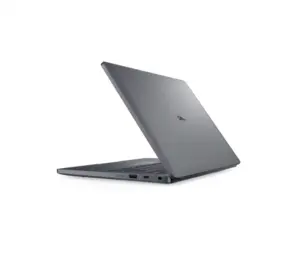
The chassis is close to that of the Dell Pro 7 14 in materials, finish, dimensions and the way it feels in the hand. The base comes in either anodised aluminium or glass-fibre composite. The composite version measures 18.65 mm thick, slightly more than the 18.1 mm of the aluminium one.
The composite model saves only around 10 g, while the thinner profile of the aluminium version is easier to notice. If a trim look matters to you, aluminium is the one to pick.
A full set of ports, including Thunderbolt 4
Connectivity is generous enough to cover most daily working needs.
On the right side you get an optional Nano-SIM slot, a 3.5 mm headphone jack, a 5 Gbps USB-A 3.2 Gen 1 port, 1 Gbps RJ-45 and a Noble lock slot.
The left side carries HDMI 2.1, another 5 Gbps USB-A 3.2 Gen 1 port and two USB-C Thunderbolt 4 ports with DisplayPort 2.1 and 100 W Power Delivery.
Keyboard and touchpad carried over from the Pro 7
The keyboard is the same one used on the more expensive Dell Pro 7 14, so typing feels the same across both machines.
The clickpad is also carried over from the Pro 7 14, which is worth noting: a mid-range model getting the same input hardware as the tier above is not a given.
120Hz screen with high sRGB coverage
Dell offers seven display options in total. Most use IPS panels, the exception being an FHD OLED. None of them support touch or HDR, which is common enough on business clamshells.
The unit tested uses a 14-inch LG Philips LP140WU IPS panel at 1,920 x 1,200 and 120Hz. It covers 96.9% of sRGB, 68.7% of AdobeRGB 1998 and 66.5% of Display P3.
Only one of the available panels can drop its refresh rate to 1Hz to save power. The rest bottom out at 60Hz or 48Hz.
Configuration and performance
The Pro 5 14 is specified for work, and the sections below look at processing, graphics, storage and how it behaves in use.
Specifications and upgradability
Component | Specification |
| Processor | Intel Core Ultra X7 368H, 16 cores / 16 threads, up to 4.9GHz |
| Integrated graphics | Intel Arc B390, 12 Xe3 cores, 1,850MHz |
| Memory | 64GB LPCAMM2, 8,533 MT/s, dual-channel |
| Storage | SK hynix PCB01 1TB SSD |
| Display | 14-inch IPS, 16:10, 1,920 x 1,200, 120Hz |
| Ports | 2 x USB-A 3.2 Gen 1, 2 x Thunderbolt 4 / USB4 40Gbps, HDMI, DisplayPort, 3.5mm jack, Noble lock slot |
| Wireless | Wi-Fi 7, Bluetooth 6 |
| Battery | 70Wh Li-Polymer |
| Dimensions | 315.5 x 226 x 18.1mm |
| Weight | 1.471kg |
| Operating system | Windows 11 Pro |
That adds up to a strong configuration: a Core Ultra X7 368H, integrated Intel Arc B390 graphics, 64GB of LPCAMM2 memory and a 1TB SK hynix SSD, alongside a 14-inch 120Hz IPS screen, Wi-Fi 7, a 70Wh battery and a wide port selection. It is a sensible fit for professional work.
What the Core Ultra X7 368H delivers
The Core Ultra X7 368H has 16 cores and 16 threads, boosting to 4.9GHz. In Cinebench R23 Multi Core the machine scored 17,350, behind the ASUS ExpertBook Ultra on 19,841, the Ryzen AI 9 HX PRO 470 version of the Dell Pro 7 14 on 18,834 and the HP OmniBook Ultra 14 on 17,663.
It still comes out ahead of the Core Ultra 7 366H version of the Dell Pro 7 14 on 17,100, the HP EliteBook 8 G2a 14 on 16,101 and the Lenovo ThinkPad T14s Gen 7 on 16,054. A low of 14,392.2 does suggest multi-core performance can fall away under sustained load.
In Cinebench R23 Single Core it scored 2,169, second in the comparison group behind the HP OmniBook Ultra 14 on 2,213. That puts it above the Core Ultra 7 366H version of the Dell Pro 7 14 and the Core Ultra X7 358H in the ASUS ExpertBook Ultra, which managed 2,081 and 2,079 respectively.
Dell Pro 14 PC14250 Laptop, 14″ FHD+, Intel Core 5 120U, 16GB, 512GB SSD: Check Availability on Amazon
Dell Pro 14 PC14250 Laptop, Intel Core 5 120U, 32GB DDR5 RAM 1TB SSD |: Check Availability on Amazon
Dell Pro 14 PC14250 Laptop, Intel Core 5 120U, 32GB DDR5 RAM, 1TB SSD: Check Availability on Amazon
Dell Pro 14 PC14250 Laptop, 14″ FHD+, Intel Ultra 5 235U, 16GB, 512GB SSD: Check Availability on Amazon
Dell Pro 14 PC14250 Laptop, Intel Core 5 120U, 16GB DDR5 RAM 512GB SSD |: Check Availability on Amazon
Integrated graphics ahead of the pack
The Arc B390 in the Pro 5 14 scored 19,706 in 3DMark 11 Performance GPU, the highest in the comparison group. That beats the 18,445 average for the Arc B390 and edges past the Radeon 8040S in the HP ZBook Ultra G1a 14 on 18,783.
It also comes out ahead of machines running the same GPU, with the HP OmniBook Ultra 14 on 18,489 and the ASUS ExpertBook Ultra on 18,313. Against the Radeon 890M in the Dell Pro 7 14, which managed 13,767, the gap is considerable.
Handles demanding games at Full HD
Cyberpunk 2077 at 1,920 x 1,080, Ultra settings and FSR off averaged 51 FPS, with a low of 41.4 FPS and a P1 of 39.2 FPS.
That is better than the ASUS ExpertBook Ultra and HP OmniBook Ultra 14, both on the Arc B390, which managed 47.2 and 44.9 FPS. The Pro 5 14 can run the game at Ultra without FSR, but it does not reach 60 FPS, so dialling back a few settings will make it smoother.
GTA V at Full HD with Highest settings, 4x MSAA and 16x AF averaged 41.4 FPS. The low dropped to just 5.87 FPS with a P1 of 27.8 FPS, so expect occasional stutter.
Surface temperatures stay in check
Under full load the hottest readings were 42.8°C on one side of the chassis and 43.6°C on the other, with averages of 37.2°C and 36.3°C in a 20°C room.
The power supply peaked at 38.6°C. Heat concentrates towards the top and one side of the body, while the rest of the surface stays in the 27.4–35°C range.
SSD reads at close to 14,000MB/s
The 1TB SK hynix PCB01 hit 13,928MB/s sequential read and 12,260MB/s sequential write at Q8T1. On the standard sequential test, read and write came in at 6,558MB/s and 5,969MB/s.
At 4K Q32T16 it managed 2,044MB/s read and 1,868MB/s write. 4K Q1T1 figures were 101.3MB/s and 175.9MB/s, and sequential read held at 11,890MB/s in the repeat test, which points to fast and consistent transfers.
Who is the Dell Pro 5 14 for?
The Pro 5 14’s strengths are its Core Ultra X7 368H, the Arc B390 graphics, 64GB of memory, a fast 1TB SSD and a 120Hz IPS panel covering 96.9% of sRGB. Add the wide range of ports, well-managed surface temperatures and the ability to run some demanding games at Full HD. On the other side, the screen has no touch or HDR support, and frame rates in GTA V drop sharply at times.
The Pro 5 14 makes sense for business users, office staff and professionals who need a 14-inch machine with strong CPU, GPU and storage performance, and who want to game after hours.
Related Posts