Design
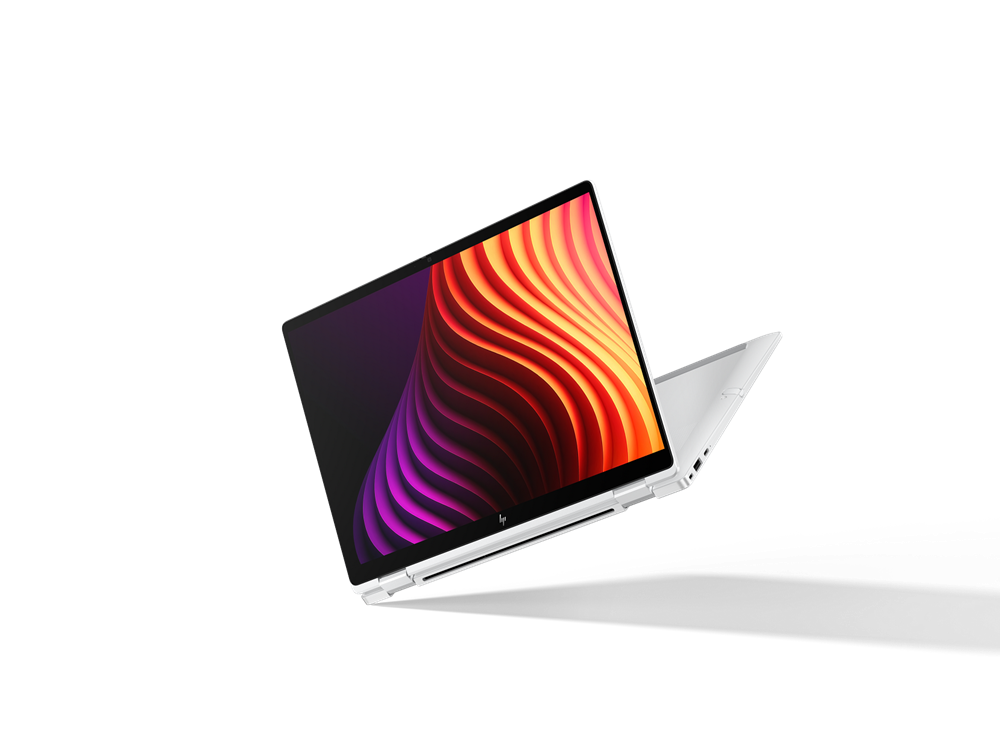
Most EliteBooks of the past few generations have used aluminium for the chassis. The EliteBook X G2i switches to magnesium. The body is finished in a silvery white while the display bezel is black plastic, and the colour contrast looks rather good. HP adds a few more touches on top of that: the EliteBook X logo on the palm rest, a large speaker grille and a drop-down hinge.
Build quality is very good overall. There is almost no flex anywhere; only the middle of the lid gives a little when you press on it. The hinge opens to 177 degrees, can be opened one-handed and does not wobble.
The bottom panel is held on by just four screws, so getting at the internals is easy, but the RAM and the Wi-Fi card are soldered to the board. The only parts you can replace are the M.2 2280 SSD and the battery. The keyboard can also be pulled out and swapped if it fails, which is worth mentioning.
Specifications
Compared with the first-generation EliteBook X, the new model is slightly smaller and lighter, but thicker. The Lenovo ThinkPad X1 Carbon Gen 14 still holds the weight crown. Full specifications are below.
| Component | Specification |
| Operating system | Microsoft Windows 11 Pro |
| CPU | Intel Core Ultra 7 356H (16 cores / 16 threads: 4 P-cores up to 4.7 GHz, 8 E-cores up to 3.7 GHz, 4 LP E-cores up to 3.3 GHz, Panther Lake architecture) |
| GPU | Intel Graphics 4 Xe3 Panther Lake iGPU |
| RAM | 32 GB LPDDR5X-9600, soldered on board, dual-channel |
| Display | 14.0-inch, 16:10, 1920 x 1200 (WUXGA, 162 PPI), IPS LED panel, SureView ePrivacy privacy screen, anti-glare (matte), 60 Hz |
| Webcam | 5 MP with infrared (IR) support and a physical privacy shutter |
| Storage | 1000 GB (1 TB) M.2 2280 NVMe PCIe 4.0 SSD (Kioxia KBG80ZNV1T02) |
| Ports | 1 x USB 3.0 / 3.1 Gen 1 1 x USB 3.1 Gen 2 2 x Thunderbolt 4 (USB-C Power Delivery) 1 x HDMI 3 x DisplayPort 1 x Kensington lock 3.5 mm headphone/microphone jack 1 x Fingerprint reader |
| Wireless | Intel Wi-Fi 7 BE211 Bluetooth 5.4 HP 5G Sub-6 CAT19 (LTE, 5G and eSIM) |
| Dimensions | 17.5 x 312.7 x 217 mm |
| Weight | 1.212 kg (charger: 172 g) |
| Battery | 68 Wh lithium-polymer |
HP ships the laptop with a compact, lightweight 65W GaN USB-C wall charger. Nothing else comes in the box.
Connectivity and security
HP changed a great deal on the EliteBook X, but the port layout is not one of those things. The number and type of ports are the same as on the previous version.
- Left: HDMI, two Thunderbolt 4 ports, 3.5 mm headphone jack
- Right: nanoSIM slot, USB-C 3.2 Gen 2 (DP-Alt Mode), USB-A 3.2 Gen 1, Kensington lock
HP uses a very fast Wi-Fi 7 solution here. The Intel B211 chip supports 320 MHz channels and posted strong benchmark results. The EliteBook can also be configured with 5G, and our test unit had it.
Being a machine built for business, the EliteBook covers nearly every security base. A Kensington lock, a fingerprint reader, an infrared (IR) camera and a mechanical webcam cover are all present, along with the SureView ePrivacy screen. What it does not have is a smartcard reader, which HP reserves for the larger EliteBook models.
Display, speakers and webcam
There are seven 14-inch 16:10 display options for the HP EliteBook X G2i, all of them with a matte, anti-glare finish:
- WUXGA (1,920 x 1,200), IPS, 400 cd/m², 100% sRGB, Low Power
- WUXGA (1,920 x 1,200), IPS, 500 cd/m², 100% sRGB, touch
- WUXGA (1,920 x 1,200), OLED, 300 cd/m², 95% DCI-P3
- WUXGA (1,920 x 1,200), IPS, 800 cd/m², 100% sRGB, SureView
- WUXGA (1,920 x 1,200), IPS, 800 cd/m², 100% sRGB, SureView, touch
- 8K (2,880 x 1,800), OLED, 500 cd/m², 100% DCI-P3, 120 Hz VRR
- 8K (2,880 x 1,800), Tandem OLED, 700 cd/m², 100% DCI-P3, 120 Hz VRR, touch
The SureView privacy panel on our test unit is both a strength and a weakness. It gets very bright, but even with privacy mode switched off the viewing angles stay narrow, and brightness drops noticeably the moment you tilt your head slightly away from dead centre with ePrivacy already off.
Brightness is not even across the panel either. The bottom of the screen manages only a little over 500 cd/m², while the centre goes past 800 cd/m². On paper this is a very bright panel, but in practice, unless you are sitting directly in front of it, it looks far dimmer than the spec sheet suggests. The trade-off, of course, is that SureView keeps your data away from unwanted eyes.
Out of the box the panel also leans too far towards green, although calibration takes care of that. HP advertises 100% sRGB coverage; our own measurement came in at roughly 91.1%. For colour-critical work that could be a problem, but the colours here are still far more accurate than on plenty of cheaper IPS panels.
For a thin-and-light business laptop, the HP EliteBook X G2i has a very good audio setup with six speakers in total. They play loud, stay well balanced and even manage a bit of bass. The 5-megapixel webcam does a decent job too, producing a sharp image with colours that do not shift much.
Keyboard and touchpad
One of the new things on the 2026 EliteBook X is the redesigned keyboard, which drops the frame around each key and ends up closer to a desktop PC keyboard than to the usual chiclet layout. It looks modern and is much easier to use than the similar design on the Dell XPS. The backlighting works well on top of that, and the keycaps are shaped to stop light leaking out around the keys.
On the whole this is a comfortable keyboard. The keys are dark grey and smooth, generously sized, with good feedback, long travel and a sensible layout. The one weak spot is the arrow keys, which are cramped.
Below the keyboard sits a 13.8 x 9 cm touchpad that clicks anywhere on its surface and responds well thanks to haptics. The click feels premium, and so does the glass surface, exactly as you would hope.
Performance
The unit we tested uses the Core Ultra 7 356H, a Panther Lake processor with four Cougar Cove performance cores, eight Darkmont efficiency cores and four low-power Darkmont cores, 16 in total. It boosts to 4.7 GHz and carries a nominal 25W TDP, although that can drop as low as 15W or climb as high as 80W depending on conditions.
As the benchmark results above show, the HP EliteBook X G2i comfortably beats both its Lunar Lake predecessor and the Lenovo ThinkPad X1 Carbon Gen 14, which runs a lower-tier Panther Lake chip. In the premium business segment this is one of the fastest machines around thanks to that high TDP, and it keeps pace with AMD’s Ryzen 9 HX 470.
That said, while the EliteBook X G2i easily outruns its predecessor on the CPU side, the Panther Lake graphics fall behind the older Intel ARC Graphics 140V. There is a higher configuration with the stronger ARC B390 GPU, and on a business laptop graphics power is usually not the top priority anyway. If you do want to game after work, here is what the machine can manage:
| Game | Low | Medium | High | Ultra |
| GTA V (2015) | 182.4 | 171 | 54.8 | 22 |
| Dota 2 Reborn (2015) | 145.2 | 93.3 | 94 | 89.7 |
| Final Fantasy XV Benchmark (2018) | 76.4 | 39.5 | 27.2 | — |
| X-Plane 11.11 (2018) | 37.6 | 32.8 | 30.7 | — |
| Baldur’s Gate 3 (2023) | 31.5 | 23.1 | 19.9 | 19.4 |
| Cyberpunk 2077 (2023) | 39.2 | 29.1 | 25.7 | 21.6 |
| F1 25 (2025) | 65.5 | 54.6 | 41.3 | — |
HP offers the EliteBook with up to 2 TB of storage, in the form of an M.2 2280 NVMe PCIe 5.0 drive. Our test unit came with a fast 1 TB PCIe 5.0 NVMe SSD made by Kioxia, which benchmarked well and showed no drop-off under sustained heavy load.
Battery life and temperatures
Given how much performance is on tap, the HP EliteBook G2i runs cooler than I had feared. Chassis temperatures barely went above 40°C during testing, and there was no sign of thermal throttling.
Power draw on this business laptop is a little higher than on the previous generation, the HP EliteBook X G1i. Given the move to the more powerful Panther Lake H platform, that is no surprise. In our Wi-Fi web browsing test at 150 cd/m² screen brightness, the 68 Wh battery lasted more than 18 hours, a good result even if it still falls short of the Lenovo ThinkPad X1 Carbon Gen 14.
Should you buy it?
With the EliteBook X, HP is aiming squarely at the top of the business laptop market. This magnesium-bodied machine has a strong configuration, a full set of security features, impressive battery life and powerful speakers, which together add up to a premium experience from end to end. HP’s SureView panel delivers high brightness, but its unstable viewing angles take a real toll on day-to-day usability.
For corporate customers, of course, a privacy screen is worth a great deal, and HP also offers a number of other display options that prioritise image quality and suit ordinary users better. So if you do not genuinely need ePrivacy, make sure you pick one of the other panels when you order an EliteBook X.
HP EliteBook X G2i 14″ Copilot+ PC Notebook – 2.8K – 120 Hz – Intel Core Ultra 7 Series 3 356H – 32 GB – 512 GB SSD – English Keyboard – Atmospheric Blue – Intel Chip – 2880 x 1800 – Windows 11 Pro: Check Availability on Amazon
HP EliteBook X G2i 14″ Touchscreen Copilot+ PC Notebook – WUXGA – Intel Core Ultra 7 Series 3 356H – 32 GB – 512 GB SSD – English Keyboard – Atmospheric Blue – Intel Chip – 1920 x 1200 – Windows 11 Pr: Check Availability on Amazon
Related Posts