Design and display
Aluminium chassis, a shade over 1.5 kg, and a 14-inch IPS screen with an anti-glare finish that holds up under office lighting.
Aluminium shell, uneven build quality
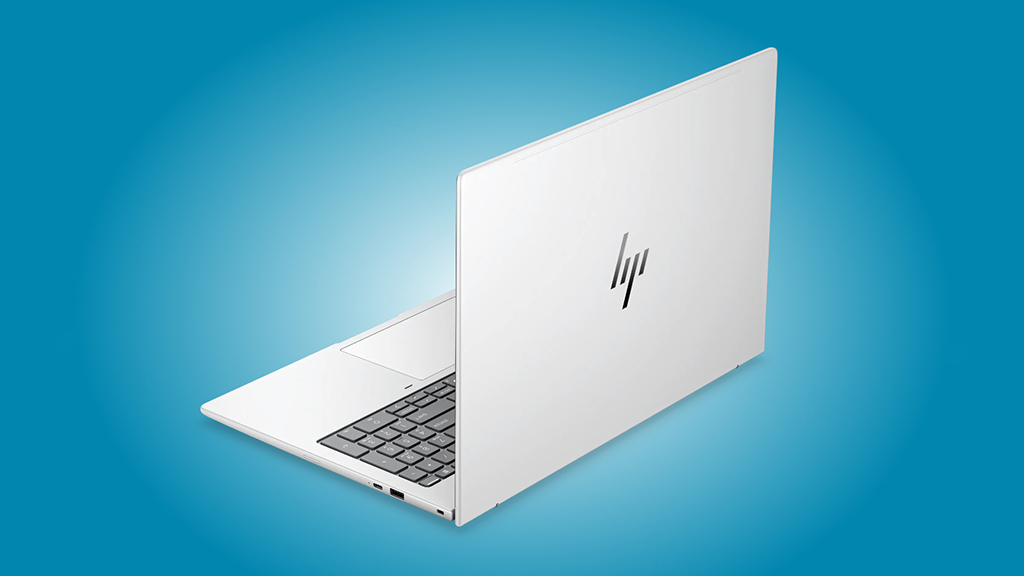
The shell is silver aluminium, and it does not pick up fingerprints, so it stays looking tidy on a desk. It is also thick, and 1.54 kg is heavy for a 14-inch machine these days.
Press down on the base and it holds. Twist it and there is flex, along with a creak. A premium laptop should not do that. The lid is better built, and the hinge stays where you put it, though it stops at about 160 degrees.
Plenty of ports, and room for a 5G modem
Ports are a strong point. There is enough here for an external monitor, a couple of drives and the usual desk accessories. Every USB-C port can charge the laptop, so it does not matter which side you plug the adapter into.
On the left: HDMI 2.1, two Thunderbolt 4 / USB-C 4.0 ports at 40 Gbps, both with DisplayPort 2.1 and Power Delivery, and a 3.5 mm headphone jack.
On the right: USB-C 3.2 Gen 2 at 10 Gbps with DisplayPort 1.4 and Power Delivery, USB-A 3.2 Gen 1 at 5 Gbps, and a Nano security lock slot. Wireless is Wi-Fi 7, and there is an internal slot for a 5G modem. Wi-Fi 7 comes as standard, and there is space inside for a 5G modem.
HP EliteBook 8 G2a 14″ Copilot+ PC Notebook – AMD Ryzen AI 7 Ryzen AI 400 Series 450-32 GB – 1 TB SSD – English Keyboard – AMD Chip: Check Availability on Amazon
HP EliteBook 8 G2a 14″ Copilot+ PC Notebook – AMD Ryzen AI 5 PRO Ryzen AI PRO 400 Series 440-32 GB – 512 GB SSD – English Keyboard – AMD Chip: Check Availability on Amazon
HP EliteBook 8 G2a 14″ Copilot+ PC Notebook – AMD Ryzen AI 7 Ryzen AI 400 Series 450-32 GB – 512 GB SSD – English Keyboard – AMD Chip: Check Availability on Amazon
HP EliteBook 8 G2a 14″ Copilot+ PC Notebook – 5G – AMD Ryzen AI 7 Ryzen AI 400 Series 450-32 GB – 512 GB SSD – English Keyboard – AMD Chip – LTE, HSPA+, DC-HSPA+, UMTS: Check Availability on Amazon
Good keyboard, accurate touchpad
Key travel is 1.5 mm, enough to type on all day without your fingers getting tired. For anyone who spends the day in documents and email, this is the part that matters most, and HP got it right.
The touchpad surface is smooth and tracking is accurate. The click is loud, though, loud enough that you will hear it in a quiet office.
Covers all of sRGB, with speakers and a webcam to match
The panel is a 14-inch IPS, 1,920 x 1,200 at 60 Hz, matte rather than glossy. Brightness averages 430 nits and contrast is near 2,000:1, with no PWM flicker. sRGB coverage reaches 99%. At that level you can edit photos and video on it, which is not a given on an office laptop. On the default profile the image leans slightly blue. On the default profile the image leans slightly blue.
The stereo speakers are better than most business laptops manage. Above the screen there is a 5 MP webcam, an IR camera for face sign-in and a physical shutter, which is all you need for daily calls. HP also ships its Poly Camera software. A couple of its features are worth having: an on-screen business card, and a virtual background that works regardless of which meeting app you are in.
Specifications and performance
Inside is a Ryzen AI 7 450 with integrated Radeon 860M graphics. That combination is enough for office work, calls and a lot of browser tabs.
The spec sheet
| Component | Specification |
| Processor | AMD Ryzen AI 7 450, 8 cores / 16 threads, up to 5.1 GHz |
| Integrated graphics | AMD Radeon 860M |
| Memory | 32 GB LPDDR5-7500 |
| Storage | Western Digital PC SN5000S 1 TB SSD |
| Display | 14-inch IPS, 1,920 x 1,200 pixels, 60 Hz, 16:10 aspect ratio, anti-glare |
| Ports | 2 x Thunderbolt 4 / USB4 40 Gbps, USB-A 3.2 Gen 1, USB-C 3.2 Gen 2, HDMI, 3.5 mm headphone jack, Kensington lock |
| Wireless | Wi-Fi 7, Bluetooth 5.4, 5G ready |
| Battery | 68 Wh |
| Dimensions | 315.6 x 222 x 15.5 mm |
| Weight | 1.544 kg |
| Operating system | Windows 11 Pro |
This is a business laptop and the hardware matches that brief. Documents, a few windows at once, video calls. Wi-Fi 7 and Bluetooth 5.4 are both in there, and there are more ports than most 14-inch machines carry. That suits someone whose laptop spends half its life in a bag.
Highlights
The processor is Intel’s Core Ultra 7 355, with an NPU for AI work, and there is 32 GB of RAM alongside it. Enough to leave a pile of applications open without closing things to make room.
The screen is a 14.0-inch 2.8K OLED and it takes touch input. Contrast is much better than an IPS panel of the same resolution, and you can tap and scroll on the screen itself.
1 TB of PCIe SSD storage. Large files have somewhere to live and applications open quickly.
Thin, light ultrabook shell in blue. It survives being carried around, and Windows 11 comes licensed out of the box.
The Ryzen AI 7 450 holds up well for office work
In Cinebench R23 multi-core the HP EliteBook 8 G2a 14 AI scored 16,101 points. That sits under the 17,377-point average for other Ryzen AI 7 450 machines, though not by a wide margin. It comes out level with the ThinkPad T14s Gen 7 and its Ryzen AI 7 PRO 450, and comfortably ahead of what most office laptops manage.
Single core came in at 2,031 points against an average of 2,022, so right on the mark. Two machines beat it in the comparison table, the Asus ExpertBook Ultra B9406CAA and the Dell Pro 7 14. Everything else sits below, the ThinkPad T14s Gen 7 included.
For its class, the Ryzen AI 7 450 is a good chip. It does not struggle with documents, a pile of browser tabs, video calls or anything else in an ordinary office workload.
The Radeon 860M is a solid integrated GPU
In 3DMark 11 Performance GPU the Radeon 860M managed 11,677 points. Average for this chip is 10,404, so the HP sits a bit above where it should. Roughly the same score as the ThinkPad T14s Gen 7 on the same GPU, and better than the Arc Graphics 140V in the Dynabook Portege Z40L-N.
The Radeon 780M and 890M in pricier machines are well out of reach. On a business laptop nobody is expecting them. The 860M has enough in it for basic graphics work and everyday tasks.
Gaming is limited to the basics
Cyberpunk 2077 at Full HD on Ultra gave 18.6 FPS. That beats the ThinkPad T14s Gen 7 on the same GPU, but a game this demanding is not playable at these settings.
GTA V on the Highest preset fares better at 29.1 FPS. That is ahead of the ThinkPad T14s Gen 7, ahead of the Radeon 780M in the EliteBook 8 G1a 14, and ahead of the average for office laptops. It is still not a stable 30 FPS with the settings up.
None of this makes the EliteBook 8 G2a 14 AI a gaming laptop. Older or lighter titles with the settings down, yes. Modern AAA at Full HD and high detail, no.
Surface temperatures stay under control
Run it at full load and the hottest spot measures 44.2°C. Averaged across the top and bottom, it is 34.8°C and 35.1°C.
The heat gathers towards the back of the chassis. Everywhere else stays cooler. The power adapter hit 45.1°C under the same load, so give it some air if you are plugged in all day.
The SSD is quick
The drive is a 1 TB Western Digital PC SN5000S. Sequential read came to 6,336 MB/s and write to 5,667 MB/s. Windows boots quickly, applications open quickly, and copying a large folder takes about as long as you would hope.
Random access holds up too, with 4K reads up to 675 MB/s and writes of 554 MB/s. Numbers in that range are what keep a machine feeling responsive when you have a lot open at once.
Who is the HP EliteBook 8 G2a 14 AI for?
The EliteBook 8 G2a 14 AI gets the basics right. Performance is steady for office work, the keyboard is good and the SSD is fast. The EliteBook 8 G2a 14 AI gets the basics right. Office performance is steady. The keyboard is good, the SSD is quick, and the IPS screen covers almost all of sRGB. Speakers are better than most business laptops manage, and a 5G modem can be fitted. Against that: 1.544 kg is heavy for a 14-inch laptop, the chassis creaks when twisted, and a 60 Hz 1,920 x 1,200 panel is thin at this price. A Full HD 60 Hz panel is also thin for the money.
2,700 euros is a lot to pay. It works out for corporate buyers whose priority is the port selection, a decent webcam and a machine that keeps going through a full working day. If weight matters more, or build quality, or a faster screen, the money goes further elsewhere.
Related Posts