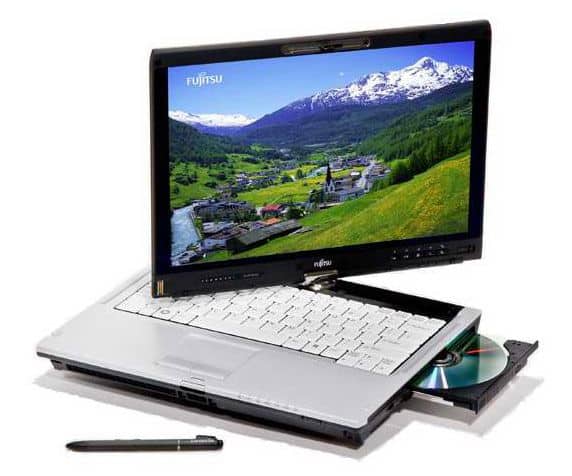
The T5010 is powered by a new 2.40 GHz Intel Core 2 Duo P8600 processor, 2 GB of DDR3 RAM, 160 GB of HDD, and a 13.3-inch LED backlit display.
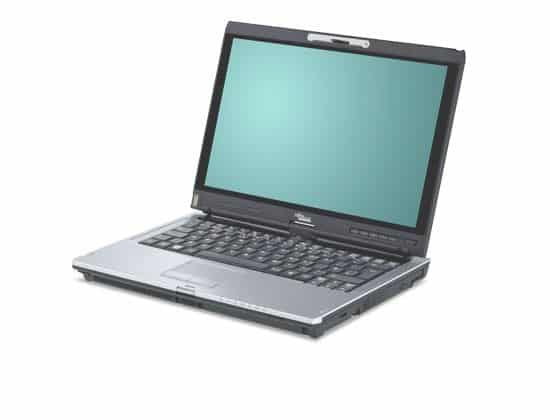
The Fujitsu T5010 is designed for business people so the design is simple but professional. The hinges have a square body that is sharp, with a crisp black “quiet” housing. The only highlight is the Fujitsu logo in the center of the lid. The top edge of the screen is the Webcam and traditional latch, the bottom edge is a row of physical keys and blue power on / off. The tablet ’s overall feature is the 2-way swivel hinge, you know, like a hinge joint. On the T5010 the swivel wheel itself is given a glossy metallic finish, and it also carries the Fujitsu logo, wich stands out against the case ’s black background. Meanwhile the keyboard and the cover both stay white.
The T5010’s touchpad is slightly to the left, with the right silver dots acting as a handy scroll bar when viewing the web or writing documents. Fujitsu’s T5010’s sturdiness is reinforced with its non-camouflaged rubber bands, which have a better grip on the lid. To reduce the monotonous, on the white background is highlighted the LED display is blue when running the machine and advertising stickers.
The LifeBook T5010 weighs in more in size and weight than other Tablet PC models. The corresponding size of the machine is 319 x 244 x 38.6 mm with the weight of 2.2 kg (2 kg without the optical drive). In general, with the weight and thickness mentioned above, it is not easy to lift the switch with one hand.
The T5010 is a 13.3-inch model, with a standard size keyboard, reasonable keypad spacing, and moderate bounce keys for a comfortable typing experience. One disadvantage of the T5010 keyboard is that it uses the “Fn” and “pg up” keys, “pg dn” to activate the “home”, “end” keys. Large touch pad with separate mouse buttons and convenient scroll bar is very responsive and easy to use.
The T5010 uses a 13.3-inch LED backlit display with a resolution of 1,280 x 800 pixels, and displays clear, sharp images and text. This is a bright mirror, true colors but easy to make the user glare when the room is too bright or used outdoors. For those who often use the external machine, Fujitsu has more options for specialized screening and upgrades cost about $ 50. Tablet features for tablet PCs must have good viewing angles that meet the T5010, with images only slightly blurry when viewed from the corners of the screen.
The T5010 is fully equipped with all the connectivity and connectivity needed for business professionals, with the exception of the HDMI port for entertainment, and has an optional WWAN connection. At the back of the machine there are two separate USB ports, LAN, VGA (with protective cover), modem and lock slot. The left side is the power outlet, the heat sink, the audio jack, a USB port, FireWire, a memory card slot, and an expansion card slot. The forehead is where the pen is attached. The right side is where you put the optical drive and another lock slot.
If you are not really happy with the built-in Fujistu configuration , you can sort of upgrade the T5010 with the stronger Intel Core 2 Duo T9600 processor, instead of using the P-series power saving chip. You can get up to 4 GB of DDR3 memory, plus a 250 GB HDD or , if you prefer fast responsiveness, a 64 GB solid state drive. T5010 is included with or without optical drive – DVD burner. In addition, Fujistu offers additional 3800 mAh 6-cell battery options and dedicated outdoor use.
The LifeBook T5010 is both a tablet PC, but also a traditional laptop with a two-way rotary screen. This touchscreen only imports data with the included Wacom stylus. The pen has a physical key for executing the action and a key for deleting the incorrectly entered character. Along with the Pen Flicks software, users can jump in eight directions to perform tasks such as shortcut, forward / back, or copy / paste. The character recognition capabilities of the machine are good and solid, users will love to use this pen to chat or write emails.
Fujitsu LifeBook T5010 Tablet PC Centrino 2 vPro – Intel Core 2 Duo P8600 2.40 GHz – 13.30: Buy it now
The swivel screen (hinges) are very solid and can be rotated in two dimensions with a rotation of 180 degrees each, while the curtain holder will also rotate to keep the curtain in the table state. On the screen frame is a key to switch the screen view from “portrait” to “landscape” and vice versa in just 2 seconds. Also on the screen is the scroll bar and fingerprint recognition security slot in the bottom left corner of the screen.
Like many new laptops, the LifeBook T5010 is equipped with two headphone jacks, built-in webcams, WiFi 802.11n connectivity, Bluetooth and DVD burner are rarely found on tablet models. The optical drive bay can also be plugged into a spare battery.
The LifeBook T5010 with the above configuration is powerful enough to carry out the basic work of a dynamic trader. But with the 2 GB of RAM and the Intel GMA 4500MHD integrated graphics, the machine is not as dominant as it could run.
Indicators assessing the performance of the system through tests with dedicated software suites results in average performance.
The graphics capabilities of the machine are really unbelievable with the Intel GMA 4500MH integrated graphics card. With 3DMark03, the test numbers come in at about 2,967, and then 1,002 shows up in 3DMark06. If you try to run F.E.A.R, the T5010 only manages around 9 frames each second at 1,024 x 768.
For World of Warcraft though, everything feels smoother, with roughly 45.9 frames per second, so it’s quite playable. On the whole, it’s super mobile, but the battery life on the LifeBook T5010 is not exactly great. It keeps going for 3 hours 3 minutes while doing basic tasks (the Toshiba Tecra R10 gets 3 hours 50 minutes). Still, when it comes to watching DVDs , the Fujitsu Lifebook T5010 lasts longer at 2 hours 32 minutes, compared with the Lenovo ThinkPad X301 (1 hour 57 minutes) and also the Toshiba Tecra R10 (1 hour 53 minutes).
Related Posts

Tech Reviewer & Product Analyst
Định Bia has spent over 10 years testing consumer electronics with a focus on smart technology. He work as a product advisor at Biareview where he helped customers find the right devices for their needs. He personally tests every product featured on this site using a consistent evaluation framework covering quality, durability, and value. All reviews are based on experience, not influenced by the manufacturer.