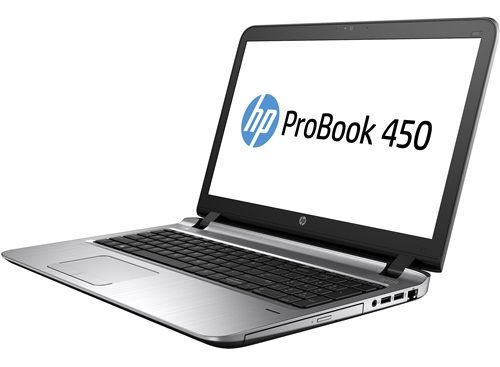
Advantage:
– Design solid aluminum alloy.
– Modern fingerprint security.
– Powerful performance.
– High battery life and good heat dissipation.
Disadvantages:
– Screen resolution is only at HD (1366 x 768 pixels).
– Not licensed Windows license.
General comment
With modern metal design, reliable security technology with strong performance. The HP ProBook 450 G3 will be a great choice for business people or office workers.
Design
Not as glamorous, splendid as other business laptops. The HP ProBook 450 G3 is enough to appeal to you with its powerful exterior.
Owing to the durable aluminum alloy frame with MIL-STD-810G military standard, it has good impact resistance and protects against unwanted effects.
The distinctive design language of the HP is still on the ProBook 450 with curved curved edges.
The double hinge is quite eye-catching but unstable, resulting in vibration
Possesses a relatively full range of connectivity ports. The HP ProBook 450 offers flexible interoperability with peripherals.
The left side features a Kensington lock, power port, heat sink, VGA port, HDMI and two USB 3.0 ports.
Right edge is the appearance of less with RJ-45 Ethernet port, 2xUSB 2.0, 3.5mm combo audio jack, and optical drive.
SD card slot is hidden on the front edge of the machine.
What is quite impressive on the HP ProBook is the machine still own fingerprint sensor, although the price is very affordable. This is a big plus to enhance the security of your device. Besides, with the good support from Windows 10 fingerprint sensor will also support you both in online tasks, safety and high security.
Monitor and sound
The third-generation HP ProBook 450 features the same 15.6-inch display, but the resolution is only HD (1366 x 768 pixels). Quite low compared to laptops in the same segment.
In addition, the machine is equipped with anti-Glare coating for good visibility outdoors or places with strong lighting environment. The 178-degree wide viewing angle will also be good for you when sharing information with friends.
With the speakers located above the keyboard, the sound emits towards the user. The sound of the machine is quite decent sound with high volume, can meet the needs of watching movies or entertainment in your 20 m2 room.
HP ProBook 450 G3 15.6″ FULL HD Business Ultrabook: Intel Core i5-6200U 500GB 7200rmp 4GB DDR4 Windows 7 Professional Upgradable to Win 10 Pro: Buy it now
HP ProBook 450 G3 15.6″ Business Ultrabook: Intel Core i5-6200U | 500GB HDD | 8GB DDR4 | (1366×768) | DVD-RW | Windows 7 Professional upgradeable to Windows 10 ProHP ProBook 450 G3 15.6″ Business Ultrabook: Intel Core i5-6200U | 500GB HDD | 8GB DDR4 | (1366×768) | DVD-RW | Windows 7 Professional upgradeable to Windows 10 Pro: Buy it now
HP ProBook 450 G3 15.6″ Business Ultrabook: Intel Core i5-6200U | 500GB HDD | 8GB DDR4 | (1366×768) | DVD-RW | Windows 10: Buy it now
HP ProBook 450 G3 15.6in Laptop: Core i7-6500U, 256GB SSD, 16GB RAM, Full HD Display, Radeon R7 Graphics: Buy it now
HP ProBook 450 G3 15.6″ Business Ultrabook: Intel Core i5-6200U | 500GB | 8GB DDR3 | (1920×1080) FHD | DVD – Windows 7 Pro / 10 Pro: Buy it now
Keyboard and TouchPad
The keyboard on the HP ProBook 450 G3 feels pretty good press, with the keys wide, the key deep enough to have good elasticity. Backlit backlight is also integrated HP to support users when working in low light environment.
The mousewheel is big in size, but the friction is so high that the operation with the mouse is not very comfortable.
Left and right mouse button are not sure. Feeling pretty creaky.
Performance
If not satisfied with the speed of the traditional 500GB hard drive built-in, users can completely add an SSD over an empty M2 SATA III interface; It delivers twice as high performance but storage capacity is still large. HP also has a user-friendly design with easy-to-remove flip-out design, so even a non-technical user can still upgrade easily.
Battery Duration and Temperature
With the 4-cell battery, the HP ProBook 450 G3 provides good uptime. The actual test of the machine runs a 1080p HD movie, 80% screen brightness and headphone plug instead of speakerphone use, continuous playback until 15% of battery life, the machine reach is 3 hour 49 minutes.
In addition, in the process of using relatively cool running machine, quiet heat dissipation fans do not make a lot of noise. The left side only warms up when running heavy tasks.
Connectivity Options
The HP ProBook 450 G3 offers a comprehensive selection of connectivity options, catering to the needs of business users. The laptop features:
- Two USB 3.0 ports
- Two USB 2.0 ports
- One USB Type-C port
- HDMI 1.4b port
- VGA port
- RJ-45 Ethernet port
- SD card reader
- Headphone/microphone combo jack
This batch of ports kind of makes it easier to plug in your peripherals and various accessories—things like external monitors , projectors , printers , and storage drives—so you dont really need extra adapters hanging around. Having both HDMI together with VGA gives you that flexible option when it comes to pairing up with different kinds of display hardware.
On the wireless side, the laptop also brings in Wi-Fi 802.11ac, plus Bluetooth 4.2, which helps with fast , dependable connectivity day to day. And then there is the Ethernet port too, that one is a solid bonus if you want a steadier and more secure wired network connection
Audio quality
The audio quality of the HP ProBook 450 G3 is pretty enough for office use and also casual stuff. It comes with stereo speakers that manage to deliver clear , fairly well balanced sound. For video calls, slide decks, and regular multimedia playback, the output works fine. Still, it might not have that deeper, richer character you’d expect from something truly immersive.
If you want a slightly nicer audio experience , then yeah using external speakers or maybe even headphones is really the way to go. The laptop also comes with a combo headphone and microphone jack, so you can plug in your preferred sound accessory without too much fuss or delay.
Security Features
Security is one of those critical things for business people , and the HP ProBook 450 G3 does offer a bunch of features that are meant to shield your info and your privacy (not only in a theoretical way). In general the notebook comes with :
– A fingerprint reader for quick and secure logins via Windows Hello
– A TPM (Trusted Platform Module) chip, which boosts protection since it supports hardware based encryption
– HP BIOSphere, designed to guard against BIOS level threats and to keep secure boot processes consistent
– HP Client Security Suite, with functions aimed at password management, encryption, and authentication
Altogether these security options make the ProBook 450 G3 a solid option for people who need to keep the confidentiality and integrity of sensitive data intact.
Software
On the software side, the HP ProBook 450 G3 ships with Windows 10 Pro already installed . This gives you a familiar environment and it’s built pretty much with business use in mind. Windows 10 Pro also includes tools like BitLocker, Remote Desktop, plus Group Policy management, and those are especially handy for enterprise setups .
Besides that , there are HP specific utilities included too, for example HP Support Assistant, HP Recovery Manager , and HP Client Security Suite. They can help with managing updates, handling troubleshooting tasks, and strengthening security day to day.
Now, while the pre loaded software is usually pretty helpful , some users might still want a more “clean” Windows setup, without extra extras that they never touch. The good news is that you can remove whatever you do not want, so you gain some system resources and also free up storage space.
Conclusion
In conclusion the HP ProBook 450 G3 feels like one of those, solid business laptops that kind of covers a lot of ground at once, and that makes it a pretty strong pick in the mid range segment. Between the practical layout, sturdy build feel, nice keyboard ,and dependable day to day performance, it really turns into a versatile machine you can use for routine work without too much fuss.
The security setup isn’t just marketing talk, the connectivity options are quite thorough ,and the battery life is decent enough for real mobility which helps a lot when you’re out in the field or just moving between meetings. Sure, the screen and audio quality are not the absolute top tier you might expect from every competitor in the same class ,but to be honest these points are more like small annoyances than deal breakers. They don’t really pull the value down that much.
All things considered, the HP ProBook 450 G3 comes across as a reliable ,cost-effective business laptop that gives good value for money. If you’re looking for a dependable computing solution for work or even personal use, it’s definitely worth putting on your short list.
Related Posts

Tech Reviewer & Product Analyst
Định Bia has spent over 10 years testing consumer electronics with a focus on smart technology. He work as a product advisor at Biareview where he helped customers find the right devices for their needs. He personally tests every product featured on this site using a consistent evaluation framework covering quality, durability, and value. All reviews are based on experience, not influenced by the manufacturer.