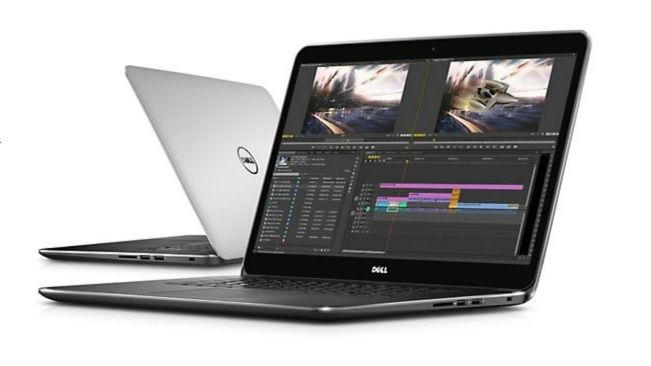
Looking at the specifications we see Dell Precision M3800 has all the qualities of a “dream laptop” for those who want a device that has powerful processing power. Inside it features a high-end Core i7 processor and discrete Nvidia Quadro graphics, which combine to deliver the ultra-high resolution 15.6-inch display, 3200 × 1880 pixels.
Advantages:
The screen quality and resolution are excellent
Slim and light design
High performance
GPUs get ISV certification
Defect:
The battery life is average
A bit slower than the MacBook
Noise and heat when handling heavy tasks
However, even with the impressive specifications, the Dell Precision M3800 stays one of those compact laptops. Thanks to its aluminum and carbon fiber frame, the M3800 comes in at only 1.8 kg, and you are looking at a thickness around 19 mm. So with those dimensions, and the whole size story, we can conclude pretty quickly that the main adversary for the Dell Precision M3800 is the 15-inch Retina MacBook Pro.
Design and quality
The design of the Precision M3800 has much in common with Dell’s high-end consumer XPS series, rather than the larger workstation series. Lids and edges are covered in brushed aluminum and the interior, body and frame are made of soft carbon fiber on a sturdy aluminum frame.
High quality materials combined with straight lines and simple curves make for a great, ultra-fine laptop. The palm rest had a negligible amount of settling, and the body had similar rigidity. Only the screen is a bit weak, with a slight deformation when it hits the back of it, but that’s the only problem with this 4mm thick panel. It is very sturdy, and only the MacBook Pro screen panel is stronger.
You will be particularly impressed with the size of the M3800. Its casing is only 17 mm thick, with a few millimeters added by the base at the back so it is about the same thickness as the MacBook Pro (18 mm), and weighs in at 1.88 kg M3800 lighter than the 200 g compared to the MacBook Pro.
The small details and overall machine are very good looking. The five-level white battery light is located on the left side, the carbon fiber cover on the body and ribs, and the metal logo on the bottom engraved with the serial number and model name and service number.
The front must have a USB 3.0 port and a USB 2.0 port with a card reader, the left side has two USB 3.0 ports, an HDMI port, a headphone jack and a mini-DisplayPort connector.
The only thing missing is the Gigabit Ethernet port, although the USB port is included. The connectivity is good with 802.11ac WiFi support, Bluetooth 4.0 connectivity. There is no mobile broadband connection, and the battery of the M3800 is an instant non-removable battery.
Screen quality, sound
In addition to its high-end specifications and sleek design, the M3800 also features an excellent touch screen. It comes with a 15.6-inch IPS panel, resolution 3200 × 1880 pixels, and yeah the pixel density is 237.9 ppi, which is higher than that 15.4-inch MacBook Pro Retina, resolution 2880 × 1800 pixels, and the pixel density there is 220.5 ppi. Kind of like the MacBook Pro, the M3800 screen is a mirror, but there’s very little room between the glass and the display panel so the reflection is fairly minimal.
Sharp-edged razors: The Live Tiles and Windows 8.1 desktops display extremely detail and text looks as beautiful as what the MacBook Pro screen can provide. Dell uses a similar Apple system to make high-resolution displays useful, with the taskbar, desktop icons, and other components of the operating system launched to take advantage of the 1080p panel.
Pixels on the screen are not the only impressive feature of Precision. After testing it with the XRite i1 Display Color display software and running measurements at 436 nit brightness and also at 0.39 nit brightness, these are honestly the best numbers ever seen on a laptop. The darkness feels a bit deep, but the contrast ratio of 1:131:1 is still excellent, like really very solid.
The color temperature came in at 6,632K, which is extremely good and quite close to the ideal of 6,500K. The 4.9 DeltaE is reasonable enough , and the M3800’s panel can push up to 92.5% of the sRGB color gamut, which is pretty excellent for a laptop. So, it means the screen can manage almost all hues with precision and also good brightness. The M3800 only handles no good red bold.
The backlight seems not really leaking, and the viewing angles are pretty good too. Also the panel is made from tough Corning Gorilla Glass , so it feels sturdy. It can be said that the Precision M3800 screen brings brightness plus a rich contrast, delivers accurate color rendering, and it has an ultra high resolution where text and pictures look really crisp. So, if your job basically requires a laptop with a solid display, then the Precision M3800 is a good fit for you.
The excellent display of the Precision M3800 comes with quite good quality speakers. They are capable of making the sound that fills a small room, good balance, loud volume, quite powerful and lively without being too noisy, midrange volume quite fit. Bass is acceptable, better than most current laptops, but should be stronger.
Efficiency
The M3800 comes with an Intel Core i7-4702HQ processor. This one is basically among Intel’s most hefty Haswell options right now. The chip’s starting 2.2GHz clock can be pushed up to 3.2GHz using Turbo Boost software, and it includes 6MB of L3 cache through four Hyper-Threaded cores. In the same time it ships with 16GB of DDR3 RAM, plus a 256GB LiteOn SSD.
For the Geekbench score, the M3800 lands at 11,477 , which is actually one of the stronger laptop results, though it still sits under the MacBook Pro by around 2,000 points. In PCMark 7 it reached 5,831 points, which feels like a solid outcome. For daily routines, honestly you will rarely have to wait, or at least not because of the system.
Dell equips the M3800 with a discrete Nvidia graphics card, but the Quadro K110M is a mid-range device based on the GK107 core, a technology that has appeared on the GTX 650 desktop graphics card and GTX 750M for mobile devices. motion.
It faces fierce competition , from Intel’s latest integrated graphics . Quadro’s average score in the Unigine Heaven graphics test was 24.9 fps. Meanwhile , the Apple MacBook and Intel’s Iris Pro 5200 come together at 30.3 ps , which is kind of surprising.
The result that the M3800 got when tested with 3DMark software trilogy was good, but it still loses to a few lower priced laptops . The Asus N550JV uses the GTX 750M, with the same graphics core, but the clock speed sits at 967 MHz, slightly above the 716 MHz of the Precision M3800. Asus laptops provide better graphics performance than Dell’s laptops, but it’s also roughly at about half the price.
The Quadro graphics core can achieve average scores in graphics tests, but it’s fast enough to overcome all of the older generation of integrated graphics and discrete graphics cards for consumer laptops. cheap workstation. Quadro chips have an advantage over most competitors that are ISV certified, meaning it can be compatible with a variety of professional applications.
When it comes to graphics, the Dell Precision M3800 is not a bargain, it has cheaper laptops with lower screen but offers higher graphics power. But Dell’s laptops are better than many laptops, and experts will appreciate the quadro core graphics and ISV certification.
The SSD LiteOne is quite powerful, sequential read and write speeds are 490MB / s and 401MB / s, and the M3800 boots up in about 11 seconds. It has been backed up with a 500GB HDD, one of the features that consumers often work with large video files, photos will enjoy.
Dell Precision M3800 15.6″ Touchscreen LED Mobile Workstation – Intel Core i7 i7-4712HQ 2.30 GHz – Silver PM3800-17944SLV: Buy it now
Dell Precision M3800 – Intel Quad-Core i7-4702HQ 2.20GHz – 16GB RAM – 512GB SSD – NVIDIA Quadro K1100M with 2GB – Windows 8.1 Pro – 15.6-inch (1920×1080) Touchscreen: Buy it now
DELL PRECISION M3800 – i7-4712HQ 2.3GHz – 16GB – 512GB SSD – Win 8.1 Pro – 15.6″ 3200×1800 TOUCHSCREEN: Buy it now
Temperature and noise
Dell is quite skillful when cramming a lot of powerful components into a small frame, but the frame is only 19mm thick is the weakness of Precision. In a few minutes, the processor temperature jumped to 96 degrees Celsius, four degrees below the CPU overload.
Too high a CPU temperature is not a big deal, unless you regularly catch a CPU running at full power for a long time, but another problem is noise. When the CPU is running hard, the laptop’s heatsink will rotate very quickly and generate noise, the laptop’s heat sink is at the bottom of the machine, so it will be inconvenient to use the Precision M3800 for a long time.
This is probably the part where the M3800 is worse than the MacBook, perhaps we have to accept these downsides to get a slim, lightweight laptop.
Battery life
Precision M3800 has limited battery life. The laptop’s 6-cell battery can provide power for laptops that survived for 4 hours and 8 minutes, for video, web browsing, and word processing with a screen brightness of 40%. This number increased to 5 hours 12 minutes by reducing the screen brightness to a lower level and disabling the WiFi connection.
That’s a poor result, but what we expect on a workstation is power, not battery life. The MacBook Pro performs better, with a screen brightness of 50%, allowing for up to 10 hours of continuous web browsing.
Keyboard and Trackpad
Like the MacBook, the Dell Precision M3800 keyboard instantly appeals to users. The character keys sit side-by-side in a recess above the rest, and there’s plenty of unused space on either side.
Texting on the M3800 is quite comfortable, the rigid body combines well with good responsiveness, consistent operation of each key. The M3800’s soft keyboard is similar to the MacBook, easy to use and can type very quickly. The trackpad is also very good quality, gesture support on smooth surface, wide and two flexible buttons. The keyboard is also backlit.
However, there are some issues, you have to sacrifice the usability of the numeric keypad for form factor, and there is no need to minimize the Enter key and navigational keys on a 15.6-inch laptop.
Conclude
The stunning display and first-class physical design of Dell Precision make it a great candidate for you if you need a laptop with the best screen. But the Apple MacBook Pro is a bit faster, with longer battery life and a slightly cheaper price. The Precision M3800 is a great laptop, but it’s a high-end option.
Related Posts

Tech Reviewer & Product Analyst
Định Bia has spent over 10 years testing consumer electronics with a focus on smart technology. He work as a product advisor at Biareview where he helped customers find the right devices for their needs. He personally tests every product featured on this site using a consistent evaluation framework covering quality, durability, and value. All reviews are based on experience, not influenced by the manufacturer.