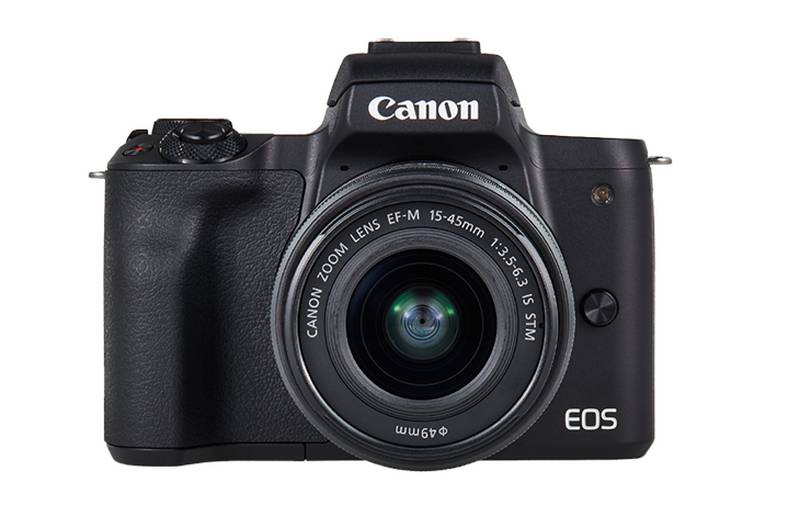
Canon’s first foray into mirrorless cameras with the M50 4K video recording is basically like a compact version of the Canon M5 of 2016, with fewer dials and buttons and a smaller body. However, it has updated interior equipment and a rotating screen.
It uses a 24.1-megapixel APS-C sensor, which is slightly smaller than the 24.2-megapixel sensor of the M5. However, the M50 can do more work and take better pictures in low light, meeting Canon requirements. This is due to the new image processor of Canon, DIGIC 8, being used in the M50.
The M50 is the first Canon body to run the DIGIC 8 chip, and it’s a solid step up: 4K at 24fps, 1080p at 60fps, 720p at 120fps for slow-mo. Burst shooting hits about 10fps in RAW or JPEG — turn on continuous autofocus and that drops to 7.4fps, which matters if you’re trying to track something moving.
In addition to increasing the shooting capacity, the 4K swivel is one thing that was not so good in the older M5 version because the screen would only flip up and down. Canon has changed the design on the M50. The screen now works by rotating out of the side, allowing for a further 180 degrees of flip, which is highly useful for shooting in all directions.
The other major complaint about the M5 was some of the quality issues, which gave a rather universal feel. It was a plastic-feel camera. The M50 seems to somewhat solve this, with a new body that feels more coherent and has a different material to the touch that does not feel like plastic. It’s more akin to the material of some of Canon’s other mirrorless series, like the M6.
The M50 is equipped with a viewfinder quite similar in design to the M5. It is very sharp and compact. It has also retained the M5’s touch-and-drag features for moving AF points around while looking through that viewfinder. The M50 houses many different types of AF points (143) compared to the M5’s 49. Canon’s Dual Pixel CMOS AF technology powers the AF system. A new “eye detection AF” mode lets the camera automatically assign focus to the subject’s eye.
The DIGIC 8 processor thus allows the usage of a complete raw file format from Canon. Images made with the M50, therefore, will be saved under the .CR3 extension, and the most important change is disappearance of M-RAW and S-RAW- which were basically “small and medium” RAW file formats consuming lesser space than a full one.
These options have always given flexibility for a raw file. Canon has replaced them with a name by the name of “C-RAW,” which refers to a RAW file of resolution M-RAW but about 40 percent in size. Canon purports this as being like having M-RAW resolution in S-RAW size. Either way, both the DIGIC 8 and the audio are the same improvements in evaluation.
Canon EOS M50 Mirrorless Camera Kit w/ EF-M15-45mm Lens and 4K Video (Black): Buy it now
Canon EOS M50 Mirrorless Camera Body with 4K Video (Black) and Pro Photography Bundle Backpack, Monopod, SanDisk 64GB SDXC Memory Card, Extra Battery Kit (EOS M50 15-45mm Video Creator Kit): Buy it now
Canon EOS M50 Mirrorless Camera w/15-45mm (Black) + 2 x 32GB + K&M Essential Photo Bundle: Buy it now
Canon EOS M50 Wi-Fi Digital ILC Camera & EF-M 15-45mm & 55-200mm IS STM Lens (Black) with 64GB Card + Battery + Charger + Flash + Tripod + Cases + Cleaning Kit: Buy it now
One of the new features of the M50 is that it can instantly upload any photos you bring to your phone. For quite some time, Canon has had a mobile application, which facilitates getting your image out of the company camera without dealing with cables or feeling awkward when moving SD cards. The new feature is similar to one offered in the transfer mode always pioneered by Nikon in its Snapbridge feature connecting the camera to Canon’s mobile application for sending compressed or full-resolution JPEGs of every photo you capture right to your smartphone. Not every kind of feature is good at all times, but I find this particularly useful on Nikon cameras in certain situations, so I certainly welcome it in Canon’s application.
With the M50, Canon is also updating desktop-based backup software; the new one, simply called Image Transfer Utility 2, aims to allow the camera to send photos to the computer as soon as it is plugged into the home Wi-Fi network.
Canon had gone on for several years into the mirrorless camera by the time the M5 came into being and was at least reasonably considered the company’s first foray into the mirrorless camera market. But it did have very serious drawbacks still, like 4K video recording and touch-screen freedom. Even with the M50, this remains a bit of a sore point for some users in that 4K is locked to 24 frames per second with no 120 frames per second option in full HD shooting. There’s also a note worth making that in 4K shooting situations, the camera effectively defaults to contrast AF rather than Dual Pixel.
Sensor Specs and Image Quality
Sensor Specifications
The Canon EOS M50 is equipped with a 24.1-megapixel APS-C CMOS sensor. This sensor size is larger than what is found in many other mirrorless cameras, especially the micro four-thirds type. It provides enhanced features in depth of field control and low-light performance. Together with the sensor is the Canon’s DIGIC 8 image processor, which effectively increases the quality of the image and processing speed.
Image Quality and Performance
Excellent image quality is rendered by the M50, with brilliantly sharp details, vibrant colors, and good dynamic range. The 24.1-megapixel resolution provides for quite large details needed for printing and heavy cropping. Canon colors have been raved about for centuries, and the M50 does not disappoint as expected in pleasing and accurate color reproduction.
Dynamic range-wise, the M50 should be commendable in capturing fairly extended tones in shadow or highlight areas. It may just however not equate to some of the dynamic ranges the higher-end APS-C or full-frame cameras would afford. Low-light performance is good, with good quality images at higher ISO settings. Noise is kept in check up to ISO 3200, and ISO 6400 will give reasonable results, albeit with some noticeable grain and loss of detail.
Autofocus System
Autofocus Technology
The M50 runs Canon’s Dual Pixel CMOS AF, and it’s fast genuinely fast, not just “fast for the price” fast. The phase-detection system covers most of the frame, with 99 selectable AF points that jump to 143 if you’re using the right lenses. Face and eye detection are in there too, and they actually work: point it at someone’s face and the focus locks onto the eyes without you hunting for it manually.
Performance
In practice, the Dual Pixel AF system of the M50 gets you a fast and reliable performance by locking focus promptly on the subject and maintaining it during continuous shooting. Face and eye detection makes it easier to get that sharp portrait. When shooting video, the autofocus operates smoothly and accurately, dodging on the hunting behavior often seen from contrast-detection astigmatic systems.
In-Body Image Stabilization
Notably, the Canon EOS M50 lacks in-built IBIS stabilization. Instead, the camera relies on IS lenses to dampen camera shake effectively. Canon offers a variety of stabilized lenses well-suited to the M50, producing decent stabilization for both stills and video applications. Although some users may consider IBIS to be a shortcoming, its absence is compensated by the presence of stabilized lenses.
Viewfinder and LCD Screen
Electronic Viewfinder
The M50 has an electronic viewfinder (EVF) of 2.36 million dots. The viewfinder provided a clear and detailed view of the scene with accurate color rendition and almost no lag. Its electronic nature allowed for the preview of exposure in real time, thus helping in the adjustment of settings and seeing the effect before taking the shot.
LCD Screen
The back screen is a 3.0-inch vari-angle touchscreen, 1.04 million dots, and it swings all the way around great for shooting from awkward high or low angles, or spinning it toward yourself for a selfie. The touchscreen works well: tap to focus, tap to shoot, and the menus don’t feel like a fight.
Performance and Speed
Continuous Shooting
The Canon EOS M50 can achieve a continuous shooting speed of up to 10 frames per second (fps) using One Shot AF and 7.4 fps using continuous AF. This burst speed is more than enough for fast-paced subjects and action shots. In terms of continuous shooting, the camera is quite efficient-the amount of time spent on lag and clearing the buffer is minimal.
Startup Time and Shutter Lag
The M50 is really quick to start and can absorb special moments without the hassle of having to wait for the camera to turn on. Lag from the shutter is virtually non-existent, as the camera responds as quickly as the photographer can bring the camera to position: all this adds up to a very sniper-style shooting experience. This is really important in capturing “passing moments” so that very important shots do not get missed.
Video Features
Resolution for Video
The Canon EOS M50 can even shoot video in 4K UHD at a rate of 24 fps. But there is a downside: the video crop factor is 1.6x when shooting in 4K mode. In addition, Dual Pixel AF is not at all accessible in 4K mode; contrast-detection AF, which is slower and less accurate, is used instead. The camera supports 60 fps for recording Full HD videos, while 720p records slow-motion videos at 120 fps.
Video Quality
The Full HD video is very high quality, detailed and sharp picture with bright colors and smooth motion. Good as it excels, the 4K video is somewhat hampered by crop factors and slow autofocus performance. However, this makes the M50 great for a casual video or a vlogging project.
Connectivity and Usability
Wi-Fi Connectivity
It’s got Wi-Fi, Bluetooth, and NFC built in, so getting photos onto your phone or laptop is easy enough. What actually matters is the Canon Camera Connect app — live view, pulling photos off the card, tweaking settings, all from your phone instead of fumbling with buttons on the body.
Menu System and Controls
Canon’s menu system is actually user-friendly and easy enough to navigate once the user learns the rest of the system. The touchscreen interface makes it even better because one can just easily modify and control things. Physical controls, including dials and buttons, are strategically located for better accessibility and personalization to facilitate efficiency and overall usability.
Battery Life
Battery life is based on CIPA standards: Canon states that the LP-E12 battery used in the EOS M50 should last for around 235 clicks per charge. This is relatively meager when compared to some DSLR and upper-mirrorless cameras. The life can be increased by using the ECO mode, giving about 370 shots per charge. Those who will be mostly shooting should get extra battery.
User Experience and Practical Applications
Everyday Photography
The Canon EOS M50 serves very well as an everyday camera, with a good compromise of compact size, an easy learning curve, and good image quality. It is suitable for any kind of casual moment-with friends, family gatherings, or weekend outings. In situations ranging from selfie-taking to group portraiture, the user-friendliness of the vari-angle touchscreen and dependable autofocus forms the M50’s clear advantage.
Travel Photography
The M50’s lightweight portability and versatility are prized among travelling photographers. Whether on city streets, nature hikes, or cultural landmarks, this camera would be right by photographers’ sides, hanging freely from their necks. A 24.1-megapixel sensor ensures that every image taken is sharply detailed and rich in color with consideration of using myriad lenses for various types of shots.
Vlogging and Content Creation
Yet another reason favoring vloggers and content creators is the M50-with a vari-angle touchscreen, Dual Pixel AF, and 4K video. The vari-angle touchscreen allows for easy framing and focus adjustment while keeping subjects sharp with reliable autofocus. However, while there may be some limitations with the 4K video, the Full HD capabilities provided by the camera are more than enough for most of the content destined for online platforms. The 3.5mm microphone jack gives provision for a great audio recording, thus enhancing the overall video production value.
Portrait Photography
Dual Pixel AF face and eye detection serve everything portrait photographers are looking for-sharp and well-focused. The camera excels at color fidelity and dynamic range, rendering skin tones beautifully in all the portraits. Carrying an EF-EOS M adapter would open up endless opportunities for portrait photographers to take advantage of Canon’s high-quality selection of prime lenses, which in turn provides more control for depth of field and amazingly rendered bokeh effects.
Sports and Action Photography
While the M50 may not boast the attributes necessary to prepare it for sports photography, it doesn’t mean that it is incapable of shooting good action shots with a good burst rate of 10 fps (with One-Shot AF) and a decent autofocus system. Compact and fast, this camera is a great travel companion to catch those split-second moments, which would otherwise be difficult for an even better sports camera with a more advanced autofocus system.
Landscape Photography
Landscape shooters will like this one: the APS-C sensor pulls solid detail and color out of a scene, and the body’s small enough to actually bring along on a long hike instead of getting left in the car. The vari-angle display will help find composing shots from low and high perspectives, while using a variety of lenses will offer creative freedom in terms of framing and perspective.
Last Thoughts
The Canon EOS M50 offers an extensive feature set in a small package as an ideal mirrorless camera. It is one of the best cameras around for consumers willing to step above the realm of cameras into the world of higher-quality images. The M50 is great for anyone seeking a top-notch secondary camera that could be carried along everywhere: students, amateurs, and pro photographers. It works in an almost no-brainer way for the ease of its intuitive design, reliable autofocus, and superior image quality across such a wide variety of photography needs.
Yes, there has been something about it: no in-body stabilization, crop factor for 4K, yet nothing so terrible about it overall to drive off anyone looking to purchase in the mirrorless market. Its versatility is complete with the addition of the EF-EOS M adapter because now both owners of the camera can enjoy an extensive range of available Canon lenses.
Bottom line: the M50 is small, easy to use, and takes genuinely good photos — which covers most of what people actually want from a camera. Travel, everyday shots, casual video, it handles all of it without making you think too hard.
Related Posts



Tech Reviewer & Product Analyst
Định Bia has spent over 10 years testing consumer electronics with a focus on smart technology. He work as a product advisor at Biareview where he helped customers find the right devices for their needs. He personally tests every product featured on this site using a consistent evaluation framework covering quality, durability, and value. All reviews are based on experience, not influenced by the manufacturer.