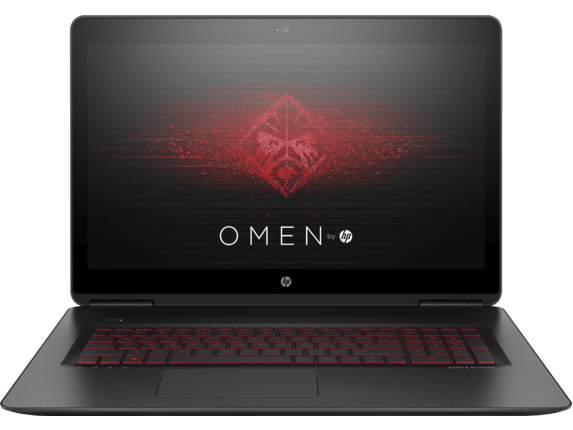
Design and Build Quality
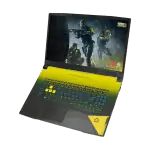
The HP Omen 15 sort of has a sleek , modern vibe that catches the attention of both gamers and working people alike, it’s not just for one crowd. It shows a minimalist aesthetic with a matte black finish and understated Omen branding. The sharper edges , plus those angular accents, make the whole thing look more distinctive, while the solid build quality keeps it feeling like it can take day to day use with no big drama.
About the body, the chassis is mainly plastic, yet it still feels sturdy and actually well put together. The hinge action stays smooth and it locks the display in place pretty confidently, so adjusting the screen is easy without any noticeable wobble. Size wise, it’s relatively compact for a gaming laptop , which helps it stay portable enough to move around, even if you still want strong performance.
Now one of the more noticeable visual touches is the RGB backlit keyboard. The keys support customizable lighting areas, so you can tune the look to your mood, or line it up with your gaming setup. The spacing feels right, typing is comfortable , and you get a decent amount of key travel along with tactile feedback that doesn’t feel mushy.
Display
The HP Omen 15 comes with a range of display options , depending on what you care about most. One setup you ll often see is the 15.6 inch Full HD panel (1920 x 1080) , using an IPS screen, usually matched with a 144Hz refresh rate. That quicker refresh makes things feel more streamlined , and you get smoother motion which is ideal for action heavy games, plus it can help cut down motion blur in rapid scenes.
The IPS tech gives those wide viewing angles and pretty faithful color, which is kinda important for gaming and content creation, like you really need it. The screen brightness is enough for indoor use, but in direct sunlight it may feel a little strained . Still, the anti glare coating does its job, it cuts down the annoying reflections, so you end up seeing the display better across different lighting situations.
If you want something even more detailed—more visual punch, honestly—there are versions with a 4K (3840 x 2160) panel. That 4K setup brings impressive sharpness and lots of tiny detail , which is great for people who care about precise color accuracy and crisp clarity while editing or designing. On the flip side, the extra resolution can put a strain on battery life and system performance, so you should think about what you actually do day to day before going with the 4K option.
Performance
Inside the HP Omen 15, you get some of the newer and stronger hardware choices that are currently on offer. There are multiple configurations, using Intel or AMD processors, so it can fit different needs and budgets. The more common picks usually land on Intel Core i7 or AMD Ryzen 7 chips, and they’re teamed up with NVIDIA GeForce RTX graphics.
With a high performance CPU alongside a capable GPU, the HP Omen 15 can manage demanding tasks without much fuss. Whether you’re jumping into the newest AAA games , streaming content, or running heavy applications, it tends to keep up well. The RTX graphics support real-time ray tracing and DLSS (Deep Learning Super Sampling), which helps deliver better looking visuals and steadier frame rates in games that support those features.
In addition to gaming, the HP Omen 15 can also act as a decent machine for productivity, sorta. With powerful processors and a healthy amount of RAM (up to 32GB) it keeps multitasking pretty smooth, and applications run with more efficiency , like video editing, 3D rendering, and even software development. It also includes fast storage options, such as NVMe SSDs, and this makes load times less of a thing, while the whole system feels more responsive.
Cooling System
For any gaming laptop, the cooling part is really one of those critical topics, and the HP Omen 15 doesn’t exactly fall short. It has an advanced cooling solution, with several heat pipes, big vents, and high-performance fans. All together it disperses heat well, so the internal parts stay in safe temperature areas even when you’re playing for longer sessions.
HP calls it the Omen Tempest Cooling Technology, and it uses a three sided venting system plus five way airflow to push thermal efficiency higher. Under normal use the fans stay kind a fairly quiet, but they can become a bit more audible when the system is under heavy load.
The sound is still pretty manageable , not overly distracting, especially if you’re wearing headphones or using a headset. This better cooling setup not only keeps the laptop temperatures more or less under control, but also helps in keeping a steadier performance overall. Throttling gets reduced, so the CPU and GPU can run nearer their peak potential for longer stretches. It really counts for players who need consistent output so they dont notice those frame rate drops or the weird lag, while they’re gaming around.
Keyboard and backlight technology
The HP Omen 15 supports the backlight keyboard in multiple lighting areas (right, left, center and WASD), and you can change the color of your choice. Not only that, the backlight is also applied to the speakers on the machine and you can set the speaker vibration to the rhythm of music or the intensity of the sound during the game. The keyboard that it uses is the chiclet keyboard that is commonly found on HP laptops, but adds a row of six programmable macro buttons along the left side of the keyboard. The touchpad of the machine is quite wide and good support in click or zoom. However, for the convenience of playing games, you will still have to use the mouse.
Connect
Nearly the HP Omen 15 ports are located at the back of the machine, in the middle of the ventilation openings. This does not help you get distracted by the wires, but it does sound a bit awkward when you plug in the mouse wire. It supports 4 USB 3.0 ports, 1 HDMI port, 1 mini Display port for connecting to a large screen, a headphone jack. The right side of the computer is the microSD slot.
The Omen 15 offers 802.11ac Wi Fi connectivity and Bluetooth 4.0, although the laptop really doesn’t come with Ethernet ports. Still, the setup has a USB / Ethernet switch so you can work around that a bit. Above the screen there’s a webcam that can record 1080p video at 30 frames per second, and it stays quite handy for calls and casual capture. On the storage side the total capacity is 512 GB. Also, when you use a PCI-to-SATA drive rather than a more conventional SATA drive, the data transfer speed comes out faster and more responsive.
HP OMEN 15 15.6″ FHD IPS Display Gaming Laptop, Intel Core i7-6700HQ Quad-Core Up to 3.5GHz, NVIDIA GeForce GTX 960M, 128GB SSD + 1TB HDD, 8GB DDR4, 802.11ac, Bluetooth, Win 10(Certified Refurbished): Buy it now
HP Omen 15-AX243DX Gaming Notepad, INTEL:I7-7700HQ/CI7, 2.8 GHz, 1TB, NVIDIA-GEFORCEGTX1050/4GB, Windows 10 Home 64 Bit, Black, 15″ FHD (Certified Refurbished)HP Omen 15-AX243DX Gaming Notepad, INTEL:I7-7700HQ/CI7, 2.8 GHz, 1TB, NVIDIA-GEFORCEGTX1050/4GB, Windows 10 Home 64 Bit, Black, 15″ FHD (Certified Refurbished): Buy it now
HP OMEN 15 UHD 4K Gaming Laptop PC (Intel i7 Processor, 2TB HDD +128GB SSD, 15.6 inch UHD 3840 x 2160 Display, 16GB RAM, GeForce GTX 1050 , Win 10 Home): Buy it now
HP OMEN 15 UHD 4K Gaming Laptop (Intel i7 Quad Core, 2TB HDD + 512GB SSD, 15.6 inch UHD 3840 x 2160, 32GB RAM, GeForce GTX 1050 Ti, Win 10): Buy it now
Configuration and Application
Configuration is the biggest highlight of this product line. The Omen 15 is powered by an Intel Core i7-4710HQ processor, clocked at 2.5GHz to 3.5GHz in Turbo mode. There is also a quad core chip that you see in Acer Aspire V 15 Nitro and Pulse Maingear. Powerful configuration will give you the best experience with any type of games. With the 16GB of RAM and the PCI Express SSD hard drive mentioned above, the machine is capable of performance management very well. In addition, the HP Omen 15 also owns quality sound with two speakers in front of the machine with Beats Audio technology. HP Omen 15 does not have many software and applications installed.
Battery Life
Battery life is sort of always a worry with gaming laptops, since the high performance bits tend to chew through power pretty fast. The HP Omen 15 actually gives you decent battery runtime for its category, though you should keep expectations a bit grounded. In the usual kind of scenarios like web browsing, video streaming , and work style productivity things, it can run about 5 to 6 hours per charge, give or take a little.
But once you start gaming , everything changes. For most gaming laptops including this one, the whole idea is to push maximum performance while it’s plugged in. If you try playing on battery only then frame rates drop and you’ll see the battery drain much quicker, generally around 1 to 2 hours depending on the title, and the settings you choose.
There’s also the matter of the 70.9Wh battery, which is fairly sizable for a laptop in this size class. On top of that, the HP Omen 15 includes fast charging , so you can replenish the charge quicker than you might expect. That matters a lot when you’re traveling , and you need a quick top up in a short window of time , not a full recharge waiting game.
Audio quality
The audio quality of the HP Omen 15 is a different thing that is worth saying. This laptop comes with dual speakers, they are tuned by Bang & Olufsen, and they push out sound that feels clear and kind of immersive. The speakers sit on the bottom, front edges of the device which helps push the audio straight toward you, rather than bouncing it around.
In general the output is pretty loud and crisp, and the clarity stays solid across multiple frequencies. The bass is alright, though it may not have that deep punch some people expect if they like a heavier, more rumble forward sound profile. If you want a richer listening session, it’s a good idea to pair it with high quality headphones or external speakers, in particular for gaming sessions or while watching movies.
It also has DTS Ultra technology, which brings virtual 3D spatial sound. Basically, it makes games and movies feel more wrapped around you, with a more lifelike soundstage. For calls, the built in microphone also does well, it captures voice chat and video meetings with clear audio and only limited background noise, so it stays easy to understand even in noisier rooms.
Software , and Features
The HP Omen 15 is basically preloaded with the Omen Command Center, kind of a software collection that gives you lots of tools and features to make your gaming feel smoother. With the Omen Command Center you can keep an eye on system performance, tweak RGB glow, mess with the fan speeds, even set up performance profiles for specific games or apps.
What really stands out , is the Game Stream capability. It lets you beam, or stream, your games from the HP Omen 15 onto other devices like a smartphone, a tablet or even another PC, using your local network. This can be handy if you prefer a bigger display , or if you want to show off your gameplay to friends, without doing too much extra work.
Along with that , the suite includes a performance mode selector. You can switch between different power setups, so you can lean toward max performance or stretch battery life. There’s also Network Booster , which nudges gaming data to the front compared to other background network activity. So in practice you get steadier online sessions , with less delay and fewer annoying spikes in lag.
Upgradeability & Maintenance
The HP Omen 15 feels built with upgradeability in mind, so you can reach some parts without too much drama. Basically the bottom panel can be pulled off after you unscrew a couple screws, and then you get to the RAM area, the storage space, and even the cooling bits.
Memory wise it supports dual-channel setups, and you can typically move the RAM up to 32GB depending on what you’re aiming for. For storage, there are M.2 NVMe SSD options plus a 2.5-inch drive bay if you want more space later. This kind of flexibility helps you stretch capacity and also nudge overall performance, especially when you drop in quicker SSDs.
Maintenance is also pretty manageable, mostly because the inside is pretty easy to reach. When needed, clearing the cooling fans and heat sink surfaces now and then can keep temperatures more steady, and it may extend the usable life of the laptop for a longer while.
Related Posts



Tech Reviewer & Product Analyst
Định Bia has spent over 10 years testing consumer electronics with a focus on smart technology. He work as a product advisor at Biareview where he helped customers find the right devices for their needs. He personally tests every product featured on this site using a consistent evaluation framework covering quality, durability, and value. All reviews are based on experience, not influenced by the manufacturer.