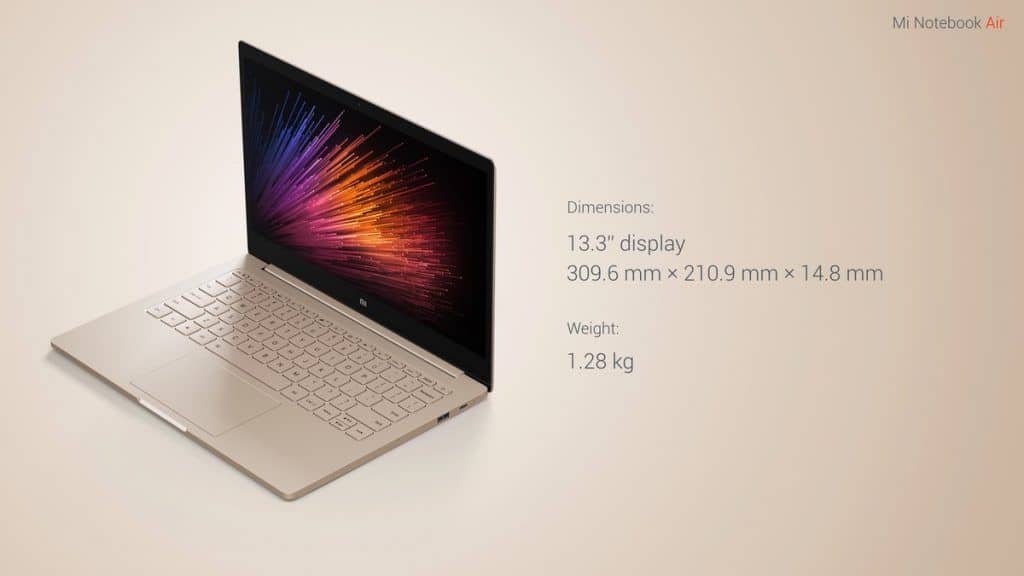
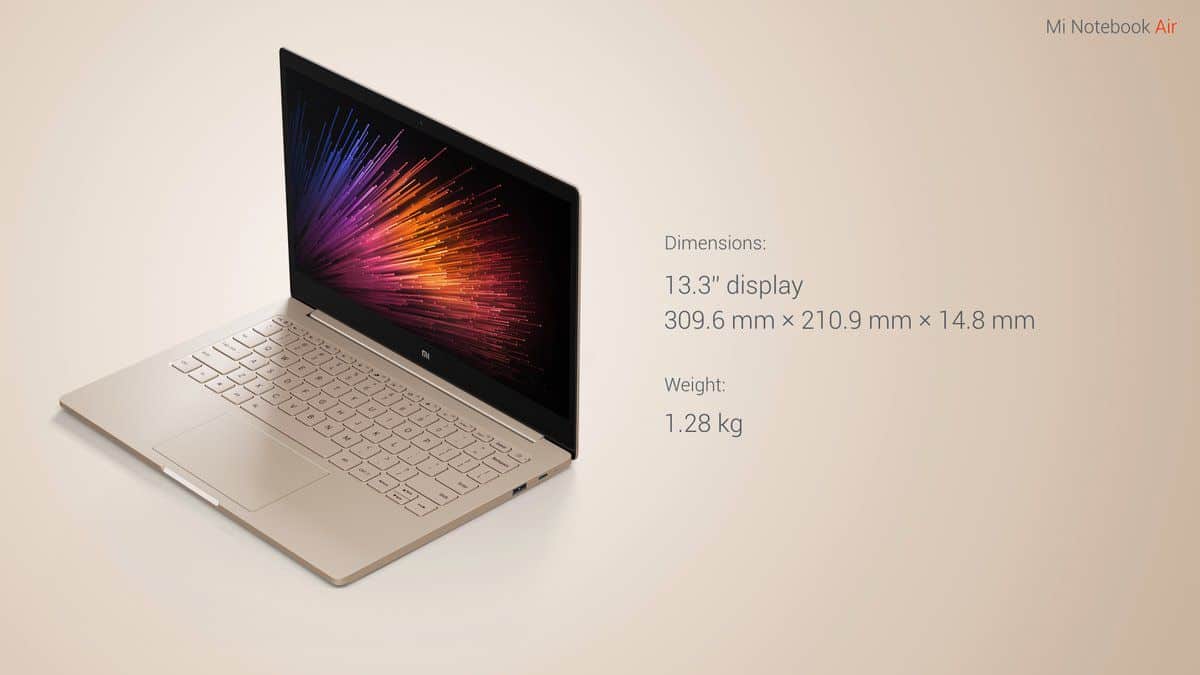
The first worth mentioning is that Xiaomi is almost “pure white” design from Apple’s Macbook Air to Mi Notebook Air. The whole body is covered with a layer of aluminum alloy that looks strong, masculine but owns a thin 12.9 mm, lightweight 1.07 kg with 12.2 inch screen version. The 13.3-inch version is parameter slightly larger, weighing 1, 28 kg and 14.8 inches thick.
Xiaomi also did not forget to “learn” the chicklet keyboard that is often used on the Macbook product. The keyboard of the Mi Notebook Air is also integrated with LED backlight with 1.3 mm key stroke.
It has 2 different configuration versions, sort of, and the better one is the 13.3-inch display, with an Intel Core i5-62000U processor running at 2.7 GHz. On the graphics side it uses a Nvidia GeForce 940MX (GDDR5 1 GB), and it also comes with 8 GB DDR4 RAM, plus an SSD 256 GB PCIe. For audio it has the built in Realtek ALC255 diffuser, the battery is 40 Wh ,and when it is fully charged, 50% in about 30 minutes using a USB-C connection, it then typically lasts around 9.5 hours.
The 12.2 inch version isn’t just the smaller model of the same specs, it is also a shortened variant of the configuration. Namely Mi Notebook Air includes an Intel Core micro 6Y30 processor at 2.2 GHz, 4 GB of RAM, 128 GB SSD, and an Intel HD Graphics 515 GPU, with the Realtek kALC233 doing the audio side.
Both versions come with a Full HD display, they ship with Windows 10 Home, and they include a SATA slot for folks who want to extend or swap storage capacity later. Also, the device is available in two colors, Gold and Silver, so you have a bit more option, depending on taste.
Display
Visual Quality
The Xiaomi Air Laptop comes with a 13.3-inch Full HD (1920 x 1080) IPS display, and honestly it looks pretty good for this size. The IPS panel gives you wider viewing angles, and dependable color reproduction too so when you scoot your seat a bit or watch from the side, things don’t quickly wash out or start looking odd. Also the whole picture stays calm, like it doesnt turn weird at the edges or anything. It’s bright enough, with decent contrast so photos videos feel lively, and not flat.
At around 166 PPI (pixels per inch) you get fairly sharp visuals, where text stays crisp and images look clear, not blurry. There’s also a matte finish on the screen that helps tame reflections and glare ,which is handy if you’re using it near windows or in brighter rooms.
Color Accuracy and Brightness
One of the more notable points on this display is the color precision. The laptop covers almost 100% of the sRGB color gamut, so it’s a good match for color sensitive work, like photo editing, graphic design and similar tasks. Brightness is another strong area, with levels that go up to about 300 nits. That should be fine indoors, and outdoors too, at least in normal lighting conditions, though in direct sunlight you may still struggle a bit.
Bezels and Screen to Body Ratio
The Xiaomi Air Laptop has relatively thin bezels , which is part of why the whole experience feels so fresh and immersive. Because the frames stay narrow, it dosen’t just look cleaner or more modern, it also helps the screen-to-body ratio go up , so you get more actual display space even though the laptop itself stays in a compact size. In other words, the design leans toward maximizing the panel area without stretching the overall footprint.
Performance
Processor and Graphics
The Xiaomi Air Laptop comes with newer Intel Core i5 or i7 processors, depending on the configuration you pick. These chips are quite capable for multi tasking, daily productivity, and even some light gaming scenarios. On top of that, the laptop adds an NVIDIA GeForce MX150 dedicated graphics card, which helps a lot with graphics heavy tasks and also casual games.
If you need something that feels a bit faster for heavier workflows, there are higher end configurations using Intel Core i7 processors. Those setups usually bring quicker processing speeds, plus stronger performance for demanding use cases like video editing , and 3D rendering.
Memory and Storage
On the Xiaomi Air Laptop, you get 8GB or 16GB of DDR4 RAM , depending on which model you end up picking. Honestly, that memory amount feels like enough for most folks, even when you’re bouncing between browser tabs and a couple other apps, for day to day work and the usual productivity stuff. For storage, it ships with fast SSD options, mostly 256GB, up to 512GB. Once that SSD is in play, you start noticing faster booting, quicker app openings, and a general speed that stays pretty fluid, all through the session.
Real-World Performance
In real life, the Xiaomi Air Laptop actually does pretty well. It handles regular activities, like web browsing, video streaming, and basic document editing, without drama. The combo of a solid processor, plenty of RAM , and that speedy SSD storage gives you that smooth and responsive sensation. Even if you leave several applications running at once, it still stays quick and efficient , not only when you’re looking at numbers.
And if you’re the type that wants extra speed, the higher tier builds help. Especially the ones using Intel Core i7, plus more RAM , bring a noticeable uplift. Those versions fit heavier workflows, for example photo editing, and video work too, and they keep things moving instead of turning sluggish, or at least not in a way you’d catch quickly.
Battery Life
Longevity and Charging
Battery life is a pretty critical factor for people who actually need a laptop for on the go moments, and the Xiaomi Air Laptop really does help with that. It comes with a 40Wh battery, and honestly that gives it a strong showing for a device in this class. In normal everyday scenarios , like browsing, video streaming, and casual productivity, most users can see something around 7-9 hours. So it feels like a solid option for students, working folks, and travelers who want a dependable machine that stays alive through most of the day without constantly being tethered to an outlet.
And even when you push it harder, say for video editing , or heavy multitasking, the Xiaomi Air Laptop still keeps up with a fairly respectable charge runtime, so it works for a wider set of users than you might expect at first.
Fast Charging
The Xiaomi Air Laptop also supports fast charging , so you can refill the battery when you’re in a hurry. Using the included charger, it can reach roughly 0% to 50% in about 30 minutes, which is pretty handy if you need a quick boost during those short breaks.
Keyboard and Touchpad
Keyboard Layout & Comfort
The keyboard on the Xiaomi Air Laptop is pretty comfortable, and it’s well suited for long typing hours or whatever you’re doing for awhile. It comes with a full size chiclet type layout, keys are spaced out nicely, and the key travel feels solid. The touch and feedback are satisfying. so it’s easier to type quickly and still stay accurate, even when your hands are moving faster than you think.
There is also backlight on it, which is honestly one of those things that you really notice in dim rooms. The lighting can be tuned across multiple brightness levels. That means you can adjust it a bit, so it’s not too harsh for your eyes.
Touchpad Responsiveness
The touchpad feels large and it reacts fast. With Windows Precision support, tracking stays smooth and accurate. There are also multi touch gestures, which makes the whole thing feel more fluid day to day. The surface is clean and smooth, fingers glide without much effort. The built in buttons click in a satisfying way, not too loud, not too mushy.
Connectivity
Ports and Slots
The Xiaomi Air Laptop gives you a decent mix of ports, so it covers the usual modern needs without drama. On the left side, you get:
1 x USB 3.0 Type-A
1 x HDMI
1 x 3.5mm audio combo jack
On the right side, it includes
1 x USB 3.0 Type-A port and 1 x USB Type-C port, a MicroSD card reader
Adding a USB Type-C port with Power Delivery plus DisplayPort support is a pretty solid move, it gives you some “future proofing” vibes and yes, generally quicker data transfer rates. The HDMI port, on the other hand, lets users hook the laptop up to an external monitor which can make work feel smoother and also makes movies, shows, and games look more… engaging.
Wireless Connectivity
On the wireless side , the Xiaomi Air Laptop includes Wi-Fi 6 (802.11ax) along with Bluetooth 5.0. These should help keep connections pretty stable , and in a snap for web use, streaming, and pairing peripherals. With Wi-Fi 6, in particular, performance tends to stay solid better even in crowded places, like cafes , or office environments where there are tons of devices all trying to connect at the same time.
Audio Quality
Speaker Performance
In terms of sound, the Xiaomi Air Laptop is above average for a laptop you’d typically find in this price tier. You get dual stereo speakers paired with Dolby Audio, and they tend to cooperate in a way that sounds clearer, more full, and kinda immersive for everyday media. The speakers sit on the bottom front of the laptop, so the sound pushes outward and also upward, which helps a bit depending on where you place it on a desk.
That said, for casual listening and video calls it’s great , but it doesn’t quite deliver the kind of heavy low end , depth, and bass you’ll hear on pricier laptops that include a dedicated subwoofer. If you want that more theater style experience, external speakers or headphones are usually the better path.
Microphone and Audio Jack
The built-in microphone does the job for voice calls and online meetings, so your communication should come through clearly enough. Plus, there’s a 3.5mm audio combo jack, which is nice because it gives flexibility if you want headphones, or even an external microphone. That kind of connector can matter for people who care about higher audio fidelity for music, gaming, or more professional sessions.
Software and Features , i guess
Operating System
The Xiaomi Air Laptop ships with Windows 10 Home already installed, so you get a pretty familiar operating system that feels user friendly . It also brings a lot of features, and it’s compatible with a huge variety of software, so it can work for both everyday life, and work stuff too.
Pre-Installed Software
Xiaomi also bundles a few in-house applications, meant to make the experience smoother , for example :
Mi Sync : this one is kind of a utility, it helps you sync your Xiaomi phone with the laptop, for smoother integration and easier file sharing between the two.
Xiaomi Cloud : a cloud storage service for quick access to files and documents on different devices, so the important data stays around when you need it.
Mi Support : software that shows system information, offers updates, and includes maintenance tools, basically to keep everything running calmly.
Overall, these tools really add weight to the package, they deliver useful options for tuning performance, and also supporting the laptop’s long term health and lifespan.
Xiaomi Air 12 Laptop – Windows 10 Home English, FHD 12.5 Inch Display, 1080P, Intel Core M3-6Y30 CPU, 4GB DDR3 RAM, Intel GPU: Buy it now
Xiaomi Air 12 Laptop – Windows 10 Home, Intel Core M3-6Y30 CPU, FHD 12.5 Inch Display, 4GB DDR3 RAM, 1080P (Gold): Buy it now
Related Posts

Tech Reviewer & Product Analyst
Định Bia has spent over 10 years testing consumer electronics with a focus on smart technology. He work as a product advisor at Biareview where he helped customers find the right devices for their needs. He personally tests every product featured on this site using a consistent evaluation framework covering quality, durability, and value. All reviews are based on experience, not influenced by the manufacturer.