Design and Build Quality
Aesthetic and Materials
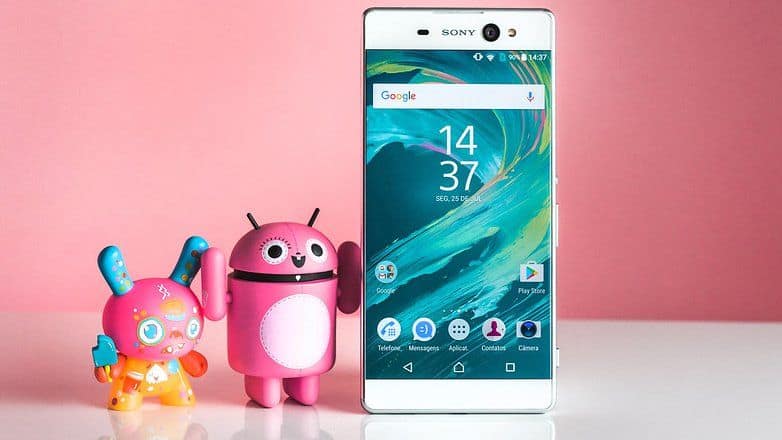
The Sony Xperia XA Ultra kinda gives off this sleek minimal vibe, pretty much matching Sony’s look from that era. It has a slim, rectangular body with clean lines, plus those rounded edges, so it feels modern, and honestly a bit more polished than you’d guess at first. Up front and on the back there’s glass covering pretty much everything ,while the sides rely on plastic for the frame. That trade off keeps the device light enough and not overly thick, even with its overall size.
A big part of the visual, is the massive 6.0-inch display, it sits inside that thinner body like it’s cradled there. The dimensions come in at 164.2 x 79.4 x 8.4 mm ,and it weighs 202 grams, so it’s definitely larger and heavier than a lot of other smartphones. Still, that slim profile, together with the smooth rounded edges, somehow makes it feel comfortable in hand even if it isn’t exactly small You can pick up the Xperia XA Ultra in a few colors like White, Graphite Black, and Lime Gold. Between the reflective glass surfaces and the more reserved design choices, you get that premium kind of impression, like it’s a bit more polished than you’d expect. At the same time, the plastic frame can feel a little less luxurious than metal, or you know aluminum would, and yeah that contrast is noticeable when you compare it directly.
Ergonomics and Handling
Because the XA Ultra is quite big , it can be a bit tricky for some users to keep a comfortable grip on, specially if you want to use it one-handed. The design is slim-ish and the edges are rounded , so that helps a lot . still, the overall size is kinda the thing here, meaning it might not feel like the best pick for people who really prefer compact smartphones.
On the side, there’s a power button with a fingerprint sensor built in, placed where your finger can reach without too much effort. Above that power area you’ll find the volume rockers and the camera shutter button , which sort of balances out the layout. Also the Xperia XA Ultra comes with a dedicated camera button , and honestly that’s a handy option if you want fast access to the camera app, no extra taps or messing around .
Display
Size and Quality
The Xperia XA Ultra shows up with a 6.0 inch Full HD IPS LCD screen, doing 1920 x 1080 pixels. On paper, that resolution can feel a bit modest compared with Quad HD or even 4K panels you see on some flagship devices, but in real life it’s still surprisingly sharp, and overall pretty clear, like you can read everything, no big fuss. The IPS LCD setup brings solid color accuracy along with broad viewing angles, so it’s pretty good for watching videos, casual scrolling, and that kind of everyday routine use.
The display size itself is one of the main highlights , giving you a broad viewing space that makes videos more immersive, games easier to read, and web pages less cramped . Brightness and contrast are generally fine for most indoor settings, though outside in direct sunlight it may not perform as strongly as newer or more advanced displays.
Performance and Daily Use
So, the XA Ultra’s display performance is pretty solid, you get responsive touch input and color reproduction that looks decent. The Full HD resolution feels like it hits a nice middle point between sharpness and battery efficiency, so the phone keeps doing its job without draining the battery too much. Sure, it may not show the same level of fine detail as screens with higher resolution , but for everyday stuff plus media playback it’s actually very well suited.
Performance
Hardware Specifications
Under the hood, the Sony Xperia XA Ultra runs on the MediaTek MT6755 Helio P10 chipset. This one comes with an octa-core processor clocked up to 2.0 GHz. You also get 3GB of RAM, and 16GB of internal storage , plus the storage can be pushed up to 200GB using a microSD card. Overall this setup gives a fairly decent blend of everyday performance and usable space, although it may still feel a bit behind when you compare it to newer flagship devices.
The Helio P10 chipset is built for a mix of steady daily tasks and moderate gaming. It may not chase the blistering speed of top tier chips from Qualcomm or Samsung, but it should still provide enough punch for most folks, particularly for everyday use and casual apps, no real stress.
Benchmark Performance
So, in benchmark tests, the Xperia XA Ultra’s performance looks kind of modest. Like, if you look at Geekbench, the device typically lands near 700 for single-core and around 3,500 for multi-core. From there it’s fair to say the XA Ultra can handle the usual stuff and some light multitasking, though it might feel a bit stretched when you try heavier applications , or when more demanding games are running.
When it comes to gaming, the Xperia XA Ultra is fine for casual games, but it doesn’t really aim for that “top tier” gaming vibe. It should run simpler titles like “Angry Birds” and “Candy Crush” without much of a problem, but if you move to visually intense games such as “Asphalt 8” or “PUBG Mobile”, you may notice some lag, or the overall performance can drop a little.
Camera
Camera Specifications
The Sony Xperia XA Ultra comes with a 21.5MP rear camera using an Exmor RS sensor, plus a broad f/2.2 aperture. This setup is meant to produce images with solid detail, and fairly accurate color. On the front, there’s a 16MP camera with an f/2.0 aperture , and it also uses a wide-angle lens, so selfies, plus group shots, tend to fit more easily.
For focusing and lighting, the back camera includes phase-detection autofocus (PDAF) and an LED flash. Meanwhile the front camera has its own dedicated LED flash, which helps with low-light selfies, a bit more than you’d expect. And yes, the Xperia XA Ultra supports full HD video capture at 30 frames per second, so recording looks smooth enough for everyday use.
Camera Performance
The rear camera on the Xperia XA Ultra gives pretty good results overall, like you get sharp, pretty detailed shots when the scene is bright enough. The Exmor RS sensor works well, with decent colors and solid contrast, so it feels made for everyday photo stuff. Still, in darker places it can get a bit iffy, there’s usually more noise, and the finer details kind of fade out.
On the front, the camera is a real strong point. You can expect high-resolution selfies, and it performs nicely across different lighting situations. The wide angle lens also helps with more flexible selfie framing, even if your not standing in the perfect spot . And plus the dedicated LED flash gives you a noticeable little boost in low light, so faces don’t end up looking as dim.
For video, the Xperia XA Ultra does a competent job. It records in Full HD, and the footage comes out clear with decent detail. For casual recording, then sharing later on social media, it’s totally fine. But, if you compare it to more advanced phones, the video side may not feel quite as capable.
Battery Life
Battery Specifications
The Sony Xperia XA Ultra includes a 2,700mAh battery that you can’t really take out. On paper, the cell capacity feels kind of average, especially when you compare it to phones that carry more hefty battery cells, but the Full HD screen and generally efficient hardware manage to offset that. So, in normal use, you still end up with reasonable battery endurance, rather than constantly hunting for a charger.
Battery Performance
In real world use, the Xperia XA Ultra usually gives you about a full day of battery life, if you’re not too heavy on it. You know like web browsing, social media, some scrolling, and occasional media playback. With heavier routines, like long gaming sessions or constant video streaming, it may need a recharge by the time the day ends. So it’s good, just not magic.
The Xperia XA Ultra comes with Sony’s Qnovo Adaptive Charging tech, it helps keep battery health and overall performance steadier by dialing the charging pace based on how you typically use the phone. It also supports regular USB charging , but it doesn’t include fast charging. Because of that, charging times can feel slower than what you’d expect from newer phones that have fast charging support.
Software Experience
User Interface
The Sony Xperia XA Ultra ships with Android 6.0 Marshmallow, plus Sony’s own custom UI on top. The layout is meant to feel clean, and kind of straightforward. There’s a traditional app drawer, and you can customize the home screens, so you can arrange apps and widgets the way you like, rather than being stuck with one fixed style.
Sony’s interface also adds some extra bits, like the Xperia Lounge app which is mainly for locating content and services. You can further tweak the whole vibe via themes and icon packs, which is honestly kind of pleasant. Overall, day to day performance feels fluid, but it may not be as feature rich, or as dialed in for customizing, compared to a few other Android skins floating around.
Software Updates
At the moment it first launched, the Xperia XA Ultra had a pretty current version of Android running. But it may not really grab the newest software updates as fast as a couple other handsets. So, because of that, some folks might end up leaning on third party ROMs or custom firmware, just so they can get newer Android releases, especially when official patches come in slowly, or, you know, aren’t there at all.
Connectivity and Extras
Connectivity Options
For connections, the Sony Xperia XA Ultra covers a pretty broad set of options. It includes 4G LTE, so mobile data feels snappy enough in day to day use. You also get Wi-Fi 802.11 a/b/g/n for solid wireless browsing, Bluetooth 4.1 for syncing with accessories, and NFC that helps with contactless payments as well as pairing.
On the hardware side, there’s a USB Type-C port for charging and file transfer. It’s the reversible kind, which is honestly more convenient than it sounds. Also, the device keeps a 3.5mm headphone jack, so you can plug in wired audio gear straight away, no dongles needed, and not really any fuss.
Extras
The Xperia XA Ultra has an IP65/68 rating for water and dust resistance, which means it offers protection if the phone gets dipped in water up to about 1.5 meters for 30 minutes. It feels like this sort of rating adds durability, and honestly a bit of peace of mind when you’re out and about and you don’t want to think too hard about “what if”.
The device also has a fingerprint sensor built into the side, in the power button area. So you get fast biometric security for unlocking the phone and keeping apps, plus data more secure. In practice the sensor is usually responsive and accurate, but because it’s on the side you might need a little time to get used to the placement, at least at first.
Overall User Experience
Performance and Daily Use
For day to day, the Sony Xperia XA Ultra gives a generally positive experience, with attention on that big display and its sort of stylish look. Performance is fine for usual tasks and light-to-moderate multitasking. Still, it’s not going to feel as strong as some of the more premium, higher end smartphones. The Full HD screen gives a nice trade off between sharpness and battery friendliness, so it works well for watching content as well as regular everyday use.
Camera and battery
The camera side is decent, not mind blowing. In good lighting the back camera does pretty well, while the front one handles selfies and you get decent results. Battery life is about right for typical day to day routines, yet if you push brightness a lot , or record more video , or keep several apps running then you might end up charging more often. On the software side it pretty much runs smoothly, with a neat interface and a few useful ways to tweak things. The only thing to keep an eye on is that it could lag slightly when it comes to the newest updates, and that depends on when the releases roll out.
Sony Xperia XA Ultra unlocked smartphone,16GB Black (US Warranty): Buy it now
Sony Xperia XA Ultra unlocked smartphone,16GB White (US Warranty): Buy it now
Sony Xperia XA Ultra F3213 16GB GSM 21MP Camera Phone – Graphite Black (Certified Refurbished): Buy it now
Sony Xperia XA Ultra unlocked smartphone,16GB Lime Gold (US Warranty): Buy it now
Comparison with Competitors
To get a fuller view of the Sony Xperia XA Ultra, it helps, to look at what other smartphones were doing around that same period, I mean roughly. You can compare it with the Samsung Galaxy A7 (2016), the LG G5, and the HTC 10. This sort of comparison can show the good points, and also the not so good points for the XA Ultra vs the rest, even if some parts blur a bit when you zoom out.
Sony Xperia XA Ultra vs. Samsung Galaxy A7 (2016)
The Samsung Galaxy A7 (2016) comes with a 5.5-inch Super AMOLED display, resolution 1920 x 1080 pixels, which honestly feels pretty close to what the XA Ultra gives you. Yet the overall size is a bit smaller, by a small margin at least. The A7 (2016) runs on an Exynos 7870 chipset, and it’s paired up with 3GB of RAM. In practice it puts you in a pretty similar performance zone as the XA Ultra’s Helio P10, or at minimum close enough that you’ll notice more or less the same kind of day to day behavior.
For the build and feel, the Galaxy A7 (2016) leans into metal and glass, it feels “premium” overall, while the XA Ultra sticks with a plastic frame, which is kind of a different vibe. Camera-wise, the A7 (2016) has a 13MP rear camera and a 5MP front camera. Still, it doesn’t include the XA Ultra’s more detailed selfie lens, and that difference can show up if you actually care about sharper faces in photos, not just “good enough”.
Battery life is kind of a wash, but still, the Galaxy A7 (2016) has a 3,300mAh cell, so it can edge out a bit more endurance. Both phones cover the usual connectivity options and everyday features, like you’d expect. However, the Galaxy A7 (2016) tends to have the edge thanks to Samsung’s software reputation, plus a more established update path, so the experience often feels steadier, less jumpy over time.
Sony Xperia XA Ultra vs LG G5
So, the LG G5 comes with a 5.3-inch Quad HD IPS LCD screen , 2560 x 1440 pixels and, honestly it just looks crisper and more colorful than the XA Ultra’s Full HD panel. The XA Ultra feels kind of more straightforward in comparison, while the G5 goes for that brighter, more “lively” mood.
For performance, the LG G5 uses the Qualcomm Snapdragon 820 chipset paired with 4GB RAM , and yeah it’s a pretty obvious upgrade from the XA Ultra’s Helio P10. In normal day to day use, the difference shows up fast, like not even close, at least that’s the vibe you get.
On the camera front, the LG G5 offers a 16MP rear camera with a wide-angle lens, plus a secondary 8MP camera for extra flexibility. Up front you get an 8MP selfie camera, which is lower than the XA Ultra’s 16MP shooter. Also, the LG G5 has a battery you can actually remove , which is something the XA Ultra doesn’t do, and for some folks that’s basically a dealbreaker.
The design is where the LG G5 starts feeling a bit unconventional. It uses a modular setup with removable parts , so swapping things around feels almost like an experiment.
The G5’s metal build, along with the added features, gives it a more premium solid feel, while the XA Ultra is more about a larger display and a slimmer profile so the handling feels kind of totally different.
Sony Xperia XA Ultra vs HTC 10
The HTC 10 has a 5.2-inch Quad HD Super LCD5 display, 2560 x 1440 pixels, and it looks sharper , plus the colors tend to pop stronger compared to the XA Ultra. In a way it’s just a cleaner viewing experience , like the XA Ultra is a step behind in crispness.
Under the hood, the HTC 10 is powered by the Qualcomm Snapdragon 820, and 4GB of RAM, so performance is stronger than the XA Ultra’s Helio P10 chipset. It’s basically the same “820 + 4GB” advantage vibe, just in a different phone.
The HTC 10 comes with a 12MP rear camera that has optical image stabilization , (OIS) and then there’s also a 5MP front-facing camera, so overall it stacks up pretty well camera wise compared to the XA Ultra. On top of that, the phone uses a metal unibody design, and that actually matters because it gives the whole thing a more premium feel, and solid build quality kinda vibe.
Battery life is also in the same ballpark as the XA Ultra , with a 3,000mAh battery that delivers similar longevity. And software wise, HTC 10 feels polished , with HTC’s Sense UI , there’s customization options there, plus the interface looks clean even when you’re digging around.
Pros and Cons
Pros
Big Display: The 6.0-inch Full HD screen gives you a roomy viewing area , which is great for watching media and also for multitasking.
Sharper Front Camera: The 16MP front camera is strong for selfies and video calls, capturing crisp and clear shots.
Good Looking Design: The streamlined, minimalist look plus the reflective glass surfaces makes the XA Ultra look kinda upscale.
Storage That Grows: Having a microSD card slot means you can expand storage without much fuss , so you can fit plenty of photos, videos, and apps.
Water plus Dust Safeguards: The IP65/68 rating gives protection from water and dust , which adds durability in day to day use.
Con
Performance Limitation vibes: The Helio P10 chipset can end up struggling a bit with heavy applications , and more demanding gaming sessions too, so there might be some performance limitations later on.
Battery size not huge: The 2,700mAh capacity may mean you recharge more often if you use it a lot, plus it does not come with fast-charging.
Resolution kinda average: The Full HD screen is fine but it sits lower, in resolution, compared to Quad HD or 4K displays that show up on competing devices.
Frame feels less premium: The plastic frame, although light, might not deliver the same durability or “premium” sensation you get with metal or aluminum alternatives.
Updates are slower: It may fall behind on the newest software updates, which can affect the overall experience, and even security, over time.
Conclusion
So, the Sony Xperia XA Ultra it’s kind of a nice pick for people who want a big display and decent day to day performance, all wrapped in a stylish look. You get that roomy 6.0-inch screen, a front camera with solid resolution, and a clean design style, so the XA Ultra fits well for media lovers and honestly for anyone who really likes having more space to look at.
Now, yes, it can feel limited in comparison with some newer, stronger competitors—especially when you talk about performance and also battery stamina. Still, it holds up pretty well as an option if you want a practical phone, with features that don’t cost a fortune. Things like expandable storage, water and dust resistance, plus the fingerprint sensor, they all quietly boost the value and make the Xperia XA Ultra easier to justify.
All in all, the Sony Xperia XA Ultra is a strong entry in the mid-range smartphone space, mixing together design, screen quality, and useful functionality that can appeal to a lot of different users. Even with a few rough edges, it gives a rounded experience, and it’s worth considering if you’re shopping for a large-screen smartphone with that touch of Sony’s premium vibe.






Tech Reviewer & Product Analyst
Định Bia has spent over 10 years testing consumer electronics with a focus on smart technology. He work as a product advisor at Biareview where he helped customers find the right devices for their needs. He personally tests every product featured on this site using a consistent evaluation framework covering quality, durability, and value. All reviews are based on experience, not influenced by the manufacturer.