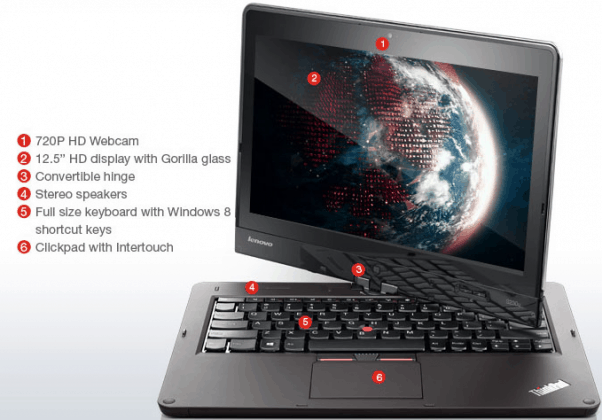
Lenovo ThinkPad Twist is hybrid model aimed at business people need a lightweight computer, high security and reliability. The product not only features a touch screen display, but also has a unique design, the creativity shown through the ability to switch between laptop and tablet, bringing users but enjoyable experience when using.
Inherent reliability of the ThinkPad laptops, Twist also has a lightweight (1.58 kg), suitable for frequent users to move. Soft plastic casing outside and carbon fiber underneath, frame structure made of magnesium alloy honeycomb structure, the overall machine is quite lightweight but still achieves the necessary rigidity, providing reliability for user.
The interesting point of Twist is the 180 degree screen rotation that makes it easy for users to collaborate, share information displayed on the screen or use it as a tablet. In addition to the convenience of using, the machine also includes a number of function buttons such as fast Windows switch between the screen mode, volume up and down keys, screen rotation lock button and the power button on the curtain form.
Design oriented business people should be the security mechanism of the new ultrabook is also more interested. Business Solutions Lenovo Solutions for Small Business provides security tools and improves system performance. The diagnostic center suite helps users manage passwords, backups, and system restore.
The machine also incorporates a Trusted Platform Module (TPM) chip to ensure hardware authentication, startup protection, and smart card authentication. Some of the security and remote management features of the Intel vPro platform allow users to configure different layers of security to better protect their computers and corporate networks.
Communication port, ability to upgrade
Like many other ultrabook models, the Twist does not have a built-in optical drive built in, but still supports a full range of communication interfaces such as mini HDMI display output, mini DisplayPort, high speed USB 3.0 interface. “4 in 1” memory card reader and both headphones and microphones. It also supports wireless connections such as Bluetooth 4.0, Wi-Fi 802.11n and also gigabit Ethernet connection.
Lenovo ThinkPad Twist S230u 13-Inch Convertible 2 in 1 Touchscreen Laptop (33476LU): Buy it now
Lenovo Thinkpad Twist S230U Laptop (Intel i3-3217U (1.8 GHz), 4 GB RAM + 256GB SDD, 12.5″ TouchScreen(1366×768) Display, Intel HD 4000 Graphic Card, Win 10 Pro) (Certified Refurbished): Buy it now
ThinkPad Twist S230u 33472TU 12.5 LED Convertible Ultrabook/Tablet – Wi-Fi – Intel – Core i5 i5: Buy it now
Lenovo ThinkPad Twist S230u 33472RU 12.5 LED Convertible Ultrabook Intel Core i7-3517U 1.9GHz 8GB DDR3 128GB SSD Intel HD Graphics 4000 Windows 8 Pro 64-bit Black: Buy it now
Monitor, keyboard and touchpad
The Gorilla Glass grille protects the screen better against external forces.
The ThinkPad Twist gets a 12.5 “multi-touch screen” with a WXGA display, meaning 1,366 x 768 pixels. IPS panel technology helps the screen show true colors, it is sort of like the approximately same as a CRT monitor , plus it gives a wider viewing angle than the Twisted Nematic display panel technology and also Vertical Alignment. The surface of the screen also has a layer of tempered glass Gorilla Glass resistant to scratch, scratches. As a result, the computer will be better protected with external forces.
Compared to all-in-one desktop PCs running Windows 8, the touchscreen Twist is much better, with smooth, precise operation. The image quality shown when used in the office is very good, the image is crisp, bright, showing two standard black and white shades, giving a pleasant feeling when working with text documents. However, due to its anti-glare lcd screen, when used outdoors or in bright light, the picture quality is also deteriorating.
The “Precision” keyboard is also one of the highlights of the ThinkPad line, with soft, curved keys and good elasticity for a clear “feel”. Users easily “surf” on the keyboard when typing text fast without fear. Unfortunately, the keyboard does not have built-in LED backlight, so it’s not convenient to work in dark environments.
Similar to the same line, the Twist retains its distinctive mouse cursor button and two left buttons, right below the keyboard, with a nostalgic styling combined with the modern touchpad’s multi-touch smart . Lightweight, easy-to-use touch keys. The smooth feel due to low friction makes the mouse move precisely, and the scrolling, zooming and rotating functions are also easier to do.
Performance
Under the hood, the Lenovo ThinkPad Twist is sort of powered by Intel’s 3rd generation Ivy Bridge processors, and there are options like the Core i3, Core i5, or Core i7. It usually ships with 4GB or 8GB of RAM, then you get storage choices too, including the more traditional hard disk drives HDDs and also solid-state drives SSDs. All of that together means the Twist can manage a pretty wide mix of work, from basic day to day productivity type stuff to apps that are a bit more demanding, too.
On the real world side of things, the ThinkPad Twist is a solid performer for its category. The Intel Core chips combined with an SSD if you pick that option, helps with quicker startup , faster opening of apps, and a multitasking experience that feels fairly smooth. So whether you’re typing up office documents, scrolling through the web, or keeping several applications going at the same time, the Twist stays responsive and efficient enough for most people.
For graphics, the built in Intel HD Graphics 4000 is adequate for a lot of business related tasks, plus casual media viewing. It’s just not meant for high end gaming or heavy graphics intensive workflows , but it still handles video playback, web surfing, and light photo editing with a decent level of comfort, and no big drama.
Battery life
Battery life, is honestly one of the big things for a portable device and the Lenovo ThinkPad Twist does pretty well there… not perfect, but decent. It comes with a 42Wh battery and that tends to translate into something like 5 to 7 hours of runtime in everyday use. By everyday i mean stuff like web browsing, editing documents, and also watching videos or other multimedia.
It works for a regular workday, sure, but it still feels a bit behind compared with some of the fresher ultrabooks, and convertibles, that are out right now. If you truly need longer unplugged time, you might end up bringing the charger along or you could go for a second battery pack, just for extra hours.
On the charging side, things are pretty smooth. Lenovo has RapidCharge and it helps a lot. The ThinkPad Twist can reach 80% in around an hour, so you can quickly refill it during short breaks, and then keep moving without too much wait.
Software
The Lenovo ThinkPad Twist originally shipped with Windows 8 Pro, taking advantage of the operating system’s touch friendly interface and, general productivity features. After that the device is also compatible with Windows 10 which brings in improved performance security and a more refined day to day user experience, kind of smoother over all.
Lenovo also throws in a suite of software tools and little utilities to push the overall experience forward. For example Lenovo Solution Center, it provides system diagnostics and, support resources. Then there’s Lenovo Settings, that lets you tinker with customization options for power management, display settings and a few other things.
The ThinkPad Twist additionally supports Lenovo’s Active Pen, a stylus for precise input for note taking, drawing and other creative tasks. The pen integrates pretty seamlessly with Windows Ink, which gives users a natural and intuitive feel if they like handwriting and sketching.
Connectivity and Ports
The Lenovo ThinkPad Twist comes pretty solid when it comes to connectivity stuff. It has two USB 3.0 ports, plus a mini DisplayPort, a mini HDMI, a 3.5mm audio jack and also a 4-in-1 card reader, meaning SD, SDHC, SDXC, and MMC all in one. With that mix, it’s easier to plug in different peripherals, or link up to external displays, without too much fuss.
Wireless options are pretty straightforward too, it includes Wi‑Fi 802.11n and Bluetooth 4.0, which should handle both internet access and device connections in a steady way. And, if you choose it, the ThinkPad Twist can also include optional 3G connectivity, so you’re not stuck hunting Wi‑Fi hotspots all the time.
Usability
A big part of the Lenovo ThinkPad Twist experience is how it can do a lot of things at once, like in a “you pick the setup” kind of way. You can switch between laptop, stand, tent, and tablet modes, and that gives it a lot of flexibility depending on how you’re using it in the moment. When you’re in laptop mode it feels more like a normal computer, with the usual ThinkPad keyboard comfort and precision. Then in tablet mode it shifts into a lighter, portable vibe, kind of ideal for reading, scrolling, and media watching.
The keyboard itself is pretty much what you’d expect from Lenovo’s ThinkPad line. Typing is kind of comfortable, and it feels responsive too, with the keys having a decent travel distance and real feedback, so after longer sessions it doesn’t get as draining. The trackpad is well made as well, smooth and fairly accurate, plus it handles multi touch gestures, which makes day to day navigation feel kinda more natural.
In tablet mode, the Twist kind of shines as a productivity device. The touch panel feels quick, responsive, and pretty spot on, and when you add the Active Pen it just makes the whole thing feel more fluid, more natural. Whether you’re jotting notes in a meeting, making quick little sketches, or tagging along on documents, the pen works exceptionally well , no real drama.
Also, the switch between the modes really helps day to day usability. In stand mode, the Twist is great for presentations, plus video calls too, and it holds a steadier, comfy viewing angle. Then there’s tent mode, which is pretty much made for watching movies, or browsing the web, since you can keep the device up without having to hold it with your hands.
Audio and Camera
About audio, the Lenovo ThinkPad Twist has stereo speakers, and they manage a pretty decent sound for something of this size. It’s not super loud or exactly forceful, but the output is clean enough and it remains usable through the day. For video calls, general media, and casual listening, it does what you’d expect, more or less. If you want it to be better, you can plug in external speakers or headphones via the 3.5mm audio jack as well.
For cameras, the Twist includes two units: a 2MP front camera mainly for video calls, and a 5MP rear camera for photos and video recording. The front-facing camera handles video conferencing nicely, especially when lighting is decent, the images look sharp and clean. The rear camera is fine for everyday, casual shots or scanning documents, but it’s not really meant to replace a dedicated camera, or even your smartphone.
Security
Security is one of those crucial aspects, for business users, and the Lenovo ThinkPad Twist brings in multiple features that help protect data and guard privacy. The device leans on Intel vPro technology, which basically gives hardware based security tools, along with remote administration options. There is also a Trusted Platform Module (TPM), used for secure encryption and authentication, without it being overly complicated.
On top of that, the ThinkPad Twist comes with a fingerprint reader, so users can sign in fast and safely, with just a simple touch. It works like an extra safety layer, making sure that, only approved users can open up the device. And if you want something more tangible, the ThinkPad Twist includes a physical lock slot, so you can fasten it with a cable lock.
Conclusion
The Lenovo ThinkPad Twist feels like a versatile, innovative option, it manages to mix tablet portability with laptop productivity pretty well. Between the sturdy build, the quality display, consistent performance, and these flexible modes, it ends up being a strong pick for business professionals and students too. Being able to jump between laptop, stand, tent, and tablet modes is a big part of the appeal, as it turns it into a handy productivity companion, not just a single purpose gadget.
While the Twist is not exactly without its limitations, like a fairly low display resolution, and a battery life that’s kind of modest, it still manages to come through with a pretty balanced and efficient computing vibe. The device has connectivity options that make sense, security features that feel dependable, and general usability that doesn’t frustrate you too much. All of that, together helps lock in its reputation as a reliable, and also versatile, convertible ultrabook.
In the end, the Lenovo ThinkPad Twist comes across as a well rounded device for folks who want both portability and day to day productivity. You get a thoughtful design, steady performance, and a feature set that’s not half done. For anyone thinking of a versatile, durable 2 in 1, it’s a solid choice. And whether you’re a business professional, a student, or the creative type, the ThinkPad Twist seems to adapt pretty easily, offering the flexibility and the functionality needed to support your work and improve your output
Related Posts

Tech Reviewer & Product Analyst
Định Bia has spent over 10 years testing consumer electronics with a focus on smart technology. He work as a product advisor at Biareview where he helped customers find the right devices for their needs. He personally tests every product featured on this site using a consistent evaluation framework covering quality, durability, and value. All reviews are based on experience, not influenced by the manufacturer.