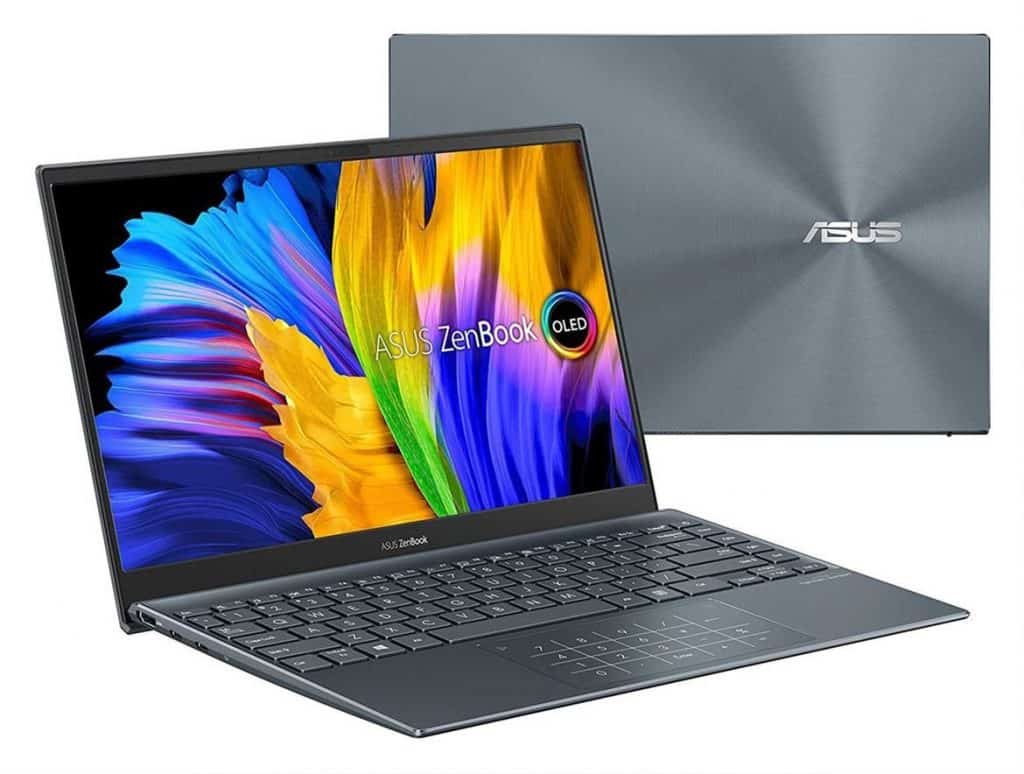
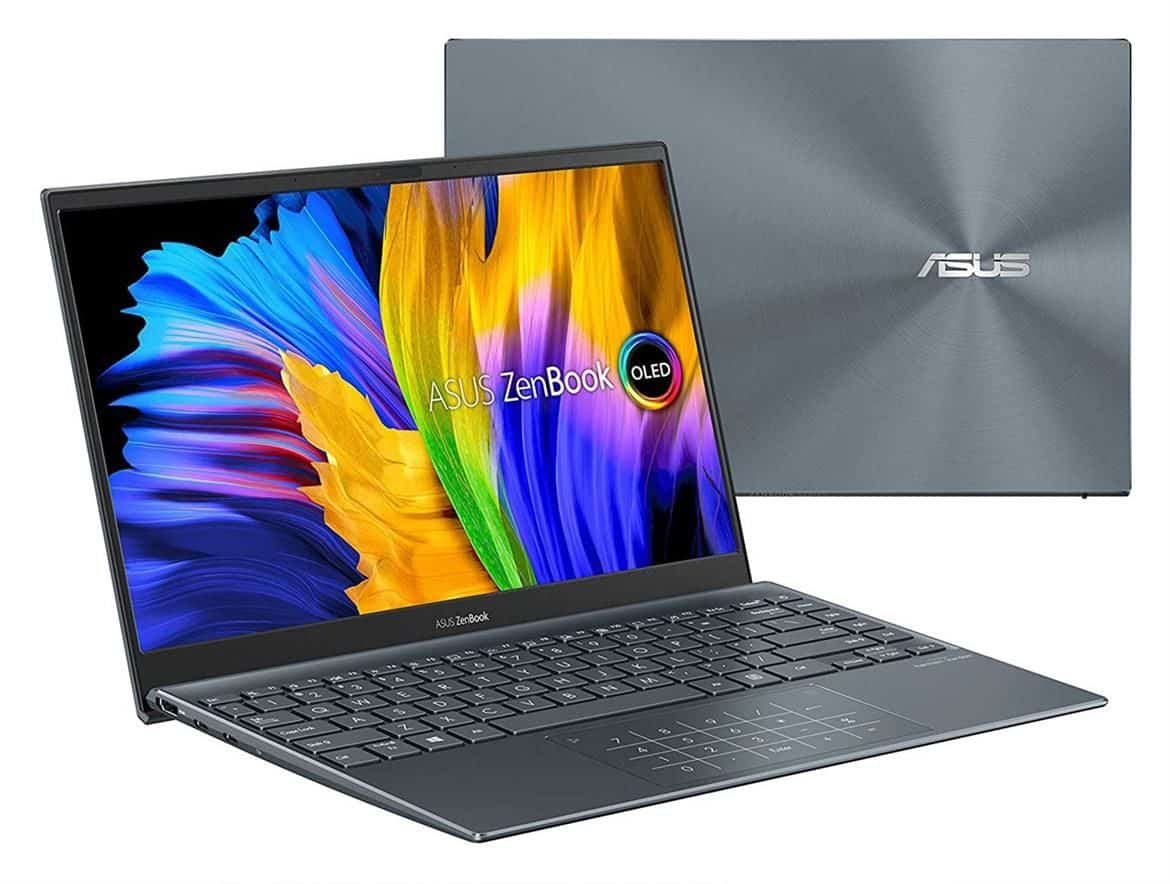
Super light laptop
Seems like the name is pretty spot on, because the device really does come with a brilliant OLED display, and then on top of that you get an AMD Ryzen 7-5800U processor plus integrated Radeon Vega graphics. There’s also massive memory, and plenty of storage space, like it’s meant to be used everyday without thinking too much about it.
ASUS has released a bunch of ZenBook 13 laptop versions (kind of like the ZenBook 14 line) using both AMD and Intel processing options. The exact model we’re showing you right now is built around an AMD Ryzen 7-5800U 8‑core, 16‑thread processor, it can boost up to a clock speed of about 4.4 GHz, or at least that’s what the spec says. For graphics you’re looking at an integrated Radeon Vega setup, paired with 16GB LPDD4X‑3733 memory, soldered to the board.
Other specs for the ZenBook 13 OLED include a 512GB NVMe PCIe Gen 3 SSD from SK Hynix, plus Wi‑Fi 802.11ax, Bluetooth 5.0, and an HD webcam. There’s also an IR sensor that fully works with Windows Hello, and you’ll find Harmon Hardon speakers. The keyboard and touchpad are both backlit, which is kinda handy when the lighting gets weird.
ASUS ZenBook 13 has a stunning 13.3″ OLED display. The hinge is firm but just enough for you to open the lid with one hand. When the lid is opened, the bottom of the machine is automatically raised at an angle to help better air circulation into the space below the system.
The keyboard has a slight bend, the keys have good sensitivity, and tactile feedback and the key travel is quite long (1.4mm). Unless you’ve been impressed with the Lenovo ThinkPad’s keyboard, we think you’ll like the ZenBook 13’s keyboard, though it will take you a while to get used to the key placement. For example, the row of navigation arrow keys in the lower right is a bit weird, and the power button is located where on other machines the Delete key is located.
Regarding the touchpad, there are no problems. Smooth and responsive, multi-touch gestures work well, moderate size and balance to the overall machine, with the feature of refusing to accidentally touch the palm to the touchpad. In addition, the touchpad is also integrated with the Numpad number pad; just press and hold the keyboard icon at the top right of the touchpad, wait for the numbers/buttons to light up and you can use this Numpad assembly. If you love a laptop that is as compact as possible, but still suitable for using Excel software, you may be very interested in this product or laptop models with built-in like this.
Speaking of the excellent HDR FullHD (1920×1080) OLED display again, the display on the ASUS ZenBook 13 OLED is truly stunning. 100% DCI-P3 color coverage, PANTONE standard for color accuracy, TÜV Rheinland-certified Low Blue Light mode for minimal vision damage, and mode support HDR. However, the maximum brightness is only 400 nits.
The display has thin bezels all around (ASUS calls this the NanoEdge bezel) with a glossy finish, which makes the OLED display look dark and deep, but also prone to reflections. Just above the screen is an HD webcam with an IR sensor and a pair of microphones, which can be used for online meetings, or online broadcasts, but not so great. The Full HD screen resolution is just enough for the 13.3-inch size, making everything displayed from Word software to watching movies a very good experience.
In terms of the overall aesthetic of the ASUS ZenBook 13 OLED, we don’t appreciate it very much. The entire device has a metallic blue finish, with the glossy ASUS logo on the lid. The edges are subtly beveled, but generally don’t leave much of an impression. The lower part has some relatively large foot pads to help keep the device in place, along with holes for the bottom speaker and a series of tiny holes to draw air into the internal heatsink, allowing air to escape out through the long, thin heatsinks along the back.
Despite being a thin and light gadget, just about 12.0″ x 8.0″ x 0.5″ and weighing roughly 1.2 Kg, the ASUS ZenBook 13 OLED still manages to feel fairly connected. On the right side you’ll find a USB-A port and a microSD card reader, while the left side holds an HDMI connector and a couple of USB-C ports. You can use either of those USB-C ports to charge the device, which is kind of handy, and it saves you from fussing around with cables.
ASUS also includes a USB-Ethernet adapter that comes with the device, a USB-C to 3.5mm jack adapter, a compact 65W USB-C charger, and a rather luxurious carrying bag.
As for the software inside, there’s not much to say. All Windows 10-related apps and utilities come pre-installed, along with a trial of Norton Internet Security and ASUS’ MyASUS app. Norton Internet Security was uninstalled by us right after a few minutes of using the device because it was quite annoying. But the MyASUS app is a handy, easy-to-use tool that keeps the machine up to date and tweaks performance and fan configurations. There is a diagnostic button, just one click will help the user to check all the hardware and control systems of the machine, very useful.
ASUS ZenBook 13 OLED (UM325S): Ryzen 5000U Performance and Benchmarks
We tested the ASUS ZenBook 13 OLED as soon as it shipped from the company, pre-installed with the latest Windows updates, and automatically updated through the company’s MyASUS app, to ensure the most accurate reflections.
Many factors can affect performance, so our tests and comparisons are for reference only. We will start with memory, CPU, etc. tests to better understand how the machine runs AMD Ryzen 5000 in everyday tasks.
ATTO’s drive benchmark tells us how well the system’s SSD performs with sequential read and write operations of different sizes. The machine is equipped with a 512GB SK Hynix PCIe Gen 3 SSD.
As you can see, read peaks at ~3.34GB/s, with peak writes around ~2.88GB/s, varying by a few MB/s depending on file size and transfer speed. It’s not the fastest we’ve seen on a laptop, but it’s still very fast and better than any other standard SATA hard drive.
Check out Cinema 4D-based Cinebench rendering performance from Maxon. Cinema 4D is a 3D animation and rendering toolkit used by famous animation producers and producers such as Sony Animation and many others. Requiring a lot of system processor resources, this is a benchmark that recognizes multithreading, and multiprocessor renders and animates 3D scenes and tracks the duration of the entire process.
The Cinebench R23 results on the ASUS ZenBook 13 OLED sit in that pretty average zone, sort of middle of the pack. On the single-threaded side it’s among the top three, while the multi-threaded figure beats any Intel 4-core CPU (like the Core i7-1185G7) but, it still lags behind other 8-core models. Also, keep in mind the Lenovo Ryzen-based setup runs the processor in a higher performance mode so it ends up scoring better, even though the core count is pretty similar.
Geekbench 5 is a cross-platform benchmark that simulates real processing workloads in physical image processing scenarios.
The ASUS ZenBook 13 OLED is near the top of the charts on Geekbench, with both single and multi-threaded scores. Intel’s latest processors hold the single-threaded advantage in this benchmark, but not as much as the Ryzen processors in the multi-threaded test.
The ASUS ZenBook 13 OLED completely excels in PCMark 10. The system gives the best overall score we’ve seen from any other similarly sized laptop to date. All the individual scores are very high, especially the Productivity score, where the ASUS machine blows other competitors off the charts.
We ran a few 3DMark tests on the ASUS ZenBook 13 OLED, to kind of compare it against a bunch of similarly-styled laptops and that whole “thin and sleek” idea.
For the 3DMark Night Raid benchmark, the ASUS ZenBook 13 OLED ends up sort of in the middle of the table. It’s pretty close to the Ryzen machines that use integrated Vega graphics, but it’s clearly a lot worse than Intel’s higher-end 11th Gen Iris Xe graphics. So, the balance is… sort of there, but not really.
With 3DMark Fire Strike it’s basically the same situation. The ASUS ZenBook 13 OLED and several Lenovo Ryzen systems are on par, while the top-end Intel Iris Xe setup still manages to take the lead.
Now, even if it is thin and light, and not really a gaming laptop, the combination of the processor and Radeon Vega graphics inside the ASUS ZenBook 13 OLED is still more than capable of handling plenty of games at high resolutions. So let’s see what it does in Middle Earth: Shadow of War.
In the first Shadow Of War test, the ASUS ZenBook 13 OLED placed above the Lenovo laptop with the Ryzen 4000-series processor. But the higher-end Iris Xe-equipped model was roughly 10% stronger across basically all the settings we tested, so there’s that gap.
Lastly, ASUS ZenBook 13 OLED had a tougher time with Gears Tactics. In this game, ASUS systems sit behind all Iris Xe-equipped machines, and naturally, behind any setup with more capable discrete graphics too.
ASUS ZenBook 13 OLED Ultra-Slim Laptop, 13.3” OLED FHD NanoEdge Bezel Display, AMD Ryzen 5 5500U, 8GB LPDDR4X RAM, 512GB PCIe SSD, NumberPad, Wi-Fi 5, Windows 11 Home, Pine Grey, UM325UA-DH51: Buy it now
ASUS ZenBook 13 OLED Ultra-Slim Laptop, 13.3” OLED FHD NanoEdge Bezel Display, AMD Ryzen 7 5700U, 8GB LPDDR4X RAM, 512GB PCIe SSD, NumberPad, Wi-Fi 5, Windows 10 Home, Pine Grey, UM325UA-DS71: Buy it now
Ryzen 5000 battery life with ASUS ZenBook 13
Our battery life test was done with a custom 1080p HD video loop test, kinda the one we developed at HotHardware. We ran everything with Windows 10 Quiet Hours / Focus Assist turned on , and the screen brightness was dialed in to be as near as possible to 115 lux on the light meter. That brightness calibration really matters, because it helps keep things fair when you compare battery life across different laptops, it can change the results a lot.
Still, every laptop comes with its own brightness range, so it’s better to use a light meter, not just the percentage from the Windows brightness slider, to make the comparison feel level and not weird. For example the ASUS ZenBook 13 OLED needs roughly 40% brightness to land at 115 lux.
ASUS ZenBook 13 OLED has really strong battery life. The way the Ryzen 5000U-series chip pairs up with the 1080p OLED screen, plus that 67Whr battery, gives you almost uninterrupted uptime that honestly feels better than anything else we’ve tested. It just keeps rolling for around 12 hours, which is really close to a full work day, or at least enough time to get through everything you need without thinking about charging.
Heat and Noise-Dissipation
ASUS ZenBook 13 OLED measures only 12.0″ x 8.0″ x 0.5″ and weighs about 1.2kg, so it’s also quite light the chassis is also relatively thin, 8-core processor with 16 threads with integrated GPU still works well, extremely cool, and quiet.
The hottest part is located on the back edge of the chassis, where the rear slit system blows air out below the screen. On the entire keyboard and touchpad area, the temperature is not worrisome. Using the laptop on your lap isn’t uncomfortable either. Although it is relatively small, there are rows of small ventilation holes at the bottom and along the entire rear edge, so a large amount of air will move through the system.
When it comes to fan noise, the ASUS ZenBook 13 OLED got fairly close to 47dB on our meter , though it sits about 40 cm away from the keyboard, which is pretty much the same kind of setup as you get with a regular desktop. It’s not too loud in a way that would be annoying , but it is definitely audible and easy to notice. In low performance mode, or when you’re doing lighter workloads, the ASUS ZenBook 13 OLED’s fan is barely going, so you dont really have to worry about sound. Still, keep in mind that once the workload ramps up and you run it continuously, the machine will make a clearly louder whirr than most other thin and light laptops in the same sort of range.
General review
We like the ASUS ZenBook 13 OLED (UM325S) AMD Ryzen. The 13.3″ screen is my favorite factor, so from the start, this machine was really attractive. That said, if the display size and configuration of this machine appeal to you, there are a few downsides. ASUS ZenBook 13 OLED is thin, light, and attractive. The system performs very well, especially with multi-threaded workloads where the 8-core 16-thread processor works. The display is class-leading FullHD HDR OLED, although the glossy background may not appeal to everyone. It is also quite well equipped in terms of ports, with a combination of USB-A, and USB-C ports, and a card reader integrated. 802.11ax Wi-Fi 6 and Bluetooth 5 wireless connectivity are also available, and ASUS has done a great job in terms of battery life.
Intel’s latest 11th generation mobile setup brings better single threaded punch in a few workloads, plus more advanced I O things like PCIe Gen 4 and Thunderbolt, so yeah there’s that. It also ships with Iris Xe integrated graphics, and some configurations tend to land higher performance too . Still though , for most folks we feel the overwhelming majority will be totally happy with the ASUS ZenBook 13 OLED Ryzen. Like, especially because the Ryzen 7 5700U versions are sitting at just $899. The unit is moving fast, honestly, so if you’re thinking about it grab it quickly.
Related Posts


Tech Reviewer & Product Analyst
Định Bia has spent over 10 years testing consumer electronics with a focus on smart technology. He work as a product advisor at Biareview where he helped customers find the right devices for their needs. He personally tests every product featured on this site using a consistent evaluation framework covering quality, durability, and value. All reviews are based on experience, not influenced by the manufacturer.