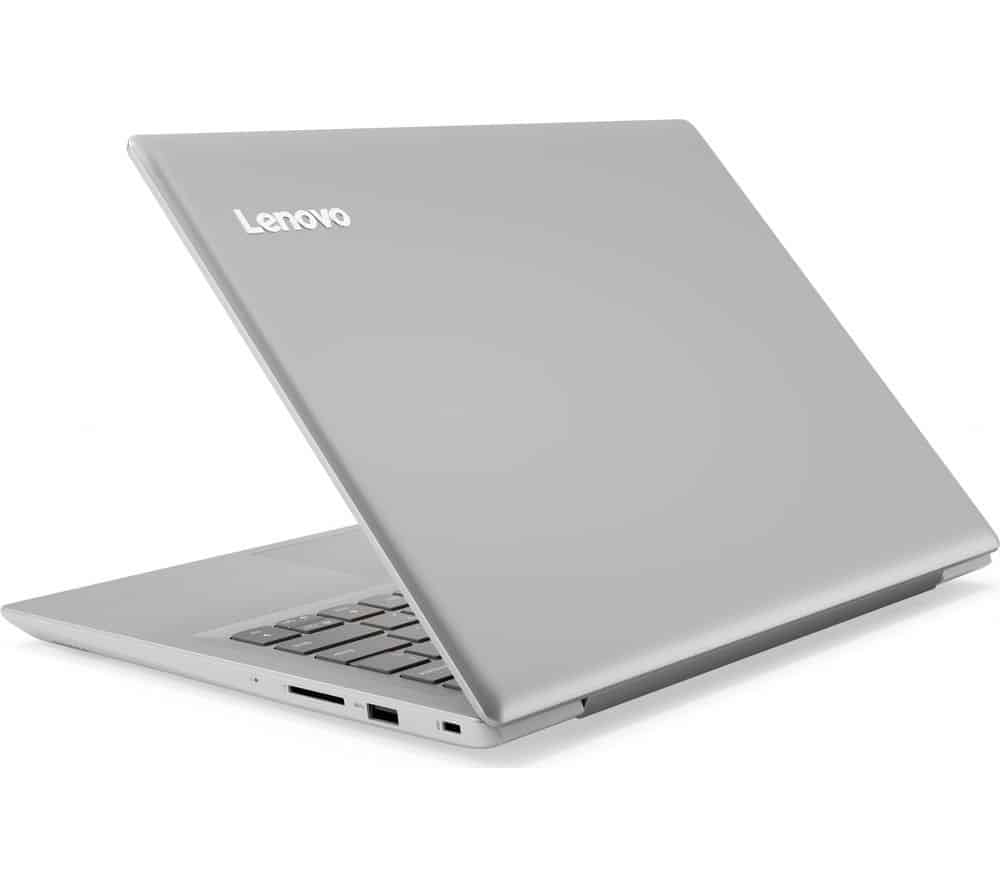
Fully equipped with the essentials of a modern laptop like a metallic shell, neat styling, especially the ultra-thin bezel, the Lenovo IdeaPad 320S makes anyone admire the design. This 13-inch laptop has refined cut lines, like high-end products, despite the low price.
The yellow version of champagne covers the whole of the shell to the palm rest. Lenovo’s mobility is particularly important when the body is slim, weighing just 1.2kg, thickness of only 16.9mm so the 320S can fit neatly in any bag, convenient to move.
Slightly light, but the IdeaPad 320S is still equipped with the necessary connections. It has two traditional USB Type A ports (one USB 3.0 high speed USB 3.0 port), one HDMI port to output images to the big screen, and notably USB 3.1 Gen 1 Type C. The Type C port on the machine only supports data transfer, but not allow charging or output images, sound. Memory card readers only support microSD cards, not SD cards.
Keeping up with the thin bezel trend on next-generation laptops, the Lenovo equips the IdeaPad 320S with a spill-over screen with a spill-over edge. Not only does the machine look more elegant and fashionable, the display area becomes more open and spacious. The content is very eye-catching with the usual tasks such as browsing the web, writing text and more impressive at the movies or play some suitable games.
Full HD resolution on a 13-inch screen ensures details are displayed. IPS panels provide accurate color, good viewing angles in different lighting conditions. Also worth noting is the 320S’s screen can be opened up to 180 degrees, a rare equipment in the segment, easy to bring the optimal viewing angle and extremely convenient for presentations, group work to share ideas with colleagues.
In terms of listening, the dual speaker system incorporates Dolby Audio technology with a power of 1.5W per speaker for loud and clear sound at maximum volume. Automatically optimizes for specific situations such as video call, video, music.
Lightweight laptops often sacrifice performance for mobility, but the IdeaPad 320S does not, so it runs on the current 8-Core Intel Core processor for i5-8250U, 4GB of RAM. DDR4 and 256GB SSD, the Intel UHD Graphics 620 graphics are capable of satisfying everything from basic to graphical, entertainment and heat dissipation. Also, long battery life can last up to 8 hours continuously after a full charge.
Lenovo 320S Business Laptop PC 14″ LED-Backlit Display Intel i5-7200U Processor 8GB DDR4 RAM 256GB SSD Dolby Audio HDMI 802.11ac Webcam Bluetooth 3.7 lbs Windows 10-Silver: Buy it now
Lenovo Laptop Ideapad 320S 15.6-Inch (Intel Core i5-8250U, 8 GB DDR4, 1TB HDD, Windows 10 Home), 81BQ000EUS: Buy it now
Lenovo Ideapad 320S 15.6-Inch Laptop (Intel Core i7, 8 GB DDR4, 1TB HDD, Windows 10 Home), 80X50002US: Buy it now
Lenovo IdeaPad 320 15.6-Inch Laptop, (Intel Core i3 4 GB RAM 1TB HDD Windows 10) 80XL003HUS: Buy it now
Design and Build Quality
The Lenovo IdeaPad 320S has this minimalist look that feels kinda sleek and modern, like it’s trying to stay out of the way but still looks polished. The clean lines and the kinda simple overall vibe make it come across professional, so it works for students and also for working folks. And yeah it comes in multiple shades too, like Platinum Grey , Snow White , and Coral Red , so you can pick what matches your own style a bit better.
Materials and build
The body, or chassis, on the IdeaPad 320S is mostly plastic , but Lenovo did that brushed aluminum thing on the lid. Because of that it gets this more premium feel ,and it also helps with durability. In general it feels solid, not flimsy at all, with little flex on the lid and also on the area where the keyboard sits.
Portability
Portability is probably one of the biggest reasons people consider the IdeaPad 320S. It weighs around 3.7 pounds (1.7 kg) , and it’s only about 0.76 inches (1.94 cm) thick, so it doesn’t feel heavy when you’re carrying it around. That makes it a handy pick for students who constantly switch locations between classes, or professionals who are always traveling or commuting.
Display
For the screen, you get a 14-inch Full HD display (1920 x 1080) using an IPS panel. The IPS panel helps with wide viewing angles and usually more consistent color than TN panels, which you still see a lot in cheaper budget laptops. Overall, the picture looks more pleasant for everyday use, and it’s easier to share what you’re seeing with others without the colors turning weird.
Brightness & Color Accuracy
This display sits at about 250 nits , so it should be fine indoors, yet in very bright outdoor light it can feel a bit washed out. Color accuracy is pretty decent for a laptop in this price bracket, things look punchy, and they stay fairly close to how they’re supposed to look. Still , if you’re doing professional photo or video editing where color needs to be spot on, this might not really cut it , no matter how you tweak the settings.
Bezels and the Screen-to-Body vibe
The IdeaPad 320S actually keeps its bezels fairly thin, especially along the sides, which gives a more immersive viewing feel. Those slimmer borders also make the whole laptop seem less bulky, so it comes across as more compact , and yeah, easier to carry around.
Performance
Lenovo’s IdeaPad 320S comes in a few configurations depending on what you care about, performance wise , and also on the budget. In our review unit, you get an Intel Core i5-8250U , 8GB RAM , and a 256GB SSD. Overall, that setup lands in a good sweet spot between speed and everyday efficiency.
Processor and Memory
The Intel Core i5-8250U is a quad-core processor, base clock around 1.6 GHz, and it can boost up to 3.4 GHz. It belongs to Intel’s 8th generation, which is basically known for improved speed and better energy habits vs older generations. Meanwhile the 8GB of RAM keeps multitasking mostly smooth, so you can juggle multiple applications at once without the kind of stuttering that ruins the vibe.
Storage
The 256GB SSD comes with quick read and write rates so you get fast boot times , and those app launches feel snappy too. Still, 256GB might feel a bit tight if someone has huge media archives or lots of software, but for most people it lands in a good spot. If you end up needing more room , you can always go for external drives , or even lean on cloud storage options.
Graphics
On the graphics side, the IdeaPad 320S uses integrated Intel UHD Graphics 620. This won’t be the right fit for heavy gaming or very graphics demanding work, but it works fine for casual games , movie watching , and basic photo touch ups. If you want noticeably stronger visuals, then a laptop with a dedicated GPU is the better direction.
Real-World Performance
Day to day, the IdeaPad 320S handles regular tasks pretty easily. Web browsing, typing up documents , and streaming media generally run smooth and quick to respond. It also keeps up decently in more demanding apps, like photo editing and light video editing , mainly because of the quad-core processor plus enough RAM.
Battery Life
Battery life matters, especially if you actually move around and work on the go. The Lenovo IdeaPad 320S includes a 52.5Wh battery, and it delivers solid endurance for a device in this class.
Usage Scenarios
In typical routines, meaning web browsing, document work, and media streaming, you can expect about 7-8 hours from a single charge. That’s enough for a full day of classes or work , without hunting for an outlet. But when you push harder , like video editing or gaming, the battery drains noticeably faster , and you may want to keep a charger nearby.
Charging
The laptop comes with a fairly normal 65W charger, and it should take the battery from 0 up to 100% in roughly 2 hours. It doesn’t really do fast charging, like not in a strong sense , but honestly the speed still feels okay, for a laptop that’s sitting in this kind of price bracket.
Keyboard and Touchpad
These two parts are pretty crucial on any laptop because they shape the daily experience, like typing comfort and how smoothly you move around. In that regard, the Lenovo IdeaPad 320S gives a pleasant typing and navigation setup, you know without too much fuss.
Keyboard
The keyboard uses a chiclet style arrangement, with keys that are spaced out in a nice way. There’s a decent bit of key travel and a tactile feel, so writing ends up being comfortable and also accurate. Plus it is backlit, with two brightness levels , which helps a lot when the room is dark, or when you are working late.
Touchpad
The touchpad is on the larger side and it responds quickly. It also supports Windows Precision drivers, so cursor movement feels smooth and pretty dependable. You also get the usual multi touch stuff like pinch to zoom and three finger swipes. The pad surface itself stays smooth and comfortable, it’s kind of easy to glide around on, making navigation simpler.
Connectivity
For ports, the Lenovo IdeaPad 320S offers a pretty fair variety. This means you can connect peripherals and external devices without constantly hunting for extra adapters.
Ports
So on the laptop side, there are two USB 3.0 ports, and they give fast-ish data transfer speeds and basically work with a lot of different peripherals. There’s also a single USB-C port, it handles data transfer ,and charging at the same time. Even if it doesn’t support Thunderbolt 3, still it feels like a smart add for modern gadget hookups. For video output, you get a full sized HDMI port, which lets you plug in an external monitor or a projector for presentations, or just to run an extended display. There’s an SD card reader too, and that’s honestly a nice thing for photographers and videographers, especially when they need to pull media off cameras quickly. And for sound, a 3.5mm audio jack is here, for headphones or external speakers.
Wireless Connectivity
The IdeaPad 320S includes dual-band Wi-Fi, (802.11ac) alongside Bluetooth 4.1, so it pretty much covers wireless on both sides. In everyday use the Wi‑Fi speed feels dependable and steady, you get pretty quick and stable internet access, no big drama. Meanwhile Bluetooth makes it easier to pair wireless accessories, like mice or headphones, without too much hassle.
Audio
Audio is often not the main focus in laptops , but the Lenovo IdeaPad 320S still manages to provide decent sound, especially for its price bracket.
Speakers
This model uses dual stereo speakers, they’re positioned on the underside of the device. The output is pretty clear and loud enough for things like watching movies or listening to music. You should probably note the bass response is kinda limited, which is pretty common for laptop speakers. If you’re after a more richer audio thing, then hooking up external speakers, or even a headset, is the better route.
Audio Software
Lenovo kinda includes Dolby Audio software , it lets you tweak the audio settings so it suits your vibe. There are also a bunch of presets, like for movies ,music, or games—so the whole listening experience feels more polished.
Software
On the Lenovo IdeaPad 320S , Windows 10 is already there, pre-installed, plus some extra Lenovo-branded apps.
Pre-Installed Software
Lenovo Vantage: this one acts like a single dashboard for system updates, hardware checks and device settings. It’s pretty handy for keeping the laptop in good shape and running without drama.
McAfee LiveSafe: a trial version of McAfee LiveSafe antivirus comes bundled. It does provide decent protection, but some people may rather delete it and switch to their own antivirus.
Microsoft Office Trial: Microsoft Office is also included as a trial, so you can test the productivity suite before actually buying a license.
Bloatware
Even if the setup apps can be beneficial, yeah , some users may see the pre-loaded package as bloatware. The good part is that most of those apps can be removed easily if you don’t really need them.
Competitors
In this kind of price range, the Lenovo IdeaPad 320S has to contend with a few other laptops. You’ll commonly see rivals like the HP Pavilion x360, Dell Inspiron 14 5000, and Acer Swift 3. Each of these models usually brings similar specs, but the IdeaPad 320S tends to stand out thanks to a clean, sleek look , solid build quality, and overall reliable performance.
User experience
So overall, the Lenovo IdeaPad 320S feels pretty good to use. The sleek design, solid build quality, and fairly capable performance sort of blend together, and that makes it kinda enjoyable for a wide mix of tasks.
Day to day usage
For the usual stuff, like web browsing, writing documents , and watching media, the IdeaPad 320S does the job well. It boots up fast, apps open with no awkward waiting, and multitasking stays smooth enough. The keyboard is comfortable, and the touchpad feels responsive , so you can stay on it for longer stretches without getting bothered.
Multimedia and fun
The Full HD IPS display looks nice, and the speakers are decent. So movies, streaming, and even scrolling through photos are all pretty pleasant experiences. The integrated graphics aren’t really meant for demanding games, but casual gaming and lighter titles run smoothly enough, even if you’re a bit picky about frames.
Portability
It’s pretty light and compact , so hauling the IdeaPad 320S around is easy, or at least, it feels that way. Whether you’re zigzagging between classes, commuting to somewhere else, or simply taking it on a trip, that portable vibe is a real plus. On top of that the battery life is pretty decent meaning you can get things done, or just relax with some media for a few hours, without instantly searching for a charger.
Pros and Cons
Pros
Sleek , modern sort of vibe : the minimalist look plus brushed aluminum finish gives the laptop a premium feel, too.
Solid build quality: sturdy frame and a dependable hinge setup help it stay durable and reliable.
Decent everyday grunt: Intel Core i5, 8GB RAM , and an SSD together handle day to day stuff pretty smoothly.
Full HD IPS screen: it shows lively colors and wide viewing angles which really improves movies and general multimedia.
Comfortable keyboard and trackpad: keys are spaced well, the touchpad responds quickly, so typing and browsing feels easy.
Easy to move around: it’s lightweight and compact, so carrying it isn’t a big deal.
Pretty reasonable battery life: with typical use it should cover a full day of work or studying.
Good value: you basically get a nice tradeoff between performance and features without paying too much.
Cons
Graphics are somewhat limited: the integrated GPU is not great for heavy gaming or demanding graphics workloads.
Display brightness is just ok: it works indoors, but outdoors with strong light it might feel a bit dim.
Pre-installed bloat: there’s some bundled software a few people may consider useless and want gone.
Not much storage space: the 256GB SSD can run out fast if you store lots of media or install bigger apps.
Conclusion
The Lenovo IdeaPad 320S is pretty well rounded laptop, it kind of balances design , speed, and the main features in a sensible way for the price you pay. It works well for lots of different people like students, working professionals , and casual users too, basically anyone that wants a dependable daily driver for emails, studying, and normal browsing. Sure, it isnt the top pick if you want heavy gaming, or serious, professional grade photo and video editing , but in most other situations it performs strongly and feels like a solid value for money.
Related Posts

Tech Reviewer & Product Analyst
Định Bia has spent over 10 years testing consumer electronics with a focus on smart technology. He work as a product advisor at Biareview where he helped customers find the right devices for their needs. He personally tests every product featured on this site using a consistent evaluation framework covering quality, durability, and value. All reviews are based on experience, not influenced by the manufacturer.