Introduction
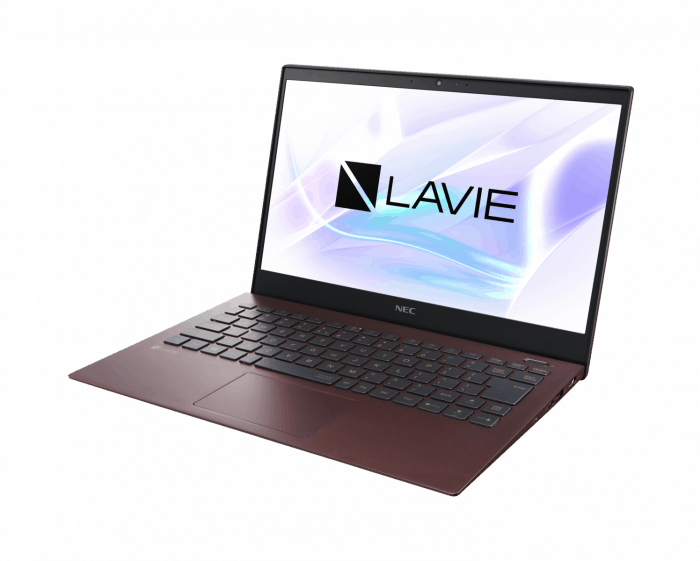
The Lavie Pro Mobile feels like a premium laptop that tries to juggle performance, travel-friendliness, and overall build quality in one kind of neat package, for pros and enthusiasts too, you know. It’s developed by NEC and then marketed under Lenovo and somehow it manages to stitch together top tier components with a neat design, so the computing experience stays flexible. In this review we’ll kind of pull it apart, look at the design build quality, display, raw performance, battery endurance, connectivity, and a few other key bits so you get a solid idea of what the Lavie Pro Mobile is really bringing.
Design and Build Quality
Aesthetic Appeal
The Lavie Pro Mobile is, honestly, an embodiment of elegance and restrained style. It has a clean , smooth look and it ships with a matte finish that gives off a very business like vibe. The whole thing is slim too, around 16.5mm thick, and the chassis is pretty light, about 1.85 pounds (0.84 kg) so it’s easy to move around without thinking too much. Even the Lavie branding on the lid looks understated, like a quiet detail, not that loud kind of flashy.
Build Materials
On the inside it’s put together with a magnesium lithium alloy and that combination makes the chassis feel solid but not all that heavy. Or at least that’s the intent, durability without making your bag turn into a whole gym session. The hinge too is made with a robust mechanism, it opens and closes smoothly , but it still feels firm enough so you don’t end up thinking about wobble. All together you just get this sense of careful workmanship, like someone really did pay attention and not just slapped it together.
Ergonomics
Ergonomics wise the laptop aims for comfort first. The edges are rounded so there’s less chance of rubbing or pressure during longer sessions. The matte surface also helps with fingerprints and smudges , so it stays looking decent instead of quickly turning into a smudgy mess. Plus the weight distribution feels balanced, meaning it sits comfortably in hand whether you’re hauling it across the office, or tossing it in a backpack for a trip, it just… works.
Display Quality
Technical Specifications
The Lavie Pro Mobile has a 13.3-inch Full HD display, resolution comes in at 1920 x 1080 on an IPS panel. Honestly this kind of resolution gives you a pretty solid middle ground, between sharpness and battery life , not too heavy, not too soft either. It also covers 100% sRGB color gamut which helps when you’re doing color-sensitive work, like photo retouching, or layout work for graphic design.
Visual Experience
This IPS setup gives wide viewing angles, so colors stay consistent and the brightness doesn’t suddenly “wash out” even if you look from the side or at a slight angle. There’s an anti-glare coating too, so reflections are reduced which is kinda helpful when you’re working in strong light. In terms of brightness it’s decent for outside use, peak brightness is around 300 nits, so it’s not completely useless in daylight.
The colors feel lively and well saturated, so when you watch videos, edit images, or just scroll around the web, the overall visual experience stays rich. Text is sharp and easy to read, that overall readability really stands out compared to softer panels.
Performance
Processor and Memory
The Lavie Pro Mobile basically rides on Intel’s 11th Generation Core i7 chip, more exact, the i7-1165G7. It is a quad core setup with Hyper-Threading, so multitasking tends to feel fairly smooth even when you’re switching around a lot. For heavier programs, it should still manage things in a steadier manner, not like it gives up quickly. And with 16GB of LPDDR4x memory too, the whole machine can juggle several apps at once, with no real lag, or at least, no noticeable slowdown.
Storage
On storage, the Lavie Pro Mobile comes with a 512GB NVMe SSD installed. This kind of storage keeps read and write speeds pretty quick, so boot time and app launching get noticeably shorter. The total 512GB is also roomy enough for most people, yet if someone wants more space, they can always rely on external solutions, like additional drives.
Graphics
For graphics, the integrated Intel Iris Xe graphics deliver a clear step up compared with earlier generations. It’s not really built for heavy gaming or demanding 3D rendering, but the Iris Xe is still more than capable for light gaming, quick video editing and other visually oriented tasks.
Real-world Performance
In real-world day to day use, the Lavie Pro Mobile handles everyday routines with ease. For example when you’re juggling big spreadsheets, tweaking high-resolution photos, or streaming 4K video, the whole experience stays smooth and consistent. Benchmark outcomes line up with that too, the device scores well in productivity runs plus creative style application testing.
Battery Life
Longevity
Battery life matters a lot for a portable computer, and the Lavie Pro Mobile does well here. It includes a 49Wh battery, and when that is paired with the efficient components, you get strong endurance. In normal usage , like web browsing , working on documents, or watching media, the laptop can typically last around 10-12 hours per single charge.
Charging Speed
Fast charging is another highlight, honestly, with the Lavie Pro Mobile able to jump to up to 80% charge in about an hour. It’s pretty useful, especially when someone needs a quick burst of power between meetings, or when you’re moving around during travel, and time is a bit tight.
Keyboard and Trackpad
Typing Experience
Typing on the Lavie Pro Mobile feels , kind of, genuinely satisfying. Even with that slim profile, the keys give a decent travel and a solid tactile response. The layout is roomy too , the keys are nicely sized, and the spacing is right there which lowers the odds of annoying typos, or so it feels. The backlit feature is also helpful. Like if you’re working at night or in darker environments you can still see what you’re doing, without squinting too much, it kinda helps.
Trackpad
The trackpad is big and reacts fast, and it supports Windows Precision drivers. That means scrolling and pointer control feel smooth, plus multi-touch gestures like pinch-to-zoom and three-finger swipes tend to work exactly as expected . The surface is smooth so it has this calm, pleasant touch, not sticky , not rough.
Connectivity and Ports
Port Selection
The Lavie Pro Mobile comes with a decent range of ports, considering how thin it is. You’ll find
2 x USB Type-C (Thunderbolt 4): they do quick data transfer, power delivery, and video output too so it feels really flexible for different peripherals.
1 x USB 3.1 Type-A, for common USB accessories, so it works pretty conveniently.
1 x HDMI, for linking up an external monitor or even a projector.
3.5mm Audio Jack, for headsets , headphones, and also microphones.
Yeah so overall, for most people this is probably enough, but if you regularly plug in lots of outside devices at the same time, you may still end up wanting a USB-C hub, or even a full docking station for the whole routine.
Wireless Connectivity
The laptop includes Wi-Fi 6, so you get fast and stable wireless internet. Bluetooth 5.1 is also there, and that helps keep a dependable connection for wireless peripherals, like mice , keyboards, and headphones.
Audio Quality
Speakers
The Lavie Pro Mobile features stereo speakers tuned by Dolby Audio. The speakers produce clear and balanced sound, making them suitable for media consumption and video calls. While the bass is understandably limited due to the laptop’s slim profile, the overall audio quality is satisfactory for a laptop of this size.
Microphone and Webcam
The built-in microphone works well during video calls, giving pretty clear audio delivery. The 720p webcam is fine for video calls, even if it does not have that crisp high definition appearance, you usually see on the more premium laptop models. That said it has a physical privacy shutter, so anyone who is nervous about snooping, or just unwanted access, gets an extra kind of reassurance.
Software and User Experience
Operating System
The Lavie Pro Mobile runs Windows 10 Pro, and it brings solid security features plus advanced administration tools that tend to help business users the most. The Pro version includes BitLocker for protecting files through encryption , Remote Desktop so you can reach your computer from anywhere, and Hyper-V for creating and running virtual machines.
Pre-installed Software
The laptop also arrives with low amounts of bloatware, which is honestly a strong point. You get practical utilities like Lenovo Vantage , which helps with system updates, hardware diagnostics, and battery management. People will likely like the cleaner software ecosystem, since it supports maximum storage availability and steady performance.
Security Features
Biometric Security
The Lavie Pro Mobile has a fingerprint reader mixed right into the power button, it also supports Windows Hello, so you get quick and protected sign-ins. This biometric way of confirming your identity gives extra security, while still keeping things easy.
TPM chip
The laptop comes with a Trusted Platform Module, usually just called a TPM chip, and it boosts security by encrypting sensitive info. That can be especially useful for business folks who deal with confidential data , or things they really do not want exposed.
Thermal Management
Cooling System
Even though the Lavie Pro Mobile is pretty slim, it still manages an efficient cooling system. The laptop uses a kind of blend of heat pipes together with a fan, so the hot air can be moved out in a steady way. When you are doing everyday tasks it stays fairly cool , and the sound stays on the quiet side. Then, when you push it with heavier work, the temps remain in a comfortable band. The fan does get louder, of course, but it stays audible rather than annoying or distracting.
User Experience
Everyday Use
The Lavie Pro Mobile excels in everyday use scenarios. Its lightweight design makes it easy to carry around, and the high-resolution display enhances productivity and entertainment. The combination of a comfortable keyboard, responsive trackpad, and robust performance ensures a pleasant user experience.
Professional Use
For professionals, the Lavie Pro Mobile bring reliability and solid performance, especially when you’re doing those more demanding tasks. Its security features, together with the Intel Core i7 processor power and the roomy RAM amount, make it a strong pick for business folks who need a dependable work machine. It’s kind of designed for people who can’t afford lag, or random interruptions, and want things to stay steady.
Comparisons with Competitors
Dell XPS 13
The Dell XPS 13 is one of the closest competitors, to the Lavie Pro Mobile. Both machines look pretty polished ,with a premium build quality, vivid high resolution displays ,and in general solid speed . Still, the Lavie Pro Mobile feels a bit more on the lighter side, so it tends to be easier for carrying around, on the go. The XPS 13 on the other hand, sometimes comes with a higher resolution 4K display option, and that small detail can become a real hook for people who mostly care about raw screen quality.
MacBook Air (M1)
The MacBook Air with the M1 chip brings impressive performance and battery life, and in a bunch of scenarios it can even outlast the Lavie Pro Mobile when you mean endurance. But the Lavie Pro Mobile offers more flexibility through its port lineup, plus it runs Windows which is a big deal for users who prefer Windows or, who genuinely have to have it for job related needs.
HP Spectre x360
The HP Spectre x360 is well known for its convertible style, meaning you can switch between laptop mode and a tablet-like setup. That versatility is honestly appealing. But the Lavie Pro Mobile, because it stays lightweight and keeps a more straightforward build, is often the better fit for people who prioritize portability and simplicity, instead of the two-in-one convertible form factor.
Conclusion
In conclusion, the Lavie Pro Mobile is kind of a well-rounded ultrabook, it does a lot of what it says, especially in performance, portability, and build quality. The sleek design , the guts that feel powerful inside, plus the long battery life, all together makes it an easy pick for lots of different people from business professionals to students. Of course, there are a couple of small improvements you could wish for, but the overall bundle is still very compelling, so the Lavie Pro Mobile ends up being a solid option in the premium ultrabook space. If you want a dependable work machine, or maybe a handy travel buddy for those days on the move, the Lavie Pro Mobile is likely to impress you, it really brings that mix of style with substance.
Related Posts

Tech Reviewer & Product Analyst
Định Bia has spent over 10 years testing consumer electronics with a focus on smart technology. He work as a product advisor at Biareview where he helped customers find the right devices for their needs. He personally tests every product featured on this site using a consistent evaluation framework covering quality, durability, and value. All reviews are based on experience, not influenced by the manufacturer.