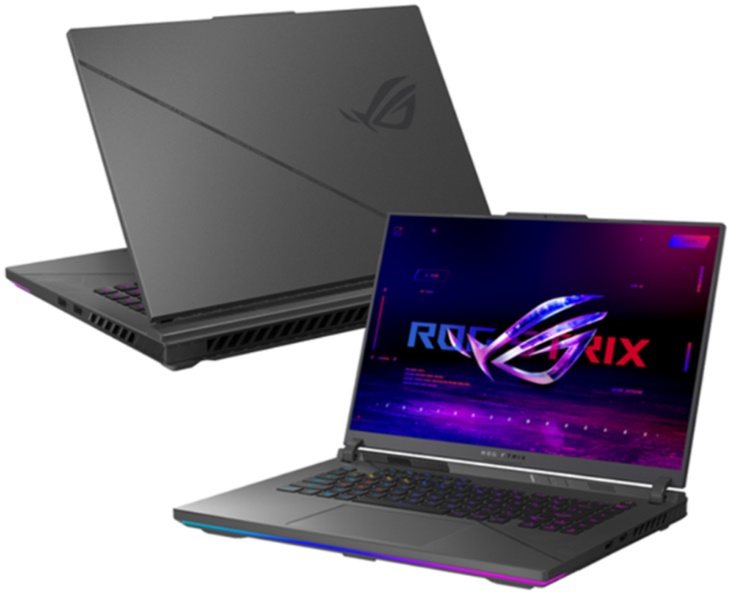
Let me start with the screen, because that’s what ASUS wants you to look at. The refresh rate went from 240Hz to 300Hz this year, on a 16-inch 2.5K panel (2,560 x 1,600, 16:10) with a 3ms response time. Whether your eyes can tell 240 from 300 is a separate argument. What I can say is that the rest of the panel is good too: 100% DCI-P3, 500 nits, G-Sync, an anti-glare coating, and Pantone Validation. You could edit photos on it and not feel like you picked the wrong laptop.
The rest of the G16 is what you’d expect. The design is carried over from last generation, now in “Eclipse Gray.” It weighs about 2.50 kg and measures 35.4 x 26.4 x 2.26–3.04 cm. It runs Windows 11 Home and has a 1080p webcam, enough for class or a call. The keyboard is a 4-zone RGB chiclet with a Copilot key, the speakers use Dolby Atmos and Smart Amp, and there’s AI noise cancellation for your mic. Headphone output is Hi-Res Audio certified.
Ports: Wi-Fi 6E, Bluetooth 5.3, RJ45 LAN, two USB4 Type-C (both do DisplayPort and G-Sync, one also does Power Delivery), and two USB 3.2 Gen 2 Type-A. The battery is 90Wh and the charger is 280W. You also get firmware TPM and a BIOS password.
If you want a quiet, plain laptop, look elsewhere. This one is for people who want power and don’t mind it looking like a gaming machine.
Specs
Inside is a Ryzen 9 8940HX (16 cores, 32 threads, up to 5.3 GHz) and an RTX 5060 with 8GB of GDDR7 at up to 115W. My take: that’s enough for modern games at Full HD or 2K, as long as you’re willing to touch the settings.
Component | Specifications |
| Processor (CPU) | AMD Ryzen 9 8940HX (16 cores, 32 threads, max clock speed 5.3 GHz) |
| Graphics card (GPU) | NVIDIA GeForce RTX 5060 8GB GDDR7 (TGP 115W max) |
| RAM | 16 GB DDR5-5200 (1 additional SO-DIMM slot available; upgradeable up to 64GB) |
| Storage (SSD) | 512GB M.2 NVMe Gen 4.0 SSD (1 additional M.2 NVMe slot available for expansion) |
| Display | 16-inch, 2.5K (2560 x 1600 pixels), IPS LCD, 300Hz, 3ms, 100% DCI-P3, 500 nits |
| Wireless connectivity | Intel Wi-Fi 6E, Bluetooth 5.3 |
| Battery and charging | Adapter 280W, 90Wh |
| Dimensions and weight | 35.4 x 26.4 x 2.26 – 3.04 cm, 2.50 Kg |
| Operating system | Windows 11 Home |
The RAM and SSD are the weak spots on paper. 16GB and 512GB are fine on day one, but both will feel small sooner than you’d like. At least each has a free slot.
Performance
CPU. The 8940HX peaks at 5,340 MHz with a rated draw of 139W, and I was curious how it would score. Here’s what I got:
- Cinebench 2024: 111 single-core, 1,470 multi-core
- Cinebench 2026: 445 single-core, 5,878 multi-core
- Geekbench 7: 2,357 single-core, 13,103 multi-core
Strong multi-core numbers. Compiling, rendering, data work, a dozen things open at once: no problem. If all you do is game with Chrome and Discord on the side, you’re paying for more CPU than you’ll use. That’s fine, but worth knowing.
GPU. The 5060 Laptop scored 12,582 in Time Spy, 6,264 in Time Spy Extreme, 12,603 in Steel Nomad Light, 2,777 in Steel Nomad, 3,023 in Speedway, and 71,549 in Night Raid. Geekbench 6 Compute: 116,350. Full HD and 2K are both comfortable. Heavy AAA games with ray tracing are where you’ll lean on DLSS and trim a few settings.
SSD. 3DMark Storage gave the 512GB PCIe 4.0 drive 2,359 points and 408 MB/s average. Don’t read that 408 as the drive’s top speed. It’s a composite score, not peak sequential read or write. My real complaint is capacity. A few AAA installs and some video files and it’s full. The specs list a second M.2 slot, but double-check your exact model before buying a drive.
Games
I started at Full HD. Black Myth: Wukong on Low, with ray tracing and motion blur off and DLSS at 65, ran at 242 FPS. Low settings are doing a lot of that work, I know. Even so, it shows how much room the 5060 has if you give up some visuals. CS2 hit 212 FPS, and with the 300Hz screen and 3ms response time, that’s the kind of setup you’d want for competitive play.
At 2K, League of Legends reached 209 FPS, enough to actually use the 300Hz panel even in a messy team fight. Black Myth: Wukong on High with ray tracing on High, motion blur off, and DLSS at 65% scaling got 166 FPS. Obviously far below 242, but the settings are much heavier, and 166 is still a good result. Delta Force at 2K on High averaged 158 FPS. I trust numbers like this more than synthetic scores, because this is what you’d actually be playing.
Cyberpunk 2077 shows the cost of ray tracing most clearly. At 2K on High, ray tracing off, DLSS on Balanced, it ran at 259 FPS. Turn ray tracing on at Medium and it dropped to 205. On an 8GB card, I’d treat DLSS as mandatory, not optional.
It’s true that AAA games at 2K with this GPU will run faster if you replace the CPU. At this resolution and settings, the CPU has much more impact than the GPU. There’s a benefit to going with the Ryzen, but you’ll eventually run into a GPU bottleneck.
Work and creative use
Outside games, the G16 does office work and coding without trouble. Large spreadsheets, IDEs, and web or app development all run fine. If you use virtual machines or Docker, or just keep a lot open, go to 32GB of RAM.
The 2.5K display covers 100% of DCI-P3 and is Pantone validated, making it an excellent choice for photo and video editing and design. Having an RTX 5060 will speed up all creative software, and it is a good idea to add more RAM and a larger SSD for higher resolution video and more demanding 3D workloads.
Battery
90Wh, 4-cell, and in my test it lasted 163 minutes (2 hours 43 minutes). With this CPU and a 300Hz screen I wasn’t expecting miracles. It’s enough for a short stretch away from an outlet. For anything longer, bring the charger.
Charging over USB4 Type-C with Power Delivery works, which is handy for travel and light work. It probably won’t keep up during gaming though, so use the 280W charger in the box when you want full power.
Is it worth buying?
I think so. The Ryzen 9 8940HX, the RTX 5060 with 8GB of GDDR7, and the 300Hz 2.5K screen are a good combination. Games run well at Full HD and 2K once you tune the settings, and it’s just as good for coding and content creation. Just budget for more RAM and storage, because that’s the first thing you’ll want to change.
ASUS ROG Strix G16 (2025) Gaming Laptop, 16” FHD+ 16:10 165Hz/3ms, NVIDIA® GeForce RTX™ 5060, Intel® Core™ i7 Processor 14650HX, 16GB DDR5, 1TB Gen 4 SSD, Wi-Fi 7, Windows 11 Home, G615JMR-AS74: Check Availability on Amazon
ASUS ROG Strix G16 (2026) Gaming Laptop, 16” ROG Nebula HDR 2.5K 240Hz/3ms, Intel Core Ultra 9 290HX Plus, NVIDIA GeForce RTX 5080, 32GB DDR5, 1TB PCIe Gen4 SSD, Wi-Fi 7, Win11 Home, G615LW-AB96: Check Availability on Amazon
ASUS ROG Strix G16 Gaming Laptop,AMD Ryzen 9 9955HX,NVIDIA GeForce RTX 5060: Check Availability on Amazon
ASUS ROG Strix G16 5070 300Hz Gaming Laptop, AMD Ryzen 9 9955HX, GeForce RTX 5070, 16″ QHD+ 2.5K 300Hz IPS, 32GB DDR5, 1TB SSD, 4-Zone RGB Backlit KB, HDMI, Copilot, Windows 11 Home, w/Bundle: Check Availability on Amazon
Related Posts