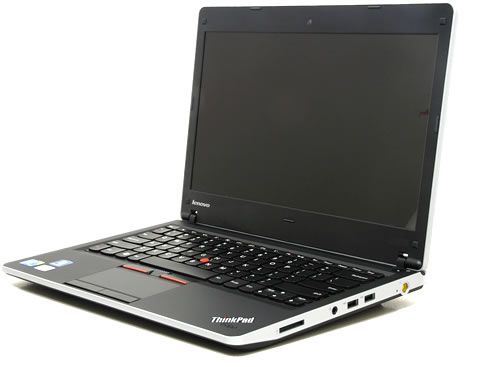
Lenovo ThinkPad Edge 13 is a new Lenovo ThinkPad lineup and produced. Inheriting the reputation of the entrepreneurial laptops once owned by IBM, the ThinkPad Edge seems to be geared towards young, dynamic, mobile users. The machine is sold in three colors: black, red and black gloss.
Angles are also rounded with silver edges rather than angles like the traditional ThinkPad line. Edge is decorated with two ThinkPad logos on both the top and the inside. In it, the dot in the letter I becomes a power light.
The ThinkPad Edge is 33.2 x 22.8 x 3 cm in detail and weighs in at 1.7kg with a 6-cell battery that makes it easy to carry around on long trips.
Edge owns a lot of ports, the left edge includes Kenshington lock, VGA, HDMI, LAN, USB. Right edge is the power connector, 2 USB ports, headphone jack and 5 types of memory card reader. Unfortunately, this model does not own eSATA high speed data exchange ports. In addition, optical drive is not integrated to reduce the weight and size of the machine will cause a lot of inconvenience to the user.
In the meantime, the front edge does not have a built-in connector but swims down to make room for the speaker system below. Due to the small size to prioritize the “mobile” and convenient to hear only in the room size is not large, less than 20 m2. However, the sound quality of the speakers is quite good, the sound is clear and the bass is slightly clear and the speakers do not play stereo.
Unlike the traditional ThinkPads, Edge has a built-in chiclet keyboard with curved styling. But this style of design has made new users hard to get used to. When manipulation on the keyboard feels “embarrassed” hands and press the keys are not standard. However, bounce and sensitivity are good. Another difference in this keyboard is Lenovo has boldly change the button function F1, F2, F3 …. into the secondary button (ie want to use these keys the user must simultaneously press both Fn function key in the bottom left corner of the keyboard).
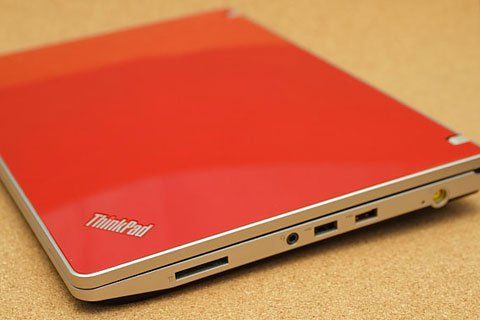
In addition, the machine also owns multi-touch mouse pad. Throughout the test, the sensitivity of the touchpad is very good, no fingerprints, swipe operation to zoom accurately only one thing is regrettable that the two mouse keys slightly deep subsidence when used.
The ThinkPad Edge has a 13.3-inch, 1366-by-135-pixel screen that displays a very fresh and crisp color. When testing high definition video, HD and Full HD can be tracked from the viewing angle, even from 90 degrees. This can be considered as the advantage of the machine compared to other models of screen laptops often narrow view. However, when used in the office with neon lights, the screen is still quite annoying balloon, the only way to overcome the problem is to maximize the screen brightness to prevent glare.
The new Lenovo ThinkVantage Tools management tool comes with a number of useful features, including password management, hardware driver updates, battery management, and PC performance (displays the remaining usage time or the time it will charge the battery when the power cord is plugged in). Backup and restore data, manage and protect the sock.
Performance
Intel Core i5-520M, 2.4GHz base clock, paired with 4GB of RAM. That’s enough to run browsers, Office, and email without friction, and it handles light multitasking reasonably well. Push it toward anything heavier and you’ll notice it slow down, but that’s not really what this machine is for.
The 320GB hard drive gives you room to work with, though it’s a traditional spinning disk — expect slower boot and load times than you’d get from an SSD. Storage-wise, fine. Speed-wise, dated even for its time.
Graphics are integrated Intel HD, which covers video playback and casual photo editing but won’t do much for gaming or anything graphically demanding. If that’s not your use case, it’s a non-issue.
Battery
6-cell, 52Wh battery, rated for 4 to 6 hours of typical use. That’s on the shorter side — enough for a short trip or a light workday, but not something you’d want to rely on for a full day away from an outlet. Lenovo’s power management tools help stretch it a bit, but they’re not going to make up the difference.
Ports
Two USB 2.0, one USB 3.0, HDMI, VGA, SD card reader, Ethernet, and a headphone/mic combo jack. Solid spread for the era — the VGA port especially, since a lot of office equipment still hadn’t moved to HDMI. Wi-Fi is 802.11b/g/n with Bluetooth 2.1, nothing remarkable but consistent.
Keyboard and Touchpad
This is where the ThinkPad heritage shows. Good key spacing, solid travel, a comfortable typing feel that holds up over long sessions, plus a full numeric keypad. No backlighting, unfortunately, so low-light typing means squinting. The touchpad handles multi-touch gestures well and sticks with physical click buttons rather than an integrated clicker — a small thing, but ThinkPad users tend to appreciate it.
Display
13.3 inches, 1366×768. Modest even by the standards of its own time, but serviceable for browsing, documents, and casual video. Speakers are fine for background listening; anyone who actually cares about sound will want headphones.
Business Features
This is really where the Edge 13 earns its ThinkPad badge. Windows 7 Professional comes standard, and Lenovo bundles in its ThinkVantage tools for system management and security — the kind of thing IT departments tend to appreciate even if the average user never opens them. Combined with the solid build and portability, it’s a laptop that feels built for a business environment rather than adapted for one.
Bottom Line
The ThinkPad Edge 13 doesn’t push any boundaries on display quality or graphics, and the battery life won’t win any awards. What it does well is the everyday stuff: comfortable typing, solid build, useful ports, and business tools that actually matter to the people who’ll be using this in an office. If you want a dependable, portable machine for standard work tasks, this is a reasonable pick — just don’t expect it to multitask past its limits.
Related Posts

Tech Reviewer & Product Analyst
Định Bia has spent over 10 years testing consumer electronics with a focus on smart technology. He work as a product advisor at Biareview where he helped customers find the right devices for their needs. He personally tests every product featured on this site using a consistent evaluation framework covering quality, durability, and value. All reviews are based on experience, not influenced by the manufacturer.