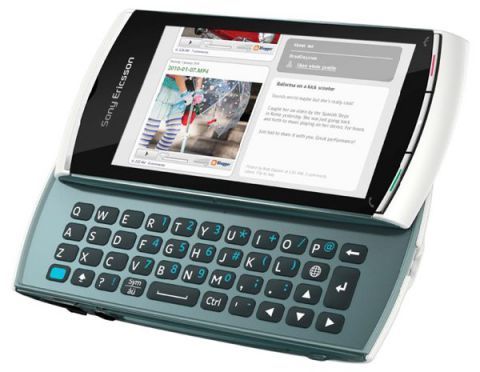
Samsung Omnia HD i8910 was the first one that kind of changed the game, mostly because it supports 720p video recording. Sony Ericsson later jumped on it too with the Sony Ericsson Vivaz, which offers similar capabilities, i mean basically the same direction.
The most notable features of Vivaz, yeah…
It has a 3.2 inch screen with 16 million colors, plus a resistive touch panel, resolution at 640 x 360 pixels.
There’s an 8 Megapixel camera too, with autofocus and LED, face recognition, smile detection, focus controls, and geotagging.
Video-wise it records 720p HD at 24 frames per second, so it looks quite smooth for its time.
It runs Symbian OS 9.4, using the S60 5th Edition interface, with a customizable Home screen, and overall it leans hard toward entertainment, kind of oriented that way.
Hardware includes a 720p processor and dedicated PowerVR SGX graphics.
Connectivity is solid, it supports 3G with HSDPA 10.2 Mbps and HSUPA 2 Mbps, plus Wi-Fi, and GPS with A-GPS.
For storage and extras you get a MicroSD card slot, a swivel screen, stereo FM, TV-out, and a web browser that also has full Flash support.
Design and Build Quality
The design of the Sony Ericsson Vivaz was, honestly, one of the most distinguishing things about it. At a time when a lot of smartphones were moving toward more utilitarian, boxy shapes, the Vivaz came with a more organic and ergonomic form. It uses a curved back and rounded edges, which makes it comfortable to hold, also easier to operate with one hand. It’s also relatively light, weighing around 97 grams which helps it feel more portable during daily use.
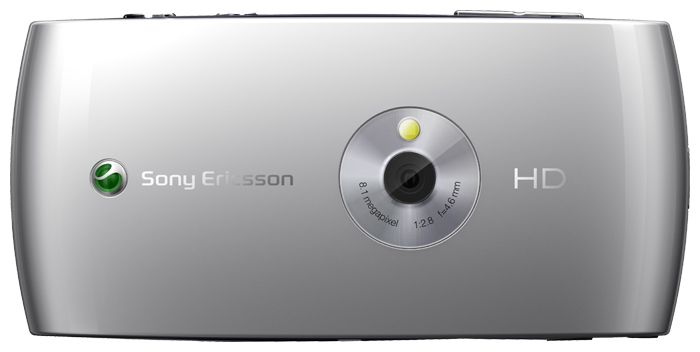
For build quality, the Vivaz feels solid, it mixes plastic and metal in a way that gives a more premium vibe, even though it stays lightweight. The front is basically taken over by the 3.2-inch resistive touchscreen, while the back has a smooth glossy finish and a clearly visible camera lens. The lens area sits slightly raised, which helps protect it from scratches if you set the phone down on a flat surface, or on rougher tables and such.
One of the design parts that kind of set the Vivaz apart, was that you could pick from a few different colors. People could choose Moon Silver, Cosmic Black, Galaxy Blue, and Venus Ruby. In a way these color options made it easier for users to match the handset to their personal style , which was also pretty unique back then since most smartphones were stuck with only one or two shades, you know.
About the physical buttons on the Sony Ericsson Vivaz, they were kept pretty minimal, pretty much in line with what design trends looked like in that period. There was a dedicated camera shutter button on the right side , and it sort of highlighted that the phone was leaning toward multimedia and photography. The volume rocker sat on the same right side, just up above the camera button, and it also acted as a zoom control when the camera was open. On the left side of the device there was a micro-USB port for charging and data transfer , plus a 3.5 mm headphone jack up at the top.
Overall the design of the Sony Ericsson Vivaz got a good response, with a lot of users liking its sleek, compact size and the care taken with the build. It was the kind of device that looked different in a crowded market , giving both flair and substance.
Display
The Sony Ericsson Vivaz came with a 3.2-inch TFT resistive touchscreen, with a resolution of 360 x 640 pixels. That worked out to around 229 pixels per inch (ppi). Even if this resolution wasn’t quite as sharp as some competing phones from the time, it was still good enough for most things, and it gave a decent level of clarity for text, images, and videos.
The resistive touch screen technology used in the Vivaz was kinda a mixed bag, honestly. Like yes it made possible to use a stylus or even your fingernail for more precise input, which could be helpful in certain cases. But at the same time, resistive screens are usually less responsive, and also less “quick” to pick up small finger touches, compared to capacitive touchscreens, which were becoming more common around that time. So in the end, some users would notice trouble with touch accuracy, and responsiveness too, especially when they tried multi-touch things, like pinch to zoom, you know those gestures.
Now, for color reproduction, the Vivaz display could put out vibrant colors, with pretty decent contrast. The viewing angles were ok, though, not super broad like on higher end phones that had more advanced display setups. It was also fairly bright, which helped it work outdoors, but direct sunlight still could be annoying because of reflections and glare, basically it wasn’t fully protected from that.
A standout bit, was the ability to handle widescreen video playback. The 16:9 aspect ratio was nice for watching videos in landscape mode, and that fit well with the Vivaz emphasis on multimedia. Sure the screen size wasn’t big by modern standards, still it was enough for media on the go, and the resolution felt sufficient for a satisfying viewing experience, even if you were paying attention.
Overall, the display on the Sony Ericsson Vivaz was competent, but not exactly flawless. The resistive touchscreen part is the main weak point, mostly because capacitive screens were getting to be the norm. Still, the color quality and that widescreen aspect ratio gave it some real value for multimedia consumption, even with the compromises, you could feel it.
Camera
Honestly the camera was pretty much the brightest point on the Sony Ericsson Vivaz, and yeah it was one of those main reasons people bought it. The Vivaz came with an 8.1 megapixel rear camera, which sounded great at the time, especially for a smartphone. But the real thing that made it stand out was that it could film in high definition, 720p, so it was kind of among the earlier phones to bring that video capability, straight out of the box.
With that 8.1-megapixel setup , you could get fairly detailed photos that looked sharp, even when the light wasn’t so friendly. The autofocus worked fast and fairly precise too, and there was touch focus as well, so you could tap the display to aim the focus on whatever part you cared about. On top of that it included an LED flash, which made a noticeable difference in darker scenes, even if it wasn’t some miracle solution.
Another thing worth mentioning is that the Vivaz camera didn’t feel barebones. The camera app had a bunch of shooting options , including face detection, smile detection, and geotagging, which were kind of advanced back then compared with other phones. There was also continuous autofocus for video, so when a person moved around, the focus tried to stay with them while you were recording.
The HD video recording ability on the Vivaz was kind of a show stealer, it felt almost unfair. It could capture 720p video running at 24 frames per second, and back in 2010 that was honestly a pretty big deal. Most of the time the video looked nice, with solid levels of detail and motion that stayed smooth , but it still didn’t quite feel like it was keeping up with proper, dedicated video cameras. Also the fact that there was a dedicated camera button on the device made it faster to begin recording, so people could snag those spontaneous moments without too much hassle, which was a pleasant little touch.
On the front there was a VGA camera, and it was mostly meant for video calling , not for selfies in any serious way. The front camera results were pretty basic, though they were still good enough for the job it was set to do. At that time front facing cameras weren’t really on top of most smartphone makers’ priority lists, so the Vivaz’s limited performance there didn’t become some huge problem.
Overall, the camera side of the Sony Ericsson Vivaz was probably one of its better things. The 8.1-megapixel rear camera could produce nice photos, and the ability to do HD video was a major selling point. If you cared about media stuff, multimedia features and all that, then the Vivaz was a pretty tempting choice.
Performance and Hardware
Inside, the Sony Ericsson Vivaz relied on a 720 MHz ARM11 processor, teamed up with 256 MB of RAM. Sure, these numbers may sound modest now, but in that moment they were pretty normal for phones. It also had 75 MB of internal storage, and yes it could be expanded through a microSD card slot, with support for cards up to 32 GB.
On a day to day basis, the Vivaz could handle most things pretty well, no huge hiccups. Stuff like dialing calls, sending texts, and browsing around felt kinda smooth ,and pretty responsive. That said, once you start asking for more, like keeping several apps open at once, or trying to play graphics intensive games, then it can get a bit sluggish and sometimes even freeze ,or go unresponsive, like it’s thinking too hard for a while.
The resistive touchscreen, which was already sort of hinted at earlier, also played a part in these performance problems. Since it doesn’t have a capacitive touchscreen, touch input wasn’t as tight or quick as what people might expect from other phones. For some users that привык to more fluid “tap and drag” interactions, it can feel annoying fast. On top of that, the RAM is relatively low, so multitasking suffers. Switching between applications may take longer , and in some cases apps might have to reload like they were never running in the first place.
A kind of standout hardware piece on the Vivaz is the accelerometer. It helps with automatic rotation, so when you tilt the device the screen turns too. This is especially handy for media playback or gaming, because landscape mode feels more immersive. Still, the rotation itself wasn’t always perfectly smooth or instantly quick the way it is on better equipped devices, and that likely comes down to hardware limitations.
Connectivity wise, the Vivaz supports 3G HSDPA networks, so mobile data can reach speeds up to 7.2 Mbps. It also has Wi-Fi 802.11 b/g, Bluetooth 2.1 with A2DP, plus GPS with A-GPS support. Overall the connectivity options were pretty wide for the period, so you could stay connected, use location based services, and generally not feel boxed in.
One of the downsides of the Vivaz hardware was, kinda, the limited internal storage. With only 75 MB of internal storage available, users were pretty much forced to rely on microSD cards for apps, photos, videos, and other stuff. Sure, the ability to expand storage was a good thing, but that small internal amount could feel like a problem if someone installed a lot of apps or was always downloading media, constantly.
Overall, the performance of the Sony Ericsson Vivaz was fine for most users but it still had its own limits. The hardware could handle everyday tasks, however more demanding activities might make the phone feel like it is struggling. Having expandable storage and a variety of connectivity options was definitely positive, yet the resistive touchscreen and the limited RAM were also noticeable, like you could really feel it.
Software and User Interface
The Sony Ericsson Vivaz ran on the Symbian S60 5th Edition operating system , which was a pretty well known platform back then, especially across Europe and Asia . People often talked about Symbian as being good at efficient use of resources , and sort of relatively speaking low power consumption too , so it matched mobile devices that didn’t have very huge hardware capabilities. Still, by 2010, Symbian was starting to look dated, more and more, particularly once competitors like iOS and Android were pulling ahead fast.
The user interface (UI) of the Sony Ericsson Vivaz was kinda a mix of the usual Symbian S60 feeling, with a few custom tweaks from Sony Ericsson as well. On the home screen you got a customizable layout, with widgets involved, plus shortcuts, and little notification bits. People could basically drop in and rearrange a bunch of items like contacts , quick weather updates, and media player controls, so that the things you use most are closer by. Still , the overall customizing choices felt a bit narrow when compared with what more modern smartphone platforms were doing then.
Using the UI mostly meant working with the resistive touchscreen, which—like I said earlier—wasn’t as slick, or quite as responsive as the capacitive types. Because it was resistive, you typically needed a firmer press, or well , a stylus, and that made the whole movement through the menus feel less natural. Especially if you were already used to a touch panel that reacts instantly. The experience also depended a lot on scrolling and tapping through the menu stacks, which could end up being a little tedious sometimes.
The Vivaz also arrived with a set of pre-loaded applications, like a web browser, an email client, and a media player, plus a bundle of productivity tools, such as calendar entries, notes, and a file manager. The web browser was working, sure, but it wasn’t really fast , or super friendly in the way modern browsers tend to be. It had trouble showing more complicated web pages, and it didn’t really support many of the newer web technologies that were starting to show up more often around that time.
One of the strengths of Symbian was that it had multitasking capabilities, like i t could do multiple things at the same time. People could run different applications simultaneously and then flip between them with the task manager, kinda smoothly most of the time. But, the Vivaz came with limited RAM so when users tried to run too many apps together it could start getting laggy or sometimes even cause app crashes. So yeah the multitasking experience was a bit constrained by the hardware, not as free-flowing as you might hope.
Also, the Vivaz had the PlayNow and TrackID services from Sony Ericsson. PlayNow was basically an online shop, where users could buy and download music, games, and various apps straight to the phone without much hassle. TrackID worked as a music recognition feature, it could identify a song by listening to a short audio sample, and that sort of thing was pretty popular back then. In practice these services brought extra value to the device, especially for folks who were into media, and wanted recognition or downloads right on the handset.
Another big part of the overall software feel was the camera app, which was arguably one of the most developed pieces of the user interface. It was kind of friendly to use and it gave quick access to a bunch of shooting modes, settings, options. The layout was also pretty intuitive so it was easy to swap between photo, video modes, adjust things like white balance, exposure, then reach features like face detection and geotagging. The whole camera app really seemed built to match the Vivaz’s stronger multimedia side.
However, the whole software experience on the Vivaz wasn’t exactly flawless, it had its downsides, kind of like every other phone. The Symbian S60 platform, even if it did the job, started to feel… a bit worn out, compared with the more sleek and modern interfaces that iOS and Android were bringing. And then there was the app ecosystem too, it was slowly fading. Less developers kept building new apps or sending updates, so people using the Vivaz ended up with a smaller, kinda narrower selection of applications than users on the other smartphone platforms.
Also, day to day, things were a little held back by the device performance limitations. You had that resistive touchscreen, a modest processor, and limited RAM all together, and suddenly the UI would feel laggy at times. Especially when you were moving through menus, or bouncing between apps, it just didn’t feel as snappy. It was pretty typical for many Symbian devices back then, because the platform wasn’t really tuned, or optimized, for touch based use the way the competitors were.
Multimedia Capabilities
Multimedia was a big deal for the Sony Ericsson Vivaz, and you could see it in both the hardware and the software side. The Vivaz was made to be a flexible media player, able to manage a wide variety of audio and video types. On the audio front it handled MP3, AAC, and WMA, while the video side covered MP4, H.264, and WMV. With all that format coverage, the Vivaz came across as a solid media gadget, so users could play their music and videos without needing to do endless file conversion chores, before anything worked.
The built in media player app was kind of straightforward, yes, and it felt easy enough to use, with a simple interface that let you wade through your music, and video libraries, make playlists, then just handle the playback without too much fuss. It also had album art plus ID3 tags, which helped with arranging music collections and made the whole thing look more interesting, less like a plain list. The sound or playback quality was decent overall, especially when you used high quality headphones, and having a 3.5mm headphone jack was honestly a nice touch, it meant you could plug in all kinds of audio gear without much thinking.
Video playback is another place where the Vivaz really showed up. That 3.2 inch display, 16:9 aspect ratio, was pretty suited to widescreen video, so the picture didn’t feel cramped or weird. The video player app handled a range of file formats and gave the usual controls, play, pause, fast forward, rewind, that kind of thing. Plus, it supported video streaming over Wi‑Fi and 3G, so you could watch clips from online services, like YouTube, which at the time was a pretty big deal, at least for many people.
And yeah, the camera app, the one mentioned earlier, was a standout. The 8.1 megapixel camera could grab sharp looking still images, and HD video recording was a key reason people wanted it. It was among the early smartphones offering 720p video capture, and it came across as fairly well implemented. The camera software also offered different shooting modes and settings, so you could tweak how you shot photos or video without feeling totally locked in.
In addition to the built-in media player and camera apps, the Vivaz also came with an FM radio that supported RDS . The FM radio app was pretty simple but it worked well enough, so users could tune into their preferred stations, and then save presets for quick access. Having an FM radio was honestly a nice touch for people who liked live broadcasts, especially in places where mobile data is costly or just not available.
Still, there was a drawback to the Vivaz multimedia setup, mostly because of the limited internal storage. It had only 75 MB of internal storage, so users basically had to lean on microSD cards to hold their music, videos , and other media collections . The device did support microSD cards up to 32 GB , but if someone didn’t own a high-capacity memory card the experience could feel a bit constrained. And then there was the resistive touchscreen , which made browsing through media libraries and controlling playback feel less straightforward than on models that used capacitive touchscreens.
Battery Life
The Sony Ericsson Vivaz was powered by a 1200 mAh lithium-ion battery, which was pretty common for smartphones from that era. In practice, the battery performance was generally decent, you could usually stretch it to a full day from a single charge, assuming moderate usage. That meant things like calling, texting, web browsing, listening to music , and snapping photos . For users who mainly relied on the phone for day-to-day basics, the battery felt adequate enough to get through the day without recharging too soon.
However , more intensive usage, especially activities that included the camera use or video playback, could drain the battery a bit faster than people expect . Recording HD video, for instance, was a power-heavy job and could really cut down the battery life. And, streaming video through 3G or Wi‑Fi too , took a fairly notable chunk of power. So users who kept doing these things , might end up needing a re charge before the day is fully done.
The battery itself was user replaceable, and that was kind of the upside, because it meant someone could just carry a second battery for longer sessions or swap it out if the performance started to sag with time. This sort of thing was pretty usual in smartphones back then , but nowadays it’s much less seen, mostly because newer phones often have sealed batteries.
On charging, the Vivaz relied on a micro‑USB port, both for charging and for data transfer. Charging time was fine, with the battery taking about two hours to reach a full charge from empty. It didn’t include fast charging, which was still pretty fresh at the time , yet the overall charging speed was still okay for most users.
The battery life on the Sony Ericsson Vivaz was satisfactory for its era, but it wasn’t exactly a headline strength. It gave enough energy for a full day of normal use, although heavy users could still feel the need to plug in more often. Having a user replaceable battery was a nice practical touch, and it added to the device’s overall usefulness.
Sony Ericsson Unlocked Vivaz U5 U5i (Blue) Unlocked, International Version with No Warranty: Buy it now
Sony Ericsson Vivaz U5a AT&T Phone with Symbian, 8.1 MP Camera, HD Video, Wi-Fi and GPS – U.S. Version – Blue: Buy it now
Sony Ericsson Vivaz U5i Unlocked GSM Smartphone with 8 MP Camera, Symbian OS, Touch Screen, Wi-Fi and GPS–International Version with No Warranty (Silver): Buy it now
Sony Ericsson Vivaz U5a Unlocked Phone with Symbian, 8.1 MP Camera, HD Video, Wi-Fi and GPS – U.S. Version – Blue: Buy it now
Strength
– Nice design and neat
– Many features, high speed connection
– Multiple video capture options
Weak point
– Silky smooth case
– Camera without protective cap
– No video call camera in front
Related Posts


Tech Reviewer & Product Analyst
Định Bia has spent over 10 years testing consumer electronics with a focus on smart technology. He work as a product advisor at Biareview where he helped customers find the right devices for their needs. He personally tests every product featured on this site using a consistent evaluation framework covering quality, durability, and value. All reviews are based on experience, not influenced by the manufacturer.