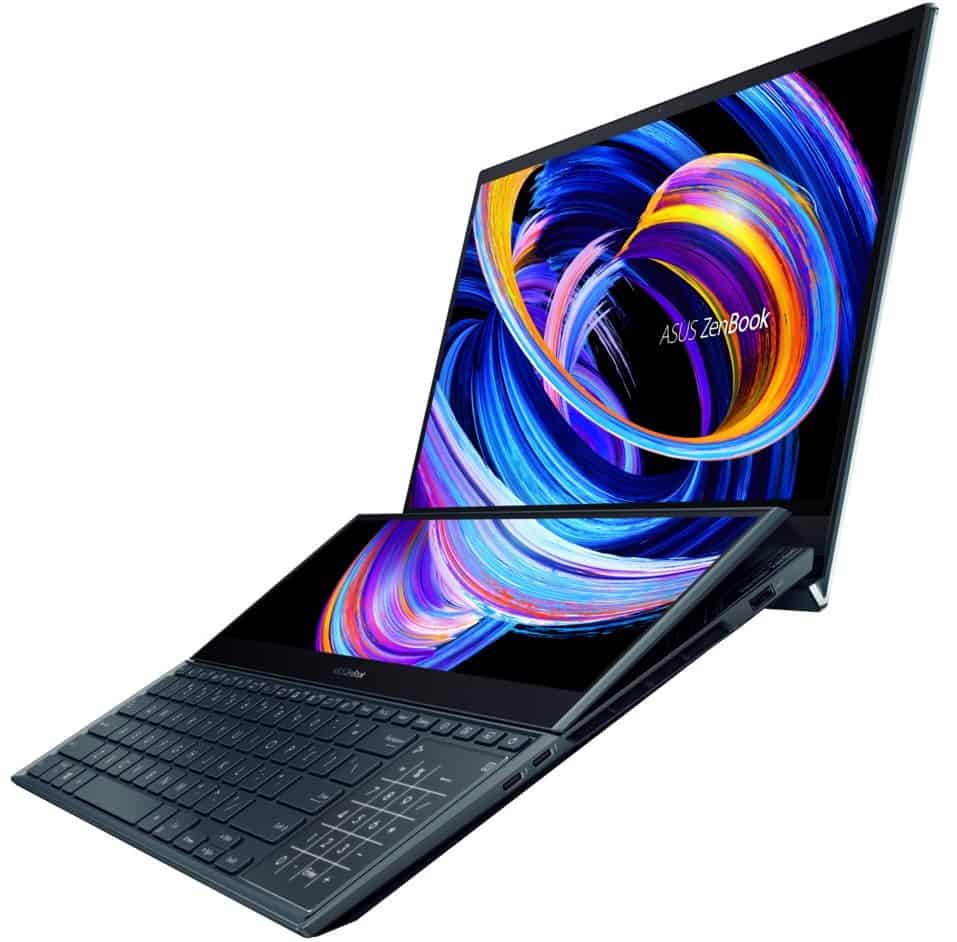
Recently, ASUS annunced the new dual display ZenBook Pro Duo 15 UX582 laptop. Apart from being pushed by the Nvidia RTX 3080 GPU and Intel i9-11900H CPU that succor in power, the laptop comes with an OLED screen that is accompanied by many attractive features for graphic artists and creative content.
Unlike the home-computer segment, OLED screens are relatively more exploited and manufactured in the mobile phone segment. Therefore, content creators can rest easy knowing that when their creations are displayed on another screen, color distortion will not be severe or affect the author’s intention too much. As for creators, the need to produce quality content and images in color would require an OLED.
If sitting in one place with a clunky monitor, mouse, or keyboard border is farthest from your definition of fun, then you need something truly portable, but safe at the same time. So, there is the one: ZenBook Pro Duo 15 ELOD UX582 for real-time high-quality work.
ZenBook Pro Duo 15 OLED display UX582 is made for content creators
After the long discussion on OLED, what makes it good? OLED has now come to be considered the screen technology with maximum characteristics that one might wish for: very high color accuracy and color range, maximum contrast, minimum response time, and last but by no means least, reduced quantity of blue light, assumed to be harmful to the eyes.
The monitor stands at the same level as performance for content creators. The better it is in terms of color, the better impression on the audience will be the actual product. For this very reason, lucky for ZenBook Pro Duo 15, OLED technology fits right in, with high color accuracy of 100 percent DCI-P3 color gamut, and 100 percent sRGB color gamut. Both of these are color spaces very popularly used by today’s content creators, DCI-P3 being more for film production in general, while sRGB stiffly relies on digital domain, that is: Digital Artworks.
ZenBook Pro Duo 15 has two ultra-thin bezel screens. Particularly, the main OLED display is big at 15.6 inches, Delta E < 2 color accuracy, and with color coverage of 100% in three color spaces: sRGB, Adobe RGB, and DCI-P3. The secondary display below is an LCD display of 14 inch, capable of raising itself at 9.5 degrees to an optimum angle of eye contact of the user for visibility. Both have 4K resolution and support a 4096 pressure level stylus for super sensitivity operation.
The idea of having two screens will allow image or video editing because we can place many application windows on the screens or stretch the application window across both screens for easy manipulation.
Moreover, with ZenBook Pro Duo 15 UX582, the secondary screen is also loaded with Control Panel software featuring an array of mathematically fine-tuned keys and knobs. The Control Panel will operate and be compatible with four software: Ps, LrC, Pr, and Ae, and be able to customize the interface that defines your experience based upon the application you are using.
It is very fast ZenBook Pro Duo 15 OLED UX582, requiring cool hand-on graphics-needs.
The configuration of the ZenBook Pro Duo 15 OLED UX582 is maybe the most powerful one among the laptop options you can get today, if it has the Intel Core i9-11900H CPU (8 cores,16 threads) and a boost clock around 4.90GHz. An Nvidia RTX 3080 GPU, 32GB of RAM and a 1TB SSD round up the overall specs.
Such a configuration puts ZenBook Pro Duo 15 OLED in the same league with amateurs to advanced media, including needs related to movie processing effects, or images Complex 3D.
ZenBook Pro Duo 15 OLED UX582 and optimized design for content…
In addition to being the screen and performance, graphic designers or content creators will consider the design factors that each company places into their laptop products. It seems that knowing this, ASUS has optimized the design of the UX582 to ensure as comfortable an experience as possible with this laptop.
This is one example: diverse ports, including Thunderbolt 4 USB Type A, a memory card reader, and wifi-6 wireless standard technology, letting users connect as many devices as they want while eliminating the use of port and reducing the cumbersome process of transferring files and editing photos and videos.
Its UX582 design of the keyboard captures “quintessence” of the previous duo laptops with the left letter key number pad incorporated into the touchpad. This design brings benefits to the user and also renders the design of the laptop look more compact and elegant.
And like the keyboard, Zenbook Pro Duo 15 OLED’s design also embraces the design language of its predecessors – it exudes bunker and futuristic feel. Add to the fact, that all three sides of the laptop are made of metal to create a luxurious and sturdy look. Well, the weight of ZenBook Pro Duo 15 OLED is 2.4 kg, this much can be said to be neither heavy nor light. General relative, those who have to move a lot will find it appropriate.
ASUS ZenBook Pro Duo 15 OLED UX582 Laptop, 15.6” OLED 4K UHD Touch Display, Intel Core i7-10870H, 16GB RAM, 1TB SSD, GeForce RTX 3070, ScreenPad Plus, Windows 10 Pro, Celestial Blue, UX582LR-XS74T: Buy it now
ASUS ZenBook Pro Duo 15 OLED UX582 Laptop, 15.6” 4K Touch Display, Intel Core i9-12900H, 32GB RAM, 1TB SSD, GeForce RTX 3070 Ti, ScreenPad Plus, Windows 11 Pro, Celestial Blue, UX582ZW-XB99T: Buy it now
ASUS ZenBook Pro Duo 15 OLED UX582 Laptop, 15.6 inch OLED UHD Touch Display, Intel Core i9-11900H, 32GB RAM, 1TB SSD, GeForce RTX 3060, ScreenPad, Windows 11 Pro, Celestial Blue, UX582HM-XH96T: Buy it now
ASUS ZenBook Pro Duo 15 OLED UX582 Laptop, 15.6” OLED 4K Touch Display, Intel Core i9-12900H, 32GB, 1TB, GeForce RTX 3060 Laptop GPU, ScreenPad Plus, Windows 11 Pro, Celestial Blue, UX582ZM-XS99T: Buy it now
ASUS ZenBook Pro Duo 15 OLED UX582 Laptop, 15.6” OLED 4K UHD Touch Display, Intel Core i7-10870H, Windows 10 Pro, Celestial Blue with Microsoft 365 Family | 15-Month Subscription | PC/Mac Download: Buy it now
ASUS ZenBook Pro Duo 15 OLED UX582 Laptop, 15.6”, Celestial Blue, UX582ZM-AS76T & TUF Dash 15 (2022) Gaming Laptop, 15.6” 144Hz FHD Display, Intel Core i7-12650H: Buy it now
Performance
Under the skin, the hardware in the Asus ZenBook Pro Duo 15 OLED UX582 is powerful enough that it really can “breathe” performance, without any kind of compromise. You get Intel’s 10th and 11th Gen Core i7 and Core i9 processors, going as far as the Intel Core i9-10980HK. In practice, these chips can take on heavy duties like video editing, 3D rendering, and software building without really breaking a sweat.
On top of that the RAM goes up to 32GB of DDR4 memory, which helps keep multitasking fluid and makes it easier to manage larger documents, projects , and apps at the same time. Storage wise it gives you access to as much as 1TB via a PCIe 3.0 x4 SSD, so reading and writing feels quick. That in turn trims down load times and it also boosts the system’s overall responsiveness when you switch between tasks.
For graphics, NVIDIA GeForce RTX 3070 or RTX 3080 shows up (depending on the configuration) and it pretty much takes the lead for unleashing the ZenBook Pro Duo 15 OLED UX582’s graphical power. That means it can handle intense graphical workloads with ease, including gaming, video editing, and 3D modeling, and really not much gets in the way.
So yeah, the strong CPU, a healthy amount of RAM, fast SSD storage, plus capable GPUs together make the ZenBook Pro Duo 15 OLED UX582 feel like a machine built for “just about anything”.
Display
The screen setup is kinda the big thing that really separates the Asus ZenBook Pro Duo 15 OLED UX582. You’ve got the main display a 15.6 inch 4K UHD OLED panel, it runs at 3840 x 2160 pixels. And with OLED tech, you get vivid hues, deeper blacks, plus this strong contrast ratio. That combo is pretty ideal for content creation and media watching, and also for everything that leans on color accuracy, more than most people realize.
Then there’s the color side, 100% DCI-P3 coverage, along with Pantone validation, so the display is meant to keep colors accurate. On top of that, HDR support is there, meaning the dynamic range and colors can look even more impressive in the right scenes.
For the auxiliary screen, the ScreenPad Plus, it’s a 14-inch 4K matte touchscreen, but the resolution is 3840 x 1100 pixels. This second display boosts productivity, it’s basically more working space for multitasking. Creative professionals, or anyone who lives in lots of windows, can use it for toolbars, reference material, or secondary applications, which turns out useful, like surprisingly.
Both screens look bright and very crisp, with solid viewing angles, and just a small amount of color shift, if any. The ScreenPad Plus even adds an anti-glare coating, to cut down on that reflected light, so things stay readable across a range of lighting situations.
Keyboard and Touchpad
The keyboard for the Asus ZenBook Pro Duo 15 OLED UX582 is backlit and full-size, permitting typing with some comfort in dark surroundings. Keys are spaced out fairly well, with decent travel and tactile feedback, making accurate yet fun typing. The keyboard layout has a slight downward shift from normal to accommodate the ScreenPad Plus, a new arrangement that may take a couple of minutes for adjustment, though practical usefulness is not greatly impaired.
The touchpad is situated to the right of the keyboard, a concept unique to the dual-screen setup. The touchpad works as a conventional one with Windows Precision driver support for smooth cursor control. By simply tapping it once, the touchpad can be switched into an equally functional numeric keypad, affording additional functionality without taking physical real estate.
Connectivity
ZenBook Pro Duo 15 OLED UX582 has more extensive connectivity setups, so you can plug stuff in without thinking too much. On the left side you’ll find a DC-in, an HDMI 2.1 port, and a USB 3.2 Gen 2 Type-A port ; on the right side there is a 3.5mm audio jack, another USB 3.2 Gen 2 Type-A port, plus two Thunderbolt 3 USB-C ports. Those Thunderbolt 3 ports cover data transfer, Power Delivery ,and DisplayPort so it’s kind of an all-in-one deal.
In practice, Thunderbolt 3 ports tend to be the reliable bridge for a broad lineup of peripheral equipment and accessory items like external graphics cards, docking stations, and various storage drives. Meanwhile, the HDMI port makes it straightforward to attach an external display, which comes in handy for presentations, and also for longer workstation sessions.
For wireless, the ZenBook Pro Duo 15 OLED UX582 includes Wi-Fi 6 (802.11ax) and Bluetooth 5.0. Together they deliver quicker ,more dependable connections than earlier generations, letting you browse the Internet, handle video calls, and move files smoothly.
Battery Life
The 8-cell 92Wh battery inside the Asus ZenBook Pro Duo 15 OLED UX582 delivers pretty decent battery life for a power hungry laptop, especially one with twin 4K panels. In real world use, it’ll probably run somewhere around 6–8 hours per charge, give or take based on how you use it, plus what sort of workload is going on at the same time. For everyday stuff, like web surfing, writing documents, and jumping into video calls it’s generally enough that you won’t be hunting for a charger in the middle of the day.
That said, once you start doing, video editing, 3D rendering, or gaming, the runtime can drop, sometimes pretty clearly. On the bright side, fast charging is supported so you can top up the power when time is tight, as in, when you’re moving fast. For example, charging it up to 60% takes roughly 49 minutes starting from 0% using the 240W power adapter , which feels like a nice extra convenience for people that are constantly on the move.
Software
The Asus ZenBook Pro Duo 15 OLED UX582 comes pre-installed with Windows 10 Pro offering a range of features meant for professional users. The laptop also comes with Asus software that promotes productivity and user experience.
Notable software is also the ScreenXpert software, which allows the maximum benefits from the ScreenPad Plus. ScreenXpert comes with tools such as App Switcher, ViewMax, and Task Group, and yeah they help people handle, sort out, and generally keep track of their multitasking workflow. Then there’s the Control Panel option, where users can setup shortcuts and different controls for their preferred applications on the secondary display, for better output and a smoother workflow.
The utility that provides system information, diagnostics, and customer support functions primarily as an update tool; options for optimizing MyAsus are also available for system performance along with special services and offers.
If one speaks in terms of performance Multitasking and Creativity for designing professionals and power users, one perceives great value for the affordable purchase price of the Asus Zenbook Pro Duo 15 OLED UX582. With this laptop, one is met with a potent combination of hardware, advances in dual-screen productivity, and gorgeous OLED display working interdependently to achieve a truly flexible solution delivering on so many fronts.
ZenBook Pro Duo OLED UX582 comes at a higher-end price, but given the productivity and creative needs of its users, it also fairly justifies such a price. It is a very interesting proposition for professionals who demand a really powerful and versatile laptop.
Advantages and Disadvantages
Advantages
The Innovative Dual Screen Layout: having two 4K screens basically boosts the multitasking side of things, so it feels like you have extra room for a lot of creative, or more professional, apps.
Best when it comes to Hardware: it runs with Intel Core i7 or i9 processors, can be loaded with up to 32GB of RAM, uses quick SSD storage , and it comes with an NVIDIA GeForce RTX 3070 or 3080 GPU, which means strong overall performance.
Gorgeous OLED Screen: the 15.6 inch 4K OLED main display is super saturated in color, with that deep black and sharp contrast, so it’s kind of a feast for video production, and also media watching.
Almost Everything I/O Related: you get nearly every kind of port people usually want, like Thunderbolt 3, HDMI 2.1, USB 3.2 Gen 2, plus a bunch of other peripheral options.
Build Quality: the chassis is built on a magnesium-aluminum alloy frame, which makes it both durable and light enough to hold without much fuss.
Disadvantages
Price: The fancy features, and overall performance, can carry a pretty hefty price tag, which might sorta work as a disincentive for some people.
Learning Process: You really need time to get used to the dual-screen setup, and also the particular keyboard and touchpad layout that comes with it.
Battery Life: Sure, it can be decent for a high-performance laptop, but battery life may turn into a drawback during demanding work like video editing, and even gaming.
Conclusion
The Asus ZenBook Pro Duo 15 OLED UX582 is a revolutionary laptop that’s essentially rewriting how productivity and creativity feel, thanks to its inventive dual-screen design, plus strong performance. It takes a rare spot in the market, acting as a versatile machine built for creative professionals, designers, video editors, and power users who need computing gear with standout multitasking capability and high-end specifications, kinda like that.
Related Posts



Tech Reviewer & Product Analyst
Định Bia has spent over 10 years testing consumer electronics with a focus on smart technology. He work as a product advisor at Biareview where he helped customers find the right devices for their needs. He personally tests every product featured on this site using a consistent evaluation framework covering quality, durability, and value. All reviews are based on experience, not influenced by the manufacturer.