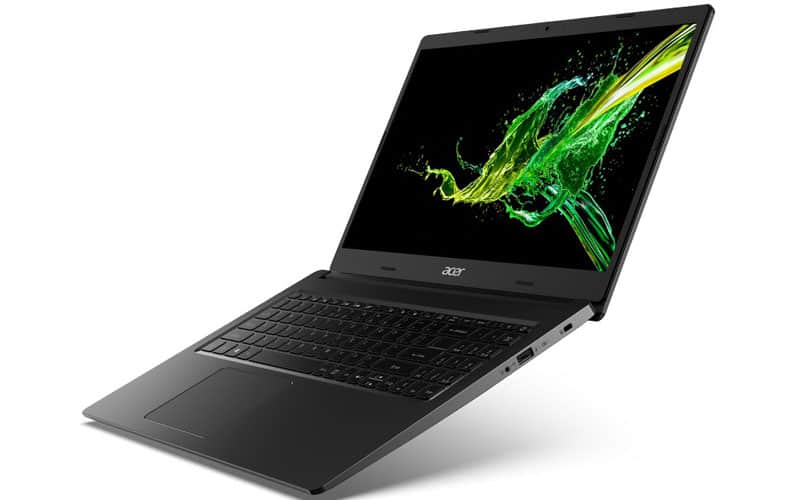
Design and finish
Usually, in the popular price range, you can hardly expect a high-quality finish from a laptop product. The Aspire 3, its outer shell is made entirely of plastic, with flex in the lid, bottom, and keyboard frame when pressed hard. In return, the surface is quite resistant to fingerprints and sweat stains.
With a weight of 1.9kg and a diameter of 19.9mm, the device is not too bulky and not too heavy to hold in the hand.
It’s a bit difficult to open the lid with one hand, when opening the lid, the body is raised at an angle relative to the ground, creating space for ventilation at the bottom. The edges of the screen are quite thin.
The full-size keyboard is familiar with the Numpad key cluster, but unfortunately, the keyboard is not backlit. The key travel is quite short, the bounce is relatively good, and the typing feeling is quite good, which is understandable in the popular price range.
The touchpad has a decent size, good sensitivity, and comfortable swiping, not too smooth but still fine. On the bottom, we will see the speaker holes as well as a rather large grille.
Connector
On the left side of the machine will be the power port, RJ-45 network port, HDMI port, and two USB-A 3.2 ports (Gen 1). On the opposite side, there will be an additional USB-A 2.0 port and a 3.5mm headphone jack with a mic.
Disassembly and upgrade
It is not surprising that the device has a battery with a fairly small capacity: 37Wh.
In the machine, there are two SODIMM slots to upgrade the Ram, the chipset of the machine can be upgraded to up to 32GB of DDR4 Ram. In terms of storage memory, in addition to the M.2 NVMe slot, we also have a 2.5-inch SATA tray.
Regarding the heatsink, we have a copper heat pipe, with a medium-sized fan.
Display screen
The Acer Aspire 3 (A315-35) shows up with a 15.6 inch display, and it also comes with a TN panel, so honestly yeah, that part is kinda expected. You end up with Full HD resolution, and the screen model number is BOE NT156FHM-N61 (BOE07CB). Overall it kind of hangs around a 16:9 aspect ratio, and the pixel density is roughly sitting near 142 PPI, more or less.
Since it’s a TN panel, the viewing angles on the device feel rather tight, so the image and colors seem a bit faded, and it can be tricky to see clearly if you’re looking from an angle.
At the brightest spot, the screen hits about 233 nits in the middle, and elsewhere it’s closer to 224 nits. The color temperature when showing a white screen is measured at 7060K, which is actually lower than the ideal temperature for the sRGB norm 6500K. Color accuracy is not great either, with a 4.0 DeltaE deviation, so it’s not the best choice for color work, or anything related. The contrast ratio is just 1:260, which also doesn’t help.
Acer Aspire 3’s screen reaches 50% sRGB color coverage.
Loudspeaker
The sound from the speakers of the Acer Aspire 3 is not “delicious”, there is a deviation on all 3 sound bands, and the maximum volume level is also not loud.
Battery life
We tested the machine’s battery lifespan when the Windows Better Performance setting was switched on, and at the same time the display brightness got set to 120 nits, then we shut down all the programs and applications except the single one that we used for the testing. the results show that the 37Wh battery inside the Aspire 3 can reach as much as 8 hours, 9 minutes of web browsing, or around 6 hours and 29 minutes for HD video playback.
CPU and GPU performance scores
At the time of this article, we have three CPU options, all of which are Intel’s energy-efficient Jasper Lake processor models: Intel Celeron N4500, Celeron N5100, and Pentium Silver N6000.
As for graphics capabilities, the processor models all have Jasper Lake iGPU (integrated graphics card) Intel UHD Graphics. In that order, we have 16, 24, and 32 EUs.
Temperature and stability
In testing the machine’s capabilities, we pushed the performance of the CPU cores to 100%, thereby monitoring their clocks and temperatures over time, as well as from light tasks to heavy eg video rendering.
Overall, the Celeron N4500 chip ran quite well at its maximum clock speed during the early period of the test, and the level of maintenance was also stable. The heat sink in the machine works well when there is a lot of support from the space on the bottom of the machine.
Summary
The Acer Aspire 3 (315-35) isn’t really an impressive, or in a way , outstanding laptop model. It comes with a newer generation chip but somehow the overall performance is not that high, the battery capacity is rather small, the connection ports feel limited, and the display screen looks average. But in return, it gives quite good mobility, affordable price, and especially good hardware upgradeability: two Ram slots, M.2 PCIe NVMe SSD hard drive and a 2.5-inch SATA drive.
We only recommend that you consider choosing a configuration with Celeron N5100 or preferably Pentium Silver N6000.
Acer Aspire 3 A315-24P-R75B Slim Laptop | 15.6″ Full HD IPS Display | AMD Ryzen 3 7320U Quad-Core Processor | AMD Radeon Graphics | 8GB LPDDR5 | 128GB NVMe SSD | WiFi 6 | Windows 11 Home in S Mode: Buy it now
Acer Aspire 3 A315-24P-R75B Slim Laptop | 15.6″ Full HD IPS Display | AMD Ryzen 3 7320U Quad-Core Processor | AMD Radeon Graphics | 8GB LPDDR5 | 128GB NVMe SSD | WiFi 6 | Windows 11 Home in S Mode: Buy it now
Acer Aspire 3 17.3″ HD+ Laptop|Intel Core I3-1115G4|8GB RAM|256GB SSD|11th Gen Intel Core I3|Intel Uhd Graphics|Windows 11 Home|Silver|Webcam Widescreen Display|EAT Mouse Pad: Buy it now
Acer Aspire 3 A315-24P-R75B Slim Laptop | 15.6″ Full HD IPS Display | AMD Ryzen 3 7320U Quad-Core Processor | AMD Radeon Graphics | 8GB LPDDR5 | 128GB NVMe SSD | WiFi 6 | Windows 11 Home in S Mode: Buy it now
Acer Aspire 3 A315-24P-R75B Laptop | 15.6″ FHD IPS | Ryzen 3 7320U | AMD Radeon Graphics | 8GB LPDDR5 | 128GB NVMe SSD | WiFi 6 | Windows 11 Home in S Mode Full HD USB Streaming 2MP Webcam: Buy it now
2022 Acer Aspire 3 Laptop | 17.3″ FHD IPS Display | Intel 11th Gen 4-Core i5-1135G7 | Iris Xe Graphics | 12GB RAM DDR4 256GB NVMe SSD | HDMI | WiFi AC | BT | RJ-45 | Webcam | Windows 10 Pro: Buy it now
Related Posts




Tech Reviewer & Product Analyst
Định Bia has spent over 10 years testing consumer electronics with a focus on smart technology. He work as a product advisor at Biareview where he helped customers find the right devices for their needs. He personally tests every product featured on this site using a consistent evaluation framework covering quality, durability, and value. All reviews are based on experience, not influenced by the manufacturer.