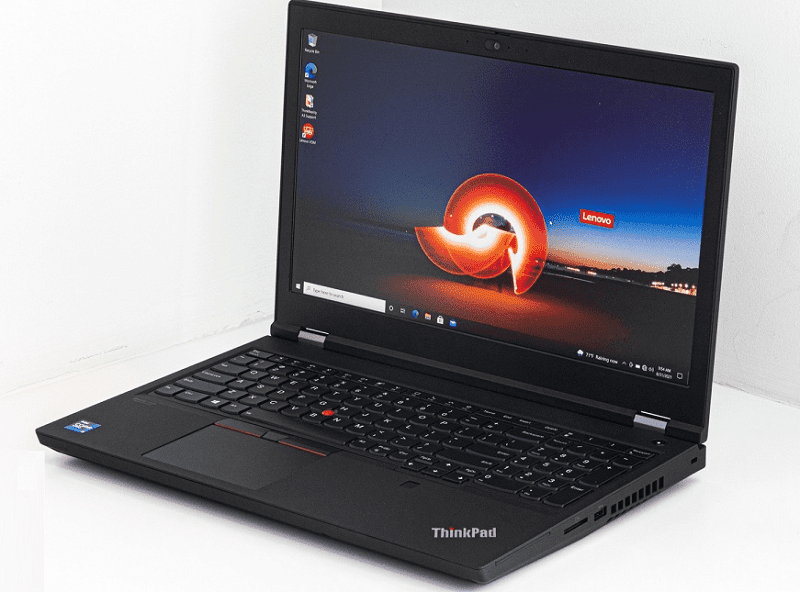
ThinkPad P15 Gen 2 is a new generation workstation model from Lenovo, it looks quite bulky and of course, is heavy (2.87kg). Equipped with Intel’s high-performance Tiger Lake H45 processor, and two Xeon options, providing high-performance power, promising to meet the intensive needs of users.
This workstation model is also optimized for graphics power, it offers high-end options such as the new RTX A-series, as well as the T-series based on the Turing architecture, which is a bit old but still has high performance.
Configuration parameters
Intel Core i7-11850H / NVIDIA RTX A2000 (80W) / 1TB SSD / 16GB Ram
Intel Core i7-11800H / NVIDIA T1200 / 512GB SSD / 16GB RAM
Intel Core i7-11800H / NVIDIA Quadro T1000 (4GB GDDR5) / 2TB SSD / 32GB RAM
- Design and finish
As a workstation model, it is easy to understand why the ThinkPad P15 Gen 2 weighs up to 2.87kg, even up to 3.07kg if you choose the touch-enabled version. The thickness at the thickest point of the machine is 31.45mm, so the appearance of the machine is quite bulky.
The body construction is extremely sturdy and sturdy, especially when combined with plastic and fiberglass composite. The ThinkPad brand identity is minimal, with only the Lenovo logo and the small ThinkPad text on the lid.
The keyboard of the ThinkPad does not say !! It’s always been great, with very long key travel, and very good responsiveness. The keyboard layout is reasonable, with a Led backlight below and spill resistance. The indispensable red TrackPoint button comes with 3 physical buttons above the touchpad. The size of the touchpad is smaller than usual, and the surface is treated with a smooth mylar layer, for high sensitivity and accuracy.
- Upgradability
Great upgradeability!! Some users will even consider it overkill!! On the bottom of the machine, we will see a lid that opens and closes, allowing quick replacement of 2 Ram SODIMM slots, and 2 M.2 PCIe x4 slots.
Next, you will need to unscrew some more screws around, notice some small screws and some cables are quite easy to break, be careful in manipulation! After removing the bottom of the machine, you will see 2 more SODIMM slots and 1 M.2 PCIe slot. So the ThinkPad P15 Gen 2 can support up to 128GB of DDR4 Ram both standard and ECC.
- I/O connection port
Plenty of ports are evenly spaced on the sides of the machine, and you’ll get a total of two USB Type-A 3.2 (Gen 1) ports, three USB Type-C 3.2 (Gen 2) ports, two of them which have integrated Thunderbolt 4 technology, HDMI 2.1 and LAN port, SD card reader and 3.5mm audio jack.
- Battery life
Although the hardware configuration of the ThinkPad P15 Gen 2 is quite power-consumed, it also has a very large battery included.
The battery capacity is 94Wh, and it performed very well in our tests, giving up to 12 hours of Web browsing time, or 10 hours and 28 minutes of video playback.
- Temperature
The heat dissipation system of the ThinkPad P15 Gen 2 is also quite monumental, with 4 large and thick heat pipes, connecting 2 fans and 4 heatsink slots. There is also an additional heatsink to help cool down the VRM circuit and the graphics memory.
Stress test
In this test, we push the performance of the CPU cores to 100%, thereby monitoring how the clock levels change, and their output temperature over time, and according to the weight of the CPU core’s action.
The CPU heats up to 100 degrees Celsius, while the clock level remains quite low, especially when compared to its “brother”: i7-11800H.
Gaming experience
The GPU’s temperature is not too hot, hovering around 85 degrees Celsius during our testing, and still keeps the clock level at about 1700-1800MHz.
Although the temperature inside the machine is very high, the outside of the machine is still quite cool. The highest temperature at the surface measured was 39 degrees Celsius.
Connectivity Options
Ports: Provides a rather broad selection of ports, like USB-C Thunderbolt 4, USB-A, HDMI, Ethernet, plus there’s an optional Smart Card reader too. So you can hook up most peripherals and add-ons, with minor hassle and a lot less fuss.
Wireless Connectivity: Includes Wi-Fi 6E, so you get quicker wireless speeds, and better network flow. This is especially important for work that eats bandwidth , like video conferencing and other heavy tasks.
Security Features
Biometric Security: Built in fingerprint reader, and optionally an IR camera, for Windows Hello facial recognition. It boosts both security, and convenience, when you’re logging in.
Discrete Trusted Platform Module (dTPM): Delivers hardware level protection for cryptographic keys, and other sensitive data. It’s aligned with enterprise security requirements so your setup stays more protected over time.
Software and User Experience
Operating System: This one comes with Windows 10 Pro , or Windows 11 Pro, and it delivers enterprise level features plus solid compatibility with professional software.
Lenovo Vantage: You also get Lenovo Vantage onboard, for system management, hardware diagnostics, and firmware updates , which helps tune performance and reliability over time.
Design and Ergonomics
Portability: Even with its sturdy build, the ThinkPad P15 Gen 2 is portable enough for folks who travel a lot or do work on-site , it tips the scales around 2.7kg (6 lbs).
Heat Management: The thermal setup is more advanced than usual, with dual-fan cooling working in tandem to push heat out efficiently, so it can keep stable performance during long heavy sessions.
Pros and Cons
Pros:
Exceptional build quality and durability, backed by MIL-STD-810H certification , which just feels reassuring.
Powerful performance too, you can pick Intel Xeon or Core i9 processors, and NVIDIA Quadro RTX graphics depending on what you actually need.
High-resolution display choices are strong as well, with solid color accuracy and HDR support, so visuals stay kind of crisp.
Also, the connectivity and security options are pretty comprehensive, they seem tailored for professional workflows , not just everyday browsing.
Cons:
It’s heavier and more bulky than most consumer-grade laptops, so portability becomes a compromise.
The starting price is higher, compared to mainstream machines, mostly because you’re paying for workstation-class components and extras.
Touchscreen availability is limited, and some people may prefer it for certain professional applications, even if it’s not always necessary.
Conclusion
The Lenovo ThinkPad P15 Gen 2 feels like a serious, dependable mobile workstation for people who want uncompromising performance and reliability:
Who It’s For: Great fit for engineers, designers, content creators, and other professionals, who need robust hardware, plus durability and security features, all in a portable form, basically.
Use Cases: Particularly good for CAD/CAM, 3D modeling, video editing, and other heavy-duty tasks that require real compute power and graphics muscle.
Final Verdict: Overall, it delivers industry-level durability, modern performance, and a design that’s pretty user-centric, so yeah it lands as a top contender in the workstation laptop space.
Lenovo ThinkPad P15 Gen 2 20YQ003AUS 15.6″ Mobile Workstation – Full HD – 1920 x 1080 – Intel Core i7 11th Gen i7-11850H Octa-core (8 Core) 2.50 GHz – 16 GB RAM – 512 GB SSD – Black: Buy it now
Lenovo ThinkPad P15 Gen 2 20YQ0083US 15.6″ Mobile Workstation – Full HD – 1920 x 1080 – Intel Core i7 11th Gen i7-11800H Octa-core (8 Core) 2.30 GHz – 32 GB Total RAM – 1 TB SSD – Black: Buy it now
Lenovo ThinkPad P15 Gen 2 20YQ003FUS 15.6″ Mobile Workstation – Full HD – 1920 x 1080 – Intel Core i9 11th Gen i9-11950H Octa-core (8 Core) 2.60 GHz – 32 GB RAM – 1 TB SSD – Black: Buy it now
Lenovo ThinkPad P15 Gen 2 20YQ0030US 15.6″ Mobile Workstation – Full HD – 1920 x 1080 – Intel Core i7 11th Gen i7-11850H Octa-core (8 Core) 2.50 GHz – 32 GB RAM – 1 TB SSD – Black: Buy it now
Lenovo ThinkPad P15 Gen 2 20YQ003PUS 15.6″ Mobile Workstation – Full HD – 1920 x 1080 – Intel Core i7 11th Gen i7-11850H Octa-core (8 Core) 2.50 GHz – 32 GB RAM – 1 TB SSD – Black: Buy it now
Lenovo ThinkPad P15 Gen 2 20YQ003YUS 15.6″ Mobile Workstation – Full HD – 1920 x 1080 – Intel Core i7 11th Gen i7-11800H Octa-core (8 Core) 2.30 GHz – 32 GB Total RAM – 1 TB SSD – Black – Intel W: Buy it now
Related Posts




Tech Reviewer & Product Analyst
Định Bia has spent over 10 years testing consumer electronics with a focus on smart technology. He work as a product advisor at Biareview where he helped customers find the right devices for their needs. He personally tests every product featured on this site using a consistent evaluation framework covering quality, durability, and value. All reviews are based on experience, not influenced by the manufacturer.