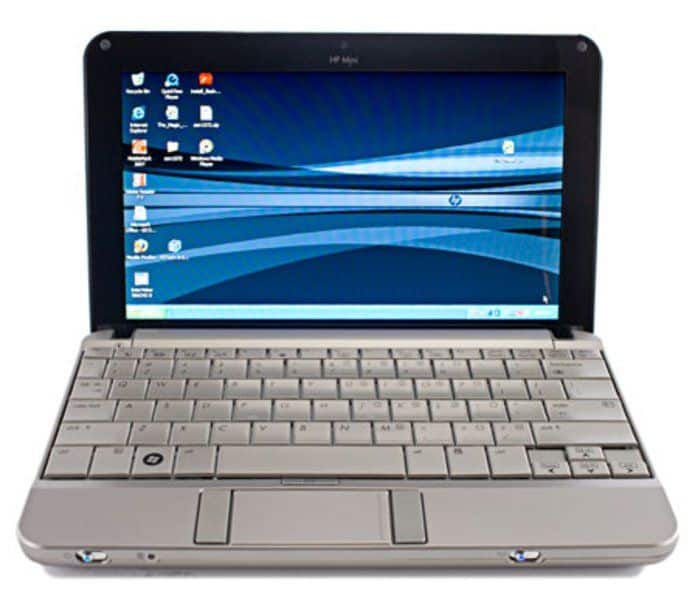
While the netbook market and ultraportable laptops are slowing, HP decided to introduce the Mini 2140. This netbook looks more entrepreneurial than the regular mini laptop with a 10.1-inch screen. Large keyboard, wide storage space and some other technical specifications.
In a nutshell, the HP Mini 2140 looks quite similar to the 2133, just different in size. The initial feel that this product is quite solid and a bit attractive.
HP made the right choice while retaining the design of the 2133 in the new lineup. The aluminum edges and plastic cover help the 2140 avoid the cheap feeling but make the machine slightly (weight about 0.9 kg). Not only that, the frame is also very solid with a combination of aluminum, plastic and magnesium alloy.
The screen is much bigger than a netbook (10.1 inches), giving you easy-to-see and easy-to-follow information. In addition, the 2140 also fully supports universal connectivity and a comfortable storage space of up to 160 GB.
Compared to many other 10-inch netbooks, the HP mini 2140’s LCD screen has a bunch of advantages, like its large but still compact size, plus pretty good color and contrast, and it feels overall “solid”. It does not have a wide viewing angle at all so. In other words, from the side the picture can get weird quickly.
Also, the screen resolution is only 1,024 x 576 pixels, while the 2133 version from last year went as far as 1,280 x 768 pixels. This low spec is kinda convenient because small lettering stays readable, but then the whole display cannot show everything at once , and you usually end up needing to use the slider. You know, scrolling becomes part of the deal.
Further, the LCD screen has a protective plastic layer, so it tends to reflect light, especially in bright sunlight.
The 2140’s keyboard is the best in the 10-inch line. Not only large in size, silver paint also helps to avoid dust. Besides, the keys are quite light to feel comfortable to touch.
Keyboard size is 92% of the keyboard on a regular laptop, so typing text on this machine is convenient. However, the trackpad is small, so it’s a bit cramped for the operation. The two right and left mouse buttons on the two sides are more inconvenient than the position under the trackpad like a regular laptop.
The performance of the Atom processor in the HP mini 2140 is not as expected. In fact, its performance is not equal to netbooks with other Atom chips, such as Asus N10, Eee PC 1000 HA, Lenovo IdeaPad S10, Acer Aspire One. However, the graphics processing capabilities as well as the configuration of the 2140 are superior to these machines.
The loudspeaker of the 2140 is quite beautiful, but not as impressive as the 2133. The HP removed the large speaker at the front of the monitor and replaced it with a smaller pair on the body. The sound is quite weak and not enough for the effect of web surfing, chat …, but in return, listening to the headphone again acceptable.
If before, the 2133 VIA’s processor is hotter than other power-saving CPUs, the HP 2140 is quite good. The temperature of this component in 2140 when operating at maximum is only 35 degrees Celsius while at 2133 it is 43. The cooling fan rarely runs at high speed even though the machine operates at high intensity.
The HP Mini 2140 uses two types of batteries, one is 3 cells, the other is 6 cells. With head type, you can use it continuously for 2 hours and 21 minutes. The thicker battery will cause the machine to be channeled, but will provide a slanting angle to the user. Naturally, the usage time will be twice as long.
Software and Operating System
The Mini 2140 shipped with either Windows XP or Windows 7 Starter Edition, depending on the model and when you bought it. Both were reasonable choices for the hardware at the time.
XP was the go-to for netbooks back then — low system requirements, stable, familiar. These days it’s well past its expiration date, and running it means either upgrading to something newer or leaning on third-party software just to stay reasonably secure.
Windows 7 Starter was built specifically for low-end machines like this one. It’s lighter on resources than the full versions of Windows 7 and still an improvement over XP, though it strips out a lot of the features found in the higher editions.
Upgradability
Not much room to work with here, given how compact the Mini 2140 is. RAM and storage can technically be upgraded, but the small form factor makes it more of a hassle than on a full-sized laptop.
RAM comes in at 1GB or 2GB of DDR2 depending on the unit. Bumping it up helps with multitasking, though you’ll want to check the max supported capacity before buying anything.
Storage-wise, swapping the hard drive for something bigger — or better, an SSD — is doable and worth it if you can manage it. The SSD swap especially makes a real difference in boot time and general responsiveness.
Security and Maintenance
Security is basic: password protection, user account controls, nothing more sophisticated than that. Given the age of this thing and the operating systems it shipped with, running current antivirus software and staying on top of updates matters more here than it would on a newer machine.
Regular maintenance helps too, keep the keyboard and screen clean, don’t allow storage to become cluttered, and keep an eye out for the small signs of hardware wear. Also battery health is kind of worth your attention, the way you charge makes a real difference in how long it stays solid over time.
Pros and Cons
What works: it’s honestly quite portable, the build feels sturdy enough to tolerate daily use, the full sized keyboard is comfortable for longer typing sessions, and the ports (USB, Ethernet, SD reader) hit the basics pretty well.
What doesn’t: performance can feel held back if you’re multitasking or running anything demanding, the display resolution and viewing angles are kind of underwhelming, upgrades end up being more of a bother than they’re worth given the size constraints, and the operating systems it shipped with are outdated compared to what’s normal today.
Bottom Line
The Mini 2140 does what a netbook is supposed to do — it’s light, it’s portable, and it handles browsing, documents, and email without much fuss. The keyboard is a genuine strength for something this small, and the connectivity options hold up better than you’d expect.
That said, go in with the right expectations. Performance and display quality haven’t aged well, and the outdated OS options mean extra work to keep things secure. If you need serious power, look elsewhere. But for basic, on-the-go computing, this one still gets the job done.
HP 2140 Mini-Note – Atom N270 / 1.6 GHz – RAM 2 GB – HDD 160 GB – GMA 950 – Gigabit Ethernet – WLAN : Bluetooth 2.0 EDR, 802.11 a/b/g/n: Buy it now
Related Posts

Tech Reviewer & Product Analyst
Định Bia has spent over 10 years testing consumer electronics with a focus on smart technology. He work as a product advisor at Biareview where he helped customers find the right devices for their needs. He personally tests every product featured on this site using a consistent evaluation framework covering quality, durability, and value. All reviews are based on experience, not influenced by the manufacturer.