Design
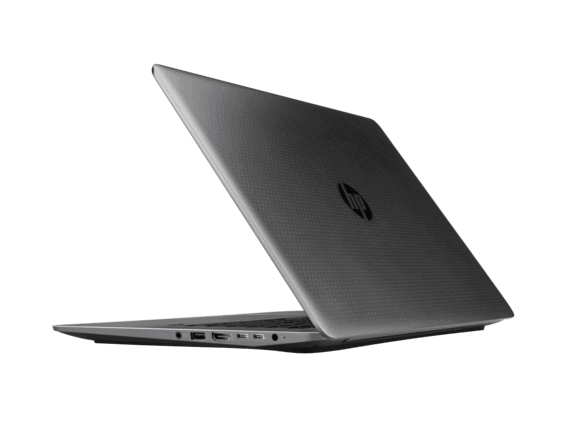
Belonging to the mobile workstation laptops, the HP ZBook Studio G3 is much tighter in design and size than traditional mobile workstations. The size of the machine is 375 x 255 x 18mm, weighs about 2kg. Without the “Mobile Workstation” printed on the hinges, no one would expect the ZBook Studio G3 to have the “power” of a desktop workstation.
HP has used magnesia to make chassis with load-bearing structure and anti-deformation. The exterior of the unit is made of monolithic alloys, which help reduce weight and improve heat dissipation. The exterior of the lid is simply handled with polished dots, the middle is the HP logo, the bottom is plastic with holes in the heat sink.
To evaluate the machine structure in a nutshell, it is enough to say the ZBook Studio G3 meets the US military’s MIL-SPEC-810G standard. If there is a need to explain a bit more about this standard, it is resistant to impact types such as: impact, vibration, wet, corrosive, extreme weather conditions (high temperature, sand dust…). With such characteristics, ZBook Studio G3 deserves the model laptop in the mobile workstation series.
Build Quality and Durability
Build quality on the ZBook Studio G3, honestly feels really exemplary for something you lug around as a mobile workstation. The mix of aluminum plus carbon fiber helps it stay robust and durable, you can tell the chassis is not just assembled, it’s kinda well considered. In hand the laptop comes off solid, there is minimal flex when you press around the base and also with the screen , like it doesn’t wobble much at all. The hinge action is smooth and secure too. The lid opens and closes with ease, and it keeps its stability even in different usage scenarios, not that “loose” feeling you get on some models.
Then there is the durability angle, it’s backed up by MIL-STD 810G certification, which basically means it aligns with military style requirements for ruggedness and reliability. That means the ZBook Studio G3 is designed to handle harsh conditions such as vibrations, drops, and also extreme temperature swings, so it reads as a dependable option for fieldwork and for environments that can be really demanding.
Display
Visual quality is another strong part, the HP ZBook Studio G3 comes with a 15.6 inch panel in multiple configurations. You can choose Full HD with 1920 x 1080, or you can jump to 4K UHD at 3840 x 2160. These options sort of cover different things, from sharper everyday watching clarity, to a more ultra high definition vibe with finer detail. The 4K UHD option in particular feels like it stands out, because that extra resolution makes the picture look more accurate, and it also usually brings out those vibrant colors more clearly too , which kind of lines up with graphic design work, video editing, and other visual disciplines in general.
It also uses IPS, short for In-Plane Switching, technology. IPS gives wide viewing angles and more consistent color reproduction. That matters a lot if you’re a professional who needs accurate color representation, and you might be viewing the screen from different angles, without getting major color distortion.
Brightness and Color Accuracy
On the ZBook Studio G3 , the display sort of stands out because it feels very bright and also stays pretty true with colors. Most of the time, the Full HD panel lands around 300 nits , and the 4K UHD option can go up to about 400 nits. With that kind of brightness, the screen usually stays readable even when the room is busy with light, like an office with big windows, or even for those outdoor moments.
Color accuracy is another noticeable part of the ZBook Studio G3 screen. The laptop is built to handle a wide color gamut, so it includes support for Adobe RGB and sRGB too, which helps the colors look right for work that really cares about matching tones. Because of that, it becomes a strong pick for people in places like graphic design, video production, and digital art. It’s the sort of “what you see is what you get” feeling, rather than a vague guess.
Touchscreen and Interactive Features
The normal display configurations usually do not come with touchscreen capabilities, but the ZBook Studio G3 can be set up with a touchscreen display in some versions. This touch feature makes using software feel more direct , it’s more intuitive, and it can be handy when the task benefits from touching rather than only clicking—like when doing design work or writing notes digitally.
Efficiency
The screen of the ZBook Studio G3 is 15.6 inches in size with two full-HD or ultra-HD resolution options, with full-HD support for touch. The screen of the other version is coated with anti-glare. The GPU used is the Quadro M1000M – a special chip manufactured by Nvidia, optimized for graphics processing (CAD, image editing, video editing …). The G3 supports up to 32GB of RAM, 128 or 256GB SDDs, and can expand to 1TB.
HP offers up to 6 processor options, topping out the two latest Intel Xeon CPUs, midrange with 2 sample use Core i7, and lowest is 2 sample Core i5. Of these, two Xeon CPUs are the E3-1545M and the E3-1505M are among Intel’s strongest rivals. Core i7 and i5 processors are also the most popular models used for workstations.
HP Zbook 15 G3 Mobile Workstation V2W06UT (15.6″ FHD Display, i7-6700HQ 2.6GHz, 8GB DDR4, 1TB 5400rpm, Webcam, Backlit Keyboard, Windows 7/10 Pro): Buy it now
HP ZBook Studio 15s G3 15.6 IPS I7-6820HQ 16GB 256GB SSD: Buy it now
In the basic use, the machine is always good even when multitasking. Try running image editing software, filmmaking and 3D design, the processing speed is very fast and smooth. Although the Quadro GPU is not optimized for gaming, the experience is still impressive with the FIFA16’s highest graphics choice.
The ZBook Studio G3’s display has great visibility, wide viewing angles and brightness. The speakers are placed on both sides of the keyboard, giving good quality. The audio system is supported by Bang & Olufsen from Denmark. Sensation typing is quite good, the surface of the keyboard is treated rough so less sweat. The mouse wheel is relatively wide, smooth.
In particular, the cooling system works very well. If used only normally, the temperature of the machine rarely increased. The heat is mainly concentrated on the bottom of the machine, though the surface is made of metal but almost no heat increase when used for a long time.
For optimal size and durability, the ZBook Studio G3 is an HP optical disc drive. The other basic connections are still well-equipped, the 3 USB ports of the machine have a slot to support the discharge of electricity for charging mobile devices.
As a precedent, the workstation’s battery life is minimal, because most of the time they are placed on the table and moved only when needed, while configuring the heavy workloads will be very waste electrical power. When fully charged, the machine runs about 2.5 hours with mixed tasks.
In general, users can hardly complain about the performance of the ZBook Studio G3. This product meets most of the needs, even when performing the toughest tasks.
Features, utilities
Besides great performance, HP also pays great attention to security on the ZBook Studio G3. The machine is equipped with a fingerprint sensor and hardware verification mechanism to help users log in quickly or enhance multiple layers of security to prevent unauthorized access.
The keyboard backlight is also a very useful facility, making it easy to use in low light conditions. Backlight is white and automatically turns off after 15 seconds of unused. In addition, ZBook Studio G3 also has a pretty accessories or ZBook Dock. It’s an extension device that connects exclusively to the HP ZBook line of workstations. Unfortunately, users have to purchase this accessory separately.
Performance
Processor and Graphics
The HP ZBook Studio G3 comes with a bunch of strong processor choices , like Intel Core i5 Core i7 , and even Core i9 CPUs from the 6th generation (Skylake) family. In practical terms these processors tend to be really capable, for everyday chores and also more involved simulations, plus data analysis work that actually wants horsepower.
On the graphics side, the ZBook Studio G3 is built around professional NVIDIA Quadro GPUs. You can find options such as the Quadro M1000M , and the Quadro M2000M , which are meant to manage heavy visual workloads. Think 3D rendering, CAD programs, and also video editing , without too much drama. These Quadro GPUs usually bring better steadiness and performance tuning than typical consumer cards, so they fit professional use cases pretty well, even when the workload gets serious.
Memory and Storage
When it comes to memory, this model supports up to 32GB of DDR4 RAM. That’s a decent amount for multitasking , plus for apps that like to eat memory. With the extra space, system behavior stays smoother when you’re dealing with bigger datasets, heavier software, and multiple programs at once
For storage, the ZBook Studio G3 gives you several routes, including SATA SSDs and PCIe NVMe SSDs. The SSD setup helps with quicker data access, which can mean faster startup and a more responsive feel overall. And if you configure it with up to 1TB of SSD capacity , there’s usually plenty of room for files, applications, and the full set of project materials.
Real World performance
In real daily use, the HP ZBook Studio G3 shows really impressive performance, for a lot of professional workflows. You get a strong mix of processing power, high performance GPUs, and enough memory, so the system can manage heavy jobs without feeling stuck. It does well whether you are running tricky simulations, editing very high resolution video, or handling big 3D models, kind of the stuff that usually stresses machines out. In short, the ZBook Studio G3 gives you the speed you need to finish tasks, smoothly and with less delay, not just on paper but in practice too.
It also benefits from an advanced cooling approach. During intense workloads the machine seems to keep steadier temperatures, which helps prevent thermal throttling from sneaking in. The cooling design uses dual fans and heat pipes that coordinate together, to move heat away so performance stays consistent even while the laptop is working hard for long stretches.
Battery life
Longevity and charging
The HP ZBook Studio G3 comes with a 6 cell 64Wh lithium ion battery. Battery runtime isn’t identical for everyone, because configuration and how you use it changes the results. Still, most people see roughly 6 to 8 hours of battery time in normal everyday conditions. For a lot of users that’s enough for a full workday, meaning you can keep going while out and about, without recharging nonstop.
On top of that, the laptop includes HP Fast Charge. With that feature the battery can reach about 50% charge in around 30 minutes, depending on what you have running. It’s a practical feature, when you need a quick boost between calls , or when there is a short window to recharge before heading back to your work.
Keyboard and Touchpad
The Keyboard Layout , and comfort on the HP ZBook Studio G3 feels pretty solid. You get a full sized backlit keyboard, with keys that are spaced out nicely, and honestly the whole thing has a good rhythm when you type. It gives responsive feedback and the key travel seems adequate , not too shallow. The backlighting is adjustable too, so when the room is dark you can still see what you’re doing without that squinting, eye strain kind of feeling.
There is a numeric keypad included, which helps a lot if your work involves heavy number work, lots of data entry or calculations. The whole layout seems made for people who want a dependable and efficient typing setup, rather than something more casual.
For the touch side, the Touchpad on the ZBook Studio G3 is large and it’s responsive. Cursor control feels accurate , and it supports multi touch gestures. The surface is smooth, and it’s comfortable enough for longer sessions. There are dedicated left and right buttons, so clicking feels straightforward without guessing.
Then, in addition to the touchpad, there’s a TrackPoint in the middle of the keyboard. It’s there as an alternative control method, for users who like a more precise navigation experience. In small, cramped environments the TrackPoint can be especially handy. Some people also just find it more ergonomic , kind of an easier input approach when you’re working all day.
Connectivity
Ports and Slots
The HP ZBook Studio G3 offers a comprehensive selection of ports and connectivity options, ensuring that users have access to a wide range of peripherals and accessories. The available ports include:
- 1 x USB 3.0 Type-C (with Thunderbolt 3 support)
- 2 x USB 3.0 Type-A
- 1 x USB 3.0 Type-C (with Power Delivery)
- 1 x HDMI 2.0
- 1 x Mini DisplayPort 1.2
- 1 x RJ-45 Ethernet port
- 1 x Smart Card reader
- 1 x SD card reader
- 1 x Audio combo jack (headphone/microphone)
Adding Thunderbolt 3 support through the USB Type-C port gives you faster data transfer speeds , external GPU connection options , and also the ability to hook up to multiple 4K displays without much hassle. Alongside that, the Mini DisplayPort and HDMI ports give a few extra paths for linking to an outside monitor or even a projector, so the ZBook Studio G3 ends up feeling pretty versatile when you are doing presentations, training sessions, or those multi-monitor setups people like to run at work.
Wireless Connectivity
For wireless, the ZBook Studio G3 comes with Wi-Fi 802.11ac and Bluetooth 4.2 . This mix keeps things dependable , and it usually performs well for both browsing and transferring files. The Wi-Fi 802.11ac standard is designed to deliver better speeds and a wider reach than earlier generations , so your connection stays steadier for things like online meetings, downloads, and day to day internet usage. Meanwhile Bluetooth 4.2 helps with quick pairing for wireless gear , like keyboards, mice, and headphones.
Audio Quality
Speaker Performance
The HP ZBook Studio G3 includes dual stereo speakers placed at the bottom of the laptop. In general, the sound is clear and well balanced, with volume that works for casual listening , plus video calls that require voice to be understandable. These speakers are tuned by Bang & Olufsen, a well known audio name that is often associated with richer tuning and cleaner playback.
The built in speakers might not really give you that bass heft and deeper resonance some people are kinda hoping for from a more immersive setup. If you want a more powerful sounding experience, you can always plug in external speakers or go with headphones, they connect through the audio combo jack, so it should work out.
Microphone and Audio Jack
The ZBook Studio G3 comes with a built-in microphone that is meant to grab clear, accurate audio for voice calls, video conferences and also for recordings. It has noise-cancelling technology in the mix which helps to cut down on background sound, so the spoken words come through with better clarity. Honestly it works well for professional communication, or those virtual meetings, where you really need the audio to be readable.
If you are one of those people who need higher quality audio input, the laptop also includes a 3.5mm audio combo jack. This port can handle both headphones and an external microphone, depending on what you plug in. That kind of flexibility is useful, because you can bring in professional-grade gear, and it tends to upgrade the whole listening, and capture quality for things like podcasting, studio recording, or even high-fidelity listening.
Security and Privacy
Security Features
The HP ZBook Studio G3 comes with a bunch of security bits meant to keep sensitive material safe, and yeah also help keep user privacy in check. Overall it includes things like :
Fingerprint Reader: the built in fingerprint reader gives biometric sign in, so users can log in with a quick touch. It adds a extra layer of protection versus only passwords, or PIN codes which is kinda nice.
Smart Card Reader: the integrated smart card reader supports secure sign-in and access rules, it is handy for workplaces that need more controls like corporate offices , or government contexts.
TPM (Trusted Platform Module): the TPM chip is a hardware security device , it helps with encryption for sensitive data, and it makes sure only permitted software is allowed to run. That basically helps against malware and access from the wrong people.
HP Sure Start: this one can do automatic recovery if BIOS gets hit, or if it becomes corrupted. It keeps the laptop firmware in a more secure and working state, so potential threats don’t get a hold as easily.
Privacy Features
The ZBook Studio G3 also has privacy oriented features, to reduce the chances of user information being looked at without permission. These features include :
HP Privacy Camera: this camera uses a physical shutter, you can close it manually when the webcam is not needed. So it blocks the lens and reduces the risk of unwanted video watching, in a straightforward way.
HP Sure View: in some setups the ZBook Studio G3 can include HP Sure View, a privacy screen method that makes the display much harder to see from the side. This makes it tougher for prying eyes to read what’s on screen in public, classrooms, or shared areas, when you might not notice.
Conclusion
The HP ZBook Studio G3 is a strong and flexible mobile workstation that ,really , shines in performance build quality, and display quality. It tends to work well for pros who need a high performance laptop for tougher work like engineering , design, and video editing. The machine feels sturdy, the connectivity options are pretty complete, and the screen looks genuinely good, so it becomes a dependable option for people who want a capable workplace on the go.
Of course the ZBook Studio G3 also has a higher price compared with typical consumer-grade laptops, but the advanced features and its sheer speed make the purchase make sense if you’re hunting for a top tier mobile workstation. In the end the HP ZBook Studio G3 stands out in the mobile workstation arena, with a nice mix of raw power, durability, and that more professional style of features.
Related Posts


Tech Reviewer & Product Analyst
Định Bia has spent over 10 years testing consumer electronics with a focus on smart technology. He work as a product advisor at Biareview where he helped customers find the right devices for their needs. He personally tests every product featured on this site using a consistent evaluation framework covering quality, durability, and value. All reviews are based on experience, not influenced by the manufacturer.