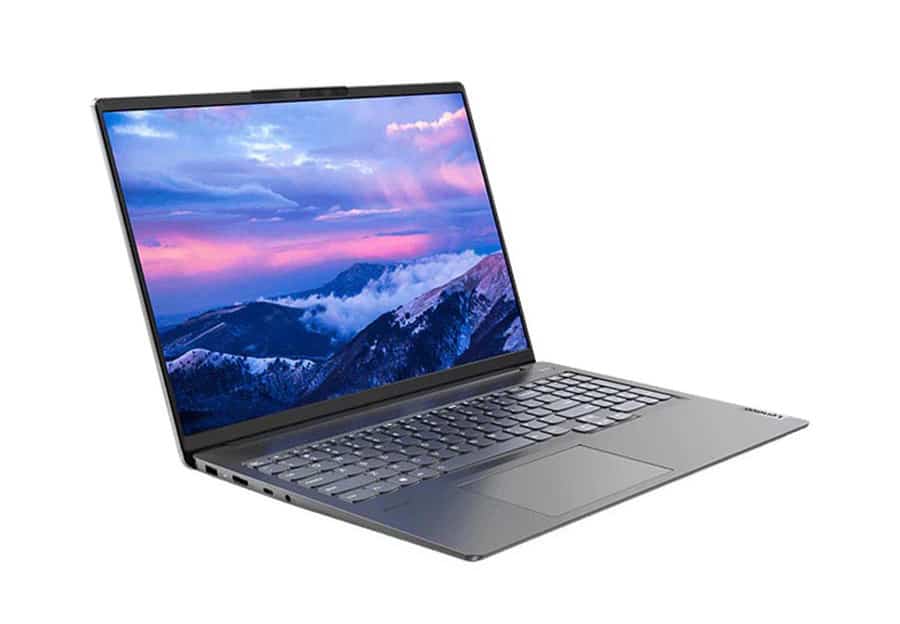
Design and finish
The body and lid of the IdeaPad 5 Pro are made from monolithic aluminum, so even though the device is quite thin, it is still extremely sturdy and solid. There is almost no flex or creaking condition on the machine. This is a point that we appreciate.
Flexible hinge mechanism, high stability, can open and close the lid easily with one hand. The screen has an anti-glare layer and a very thin bezel. There is a top edge of the screen with a “rabbit ear” notch but it is raised, equipped with a 720p webcam and IR face recognition. This notch also forms a ledge for you to grasp when opening the lid.
The power button is separated from the keyboard, there is no one-touch fingerprint reader. The keyboard has quite large keys, and the NumPad cluster supports many number-related jobs. The key travel is not long, but the response is quite good.
Next is the base. Here, you won’t find a fingerprint reader, but on the bright side, the power button is separated from the keyboard. Also, the keycaps look pretty big (including the Arrow keys) and there’s a NumberPad to play with. On the other hand, the key travel is a bit shallow, although the response is quite clicky. The surface of the Touchpad is lightly roughened, providing a smooth gliding experience, and quite high sensitivity.
Connection ports
On the left side there is the power port , the HDMI 1.4b port, and also a USB Type-C 3.2 port (Gen. 2) plus the audio jack. Then on the opposite right edge, you will notice two USB Type-A 3.2 (Gen 1) ports, along with an SD card reader.
Dismantle, upgrade, and clean
The IdeaPad 5 Pro’s large battery is easy to see, it has a capacity of 75Wh.
Regarding the RAM, the machine cannot be upgraded, Ram is soldered to the motherboard. But the manufacturer also offers DDR4 Ram options up to 32GB. In terms of data storage memory, we have an M.2 PCIe x4 slot.
Regarding the cooling system of the machine, there are two copper heat pipes common to both the CPU and GPU, in addition to two large fans, that blow the heat out.
Display screen
The Lenovo IdeaPad 5 Pro that we experienced has a WQXGA panel with a 60Hz refresh rate – the model code is LEN160WQXGA (LEN9150). Size 16 inches, resolution 2560×1600 pixels. 16:10 aspect ratio, 189 PPI pixel density.
The screen viewing angle is spacious and comfortable, you can see pictures taken from the screen viewing angle.
Maximum brightness is 367 nits in the center of the screen, and 361 nits are the average for the rest of the area, with a maximum deviation of 9%. The corresponding color temperature on a white screen is 6700K – slightly colder than the standard sRGB optimum of 6500K.
You can see how the home screen works from a uniform perspective. DeltaE color aberration is pretty low, the contrast ratio is holding up at 1:1470 so the screen can be used quite well for work that involves color, graphic design, and also photo or video editing sometimes.
The screen of the IdeaPad 5 Pro (2021) has 90% sRGB color coverage.
Battery life
Test the battery of the machine in the condition that Windows’ Better Performance mode is on, the screen brightness is adjusted to 120 nits, and turn off all programs and applications, except for the program we used to test the machine. The IdeaPad 5 Pro’s 75Wh battery delivers up to 13 hours of Web browsing or nearly 9 hours of video playback.
CPU and GPU Performance
Regarding the processor options we have: Ryzen 5 5600H, Ryzen 7 5800H, and Ryzen 9 5900HX.
When you look at the GPU options on the IdeaPad 5 Pro it comes in one configuration with no dedicated discrete GPU, and then another two options where you can pick, between GTX 1650 and RTX 3050 (50W) kinda depends on the setup.
Temperature and cooling system
In the stress test, we push CPU performance to 100% on all cores, thereby monitoring the clock rate and temperature, over time and the weight of the tasks.
Even though High-Performance mode is enabled from the BIOS, this laptop model still cannot maintain the base clock speed of Ryzen 7-5800H for a long time.
Overall, the Lenovo IdeaPad 5 Pro is still good at fighting games, in addition, the highest temperature on the keyboard surface is 45 degrees Celsius. Users can feel the heat, but not too hot.
Advantage:
Slim design, sturdy aluminum frame
High color coverage, low chromatic aberration, suitable for many professional purposes
High-resolution screen and 16:10″ aspect ratio
High performance and quite stable
With built-in facial recognition
Defect:
Performance is a bit limited due to the cooling system
Onboard RAM
Lenovo IdeaPad 5 Pro Laptop, 16″ QHD (2560 x 1600) IPS Display, AMD 6-Core Ryzen 5 5600H (Beat i7-1255U), 8GB RAM, 512GB PCIe SSD, USB-C, HDMI, SD Card Reader, Webcam, Backlit Keyboard, KeyPad, Win 11: Buy it now
Lenovo IdeaPad 5 Pro 16ARH7 82SN000EUS 16″ Notebook – WQXGA – 2560 x 1600 – AMD Ryzen 5 6600HS Hexa-core (6 Core) 3.30 GHz – 16 GB Total RAM – 16 GB On-Board Memory – 512 GB SSD – Storm Gray – AM: Buy it now
Software and User Experience
On the whole , the Operating System comes with either Windows 10 or Windows 11 Home , so you get that familiar , smooth setup, and also a quick access to a wide range of applications. It feels pretty efficient, even if you’re switching between tasks.
Then there’s Lenovo Vantage, which is included, it helps with system optimization, keeps things updated, and supports management… overall, it can make the device seem faster and a bit more tuned for daily use, and honestly that helps the user experience.
Design and Ergonomics
For Build Quality, the construction is solid, there’s clear attention to detail, like hinge durability and chassis integrity, so it should handle long-term reliability without weird looseness or fatigue.
Portability is also a win: it’s lightweight and slim, so it’s fairly easy to move around, slide it into a backpack or bag for work, or just carry it for travel when you need to.
Pros and Cons
Pros:
It feels sleek and, well stylish, with that premium kind of vibe, yknow.
You get high resolution display options that actually show good color accuracy too.
The AMD Ryzen processors are strong enough for multitasking and overall productivity, even when things get busy.
Battery life is pretty adequate, plus fast charging capabilities so it doesn’t drag.
Cons:
The availability for high refresh rate display options feels limited, like it’s not always there when you want it.
Integrated graphics may not be enough for intensive gaming or heavier professional graphics work.
Some models use plastic components, which can feel a bit less premium next to all metal constructions, unfortunately.
Conclusion
The Lenovo IdeaPad 5 Pro kind of stands out in the mid-range laptop space, like it has that mix of solid performance, a clean look, and fairly reachable pricing, even if it’s not trying to be flashy.
Who It’s For: This one works for students, professionals, and basically anyone who wants a versatile machine for day to day work, media watching , and some light gaming too.
Use Cases: It feels right for office style productivity apps, web browsing, streaming, and casual gaming moments.
Final Verdict: Overall, it delivers nice value thanks to dependable speed , good design, and features that feel easy to live with, so it ends up being a practical pick for a pretty broad range of people.
Related Posts




Tech Reviewer & Product Analyst
Định Bia has spent over 10 years testing consumer electronics with a focus on smart technology. He work as a product advisor at Biareview where he helped customers find the right devices for their needs. He personally tests every product featured on this site using a consistent evaluation framework covering quality, durability, and value. All reviews are based on experience, not influenced by the manufacturer.