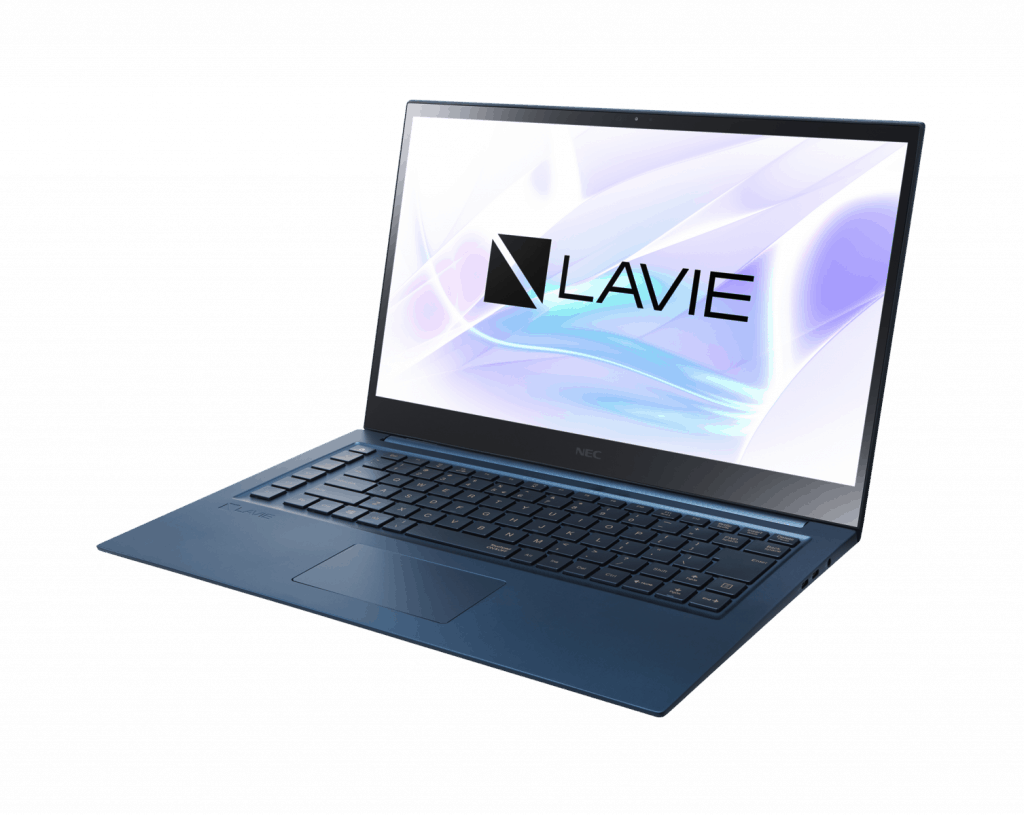
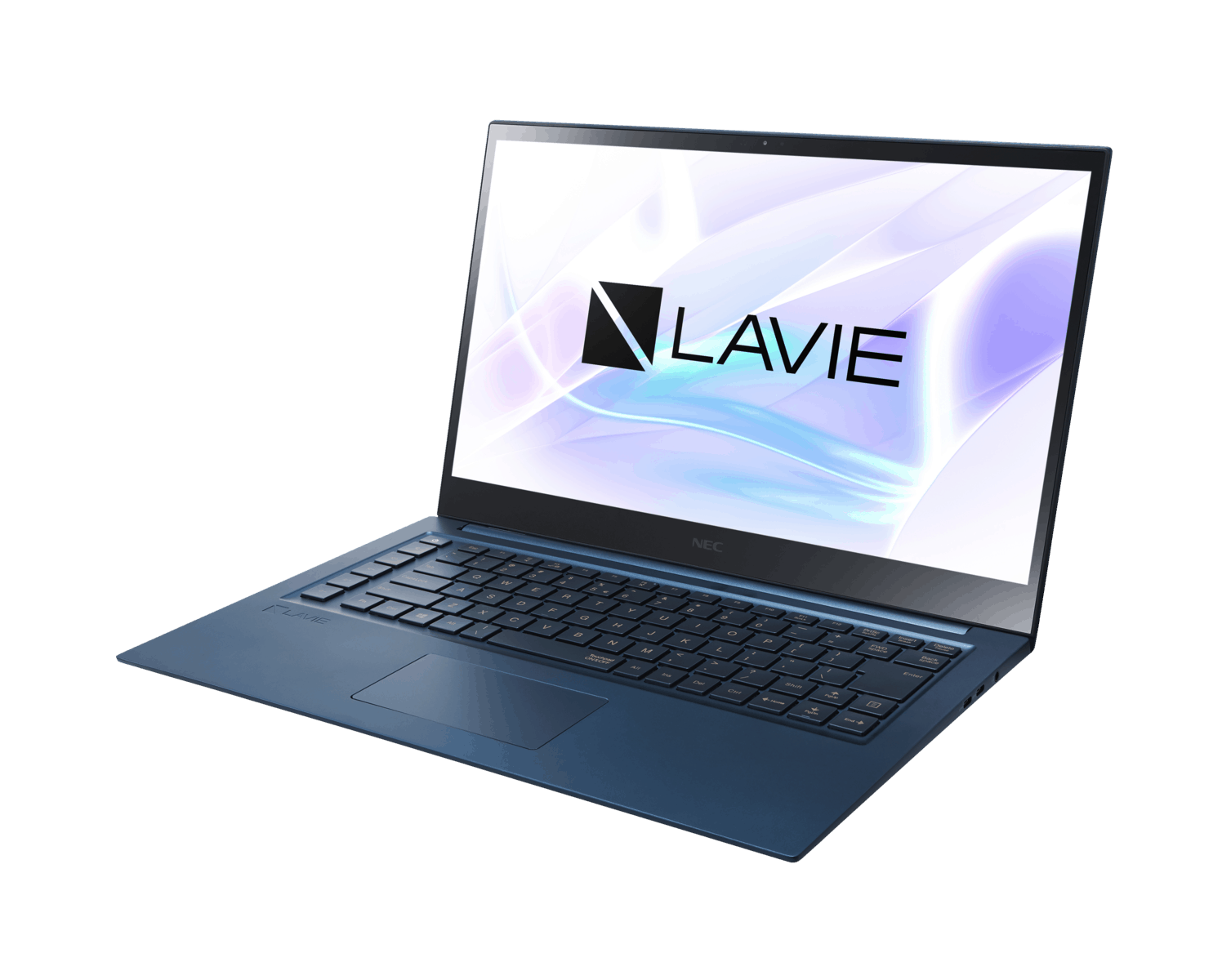
The Lavie Vega laptop, a product of the collaboration between Lenovo and NEC , comes off as a bit of a premium ultrabook meant for professionals and creatives alike. It kinda promises high-end performance , a slick design, and some genuinely advanced features. In this kind of deep review we are going to look at pretty much every detail of the Lavie Vega—design, build quality, performance, display, keyboard, trackpad, connections, battery duration, audio, software, and the overall “is it worth it” side of things. So by the time you finish reading, you should have a clear picture of what the Lavie Vega delivers and whether it matches your own needs.
Design and Build Quality
The Lavie Vega feels like a real statement piece in terms of style and premium construction. It has a sleek minimalist vibe with crisp, clean lines, and a finish that looks smooth without being showy. The materials are top level, with an aluminum chassis inside , which gives it that elevated feel while also helping with durability. It also shows up in a deep navy blue color, not the usual silver, grey, or “meh” tones most laptops seem stuck with.
In terms of size , it lands at about 2.5 pounds (1.13 kg) and it’s only 0.59 inches thick. That means it’s light, and easy to carry around, especially if you are always travelling or moving between meetings, studios, cafés, you know the drill. Even with the slim look, it still feels firm and reliable, there’s no obvious wobble or flex in the lid, or the keyboard deck, which is honestly a good sign.
One of the more standout things about the Lavie Vega’s design is the edge to edge glass display , it kind of gives that modern and elegant vibe you expect from a more premium device. The hinge mechanism feels smooth too, and honestly it makes the lid easy to open, easy to close, and it doesn’t feel jittery. In general, the design and build quality of the Lavie Vega are exceptional , it blends style, portability, plus durability into one neat package.
Display
The Lavie Vega comes with a 13.3 inch 4K UHD screen , and it might be its most impressive feature. The resolution is 3840 x 2160 pixels , and that’s what brings the clarity and crisp detail. Because the picture looks so clean, it works really well for tasks that need fine visuals, like photo editing and video work. The IPS panel helps with wide viewing angles, which matters if you’re checking the screen from side ways or at different positions , so color accuracy and brightness stay more consistent.
For colors, it supports 100% sRGB color gamut, so the tones look vibrant yet accurate, images and videos can appear more lifelike. There’s also a high contrast ratio , and that helps with deep blacks and bright whites. On top of that, the display supports HDR content, which brings more realism and extra depth when you’re watching media.
The edge-to-edge glass approach not only looks good in a kind of, aesthetically pleasing way but it also boosts that immersive feel when you’re using the laptop. The bezels are really kept minimal, so the screen real estate gets maximized, and the whole thing kinda feels more modern… more polished, you know. And the touch support on the display adds yet another layer of everyday usability, letting you interact in a more intuitive manner without thinking too hard.
In general, the Lavie Vega’s display is one of its strongest sales points. It delivers exceptional clarity, solid color accuracy, and strong brightness. Whether you’re pushing through creative work, streaming movies, or just scrolling around the web, the visual output stays top-tier.
Performance
Inside, the Lavie Vega is driven by the newest Intel Core i7 processor which gives you plenty of muscle for a broad set of tasks. You get a quad-core setup, base clock at 1.8 GHz and turbo boost reaching up to 4.9 GHz. This combination keeps things smooth even with demanding applications running. If you’re multitasking, working with productivity tools, or doing some light gaming the laptop handles it all pretty effortlessly, most of the time.
It also includes 16GB of LPDDR3 RAM, which is more than enough for most people. That means smooth multitasking, so multiple apps can run together without those annoying slowdowns. Also, the memory is soldered to the motherboard, so you can’t upgrade it later, though 16GB should still be adequate for the near future, at least.
Storage is managed by a fast 512GB PCIe NVMe SSD , so in practice it gives quick boot times too, also helps with those fast application launches and swift file transfers. The SSD makes the whole laptop feel responsive and, you know , snappy, which really supports a smoother overall experience. For most people the capacity is enough, but if someone needs extra space, there is always the option to use external storage solutions .
On the graphics side, the Lavie Vega leans on integrated Intel UHD Graphics . That said, it’s obviously not the right tool for high-end gaming , or anything super demanding , yet it’s still very capable for everyday visuals and even a bit of light creative work. If you’re a professional and you really need more GPU muscle, you could think about an external GPU.
Keyboard and Trackpad
The Lavie Vega comes with a backlit chiclet keyboard , it feels comfortable when typing. The keys are spaced out nicely, and you get a decent amount of travel, plus solid tactile feedback . Backlighting is adjustable, so working in darker rooms is no big deal. The keyboard layout stays standard, with all the important keys easy to reach, and nothing feels oddly placed.
One notable kind of feature on the keyboard is that a fingerprint reader is basically built right into the power button. So you can do fast logins that are also secure, thanks to Windows Hello, and i guess that just helps the laptop feel more protected overall.
Now the trackpad on the Lavie Vega is large and also really responsive. It supports Windows Precision drivers, which makes the cursor movement feel accurate and keeps multi-touch gestures smooth, even when you do quick swipes or small adjustments. The glass surface of the trackpad makes it glide more consistently, and the buttons that are integrated there give a nice tactile click, when you actually press them. In general , the keyboard and trackpad setup on the Lavie Vega feels pleasant, and pretty efficient for day to day use.
Audio
Audio quality is still a big deal for any laptop, and the Lavie Vega does not really fall short here. It comes with a high-quality speaker arrangement made with Yamaha, so the output sounds clear and balanced. Those speakers sit on the sides of the keyboard, which means the sound can come out without much obstruction.
The sound quality is pretty excellent for a laptop of this size, with solid clarity and an alright kind of volume. The bass is adequate, though it can’t really reach that deep, layered vibe you get from bigger, dedicated speakers. For most people, the built-in speakers will feel like enough for listening to music, watching movies, and doing video calls, even if it’s not “concert hall” level.
Also, the Lavie Vega comes with a high-quality audio jack, and that gives very good output for headphones and external speakers. It’s especially handy for users who need high-fidelity audio for work stuff, or immersive media, kind of the more detailed kind of listening.
Connectivity
The Lavie Vega offers a decent mix of connectivity options, even if it might seem a bit limited if you want a large number of ports. You get:
2 x USB 3.1 Gen 1 Type-A
1 x USB 3.1 Gen 1 Type-C
1 x HDMI 1.4
1 x Headphone microphone combo jack
1 x MicroSD card reader
Having both USB Type-A and Type-C ports is a nice touch, since it keeps things compatible with a broader range of peripherals, kind of like it does the same old job but better. The HDMI 1.4 port makes it easier to hook up to external screens , including projectors as well which can be handy if you’re presenting, or doing that setup where you need an extra display. The microSD card reader is also a convenient little addition when you need to move files from cameras, or other gear, quickly without extra adapters.
However, the whole thing about no Thunderbolt 3 port can be kinda of a drawback for some users, because it reduces the ability to hook up high-speed peripherals, like external GPUs or that kind of ultra-fast storage solutions. Also, since there’s no Ethernet port, people end up either sticking with Wi‑Fi for internet or using a USB to Ethernet adapter, which is not always what everyone wants.
On the other hand, wireless connectivity looks pretty solid, with Wi‑Fi 6 (802.11ax) and Bluetooth 5.0 doing the heavy lifting. That combo should help with fast, stable links for your wireless tasks in general. And because it’s the latest Wi‑Fi standard, expect better performance in crowded places, plus improved reach and overall speed.
Battery Life
Battery life matters a lot on any portable device, and the Lavie Vega basically plays it well here. It comes with a 50Wh battery, which is pretty impressive for an ultrabook, especially with a 4K display involved. In everyday scenarios, like browsing the web, typing up documents, and streaming or media watching, the Lavie Vega can usually run about 10–12 hours per charge.
For more demanding tasks, like video editing or gaming, the battery life will be shorter , but it is still pretty respectable, especially when you consider the high-resolution display and the powerful internals. The laptop also supports fast charging , so the battery can reach up to 80% charge in just about an hour. This is particularly handy for people who need a quick recharge between meetings or classes , because otherwise well timing gets a little stressful.
Software and Features
The Lavie Vega arrives with Windows 10 Pro already installed, so you get an operating system that feels familiar and also quite versatile, with tons of productivity and security tools. On top of that , the Pro edition brings extra options like BitLocker encryption, remote desktop access, and group policy management, which can be really valuable for business users and teams who manage devices.
Lenovo and NEC also throw in a few proprietary software utilities to improve the whole experience. One standout utility is Lenovo Vantage, where you can handle system updates, tune hardware settings, and even reach support resources without much hassle. It also gives useful visibility into performance, and it helps keep things running in the most stable and good-condition way.
Gaming Performance
The Lavie Vega si snt really a “gaming laptop” , but honestly it still can manage some light play because of its Intel UHD Graphics. If you’re into casual games, or older titles, then lower settings work pretty well and you can get a decent little gaming experience, for the days when you just want to game on the side.
Now for the heavier games though, the built-in graphics will start to feel weak, and the performance can end up not being really satisfying. So if you actually care about gaming performance, you should think about getting a laptop that has a dedicated GPU, or if that option isn’t available, you can also explore an external GPU, using a compatible dock or enclosure.
Cooling and Thermals
Keeping everything cool matters a lot, not only for smooth performance but also for long term durability, and the Lavie Vega does a commendable job here. It uses a capable cooling setup with dual fans plus vents placed in a way that helps the heat get away quicker when you’re doing demanding work.
Design of the Cooling System
The internal cooling system is made to control temps without turning into a loud machine. With two fans it supports better airflow, so the CPU and the GPU stay within safe temperature limits even when tasks get intense. Fan behavior is also kind of smart, it ramps up or down based on system load. When you’re doing lighter tasks like web browsing or document editing, the fans stay mostly quiet , and the whole setup feels kinda comfortable for work. But once you push heavier stuff, like video editing or gaming, then the fans do get louder, there’s more noise for sure, even if it doesn’t go so far that it would feel fully unbearable or anything.
Temperature Management
When it comes to temperature management, the Lavie Vega stays impressively cool under day to day operating conditions. The keyboard zone and palm rest remain somewhat warm, but still not to the point that it feels uncomfortable even after long sessions. The bottom panel of the laptop can get warm, but honestly that is pretty common on most systems once they are under load. During our own testing, we noticed the CPU temperature often did not go past 85°C, even while running demanding workloads, which points to solid thermal control, and a good overall design.
So, in short, the Lavie Vega’s cooling setup looks like it was made with its target use cases in mind. Sure, it isn’t really a gaming powerhouse type of machine, but it handles routine tasks, light creative sessions, and productivity applications without heat piling up too quickly. That basically helps keep things comfortable for users over time.
Security Features
Security is a major worry for lots of users, especially professionals who work with sensitive files. The Lavie Vega includes a set of security measures to shield your information and support peace of mind, such as:
Fingerprint Reader: Tucked right into the power button, the fingerprint reader makes fast logins possible, and keeps things secure with Windows Hello. It’s a biometric authentication method that feels convenient, but also adds that extra layer of defense against access that should not happen.
TPM (Trusted Platform Module): The Lavie Vega comes with a TPM chip, delivering hardware based security. In practice, this chip helps protect sensitive information—passwords , encryption keys—by encrypting them at the hardware level so your data stays safer even if someone tries a physical approach.
Privacy Shutter: There is also a physical privacy shutter for the webcam, so the camera can be blocked whenever it’s not really needed. This kind of control is especially useful for people who care about privacy and security in today’s always-on digital world, or you could say the online landscape.
Windows Security: the Lavie Vega comes with Windows 10 Pro, it includes built in protections such as Windows Defender Antivirus and the Firewall. Together those tools go toward broader coverage against malware, ransomware, and other common security dangers.
Overall, the Lavie Vega leans more toward protecting the user with a combo of hardware and software bits, so it sort of reads as a steady alternative for professionals who handle sensitive information and would rather not take shortcuts.
Software performance and optimization
The laptop performance is, in general, pretty tied to what software it runs. The Lavie Vega comes pre-installed with Windows 10 Pro, so users get a solid and flexible operating system right away. Windows 10 is usually praised for its steadiness and, also for frequent updates, plus it supports an enormous range of applications. So it works well for home use and work use, even if the workload is mixed.
System optimization software
Lenovo and NEC also bundle their own software utilities, meant to improve the overall experience. One of the more notable ones is Lenovo Vantage, it kind a provides a set of controls to fine tune system performance. Through Lenovo Vantage, you can handle system updates, tweak the power profile, and even reach diagnostic tools. It also gives useful views into system health and overall speed so the machine can stay in good shape over time, rather than slowly drifting out of spec.
On top of that, the Lavie Vega typically ships with several pre-loaded applications that help with productivity. These usually include :
Microsoft Office Trial: a trial version of Microsoft Office is commonly included, so you can use core tools like Word, Excel, and PowerPoint.
Security software: it often comes with a trial of a well-known antivirus program, for protection from day one, and not just later.
Backup and recovery tools: these applications help people plan scheduled backups and recover the system if data gets lost.
Even though adding extra applications can help in a few ways, users really should watch out for pre-installed bloatware. And honestly, Lavie Vega usually comes with a more modest bundle of software, so the system feels cleaner, and faster to use from the start, out of the box.
Battery Life and Charging
Battery performance is, kind of, the key thing for a portable laptop, and Lavie Vega does well here. It ships with a 50Wh battery and that translates into impressive endurance. So if you need a dependable machine for moving around, it holds up pretty nicely.
Battery Performance
In everyday use—think web browsing, writing documents, and streaming video—the Lavie Vega can reach roughly 10-12 hours. That’s a strong result, especially since the laptop includes a 4K UHD display, and those panels can drain power more quickly than people expect. During our hands-on testing, lighter jobs like working in a word processor, or just browsing with the screen brightness kept low, pushed the runtime near the top of that range.
Of course, heavier workloads will change the picture. When you’re doing video editing, or playing games, the battery drops, naturally. In that situation, you can expect about 5-7 hours of real use before you need to plug in again, which is still decent compared with many other laptops in the same general category.
Fast Charging Capability
One of the more noticeable highlights on the Lavie Vega’s battery is its fast charging capability, honestly. With this laptop you can get up to 80% charge in about one hour which feels pretty handy when you, know you are running late between meetings or classes. It’s especially useful for busy professionals and students who are always moving around, and may not really have time for long charging sits.
Portability and Everyday Use
Lavie Vega is built with portability in mind, so it makes sense for professionals and students who want a light, compact machine for day to day work.
Weight and Dimensions
It weighs around 2.5 pounds (1.13 kg) and is only about 0.59 inches thick. So yeah it’s quite lightweight and slim. You can just tuck it into a backpack, or briefcase without it feeling like extra weight. For commuting, class days, or travel it’s easy to carry, and also pretty straightforward to use anywhere.
Everyday Use Experience
For day-to-day use, the Lavie Vega feels kind of smooth and enjoyable, but also not overly complicated. It’s like the overall combo of a high resolution display, a comfy keyboard , and a quick responsive trackpad gives you a user friendly setup that really supports productivity.
For normal tasks, like web browsing, word processing, and watching or streaming media, it performs with ease. The snappy performance helps users move between applications without annoying pauses. The display looks bright which improves the viewing experience, in a way you can actually notice.
Comparisons with Competitors
In the crowded ultrabook space, the Lavie Vega has to share attention with a few serious rivals. So, in a kind of side by side way, we’ll look at how it stacks up against some key contenders… to show where it feels strong and where it kind of stumbles. Not perfectly, but close enough.
1. Dell XPS 13
Pros:
– Really solid build quality and premium materials overall.
– The near-borderless InfinityEdge screen looks sharp, and the brightness is honestly quite impressive.
– Strong day to day performance plus good battery stamina.
Cons:
– Usually a higher price tag.
– Ports are limited, it’s mostly USB-C, so if you rely on adapters… you know.
Comparison: The Lavie Vega can hold its own against the XPS 13, especially with display quality and general performance. Still the XPS 13 has that more premium feel, and it tends to edge out the Lavie Vega a bit on battery, even if you’re paying more.
2. MacBook Air (M1)
Pros:
– Very strong performance thanks to Apple’s M1 chip.
– Battery life is great, commonly quoted around 15 to 18 hours.
– It’s light and surprisingly compact for what it offers.
Cons:
– Price is often higher even for similar configurations.
– Upgrade options are pretty constrained, so you commit earlier than you might like.
Comparison: The MacBook Air beats the Lavie Vega on battery endurance and overall efficiency. But the Lavie Vega’s 4K display plus the extra connectivity choices can make it more interesting for people who want versatility without thinking too much.
3. HP Spectre x360
Pros:
Premium design with a flexible convertible setup.
Great display options, up to 4K in some configs.
Strong overall performance, and honestly the battery life is pretty solid.
Cons:
It feels heavier compared to the Lavie Vega.
For high-end configurations, the price can get rather high, no doubt.
Comparison: The Spectre x360 is close on features, yet the Lavie Vega can be the more budget friendly route for people who really care about staying light and super portable, without giving up too much performance.
Conclusion: Is the Lavie Vega Worth It?
The Lavie Vega really shows up as a solid pick for anyone wanting a portable, high-performance ultrabook. The 4K display looks impressive, the chassis stays lightweight, and day to day speed remains dependable. It fits professionals, students, and also creatives—like people who live on deadlines and want a clean, sharp screen.
Even with a few weak spots, like depending on integrated graphics and having a somewhat short port selection, those negatives get balanced out by the bigger wins. Battery life is impressive , and the fast-charging support makes it easier when you are moving around. Overall, if you want portable power with a premium feel, this one makes sense.
Pros And Cons Quick Take
Pros:
– Great 4K screen, and the color handling feels really spot on.
– It’s light enough that travel is kinda easy, portable design yes.
– Solid overall speed powered by Intel Core i7 and enough RAM to keep things smooth.
– Backlit keyboard plus a built in finger print reader, which is pretty handy.
– Charging feels quick, and the battery life is honestly quite impressive.
Cons:
– The integrated graphics may hold you back, especially for gaming or heavier visuals.
– Port selection feels a bit thin, it doesn’t include Thunderbolt 3 either.
– The price could be higher than some comparable alternatives, so it depends on budget.
Related Posts


Tech Reviewer & Product Analyst
Định Bia has spent over 10 years testing consumer electronics with a focus on smart technology. He work as a product advisor at Biareview where he helped customers find the right devices for their needs. He personally tests every product featured on this site using a consistent evaluation framework covering quality, durability, and value. All reviews are based on experience, not influenced by the manufacturer.