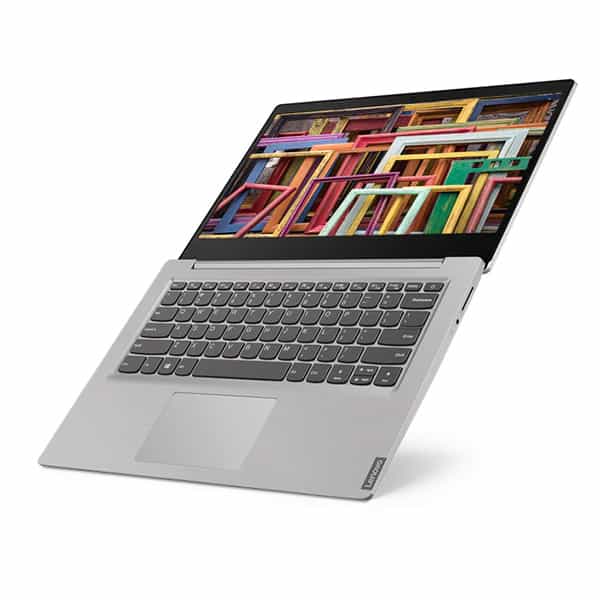
The learning and work load demands on students are getting higher and higher. So buying yourself a laptop to match what you actually need is, honestly, not that easy. Here is a small review for the Lenovo Ideapad S145-14IIL-81W600AQVN (i3-1005G1) (Black) laptop. I hope it helps you pick something that fits your budget and also covers your everyday use, more or less.
Design and Build Quality
The Lenovo Ideapad S145 has a plain, simple looking design, still it feels a bit classy, the type you usually see on budget systems. The body uses plastic, sure, but the surface is smooth and matte, which gives it a nicer, more “real” feel than you might expect at this price. It also comes in several color options, and there is a grey variant that looks a little more composed and stylish in day to day use.
In terms of size, it weighs about 4.08 pounds (1.85 kg) and it’s around 0.8 inches thick. For a 15.6-inch laptop that is pretty light, and it’s easy to toss in a backpack or laptop sleeve without too much complaining. This makes it a decent fit for students, or anyone who works around campus and needs a device they can carry quickly.
Even though it’s plastic, the overall build quality still feels okay. There is some noticeable flex around the lid and keyboard area, but it doesn’t feel extreme, so normal use should be fine. The hinge is sturdy enough, the screen opens smoothly and it stays put at different angles, which matters more than people think. All in all, the design and build of the Ideapad S145 feel reasonable for the money, sort of a balanced mix between looks and durability, without any big surprises.
The Lenovo Ideapad S145 arrives with a 15.6-inch display, and yes it comes in different versions , HD (1366 x 768) plus Full HD (1920 x 1080). For this review i’m zooming in on the Full HD model, since that one feels a bit more sensible for people who want extra clarity and finer detail.
On the Full HD unit, you get a resolution of 1920 x 1080 pixels, so text looks crisp and images show up clean. It uses an IPS panel, which usually means wider viewing angles , so colors and brightness keep feeling more steady even if you are not looking straight on. There is also a matte finish , that sort of surface kind of helps reduce glare and unwanted reflections, and it’s honestly easier to work with in rooms that have strong lighting.
Brightness is capped at roughly 220 nits, so in indoor settings it works, but outdoors in direct sun, or in very bright places it can get a little washed out. Color performance is decent for everyday stuff, like web browsing and video streaming, though if you’re doing pro photo or video editing and you really need exact color accuracy, this panel likely won’t satisfy those expectations.
All in all , the Ideapad S145 screen is fine for daily tasks and casual media watching. It doesn’t reach the polish you’d see on higher-end laptops, still it delivers a comfortable viewing experience for the money you pay.
Performance
Lenovo Ideapad S145 comes in a bunch of configurations, so you can pick different processors , RAM, and storage… for this review, we’re zooming in on a mid range setup with an Intel Core i5 inside, 8GB of memory, and a 256GB SSD.
The Intel Core i5 gives you enough grunt for most everyday tasks like web surfing, document work, and watching videos. It’s a quad core CPU with a baseline clock of 1.6 GHz, though it can climb up to 3.9 GHz when it needs to. So day to day stuff feels fluid, still, heavier apps—like video editing, or gaming—might stretch things a bit , and then you’ll notice the limits.
On the RAM side, 8GB lets the Ideapad S145 do multitasking without drama. You can have a few programs open at once, and generally you won’t see big slowdowns. For many people this is totally fine, but if you’re a power user, or if your workflow involves memory heavy software, moving up to 12GB or 16GB can feel more comfortable.
Then there’s the 256GB SSD which brings speedy storage and quick file access. An SSD is usually pretty faster than a traditional HDD , so you end up with quicker booting and faster app startup too, overall you feel a more “snappy” system. If you end up needing more storage, you can often pick a larger SSD later. And if you want to get fancy, you could even do a hybrid setup, like SSD plus HDD depending on the exact drive model.
In terms of graphics, the Lenovo Ideapad S145 leans on integrated Intel UHD Graphics. It’s kind of enough for everyday chores , and some light gaming stuff, but it is really not made for heavier graphic workloads, or for modern AAA titles. If you want smoother performance, and more serious visual output, then a laptop with a dedicated GPU might be the better path.
Keyboard and Trackpad
The keyboard on the Lenovo Ideapad S145 is built around comfort and real-world usability, if that makes sense. You get a full-sized layout complete with a numeric keypad , and for people who deal with numbers often, that part is genuinely handy. The chiclet style keys are spaced out nicely and they give you a comfortable typing rhythm, with a decent amount of key travel and tactile feedback, too.
One thing though, the keyboard isn’t backlit, so in darker rooms it can be a minor pain. Still, for regular usage the typing experience feels fine, and the numeric keypad counts as a small but real plus.
The trackpad is kinda on the larger side, and it reacts quickly. It also plays nicely with Windows Precision drivers so the cursor movement stays accurate and the multi touch gestures feel smooth. The actual surface of the trackpad is smooth enough that your fingers slide along without any fuss, and the built in buttons click in a satisfying way when you press them. Overall, it’s a good user experience and it matches the keyboard well, not awkward or clunky.
Audio
The Lenovo Ideapad S145 has audio quality that is pretty decent , especially considering it is a budget laptop. It uses dual speakers that are placed on the bottom of the chassis, which can be a little annoying because if the laptop sits on a soft surface like a bed or couch, the sound gets kind of muffled, and you lose some clarity.
In general the output is clear , and loud enough for everyday casual listening. Still , it does not really bring much depth, and the bass feels limited , which is pretty normal for most budget models. So for a more rounded experience people often go with headphones or external speakers , since those usually help fill in what the built-in speakers can not.
The Ideapad S145 also comes with Dolby Audio, and that helps lift the overall sound impression. It will not match a high end audio setup, of course, but it delivers an acceptable experience for watching movies, listening to music, and joining video calls.
Connectivity
On the connectivity side, the Lenovo Ideapad S145 gives a solid mix of ports that covers a range of everyday needs. It includes:
2 x USB 3.1 Gen 1 Type-A
1 x USB 2.0 Type-A
1 x HDMI 1.4b
1 x RJ-45 Ethernet port
1 x Headphone/microphone combo jack
1 x SD card reader
Having more USB Type-A ports around is kind of the point, since it keeps things compatible with a lot of peripherals and little accessories. You get an HDMI port too, so you can just plug into an outside monitor or a projector, no big drama. There’s also an RJ-45 Ethernet port which gives a pretty dependable and quick wired internet connection, for when Wi‑Fi isn’t ideal. And then the SD card reader feels like a practical extra, especially if you need to move files from cameras , or other devices where the storage ends up on an SD card.
For wireless stuff, it’s also covered pretty well, with Wi‑Fi 5 (802.11ac) along with Bluetooth 4.2. Sure, those aren’t the newest standards , but they still tend to give stable, fast connections that most users will be fine with. That said, if you specifically want Wi‑Fi 6 or Bluetooth 5.0, you may want to consider more recent models, or higher-end laptops.
Battery Life
Battery life is always a big deal on any laptop , and the Lenovo Ideapad S145 does a decent kind of job here. It includes a 35Wh battery, which usually keeps going for around 5-7 hours on a single charge. The exact runtime, depends on what you are doing , and on your own habits too. For a lot of people, that’s enough for the whole day of work or studying , as long as you’re not running heavy apps non stop or constantly pushing it through the most demanding tasks.
Software and Features
On the Lenovo Ideapad S145, Windows 10 Home is already installed, so you get a familiar operating system that feels easy to live with, plus it includes a lot of productivity and entertainment options. Lenovo also adds a handful of proprietary utilities , meant to upgrade the overall experience and fine tune how the laptop runs.
Lenovo Vantage is one example of that, it helps you handle system updates , tweak hardware settings, and also reach support resources. The program offers useful performance clues and it can help users keep everything in a good working balance, over time.
Another useful feature on the Lenovo side is App Explorer, this kind of offers a curated bunch of applications that a person can download and install. It kind of helps, so users can locate helpful software without needing to scroll through all that huge list of available apps, which is… honestly not great when you just want something simple.
The Ideapad S145 also brings some security features, for example there’s a Trusted Platform Module , TPM chip in there, which works to safeguard important information by encrypting it. Even if it does not include a fingerprint reader or facial recognition, these basic protections still add some real coverage for user data.
Gaming Performance
The Lenovo Ideapad S145 wasn’t really build for gaming first, yet it can still handle light gaming and older games in a decent, kind of okay way. Appreciate the integrated Intel UHD Graphics, it’s able to boot up less demanding titles, like Minecraft, The Sims 4, and other vintage games at lower settings.
For people who are really serious about gaming, getting a laptop with a dedicated GPU is usually the smarter move. But if you’re more of a casual gamer or you mainly play titles that are not that hard on hardware, the Ideapad S145 can still deliver a pretty decent gaming experience , even if it has those obvious limits.
Cooling and Thermals
Good cooling matters a lot, not only for keeping performance steady, but also for making sure the system lives longer. The Lenovo Ideapad S145 comes with one cooling fan, plus a ventilation setup that is actually pretty decent. In everyday use, like browsing the web or watching video , the machine tends to stay cool enough and quiet too. During these routines, the fan stays calm, basically doing its job without turning into background annoyance, so the overall experience feels comfortable.
Still, once you start pushing it harder, like running heavier multitasking for a while, or doing light gaming , the fan ramps up. That extra airflow helps push away the extra heat, but yeah, the fan sound becomes more noticeable. It’s not really “blaring” or unbearable though , and most users probably won’t treat it as some big distraction.
On the thermal management side , the laptop does a decent job at stopping too much heat from stacking up. The palm rest and the keyboard zone stay pretty cool, even when its working harder so you can just keep using it, pretty comfortably, for a long while. The underside does get warm, of course but it never really turns into that “oh wow” uncomfortable heat.
So yeah , in general the cooling solution inside the Ideapad S145 is effective, mostly for the kinds of things it was meant to do. If you plan to run super demanding apps, or keep heavy performance going for hours and hours, then it might not feel like the right fit. But for daily tasks and lighter workloads, it handles that quite well.
Upgradability
The Lenovo Ideapad S145 has at least some degree of upgradability, which is useful if you want to stretch the lifespan of the machine. You can remove the back panel by taking out a few screws and then you get access to the inner components.
One of the key parts you can improve is the RAM. The laptop usually shows up with 4GB, or 8GB of RAM, but most users can go further to around 12GB or 16GB max depending on the exact configuration. This tends to boost day-to-day speed, especially when you run multiple tabs , apps at once or use more demanding programs.
The storage is something you can adjust. The Ideapad S145 takes both 2.5-inch SATA drives and M.2 SSDs, which means you get a sort of flexibility, like picking the drive style and the capacity that fits what you do. If you switch to a larger SSD, or add a second drive, you’ll generally get more space and quicker data access, even when opening heavier files.
The CPU and GPU are soldered onto the motherboard, so they can’t be swapped out. Still, being able to upgrade RAM and storage is a pretty big plus for a budget laptop, because you can fine tune the system for your own needs, and maybe stretch its usable life longer.
Value and Competition
The Lenovo Ideapad S145 is kind of aimed at the budget segment, it provides a decent mix of performance, features and cost. It sort of faces off, with other entry level models from HP, Dell, Acer and ASUS. Here’s a quick look at how it stacks up next to some of its main rivals, and what you can expect overall:
HP 15 Series: At a similar price, the HP 15 line feels pretty close in features too, you get comparable day to day performance with Intel or AMD processors. Usually there’s a more premium kind of build and the keyboard experience is a bit better, but the Ideapad S145 kinda wins when it comes to upgrade paths and options, overall.
Dell Inspiron 15 3000 Series: Dell’s entry level laptops are generally solid, build wise and performance wise, they can feel similar to the Ideapad S145. Still, Dell models often land at a slightly higher price even when the specifications look about the same.
Acer Aspire 5: The Acer Aspire 5 is another legit contender. It can come with a metal chassis, a screen that looks noticeably better, and it often ships with a backlit keyboard , thing is, the Ideapad S145 usually doesn’t. So if you really care about those kinds of details , the Aspire 5 might feel like the more sensible pick.
ASUS VivoBook 15: The VivoBook 15 lineup feels smoother overall, and it shows up in a wide range of configurations, sort of. You may spot small bonuses like a backlit keyboard, or a fingerprint reader, though those extras usually aren’t part of the Ideapad S145 package. Still , the VivoBook 15 can end up costing more, sometimes quite a bit more.
If we’re talking value, the Lenovo Ideapad S145 tends to stand out, mainly because of upgradeability, pretty decent performance, and a price that stays friendly. It’s a good option for people who want a dependable laptop for everyday needs without spending a ton.
Pros and Cons
Pros:
– Affordable Price: The Ideapad S145 gives pretty good value for the money, so it becomes usable for a lot of different people.
– Decent Performance: Depending on the configuration, it can come with an Intel Core i5 processor and SSD storage. Overall, it deals with everyday tasks pretty fine.
– Upgradability: You can upgrade the RAM and the storage, this kind of tweakability helps stretch the laptop’s useful life, at least in a practical way.
– Good Connectivity: There are multiple ports, like USB 3.1, HDMI, and Ethernet, so it’s easier to plug in other gear without too much drama.
– Comfortable Keyboard: The full-sized keyboard with the numeric keypad feels comfortable, and typing plus data entry is usually ok.
Cons:
– Mediocre Display: The screen is “fine” for daily use, but it does not shine much. The brightness and color accuracy are kinda weak, so photo or video work in a more professional sense is not ideal.
– Plastic Build: It’s built with plastic, which is durable enough for regular routines. Still, it lacks that premium touch you get with a metal chassis on pricier machines.
– No Backlit Keyboard: If you often work in darker rooms, the lack of a backlit keyboard is kind of a downside.
– Limited Graphics Performance: Integrated graphics won’t really cut it for heavy gaming or graphics-heavy applications, you know, the more demanding stuff.
Conclusion
The Lenovo Ideapad S145 is kind of a well rounded budget laptop, it gives a nice blend of performance, built in features and overall affordability, you know. It works especially well for students, busy professionals, and casual users who want something dependable for everyday stuff like web browsing, writing documents, watching videos, that sort of thing.
It does have some downsides, like the display that feels a bit mediocre and the plastic build that doesn’t exactly scream premium. But it kind of balances that out with decent speed, decent expandability options, and solid connectivity… mostly, it stays practical. Also the keyboard feels comfortable to type on, and the trackpad is responsive enough so navigation doesn’t feel annoying.
If you are looking for a budget friendly laptop that handles daily computing without going too far down on performance, then the Lenovo Ideapad S145 is a pretty solid pick. In its price tier it competes well with other entry level options and honestly, the value for money seems fair.
To wrap it up, the Lenovo Ideapad S145 is a reliable and affordable device for people who want a dependable machine for regular use. Its upgradability plus the reasonably good performance helps it stay flexible as your needs change, meaning it can remain a useful tool for quite awhile, not just a short sprint.
New Lenovo Ideapad S145 14″ Laptop Intel Pentium Gold 5405U Dual-Core CPU, 4GB Memory 128GB SSD Windows 10 Grey (Renewed): Buy it now
Newest Lenovo IdeaPad S145 15.6″ HD Business Laptop, AMD A6-9225 Dual-core Upto 3.0GHz, 8GB RAM, 1TB HDD, AMD Radeon R4 Graphics, HDMI, WiFi, Card Reader, Windows 10, Black: Buy it now
Lenovo Ideapad S145 14.0″ HD Pentium 5405U 2.3GHz 4GB RAM 128GB SSD (Renewed): Buy it now
2019 Lenovo IdeaPad S145 15.6″ Laptop Computer: AMD Core A6-9225 up to 3.0GHz, 4GB DDR4 RAM, 500GB HDD, 802.11AC WiFi, Bluetooth 4.2, USB 3.1, HDMI, Black Texture, Windows 10 Home: Buy it now
Newest Lenovo Ideapad S145 15.6″ HD Laptop, Intel Dual-Core Pentium 5405U Gold 2.3GHz, 4GB DDR4 RAM, 500GB HDD, HDMI, Wi-Fi, Bluetooth, Windows 10 Home: Buy it now
Related Posts







Tech Reviewer & Product Analyst
Định Bia has spent over 10 years testing consumer electronics with a focus on smart technology. He work as a product advisor at Biareview where he helped customers find the right devices for their needs. He personally tests every product featured on this site using a consistent evaluation framework covering quality, durability, and value. All reviews are based on experience, not influenced by the manufacturer.