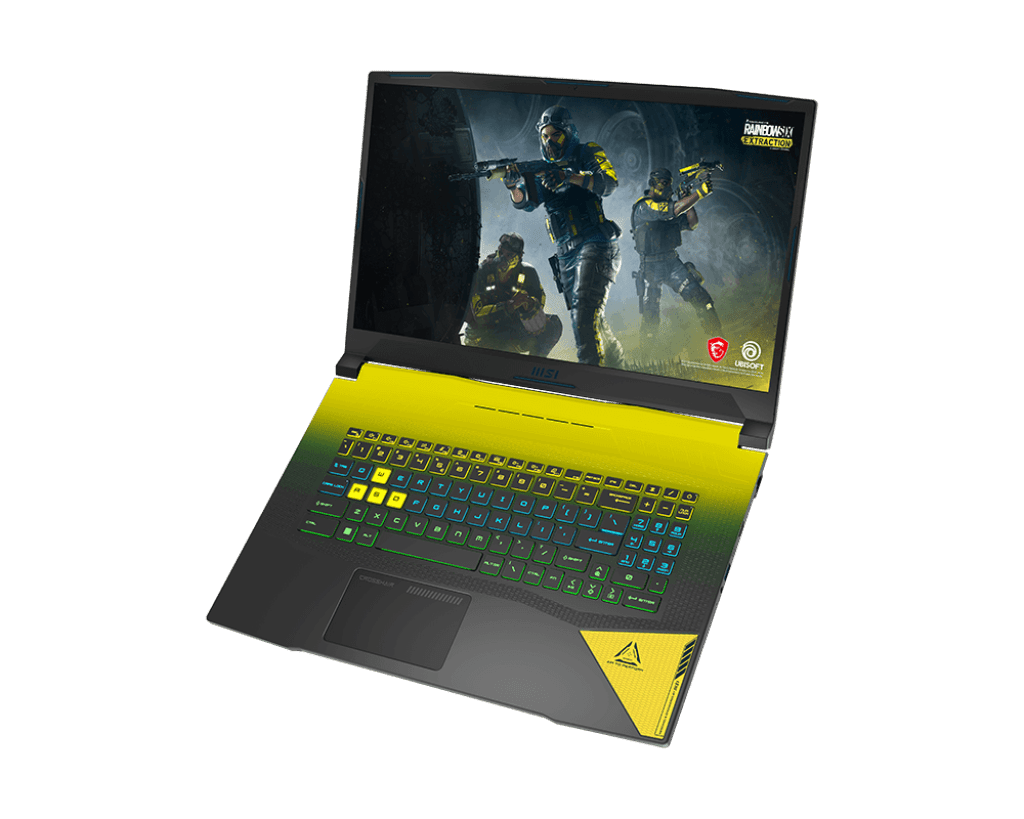
MSI Crosshair 17 Gaming Laptop is an MSI gaming laptop line equipped with a 12th generation Intel Core i7 processor with 14 cores and NVIDIA GeForce RTX 30 series graphics card, possessing a beautiful, impressive, and optimized design to help bring out the full power during gaming and give maximum performance up to 40% higher than the previous generation.
Exceptional strength
MSI Crosshair 17 comes with the newest 12th generation Intel Core H-series processor, it has 14 cores and 20 threads so it can push maximum output when you play games, work in office software, and also for other multitasking jobs.
Powerful GeForce RTX 30 Series
GeForce RTX 30 Series graphics cards powered by the Ampere platform, NVIDIA’s 2nd Gen RTX architecture with RT cores, Tensor cores, and new streaming multiprocessors, delivering the most realistic ray tracing graphics and features advanced AI features. Thereby ensuring performance for gamers, enjoying high-graphics games with the best quality.
Resizable BAR feature
As a premium feature of the PCI Express MSI Crosshair 17 interface, it allows the CPU to use the full cache on the GPU, which improves performance. This is also the feature that creates the power and name of the MSI Crosshair 17 Gaming laptop.
Realistic, sharp images
Thanks to the Ray Tracing technology on the MSI Crosshair 17, your blockbuster gaming experience will be taken to the next level with unparalleled picture quality. The ability to accurately simulate the interaction of light rays in real-time makes the image in the game more realistic than ever.
Besides, MSI Crosshair 17 is also equipped with a QHD IPS screen that delivers high-definition images, a scan frequency of up to 165Hz to help eliminate motion blur, and frame breakage, ensuring the experience for gamers.
Cooler Boost 5 Heatsink
MSI Crosshair 17’s separate heatsink for both CPU and GPU includes 2 Fans with a total of 6 heat pipes, the perfect combination to minimize heat and optimize airflow to ensure high gaming performance in one compact machine.
Realistic NAHIMIC 3 surround sound quality
NAHIMIC 3 is an improved system of 7.1 surround sound, which makes the sound more realistic, helping gamers immerse themselves in the game. Not only games, but the experience of conference calls also becomes a lot more interesting. The MSI Crosshair 17 offers true 3D surround effects that can be easily adjusted with the supplied software to suit any environment and for a flawless audio experience.
WiFi 6 Support
The MSI Crosshair 17 Gaming Laptop comes with the newest 802.11ax WiFi 6, and yeah it can be up to 3x faster than WiFi 5, it’s made for that smoother gaming vibe, live streaming sessions and online meeting moments , with less hiccups overall.
Performance
In side the MSI Crosshair 17, you get the latest 11th Gen Intel Core i7 or i9 processors, matched up with NVIDIA GeForce RTX 30-series graphics cards. With this setup, the laptop is basically ready for even the most demanding AAA games, without the whole thing feeling all that stressed. When you mix a high powered CPU and GPU like this together, you usually get really strong frame rates, even if you push the visuals higher, so the experience stays immersive.
Memory and storage also get plenty of attention. The Crosshair 17 supports as much as 64GB of DDR4 RAM, and you can choose configurations with several NVMe SSDs, for quicker loading and that extra room for files, libraries, and everything else. This flexibility fits not only players , but also busy professionals who need heavier multitasking on a regular basis.
Cooling and Noise
Good cooling really matters, especially if you play for a long time and want everything to stay snappy. The MSI Crosshair 17 uses MSI’s Cooler Boost Trinity+ system, and it has dedicated heat pipes along with multiple fans that work together to move heat away. When you’re actually gaming, the fans do ramp up to keep temperatures under control , so you’ll hear them, but usually it stays in that kind of noticeable yet not fully annoying range. Still, if you’re sensitive to fan sound , or you game in quieter rooms , that extra noise is something to keep in mind.
Connectivity and Ports
On the connectivity side, the Crosshair 17 gives you a pretty wide spread of options. You get USB Type-A and USB Type-C ports, plus support for Thunderbolt 4 on higher end configurations. There’s also an HDMI output, Ethernet, and an SD card reader. Having Thunderbolt 4 here is a nice bonus if you care about fast data transfers, or if you want to plug in external screens without much hassle, especially for people that do more than just gaming.
Battery Life
To be honest, gaming laptops rarely deliver amazing battery results. The Crosshair 17 matches that reality. In everyday use, like browsing the web or doing work type tasks, you’re looking at roughly 4 to 5 hours. But when you get into gaming, or any GPU heavy workload, the runtime drops fast, usually landing around 1.5 to 2 hours. So for long sessions you’ll likely stay close to a wall outlet, which is pretty standard for a machine in this performance class.
Audio, and Media
The MSI Crosshair 17 comes with Nahimic 3 audio enhancement stuff, it aims to push immersive 3D audio using the stereo speakers. In practice the sound is decent, there is decent clarity, and a decent bass hit too for a laptop this size. It is not really a replacement for proper external speakers or good headphones, but the built in speakers still feel satisfying enough for gaming and everyday multimedia.
Software, and user experience
Right out of the box, the Crosshair 17 runs Windows 11 , and it kind of feels tuned for gaming plus modern productivity. MSI also bundles gaming themed software, so you can tweak performance modes, glance at system metrics, and swing the RGB lighting profiles around with MSI Dragon Center. Overall the bundle helps, it makes daily use smoother, and it gives you plenty of control without turning everything into a maze for people who are not that tech inclined.
Conclusion
The MSI Crosshair 17, honestly looks like a strong gaming laptop, it mixes capable hardware with a clean design and a vivid display. It tends to shine when it comes to high frame rates and generally smooth play sessions, so if you’re the type of gamer who cares about speed and steadiness, this one fits. Sure, battery life and fan noise under heavy load are the typical trade offs, but they are pretty minor when you zoom out at what the machine is delivering.
So for gamers and content creators who want to put money into a premium gaming laptop, with top tier specs and a solid build, the MSI Crosshair 17 is definitely worth putting on your shortlist.
MSI Crosshair17 17.3″ 144Hz FHD Gaming Laptop Intel Core i7-11800H RTX3060 16GB 512GBNVMe SSD Win10: Buy it now
MSI Crosshair17 17.3″ 144Hz FHD Gaming Laptop Intel Core i7-11800H RTX3050TI 16GB 512GBNVMe SSD Win11 – Titanium Gray (A11UDK-645): Buy it now
MSI Crosshair 17 Gaming Laptop 17.3” FHD IPS 144Hz (72% NTSC) 11th Generation Intel Octa-core i7-11800H 64GB RAM 2TB SSD GeForce RTX 3050 Ti 4GB USB-C Backlit Keyboard Win10 + HDMI Cable: Buy it now
MSI Crosshair 17 17.3″ 144Hz FHD Gaming Laptop: Intel Core i7-12700H RTX 3060 16GB 512GB NVMe SSD, Type-C USB 3.2 , Backlight Keyboard , Cooler Boost 5, Win11 Home: Multi-Color Gradient B12UEZ-296: Buy it now
Related Posts

Tech Reviewer & Product Analyst
Định Bia has spent over 10 years testing consumer electronics with a focus on smart technology. He work as a product advisor at Biareview where he helped customers find the right devices for their needs. He personally tests every product featured on this site using a consistent evaluation framework covering quality, durability, and value. All reviews are based on experience, not influenced by the manufacturer.