- Slim, elegant design
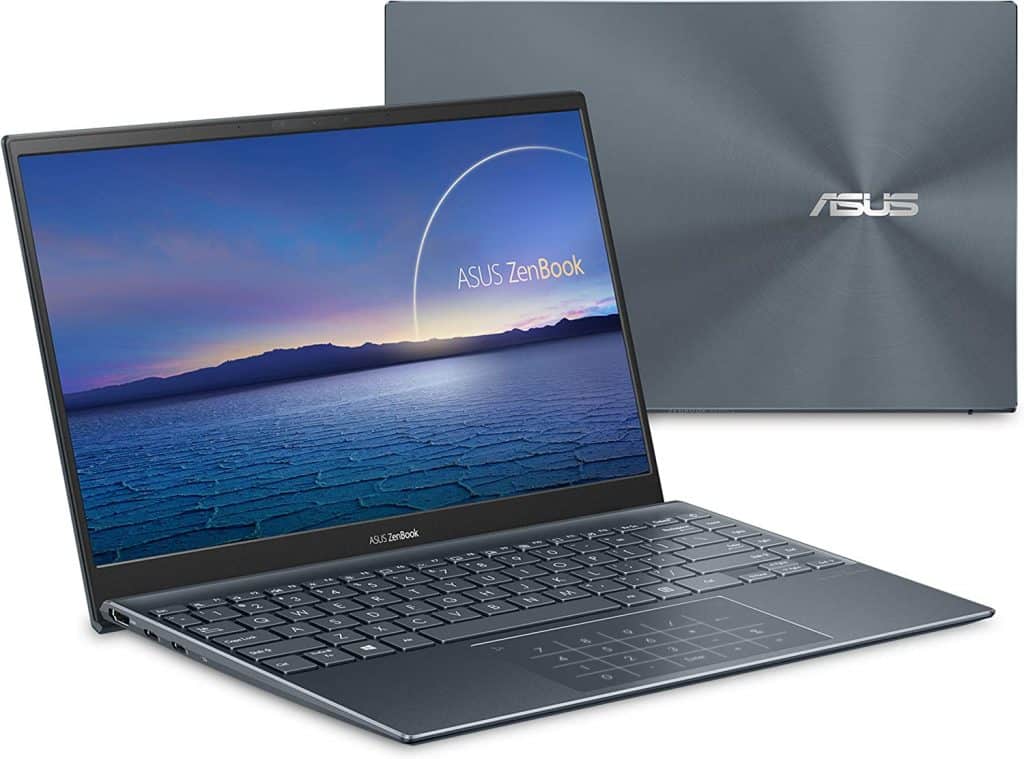
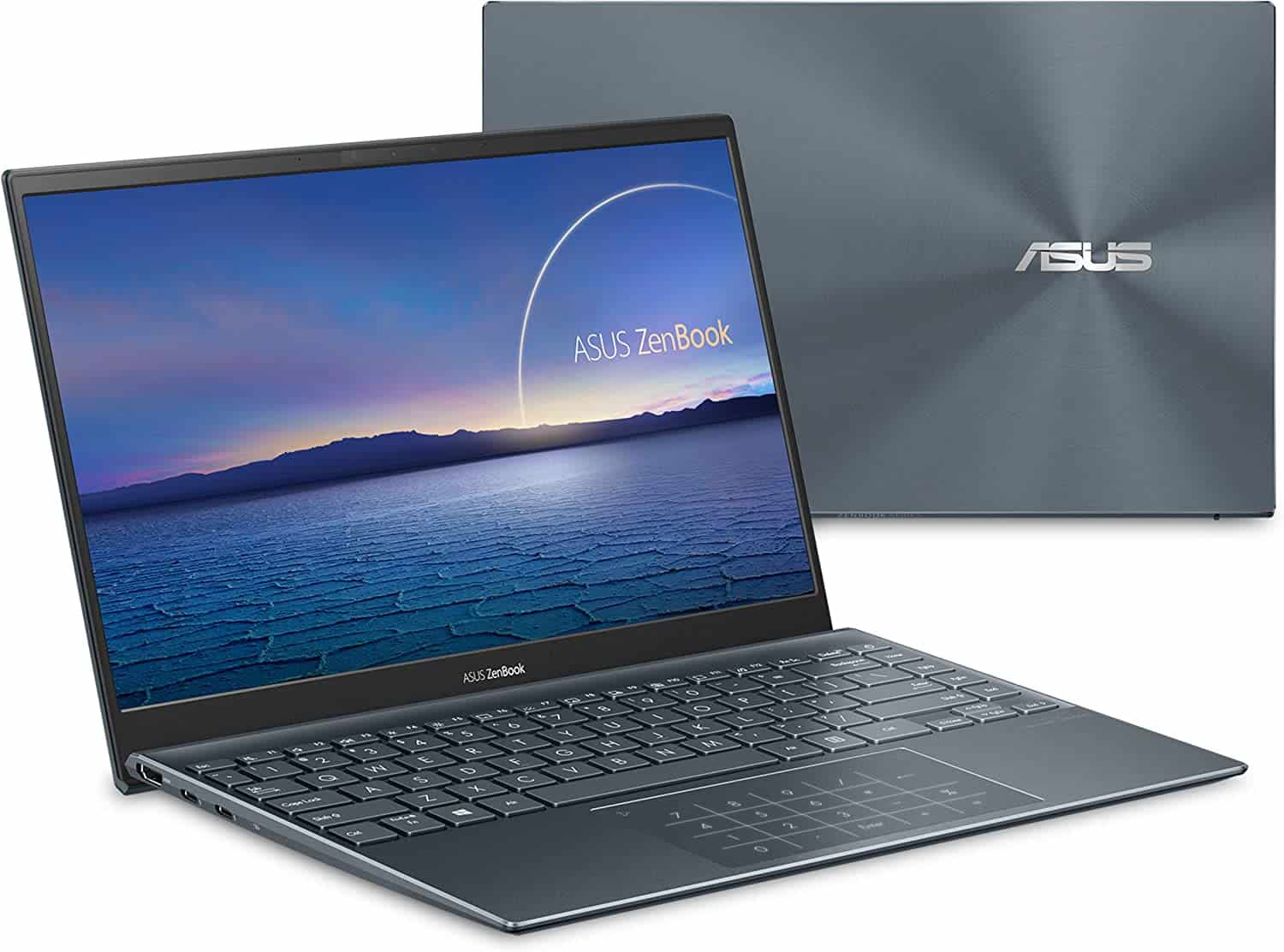
Asus Zenbook 14 has a luxurious , kind of high end vibe with that metal case so the laptop arrives at just 15.9 mm thin and around 1.19 kg in weight. In real use, it feels like a really solid option for office folks, business people , or basically anyone who keeps a laptop in motion. Even though Zenbook 14 is slim and light, it still feels pretty rigid, because it sticks to the MIL-STD 810 standard for military durability, so you can stay relaxed if you accidentally drop it off the desk.
Especially when you open the lid, the keyboard lifts itself to roughly a 3 degree angle, since the laptop uses an Ergolift hinge design. That little lift , it gives you a nicer typing sensation, can cut down on hand fatigue, and also helps with heat dissipation in a more efficient way.
- Multi-color NanoEdge display
In addition, the screen also has a bezel design on both sides with 2.9mm stimulation and 3.3mm bottom for a screen-to-body ratio of up to 92%. At the same time, Asus integrates an anti-glare feature to help protect the eyes when working for too long in front of the computer.
- Novelty keyboard and trackpad
If the above talks about the external design, this part will go into the interior design of the keyboard and touchpad. Asus Zenbook 14 has 1.4 mm key travel, good bounce feels comfortable when typing. Not only that but the keyboard is also equipped with a backlight with three different brightness modes, suitable for working in dark environments.
The touchpad of the Asus Zenbook 14 has a very fast response time when surfing. Moreover, Asus has integrated a numeric keypad right on the trackpad. This is very convenient for office workers, especially accountants, who can enter data quickly and accurately with just one touch.
- Outstanding configuration and performance
The Asus Zenbook 14 laptop includes an Intel Core i5-8265U processor, ramped up to 3.9GHz, to help get the system going in under 5 seconds, or so it says. Also you get 8GB RAM and a 512GB NMVe SSD, which should handle most everyday tasks pretty nicely and keep things feeling zippy while apps are loading.
In addition, the machine also integrates discrete graphics NVIDIA GeForce MX150 with performance up to 2.4 times faster than standard integrated graphics chips using the same memory. This card helps to smoothly handle graphic tasks such as video, and photo editing, …
- Good battery life
Although it is a thin and light laptop, Zenbook 14 has a battery capacity that is rated at a good level with 50Wh 3-cell for more than 6 hours of use with basic office applications such as word, excel,… for heavy tasks such as gaming, design,… it’s just over 4 hours if used.
- Advanced security features
The security system of the Asus Zenbook 14 has been moved to a new application which is a camera that incorporates an infrared sensor to recognize the host’s face. This helps to ensure the absolute security of user information and at the same time brings more convenience, because you just need to turn on the device and automatically scan the face of the machine and it will work right away. This camera is designed to be small in the upper corner of the screen.
Connectivity and Ports
Port Selection
Despite its compact size, the ASUS ZenBook 14 provides a comprehensive selection of connectivity options to accommodate peripheral devices and external displays:
- 1 x USB 3.2 Gen 1 Type-C port (supports Power Delivery and DisplayPort)
- 2 x USB 3.2 Gen 2 Type-A ports
- 1 x HDMI 2.0 port
- 1 x microSD card reader
- 1 x Audio combo jack (headphone/microphone)
Wireless Connectivity
The laptop comes with Wi‑Fi 6 (802.11ax) tech, which helps deliver fast and dependable wireless internet connectivity , so online browsing, streaming, and file downloads stay pretty smooth. It also includes Bluetooth 5.0 support, letting you pair wirelessly with Bluetooth enabled peripherals like a mouse, keyboards and headphones, and this kind of improves day to day productivity and convenience depending on what you are doing.
Software and user experience
Operating system
On the ASUS ZenBook 14 you get either Windows 10 Home or Windows 11 Home already installed. Both provide a straightforward experience, plus productivity focused tools, regular security updates, and good compatibility with a lot of applications, including things you can grab from the Microsoft Store. Windows 11 feels more modern, it has a refreshed layout, better task management, and performance tuning that’s geared toward multitasking, creating content, and even entertainment.
ASUS Quick Key
The ASUS Quick Key software lets you set up custom shortcuts, and basically automate those repetitive steps using the laptop touchpad. You can assign gestures or hotkeys to specific actions, or certain applications, so your workflow feels faster, and less manual input is required. It also makes moving through multiple windows or programs less cumbersome, which helps your overall productivity, and day to day comfort.
Security Features
Biometric Security
Several ASUS ZenBook 14 models come with a fingerprint sensor, right inside the touchpad, so it supports secure biometric sign in through Windows Hello. it makes device security feel a bit more “hands-on” because users can access their account fast, without typing passwords, and that helps protect personal data, while also reducing the chances of someone getting in without permission.
Webcam Privacy Shield
ASUS also adds a webcam privacy shield to the laptop’s design. so when you’re not using it, you can cover the webcam lens, which gives extra privacy and security. That physical cover can block potential unauthorized access, or keep you from accidentally recording video, offering some peace of mind especially if you’re concerned about webcam security and want to better safeguard your online privacy.
Conclusion
Overall, the ASUS ZenBook 14 seems to hit a nice middle ground between portability, solid performance, and that premium looking design stuff that modern users expect. Of course, it wont really “out-muscle” gaming laptops or top tier workstations in raw processing power, but the compact build, efficient cooling, and long battery runtime make it a strong option for anyone trying to boost productivity with as little friction as possible, and without too many compromises.
ASUS ZenBook 14 Ultra-Slim Laptop 14” FHD Display, AMD Ryzen 7 5800H CPU, Radeon Vega 7 Graphics, 16GB RAM, 1TB PCIe SSD, NumberPad, Windows 11 Pro, Pine Grey, UM425QA-EH74: Buy it now
ASUS ZenBook 14 Ultra-Slim Laptop 14” FHD Display, AMD Ryzen 9 5900HX CPU, Radeon Vega 7 Graphics, 16GB RAM, 1TB PCIe SSD, NumberPad, Windows 11 Pro, Pine Grey, UM425QA-XH99: Buy it now
ASUS ZenBook 14 OLED Laptop 14” 2.8K OLED Display, AMD Ryzen 7 5825U CPU, Radeon Graphics, 8GB RAM, 512GB PCIe SSD, Windows 11 Home, Jade Black, UM3402YA-DS71: Buy it now
ASUS Zenbook 14 Laptop – AMD Ryzen 5-8GB RAM – NVIDIA GEFORCE MX350-256GB SSD – Win 10, Light Gray: Buy it now
ASUS ZenBook 14 Ultra-Slim Laptop 14” Full HD NanoEdge Display, Intel Core i7-1165G7, 8GB RAM, 512GB PCIe SSD, NumberPad, Thunderbolt 4, Windows 10 Home, AI noise-cancellation, Pine Grey, UX425EA-EH71: Buy it now
Related Posts

Tech Reviewer & Product Analyst
Định Bia has spent over 10 years testing consumer electronics with a focus on smart technology. He work as a product advisor at Biareview where he helped customers find the right devices for their needs. He personally tests every product featured on this site using a consistent evaluation framework covering quality, durability, and value. All reviews are based on experience, not influenced by the manufacturer.