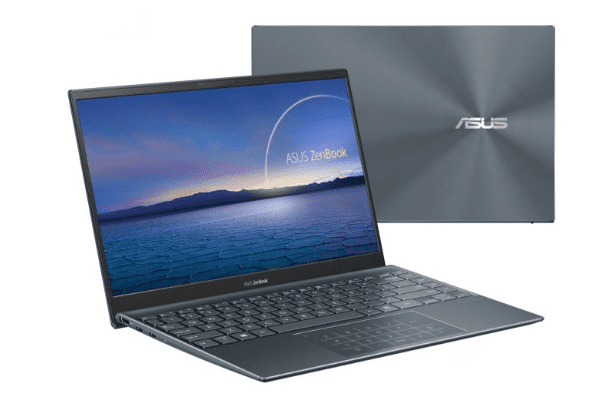
Asus ZenBook has long been a notable product line in the high-end laptop market; with the upgraded Intel Tiger Lake processor, the Asus ZenBook 13 UX325EA impresses thanks to its slim and lightweight design but carries its performance powerful ability.
The Asus ZenBook 13 UX325EA model used in the review runs for $999, and you’ll basically end up with a laptop that is powered by Intel’s most recent 11th Gen Intel Core i7 1165G7 chip, plus Intel’s 1TB solid state drive, and 16GB of system memory. Let’s check if that 11th generation Intel processor is really as capable as Intel is saying in this introduction.
Slim, lightweight, eye-catching design
The Asus ZenBook 13 UX325EA is one of the smallest and lightest 13.3-inch laptops on the market. The machine has only 13.97 x 203.2 x 304.29 mm and weighs only 1.07kg. To do this, Asus has significantly reduced the screen border to bring the screen-to-body ratio up to 88%.
In terms of colors, Asus ZenBook 13 UX325EA gives users youthful and eye-catching Pine Gray and Lilac Mist color options. The product will be more suitable for young people who prefer dynamism than a luxury and high-end product like Dell XPS 13 or MacBook Pro.
The touchpad part of the product is also somewhat uncertain; when touched slightly shakes and used, there will be a rattle, not creating a sense of confidence. But in general, with a product under $1000, it is difficult to ask for too much.
Display Quality
The Asus ZenBook 13 UX325EA has a 13.3-inch Full HD (1920 x 1080 pixels) IPS screen, giving vibrant colors, sharp details, and wide viewing angles ,so you get a more immersive watching and working vibe. The panel uses Asus NanoEdge tech , which keeps the bezels nice and thin on every side, pushing the screen-to-body ratio up to 88%, basically cutting down distractions while you’re doing productivity tasks or just consuming multimedia.
Also, this display supports 100% sRGB coverage so colors stay consistent, which is really good for professional photo editing, visual layout work, and all kinds of content creation. On top of that the brightness is high and there’s an anti-glare coating , helping you see well in different lighting conditions, even outdoors or in bright rooms, without sacrificing clarity or that comfortable feel for your eyes.
ZenBook 13″ keyboard and touchpad
Like many other Asus devices, when opening the screen, the hinge will raise the device to create a tilt of about 3 degrees for comfortable typing.
Typing feeling is also quite good; the keys are firm and quiet. However, adding a row of keys on the right side (Page Up, Page Down, Home, and End) makes all the keyboards deviate to the left and a little smaller, which may not satisfy fastidious users.
As for the touchpad, although the design is a bit loose, the experience is quite good. In particular, this touchpad also has a virtual Numpad useful for those who like a compact laptop but need a numeric keypad for some tasks.
Performance of Intel Core i7-1165G7 processor
ZenBook 13 is, one of the first laptops that come with Intel’s 11th gen Tiger Lake CPUs so yea it’s kinda early for this setup. The unit that we actually evaluated is running a 4-core, 8-thread Core i7-1165G7 with a base clock of 2.8GHz, not too shabby. This new processor also bundles Intel’s newest Iris Xe Graphics iGPU, integrated graphics, which is built right in. Now let’s see if the new processor is really powerful. To know if ZenBook 13 with Intel Tiger Lake processor is powerful, we will put it next to some other competitors such as Acer Swift 3 (i7-1065G7), MacBook Air 2020 (i5-1030NG7), HP Envy x360 13 (Ryzen 5 4500U), and Dell XPS 13 (i7-1065G7).
First comes the real performance measurement tool with PCMark 10 and PCMark 8 tests. This software will simulate real user tasks from web surfing, office applications, image editing. ZenBook 13 easily surpasses the rest of the competition on this test, but the difference is not too big.
Intel’s new processor also performs very well in terms of video decoding. ZenBook 13 took 16 minutes to transcode a 4K video with Handbrake, roughly equivalent to the Envy x360 equipped with a 6-core processor from AMD. Interestingly, the Dell XPS 13 9300 performed very well, despite having the same processor as the Acer Swift 3 but significantly faster, which is not too strange. The XPS has a much higher price and is also very well optimized by Dell.
Coming to the Cinebench R15 test, a test that uses the CPU to decode a complex image, the results show that the i7-1165G7 is more powerful than AMD’s Ryzen 5 4500U.
When it comes to graphics performance tests, the ZenBook 13 is far ahead of previous generations, and also the AMD Radeon GPU integrated with the Ryzen 5 4500U.
With this result, users can confidently fight many smooth eSport games with good graphics settings; some mid-range games can still play well without a discrete graphics card.
Connectivity and Ports
When it comes to connectivity options, the Asus ZenBook 13 UX325EA kinda gives a broad selection of ports, meant to handle different peripherals and outside devices. On top of that, you get two USB Type-C Thunderbolt 4 ports, for fast data movement, connecting an external display, and even charging connected equipment. Those Thunderbolt 4 ports are pretty useful for people who want to hook up more than one monitor, storage gear or docking stations, so the overall setup feels more smooth, and productive.
Besides that, there’s also a USB 3.2 Gen 1 Type-A port, this one is there for older peripherals, like a mouse, or an external storage drive. You also get a full size HDMI 2.0b port, which works for video output to screens, TVs, or projectors. And then there’s a microSD card reader, allowing quick file transfers from digital cameras or mobile devices. That little addition really helps for content creation, photography workflows, and general multimedia tasks, even when you’re on the move.
Battery life
ZenBook 13 is equipped with a battery capacity of up to 67Wh, but the results are not expected. That may be because Asus does not optimize its hardware and software well. In this regard, the XPS 13 still excels, despite owning a battery capacity of only 52Wh, but the results are extremely impressive.
The above results show that Intel’s new Ice Lake processor is really powerful; if it is equipped for a well-optimized device like the XPS 13, it can be even more powerful. Regarding ZenBook 13, with what can be seen, the product is a pretty good choice in the $1000 price range.
Audio and Multimedia Experience
The Asus ZenBook 13 UX325EA comes with Harman Kardon -certified stereo speakers, and they deliver kind of immersive audio , with pretty clear sound for all the usual stuff like videos, video calls, and general entertainment. The speakers give a balanced audio output with stronger bass and treble , so it feels more enjoyable when you are playing music, streaming movies, or doing those virtual meetings. Also, Asus includes SonicMaster tech which boosts audio realism and spatial accuracy, so it feels more surrounding, especially when you are working through multimedia content or joining online collaborations.
Software and User Experience
On the software side, the Asus ZenBook 13 UX325EA comes preloaded with Windows 10 Home,or Windows 11 Home depending on the configuration, so it feels familiar to most people. Asus also ships its own little toolkit like MyASUS, which is pretty handy for system tuning and a kind of more careful adjustments, especially when you want quick control. In addition it handles firmware updates and even more personalized customer support so managing the whole device, day to day, stays kinda easier. The laptop uses an intelligent cooling system too , which helps with heat dissipation , and keeps performance steady. So during heavier workloads or long sessions, it stays responsive rather than slowing down.
Conclusion
In conclusion, the Asus ZenBook 13 UX325EA really shows up as a versatile ultraportable laptop, that seems to do well across performance, portability, and those user focused features for professionals, students, and also the kind of mobile enthusiasts who never really sit still. The premium design, the vibrant screen , solid processors, and long lasting battery life , plus connectivity that covers pretty much everything , make it feel like a smooth mix of function and movement, for different everyday computing styles.
Whether you are working from home, jumping into classes, creating content, or just winding down with multimedia entertainment, the ZenBook 13 brings the kind of speed, stability, and flexibility that helps your productivity and creativity keep going, across work and leisure settings. And honestly, its ergonomic keyboard, immersive display, and steady connectivity options make it a standout pick for anyone who wants something light and capable , without having to compromise on real performance or overall user satisfaction.
The Asus ZenBook 13 UX325EA , kinda mirrors Asus commitment to innovation and craftsmanship , and also that user first design mindset for the ultra portable laptop segment. It almost sets the tone for excellence in mobility productivity and day to day personal computing experience , even if you re picky about the tiny details.
ASUS ZenBook 13 Ultra-Slim Laptop, 13.3” OLED FHD NanoEdge Bezel Display, Intel Core i5-1135G7, 8GB LPDDR4X RAM, 256GB SSD, NumberPad, Thunderbolt 4, Wi-Fi 6, Windows 10 Home,Black, UX325EA-DS51: Buy it now
ASUS ZenBook 13 Ultra-Slim Laptop, 13.3” OLED FHD NanoEdge Bezel Display, Intel Core i7-1165G7, 8GB LPDDR4X RAM, 512GB SSD, NumberPad, Thunderbolt 4, Wi-Fi 6, Windows 10 Home, Pine Grey, UX325EA-ES71: Buy it now
ASUS ZenBook 13 Ultra-Slim Laptop, 13.3” OLED FHD NanoEdge Bezel Display, Intel Core i7-1165G7, 16GB LPDDR4X RAM, 512GB SSD, NumberPad, Thunderbolt 4, Wi-Fi 6, Windows 10 Pro, Pine Grey, UX325EA-XS74: Buy it now
Related Posts

Tech Reviewer & Product Analyst
Định Bia has spent over 10 years testing consumer electronics with a focus on smart technology. He work as a product advisor at Biareview where he helped customers find the right devices for their needs. He personally tests every product featured on this site using a consistent evaluation framework covering quality, durability, and value. All reviews are based on experience, not influenced by the manufacturer.