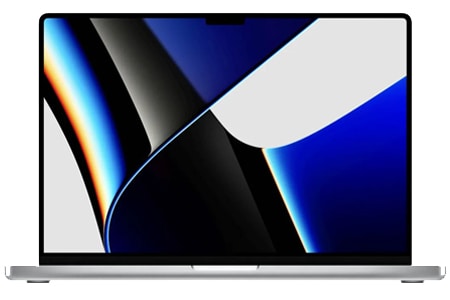
From the outside, the MacBook M1 is almost no different from the versions equipped with Intel processors launched earlier this year. Both have Retina True Tone screens with a P3 color range and a Magic Keyboard with a scissor mechanism instead of the old butterfly keyboard. Both have two Thunderbolt 3/USB4 ports and a 3.5mm jack.
However there is still a slight change in appearance on the MacBook Air, especially in the keyboard area. If you look closely, you might notice that instead of the Launchpad key, and the two keys used to raise or lower the keyboard brightness, it is now different—like it’s been changed to Search, Dictation, and Do Not Disturb. And besides those changes, the Fn key in the bottom-left corner of the keyboard also behaves like an emoji key, so you can call up an emoji pop-up that appears when you tap it quickly.
This difference cannot be seen on the MacBook Pro because the Touch Bar and the Fn key, with the Intel MacBooks, all have the same feature after updating to macOS Big Sur.
The rest of the differences between the Intel MacBook and the MacBook M1. Here’s what you’ll get with the MacBook M1.
Instant “Wake Up”
Like iPhone, iPad, MacBook M1 can wake up instantly while in sleep mode. If you own an Intel MacBook model, you may have noticed that after opening the lid, you will need to wait a few seconds to be ready to work, although not too long, sometimes annoying us when there is a problem urgent work.
Quiet activity
The MacBook Air 13-inch M1 is completely fanless and a great choice for those who prefer a completely quiet laptop. Even with fans maintaining high performance for long periods, the MacBook Pro M1 and Mac mini M1 are extremely quiet even when running continuous performance tests. Thanks to the very efficient use of power from the 5nm ARM chip possible.
Great quality screen
The MacBook Air display is getting more and more similar to the MacBook Pro’s screen, like honestly pretty close. On the MacBook Air 2020 models, both the Intel ones and the M1 versions end up with Retina panels, and they also bring True Tone along for the ride too. they both use the same P3 color gamut that you see on the MacBook Pro. The part that really feels different is mostly brightness, like that only. the Air usually hits around 400 nits max, while the Pro can go to roughly 500 nits, or so. in regular indoor life, we’re typically sitting somewhere near 150-300 nits, and honestly going past that is kinda unusual, most of the time.
Still has a 720p webcam.
The 720p FaceTime camera is probably a problem that MacBook users have always been dissatisfied with for many years now. Apple could have fitted a much better 1080p camera than it did with the iMac.
Apple M1 chip – a game-changer on MacBook M1
Without the M1 chip, the new MacBook duo is not worth mentioning because they are almost no different from the old Intel MacBook. Like the A-series processors in iOS devices, the M1 processor also contains all the CPU, GPU, Neural Engine, and unified memory components. In addition, there are storage controllers, Image Signal Processors, Secure Encryption, and more.
The Apple M1 is a processor with 8 CPU cores, which is unthinkable, especially on the MacBook Air. The 8-core CPU is divided into four high-performance (p-cluster) and four energy-efficient cores (e-cluster). Depending on the type of workload, each cluster will work together to be as efficient as possible.
Below is a test in MacBook Air M1, with four power-efficient cores named CPU 0 – CPU 3, 4 high-performance cores including CPU 4 – CPU 7.
According to the above test, it is easy to see that the M1 processor has the highest clock speed of 3.2GHz, which is interesting when comparing it with the MacBook Air 2020 with Intel Core i3 configuration with a clock speed 1.1 – 3.2GHz.
7 core GPU
That entry-level MacBook Air ships with a 7 core GPU, while the higher tier ones and basically all MacBook Pro models carry an 8 core GPU. Apple’s integrated graphics are still better than the discrete GTX 1050 Ti card, at least in these kinds of comparisons. Proof wise, let’s check the tests in Final Cut Pro, Unigine, and Geekbench. Remember that Unigine tests run using the Rosetta 2 engine, leading to degraded performance.
Final Cut Pro performance
HEVC (H.265) is a high-ratio compressed video codec, resulting in low video size but still excellent quality. However, for encryption and decryption, you need powerful enough hardware to use it. Apple has proven that the iPhone 12 can easily record and play 10-bit HEVC 4K video; of course, the Mac M1 is the same.
On the Intel MacBook Air, 10-bit H.265 video playback is quite difficult, sometimes stuttering and rendering time is…
As a result of the image above, it can be seen that the ability to render 10 bit 4K HEVC video on the MacBook M1 is amazing. In some cases, render times were even faster than the Mac Pro 28-Core with dedicated W5700X graphics. That’s not to say Apple’s silicon Macs are a complete replacement for high-performance machines, but the results are truly incredible for a laptop that’s thin and fanless.
Neural Engine 16 cores
With that 16-core Neural Engine, machine learning–driven tasks can end up being quicker and more cost efficient on Apple’s latest Mac hardware. Like, take Final Cut Pro’s Smart Conform, it taps machine learning to automatically resize those clips when their aspect ratio doesn’t match the project, and that whole workflow feels a lot more snappy on the Mac M1. Also, pro tools such as Pixelmator Pro, can enlarge pictures while keeping their edges crisp and very clear, and it seems even faster than what we had before.
In the future, the Neural Engine could be used for features like automatic captioning and transcription, among other potential applications.
Unified Memory
With these new Macs, Apple has placed RAM right on the M1 die, which means that the Mac mini is no longer upgradeable. But in return, this consolidation makes for much faster data access speeds, and RAM can be accessed directly from the GPU and faster Neural Engine.
MacBook M1 is equipped with a high-speed SSD
Apple says the SSD inside the MacBook Air M1 is nearly twice as fast as the SSD in its predecessor.
Wi-Fi 6
MacBook Pro is Apple’s first computer equipped with Wi-Fi 6, which offers many advantages such as higher speed and lower latency.
Thunderbolt/USB4
Not Thunderbolt 4, but USB 4 to be exact; it’s the same as Thunderbolt 3. This port is backward compatible with virtually any Intel Mac compatible device. USB4 has the same 40Gbps data transfer capabilities as Thunderbolt 3, supports outputting displays to 6K@60, and powers the MacBook.
Really impressive MacBook M1 battery life
The results obtained are really impressive, not only comfortable for an 8-hour working day but even for you to work from morning to night or until the next day to need to plug in the charger. If the future 16-inch MacBook Pro retains the current battery capacity, the battery life will perhaps exceed the above results.
Ending
Although, at the moment, there is still a lot of software that cannot run directly on the MacBook M1, most office users who are not too professional can fully respond. When buying MacBook M1, users will receive a product with excellent performance when running optimized software. Of course, still powerful enough with software running through Rosetta 2, especially the ability to operate extremely quiet, great battery life, and a price comparable to the basic configuration of the predecessor Intel MacBook.
2020 Apple MacBook Air Laptop: Apple M1 Chip, 13” Retina Display, 8GB RAM, 256GB SSD Storage, Backlit Keyboard, FaceTime HD Camera, Touch ID. Works with iPhone/iPad; Space Gray: Buy it now
2021 Apple MacBook Pro (16-inch, Apple M1 Pro chip with 10‑core CPU and 16‑core GPU, 16GB RAM, 1TB SSD) – Silver: Buy it now
Apple MacBook Pro with Apple M1 Chip (13-inch, 16GB RAM, 256GB SSD Storage) – Space Gray (Latest Model) Z11B000E3: Buy it now
MacBook Pro Apple M1 chip 8GB Memory 256GB SSD Space Gray: Buy it now
Related Posts




Tech Reviewer & Product Analyst
Định Bia has spent over 10 years testing consumer electronics with a focus on smart technology. He work as a product advisor at Biareview where he helped customers find the right devices for their needs. He personally tests every product featured on this site using a consistent evaluation framework covering quality, durability, and value. All reviews are based on experience, not influenced by the manufacturer.