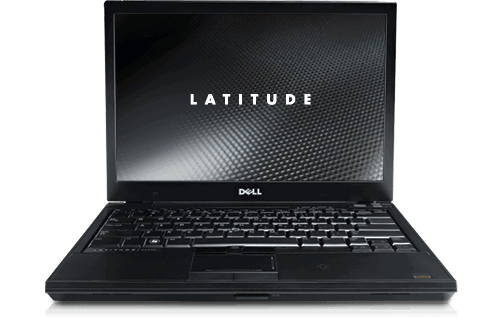
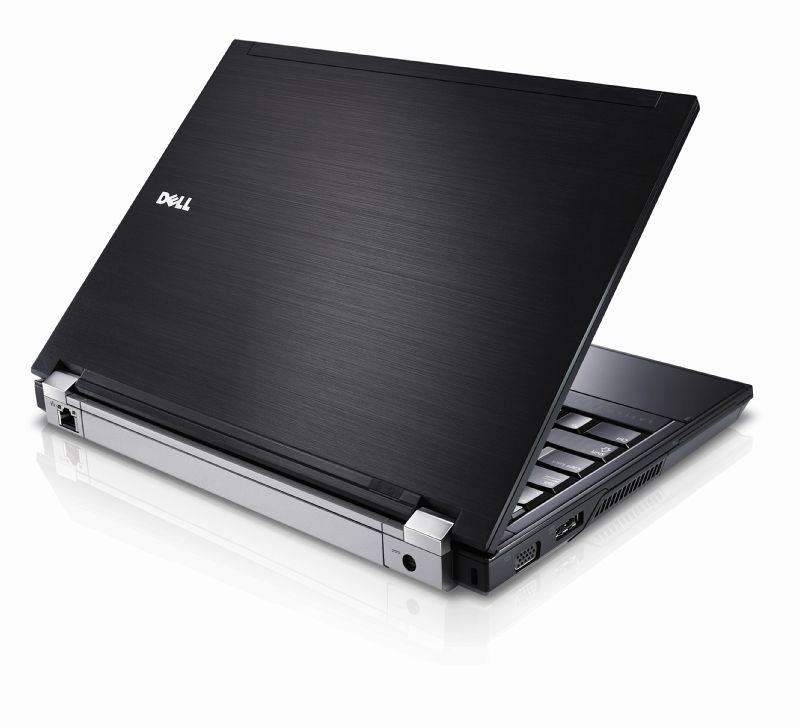
Dell Latitude E4300 re-establishes Dell’s E Series lineup with sleek metal looks. The rectangular shape is quite similar to the E6400 with a solid but attractive external body. Many important components in the magnesium body. The manufacturer specially elaborates the shell so that when handling the shell does not cling to the fingerprint.
LCD monitors are equipped with solid protection. When using pointed objects, you will also see no scratches, even thin crystals that do not vibrate like in other LCDs. The Dell Latitude E4300 has a good angle of view. In addition, the support brightness is also much higher than that of other Dell products. However, the image is still not as clear as the Sony Vaio Z series.
The keyboard of the handset, the keys are comfortable but the downside is to create clicks while typing, though, the manufacturer tried to make the keys slightly lighter. Besides, the trackpad is not very sensitive either. The E4300 also does not limit the type of typing that often touches the trackpad to interrupt work.
The machine is quite impressive performance when it can match the Dell E6400. The E4300 uses a 2.4 GHz Core 2 Duo SP9400 processor, with up to 6 MB of buffer memory, twice the E6400’s P8600 processor.
Testing shows that the Dell Latitude E4300 takes 35 seconds to boot Windows XP SP3. Whereas D820 with equivalent programs and operating systems takes up to 69 seconds.
Hard drive with relatively storage space, only 80 GB, but supports the highest spin speed in HDD Sata (7,200 rpm). This feature is quite good for ensuring fast read speeds, while not being able to invest in SSDs.
The problem of heat dissipation is always concerned with an ultraportable laptop. The E4300 supports the SP9400 chip with a power consumption of only 25 watts, which is almost 50% lower than other Core 2 Duo CPUs. In addition, the metal cooling system and cooling fan has done quite well his work, always keep cool for the machine. The warmth of the hand and the machine’s undercurrent are sometimes hot as the system processes more information.
The 6-cell battery can allow the device to run continuously for 5 to 6 hours if the screen brightness decreases and the unnecessary functions are disabled. In addition, if using editing software and for continuous Wi-Fi connection, the E4300 can run 3 hours 25 minutes.
Wireless connection supports speeds up to 130 Mb / s, standard. The handset supports multiple 1394 or eSATA connections for external storage expansion but does not have an HDMI port for high quality multimedia entertainment.
Dell Latitude E4300 13.3″ Laptop (Intel Core 2 Duo 2.4Ghz, 160GB Hard Drive, 4096Mb RAM, DVDRW Drive, XP Profesional): Buy it now
Dell Latitude E4300 13.3″ Skinned Laptop, Core 2 Duo 2.20GHz, 2GB Ram,80GB: Buy it now
Display
1280×800 on a 13.3-inch panel. Low by today’s standards, but this was a normal business laptop resolution back then, and honestly it’s still fine for email and word processing.
Don’t expect accurate color, this isn’t the sort of laptop for photo work, not really. Brightness is decent indoors, but outside it kind of falls apart, and the anti-glare layer does more than you’d think once you’re stuck in office lighting.
Performance wise… you’re looking at a Core 2 Duo, either the P9400 or SP9400. Sure, it’s dated now, but back then these processors actually did real work. If you push the RAM to 8GB, multitasking stops feeling like a chore, kind of magically.
The upgrade that actually changes this laptop is swapping the HDD for an SSD. Boot times drop, everything feels lighter, heat goes down, battery goes up. If you’re still running one of these, do this first.
Graphics is Intel GMA 4500MHD, which means video and light photo editing are fine and everything past that isn’t happening. Makes sense — this was built for spreadsheets, not games.
Connectivity
Wi-Fi and Bluetooth are both dependable. Ports are generous for the era — three USB 2.0, VGA, Ethernet, plus a smart card reader and SD slot. You’re not going to be digging around for an adapter with this one.
Keyboard and trackpad
The keyboard is the standout. Spill-resistant, good travel, comfortable for hours. The backlighting is a small feature you don’t think about until you’re typing in a dark room and suddenly appreciate it.
Trackpad’s responsive, has physical buttons instead of the clickpad style, and there’s a pointing stick too — still preferred by a lot of longtime business users who never made the switch.
Battery
Four or six cell. The six-cell gets you 4-6 hours doing normal work, which covers most of a workday if you’re not pushing it hard. Dell’s power software helps you squeeze more out of it when you’re away from an outlet.
Security
This is genuinely one of its strong points. Fingerprint reader, smart card support, TPM encryption, Dell ControlVault for credentials — more security hardware than most laptops from this era bothered including.
OS and software
Came with Vista or XP, runs fine on 7, 8, or 10 now. Dell’s ControlPoint utility handles system settings; some people find it useful, some just wipe it and do a clean install.
Upgrades
Easy to open up, easy to work on. RAM and storage are both simple to access, and Dell’s service manuals make DIY repairs realistic instead of theoretical. Max the RAM, swap in an SSD, and it’s a different laptop than the one that shipped.
Related Posts

Tech Reviewer & Product Analyst
Định Bia has spent over 10 years testing consumer electronics with a focus on smart technology. He work as a product advisor at Biareview where he helped customers find the right devices for their needs. He personally tests every product featured on this site using a consistent evaluation framework covering quality, durability, and value. All reviews are based on experience, not influenced by the manufacturer.