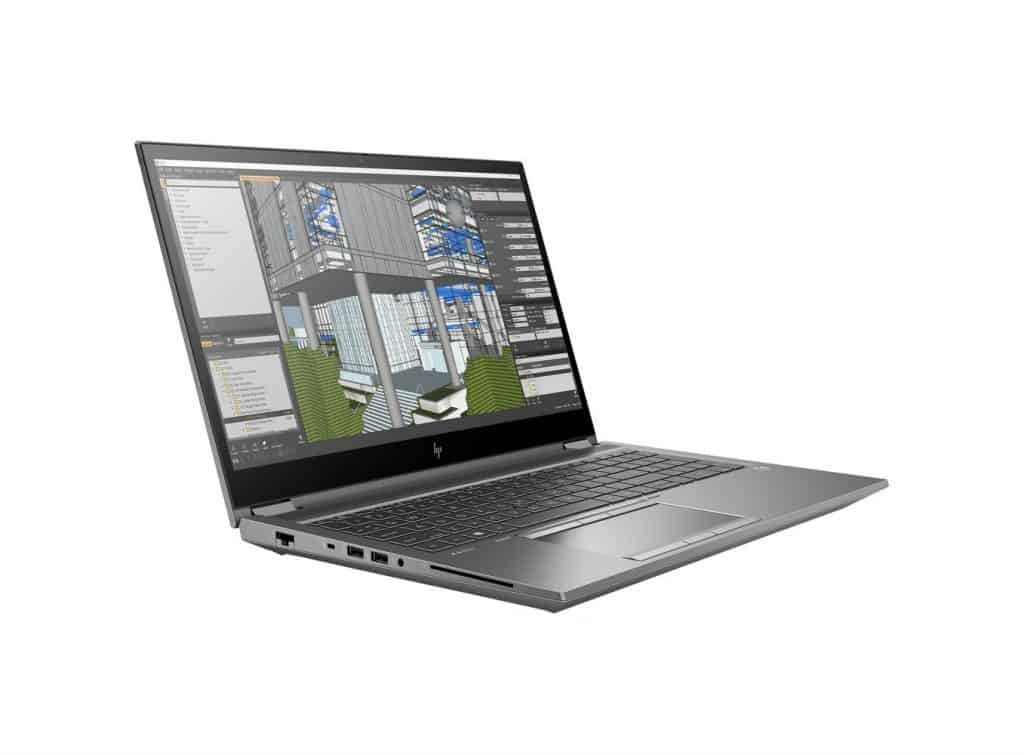
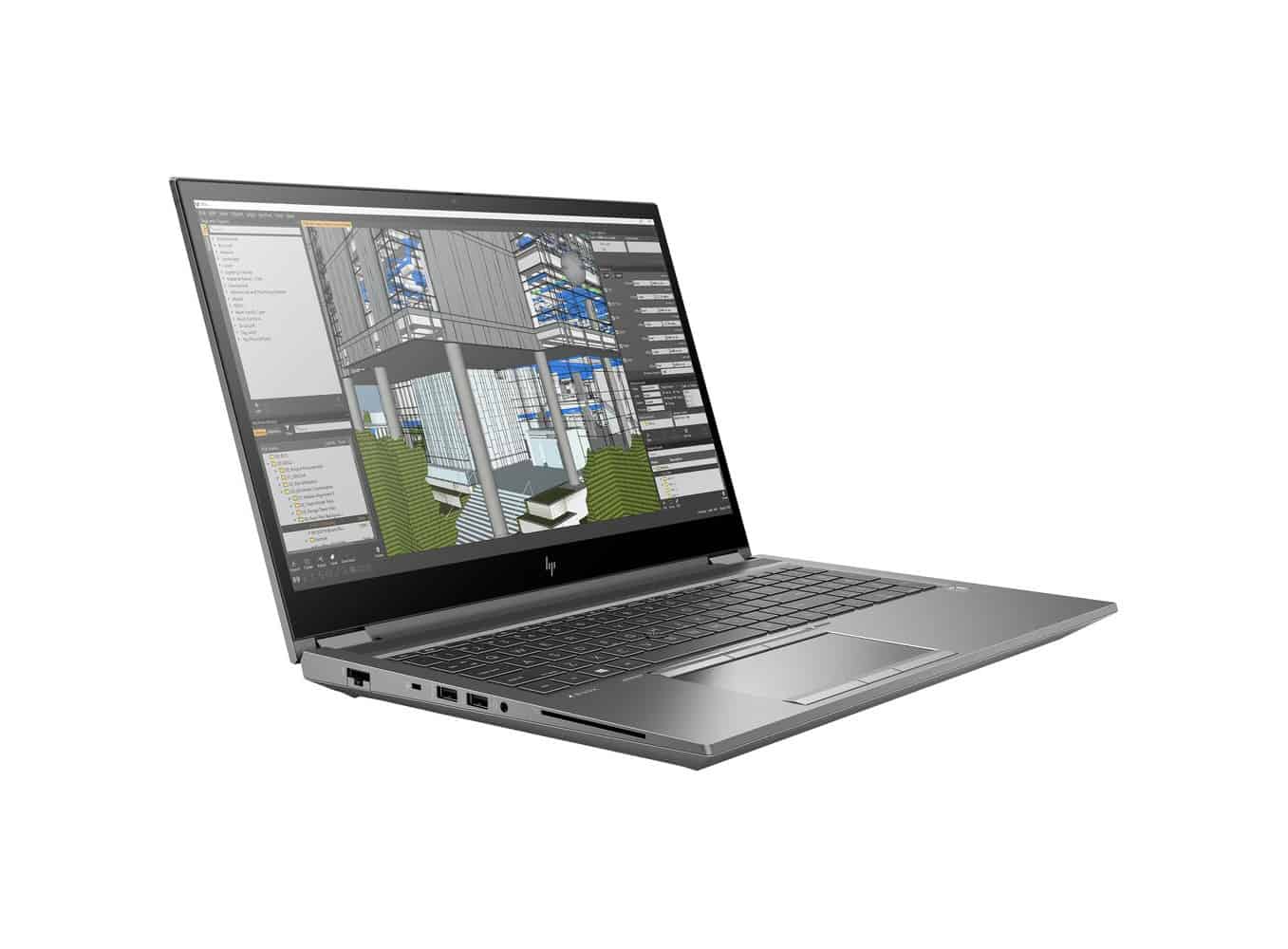
Referring to mobile workstation laptops, it is impossible not to mention the ZBook models of the HP brand. In this article, we want to talk about the latest 8th generation device, it has a perfect design, using today’s high-performance hardware, which can include options such as processor chips mobile Xeon processor, support ECC Ram memory,..
Built as a battle machine with the power to handle “hard” tasks, not many laptop models can match the HP ZBook Fury 15 G8. Let’s find out the advantages and disadvantages of this machine through our article.
Specifications (a few typical options)
CPU: Intel Core i9-11950H / Core i9-11900H / Core i7-11850H / Xeon W-11955M
GPU: Nvidia RTX A2000 / T1200 / RTX A5000 / AMD Radeon Pro W6600M
Display: 15.6 inch, Full HD IPS / 4K UHD IPS / 4K UHD IPS 120Hz
4 M.2 NVMe 2280 slots
Ram support up to 128GB
Dimensions: 361 x 242.5 x 26 mm
Weight: 2.35 kg (5.2 lbs)
- Design and Finish
Overall, the device uses two metal materials to build, with the lid and bottom made of aluminum, while the inside like the keyboard frame is made of magnesium. If you choose the option with a touch screen, the screen will be reinforced with Gorilla Glass.
When compared to its closest competitor, the ThinkPad P15 Gen 2, the ZBook is 500 grams lighter and 5 mm thinner. The laptop is quite large in size, the lines and details are generally minimalist, not too aggressive, with a prominent glossy chrome Z logo on the lid.
As for the keyboard, they provide a very good experience: responsive, good bounce, soft and smooth typing, below has a spill-resistant tray layout and backlight. The keys are quite large, although the up and down arrow keys are a bit small.
The touchpad has up to 6 buttons, with the top row for the Pointing Bar. The surface of the touchpad is handled very min with high precision, smooth and comfortable gliding, quick response.
- Upgradability
The HP ZBook Fury 15 G8 can be considered the best upgradeable mobile workstation laptop we have ever experienced, also the best in the world today!! With a total of 4 SODIMM slots and 4 M.2 PCIe x4 slots.
You can choose to sacrifice 2 M.2 slots to fit a 2.5 inch SATA drive, and with this drive model you won’t have to worry about running out of memory!!
- Battery life
The battery in the HP ZBook Fury 15 G8 has a capacity of 94Wh, and in our test in the condition: turn off all running applications, leaving only one of our applications to test, Windows’ Better Performance mode was enabled, the screen brightness was adjusted to 120 nits. The recorded results of the device lasted 16 hours and 40 minutes of web browsing, or 10 hours and 57 minutes of video playback, an impressive result with a device running the i7-11850H chip.
- Connection ports
The connection ports on the ZBook Fury 15 G8 are quite diverse, users will receive 2 USB-A 3.2 Gen 1 ports, 2 USB-C ports with integrated Thunderbolt 4, LAN port, mini Display Port 1.4, HDMI port and SD card reader slot.
- GPU Performance
For graphics, you get the RTX Ampere A-series professional-grade graphics card, along with the Radeon Pro W6600M. We tested the RTX A2000, it performed worse than the card fitted inside the ThinkPad P15 Gen 2.
And obviously this series of GPUs are not made for gaming!
Performance
Processor options
The HP ZBook Fury 15 G8 runs on Intel 11th generation chips, and you can pick between the Core i5 all the way up to the Core i9,plus there are Xeon processors available if you need something a bit more hardcore for heavier jobs. These CPUs sit on Intel’s Tiger Lake architecture, so you get noticeable boosts in speed and efficiency compared to earlier rounds of hardware.
Memory and storage
On the memory side, the device can take as much as 128GB of DDR4 RAM , which helps a lot with multitasking and keeps demanding apps from feeling cramped. When it comes to storage, the laptop includes multiple choices like PCIe NVMe SSDs, with sizes reaching up to 4TB. That faster storage setup means quicker startup , quicker file moves, and generally smoother work once you’re dealing with big projects or oversized files.
Graphics Capabilities
When it comes to graphics performance, it really matters for any workstation, and the ZBook Fury 15 G8 kind of nails that. It comes with several professional level GPU choices, among them the NVIDIA Quadro RTX series, and also AMD Radeon Pro graphics. In general, these graphics units are meant for serious visual heavy work, like 3D rendering, CAD programs , and video editing, basically without much fuss.
Real-World Performance
Day to day, the ZBook Fury 15 G8 handles tricky jobs really well. For example, if you’re juggling multiple virtual machines at once , or rendering high resolution 3D scenes, or even working through 4K video footage, it stays responsive and smooth. There aren’t major slowdowns, and it doesn’t seem to hit thermal throttling in a noticeable way. All of that makes sense because you’re getting a strong CPU along with lots of RAM, plus a high-end GPU that’s ready for the more demanding pro software.
Benchmark Performance
In benchmark tests, the ZBook Fury 15 G8, it tends to score really high on a bunch of performance indicators. Like in Cinebench R23 , it lands impressive results in both single-core and multi-core runs, so you can see it works well with single-threaded stuff and also with heavier multi-threaded chores, kinda smoothly. Also when you look at GPU benchmarks such as 3DMark, the Quadro RTX or Radeon Pro GPUs basically bring top-tier output that fits professional workloads without much fuss.
Keyboard and Touchpad
Keyboard Design
The keyboard on the HP ZBook Fury 15 G8 feels like it was pretty much made for comfort and steady productivity, like it should. You get a full sized layout, and it also has a numeric keypad, which is a handy extra for people who constantly juggle figures , or end up doing spreadsheet type tasks. The key spacing is pretty decent, with a travel distance around 1.5mm, and that brings a satisfying typing feel, for most setups.
Backlighting and Durability
There is backlighting too, so typing in dimmer rooms becomes easier without much fuss. The glow level can be adjusted across multiple brightness settings, so the keys stay readable while you don’t get that annoying distraction effect. Then there’s durability, HP mentions the keys are rated up to 10 million keystrokes, which honestly feels reassuring.
Touchpad
The touchpad is large and responds well, with support for multi touch gestures, like pinch to zoom , two finger scrolling, and three finger swiping. The surface is smooth, which helps keep cursor movement accurate and controlled. Also, it includes dedicated left and right click buttons, giving you tactile feedback if you prefer the physical button approach rather than relying only on tapping.
Pointing Stick
If you , prefer something besides the touchpad, the ZBook Fury 15 G8 also has a pointing stick placed between the G, H and B keys. Honestly, it feels nice when you want more exact movement, and don’t want to pull your hands away from the keyboard too often, or at all.
Battery Life
Battery Capacity and Performance
Inside the HP ZBook Fury 15 G8 you’ll find an 8-cell 94Wh battery, which is pretty hefty for a mobile workstation. Still, battery endurance really depends on what you picked for the configuration and how you’re using it day to day. For everyday work like web browsing, typing documents, and watching videos, people can typically get something like 8-10 hours on the Full HD setup. But once you do heavy workloads , like 3D rendering, video editing, or you run the 4K panel, the battery is more likely to drop to about 4-6 hours.
Fast Charging
There’s also fast charging onboard, so the battery can go from 0% up to 50% in roughly 30 minutes. This comes in handy when you’re in a rush, say you need a quick top up between sessions, or while you’re traveling and near no power outlet.
Connectivity and Ports
Comprehensive Port Pick
The HP ZBook Fury 15 G8 kind of comes with a lot of different ports so it can handle plenty of connectivity situations, basically:
2 x Thunderbolt 4 (USB-C): These give you data movement, charging, and also video output in one go.
2 x USB 3.1 Type-A: Good for classic USB gadgets, you know keyboards, drives, and similar things.
1 x HDMI 2.0: Lets you plug in an extra monitor pretty smoothly.
1 x Mini DisplayPort 1.4: Another display route, if you prefer that standard.
1 x RJ-45 Ethernet: For a straightforward wired internet setup.
1 x Smart Card Reader: Adds stronger security, authentication included.
1 x SD card reader: Handy for quickly grabbing files from SD cards.
1 x 3.5mm headphone/microphone combo jack: Regular audio connection, all in one.
Wireless Connectivity
The ZBook Fury 15 G8 comes with Wi-Fi 6 (802.11ax) ,so you get fast, pretty reliable wireless connectivity. With Wi‑Fi 6 you can expect better behavior in crowded places, and a generally stronger overall speed along with improved reach compared with the older generations. It also has Bluetooth 5.0 for connecting wireless things like headphones, a mouse or a keyboard ,whatever you’re using at the time.
Expandability
Another big perk with the ZBook Fury 15 G8 is the expandability, it feels genuinely practical. You get easy access panels, which means upgrading the RAM and storage, plus a few other bits ,isn’t a huge hassle. That flexibility helps the notebook keep up with changing work needs, over months and even years.
Audio
Built‑in Speakers
The HP ZBook Fury 15 G8 includes dual stereo speakers tuned by Bang & Olufsen. For a laptop the sound is impressive, clear highs and mids, and a solid amount of bass for what it is. The speaker placement is meant to push the audio towards you, so the listening experience feels a bit more immersive than usual.
Headphone and Microphone
The laptop comes with a 3.5mm headphone microphone combo jack, for linking external audio devices. At the same time, the built in microphones use noise canceling tech so the sound stays pretty clear, especially when you are on video calls, or in those online meetings and such.
External Audio Support
Also, the Thunderbolt 4 plus the USB-C ports can run external audio hardware too, like high end headphones and external speakers. So you get more options, when you want louder detail, for professional audio editing, or just consuming media with better sound.
Security Features
Biometric Authentication
On the HP ZBook Fury 15 G8 there’s a fingerprint reader and an optional IR camera for facial recognition, both tied into Windows Hello. These biometric options make login feel simple while still being secure.
TPM 2.0 and HP Sure Start
This model includes a Trusted Platform Module, TPM 2.0 which helps with hardware based protection by keeping cryptographic keys stored in a safer way. In addition, HP Sure Start— a self healing BIOS feature— guards against firmware attacks by spotting BIOS damage automatically, and then bouncing back after corruption, like it never happened.
Smart Card Reader
For professionals who want that extra layer of protection , the ZBook Fury 15 G8 includes a smart card reader. This option supports secure authentication, and it can be used in settings where smart card access becomes a sort of must-have.
Software and Operating System
Pre-installed Software
The HP ZBook Fury 15 G8 ships with Windows 10 Pro already installed,so you get a familiar yet solid operating system made for professional daily use. On top of that, HP includes several proprietary software tools meant to boost output and also security, for example:
HP Performance Advisor: this tool helps tune system performance by showing detailed configuration guidance that matches your workload.
HP Remote Graphics Software (RGS): lets users reach into and control their ZBook from another device, which supports high-performance remote work in a practical way.
HP Client Security Manager: a collection of protection utilities built to safeguard your data, device, and identity all at once.
ISV Certifications
The ZBook Fury 15 G8 keeps a bunch of different ISV (Independent Software Vendor) certifications, so it fits well and tends to run fast with pro apps like Adobe Creative Cloud, AutoCAD , SolidWorks, and others. For people who actually depend on a couple of specific programs during the day, these checks kinda give that “you are good” feeling.
Operating System Options
For the system, Windows 10 Pro is basically the default setup. But HP also has configurations with Ubuntu Linux, which helps if you want, or you have to, work inside a Linux environment. Because of that, the ZBook Fury 15 G8 ends up being a flexible option for a lot of professional scenarios, not just one type.
Thermal Management
Cooling System
On the heat side, the ZBook Fury 15 G8 includes a pretty advanced cooling design meant to keep things stable when workloads get heavy. You get multiple heat pipes, dual fans, and big ventilation openings, all aimed at moving heat out efficiently. Under normal use the fans stay relatively quiet, then they speed up only when it really matters, so there s some steady tradeoff between cooling ability and noise.
User adjustable settings
In HP’s BIOS there are user-configurable settings, that let you tweak how the fans run ,and also the thermal thresholds. In practice this kind of customization lets people lean toward performance, or lean toward quieter operation, depending on their day to day needs.
Performance while things are cooking
During long stretches of heavy work, like 3D rendering or video encoding , the ZBook Fury 15 G8 keeps its performance steady. There isn’t much noticeable thermal throttling, so the system stays usable without that annoying dip. The cooling solution does a solid job handling the heat from the high-performance parts, and that supports reliable day to day operation even under pressure.
Portability and moving around
Portability in plain terms
Sure, the ZBook Fury 15 G8 is pretty portable for a mobile workstation. Still , it’s larger and heavier than typical consumer laptops, and definitely more bulky than most ultrabooks. But honestly that extra size and weight make sense, because you’re getting serious hardware and a broad feature set. The sturdy build, plus the wide port selection, make it a good fit for professionals who need a dependable workstation when they’re not sitting in one place, all day.
Power adapter
The laptop comes with a 200W or 230W power adapter depending on the configuration , and yeah it is relatively compact too. It also includes a long cable, which gives some flexibility for different work environments or weird desk setups. And the fast charging feature helps users quickly replenish the battery when it’s needed most , so you are not stuck waiting around.
Travel-friendly features
The ZBook Fury 15 G8 includes a few travel-friendly items like a durable chassis and a spill-resistant keyboard. There’s also optional global LTE connectivity if you need that extra coverage. Together these small choices make it a reliable partner for professionals who often travel, or just constantly work in different places.
Customer support and warranty
Warranty options
HP provides a standard three-year warranty for the ZBook Fury 15 G8. This covers parts , labor, and on-site service. You can also buy extended warranty options and extra support packages, which means more reassurance and protection for your investment , even when things get busy.
Customer Support
HP kinda goes all in with customer support for the ZBook Fury 15 G8 . You get 24/7 technical assistance ,plus online resources ,and community forums too. The support staff is knowledgeable and generally quick to respond, so if something breaks or you just have a question, it tends to get handled promptly and pretty effectively.
Self-Service and Maintenance
On the maintenance side, the laptop has easy-access panels which means you can do upgrades and routine service without having to rely on a professional ,or at least not by default. HP also ships detailed guides and video tutorials, so you can follow along when upgrading RAM storage , and some other components. The whole idea is kind of straightforward, at least for most users who are comfortable opening things up.
Conclusion
Summary of Strengths
Overall the HP ZBook Fury 15 G8 feels like a top-tier mobile workstation that stands out across several areas:
Performance: Thanks to strong Intel processors , up to 128GB of RAM ,and pro-grade GPUs, it delivers solid horsepower for heavy, demanding workloads.
Display: The high-resolution and color-accurate screens (including 4K UHD choices) give you sharp visuals for professional tools and creative work.
Build Quality: The durable frame and premium materials help it last ,with dependable everyday reliability.
Expandability: Access to internal parts is simple enough that future upgrades and maintenance are less painful.
Security: Built-in protections , including biometric authentication and TPM 2.0 ,help keep sensitive information guarded.
Connectivity: With lots of ports plus flexible wireless options ,it fits a wide range of professional workflows.
It’s not just fast, it’s also built to stay useful, with practical support and upgrade paths.
Areas for Improvement
While the ZBook Fury 15 G8 really is a standout workstation, there are still a few spots where it could be more, um, dialed in.
Weight wise, it feels pretty reasonable for its class, but yeah it’s still heavier than your everyday consumer laptops so this might matter if you’re constantly on the move.
Battery Life is also decent for day to day stuff, but for heavy workloads it could be better, especially if you’re running that 4K display all the time.
Final Verdict
The HP ZBook Fury 15 G8 is a top-tier mobile workstation, and it brings serious performance, strong build quality and a lot of flexibility for professionals.
You get capable hardware, a premium chassis , and a broad feature set that helps it stay dependable for tough assignments.
It does cost more than some alternatives though, but honestly, the price seems earned because of what you get, so professionals can stay productive, both in the office and while traveling too.
If you’re after a mobile workstation that can manage the most demanding workloads with ease, then the HP ZBook Fury 15 G8 is a really solid choice.
HP ZBook Fury 15 G8 15.6″ Mobile Workstation – 4K UHD – 3840 x 2160 – Intel Core i7 11th Gen i7-11800H Octa-core (8 Core) 2.30 GHz – 32 GB Total RAM – 512 GB SSD: Buy it now
HP ZBook Fury 15 G8 15.6″ Mobile Workstation – Full HD – 1920 x 1080 – Intel Core i7 11th Gen i7-11850H Octa-core (8 Core) 2.50 GHz – 32 GB RAM – 512 GB SSD: Buy it now
HP ZBook Fury 15 G8 15.6″ Mobile Workstation – Full HD – 1920 x 1080 – Intel Core i9 11th Gen i9-11950H Octa-core (8 Core) 2.60 GHz – 64 GB RAM – 1 TB SSD: Buy it now
HP ZBook Fury 15 G8 15.6″ Mobile Workstation – Full HD – 1920 x 1080 – Intel Core i9 11th Gen i9-11950H Octa-core (8 Core) 2.60 GHz – 32 GB Total RAM – 1 TB SSD – Intel WM590 Chip – Windows 11 Pr: Buy it now
HP ZBook Fury 15 G8 15.6″ Mobile Workstation – Full HD – 1920 x 1080 – Intel Core i7 11th Gen i7-11850H Octa-core (8 Core) 2.50 GHz – 32 GB Total RAM – 512 GB SSD: Buy it now
Related Posts


Tech Reviewer & Product Analyst
Định Bia has spent over 10 years testing consumer electronics with a focus on smart technology. He work as a product advisor at Biareview where he helped customers find the right devices for their needs. He personally tests every product featured on this site using a consistent evaluation framework covering quality, durability, and value. All reviews are based on experience, not influenced by the manufacturer.