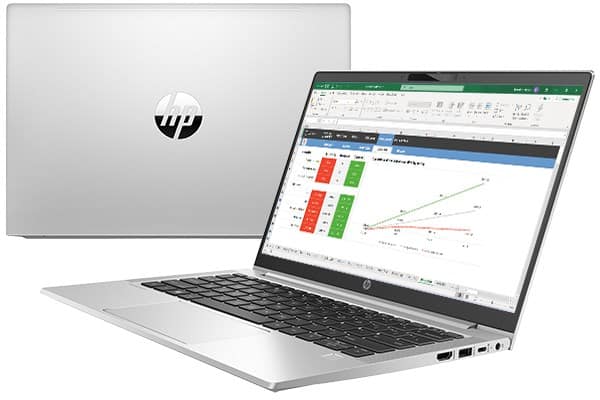
ProBook 400-series is a representative product line for HP’s office laptop models, suitable for young office workers, to be used for common daily tasks: text editing, checking mail, surfing the web, etc. Brings mobility flexibility, when moving to many different work environments, from one location to another, from one meeting to another.
The 13.3-inch HP ProBook 430 G8 model we have here is equipped with a total of 3 different processor options, providing different performance power depending on the needs of the user.
Besides, the 430 G8 also has 2 display panel options, including IPS and TN, we are a bit surprised that HP still offers a TN option at present in 2022. In general if you are looking for your self a laptop for studying, or for office work, you want a kind of balance between day to day performance and relaxation, plus an elegant look and rugged durability… well then, the HP Probook 430 G8 seems like an option worth referencing.
Specifications
CPU: Intel Core i7-1165G7 / Intel Core i5-1135G7 / Intel Core i3-1115G4
GPU: Intel Iris Xe Graphics / Intel UHD Graphics
Screen: size 13.3inch, resolution HD (1366 x 768), TN / Full HD (1920 x 1080), IPS
Storage: SSD M.2 NVMe PCIe 2280
RAM: support up to 64GB
Battery: 3 Cell, 41Wh / 45Wh
Dimensions: 306.8 x 208.3 x 17.5 mm (12.08″ x 8.20″ x 0.69″)
Weight: 1.28 kg (2.8 lbs)
- Design and finishing quality
The HP ProBook 430 G8 laptop model has an outer shell material that is a combination of hard plastic and metal, in which the A side (the lid) is a bright and eye-catching silver painted metal plate. In general, we give a good assessment of the machine’s finishing quality, but it still has some points on the lid, and the bottom of the machine has a slight flex phenomenon, relatively creaking, but still at an acceptable level.
The lid can be opened easily with one hand thanks to the flexibility of the hinge, revealing a screen with 3 ultra-thin edges, we will have an HD Webcam on the top edge with the HP logo on the edge below. The ProBook 430 G8 has a very slim-looking hinge, allowing the lid to lie flat and compact on the surface.
- Keyboard and Touchpad
Looking from the screen to the bottom, the two sides of the keyboard will have a series of speaker slots on each side with many tiny speaker holes. Regarding the keyboard, we appreciate the experience that the 430 G8 brings, the keyboard of the machine has a rather long keystroke, although the machine is quite thin (17.5mm), the bounce is relatively smooth and quiet, and the distance between the right keys. Bringing a comfortable typing and typing experience, and is also quiet enough for you to use in office environments, public spaces, etc.
As for the touchpad, it has a plastic surface, which is handled quite smoothly, so the swiping operation is generally comfortable, smooth, and highly sensitive.
- I/O connection port
The left and right sides of the ProBook 430 G8 are fully equipped with today’s basic and popular connectivity ports. In addition to basic connectivity features, some connections are also equipped with new advanced technologies: we will have 2 USB-A 3.2 (Gen 1) ports, including 1 port that supports charging external devices outside even when we have turned off the machine 1 HDMI 1.4b port, MicroSD card reader slot, headphone jack with 3.5mm mic.
In particular, we will have a USB-C 3.2 port (Gen 2) integrated with Thunderbolt 4 technology, in addition to fast data transfer speeds, this port also doubles as a Display Port to output images to an external monitor and supports Power Delivery fast charging technology.
- Battery life
Inside the HP ProBook 430 G8, we have a 45Wh battery, with the same 11th generation Tiger Lake U processor chip that has good performance but still saves energy (the laptop model we tested uses an Intel Core i5-1135G7 chip).
Test battery life under the following test conditions: Windows’ Better Performance setting enabled, screen brightness adjusted down to 120 nits, shutting down all running applications, just to the program we use to test the machine. As a result, the ProBook 430 G8 can last up to 10 hours and 44 minutes of Web browsing, or 8 hours and 20 minutes of video playback.
- Screen display quality is not high
As we said at the beginning of the article, HP offers 2 display panel options for ProBook 430 G8, of which the lowest option is a TN panel with HD resolution (1366 x 768p), no comment about this. We tested the second option, which is also a higher-end option with an increased resolution of Full HD and a better panel of IPS.
The screen of the ProBook 430 G8 gives a wide and comfortable viewing angle to the sides, the image and color are less changed, and the display quality is quite good. Maximum brightness at the midpoint of the screen is 285 nits, while the average across the surface is 278 nits, with a maximum deviation of 6% and a contrast ratio of 1470:1. Overall, brightness uniformity is good.
Unfortunately, the color coverage is quite low, reaching only 56% of sRGB color coverage, while at the moment office laptop models in the same segment have better color reproduction.
Software and Operating System
Windows 10 Pro
The HP ProBook 430 G8 comes with Windows 10 Pro already set on it , so it feels familiar kind of straight away, and also pretty solid for people using it at work. Windows 10 Pro is full of practical tools for getting stuff done and keeping things safer, for example BitLocker encryption , Remote Desktop, and Group Policy Management. Overall it’s just one of those everyday operating systems that you don’t really have to relearn , not most of the time anyway.
HP Software Suite
Along with the system it self, HP also throws in a few proprietary software bits, to make the whole experience smoother , kind of more complete:
HP Client Security Manager : it’s a security tool set made to safeguard data, devices and identities.
HP Connection Optimizer : this one automatically sorts, and improves network traffic so things move more efficiently.
HP Noise Cancellation Software : it cuts down background sound during audio or video calls, so what you say ends up being a lot easier to understand.
Audio and Webcam
Audio Quality
On the audio side, the HP ProBook 430 G8 has stereo speakers tuned by Bang & Olufsen , giving you clear and well balanced sound. Now, it may not provide that heavy, deep bass punch, but honestly it works well enough for video calls , slide shows, and regular media use. If you want something more immersive , you can plug in external speakers or headphones through the headphone/microphone combo jack, or just use Bluetooth instead.
Webcam and microphone
On this laptop you get a 720p HD webcam, and honestly it’s pretty solid for video conferencing, plus it helps a lot during online meetings. There is also an integrated privacy shutter, so you can physically cover the camera when it’s not being used, which boosts privacy and security. The dual-array microphones pick up voices clearly, so it’s easier to have clean communication while you’re on calls or in meetings.
Upgradability and maintenance
Easy access panels
The HP ProBook 430 G8 is built with upgradability in mind. You’ll notice it has easy-access panels that let you upgrade RAM and storage without needing specialized tools. The whole idea is that it becomes simpler for users to keep the laptop useful longer, just by swapping components when you need to.
Detailed documentation
HP includes detailed documentation, along with video tutorials, to walk you through upgrading and maintaining it. So instead of guessing, users can follow the steps, and do the work confidently, or at least with less uncertainty.
HP ProBook 430 G8 13.3″ Notebook – Intel Core i7 (11th Gen) i7-1165G7 Quad-core (4 Core) – 16 GB RAM – 512 GB SSD – Windows 10 Pro – Intel Iris Xe Graphics – English Keyboard – 12.75 Hour Battery: Buy it now
HP 13.3″ ProBook 430 G8 Laptop: Buy it now
Smart Buy PROBOOK 430 G8 I7-1165G7 13.3 16 512 W11P64 DG W10: Buy it now
Smart Buy PROBOOK 430 G8 I5-1135G7 13.3 8 256 W11P64 DG W10: Buy it now
Related Posts

Tech Reviewer & Product Analyst
Định Bia has spent over 10 years testing consumer electronics with a focus on smart technology. He work as a product advisor at Biareview where he helped customers find the right devices for their needs. He personally tests every product featured on this site using a consistent evaluation framework covering quality, durability, and value. All reviews are based on experience, not influenced by the manufacturer.