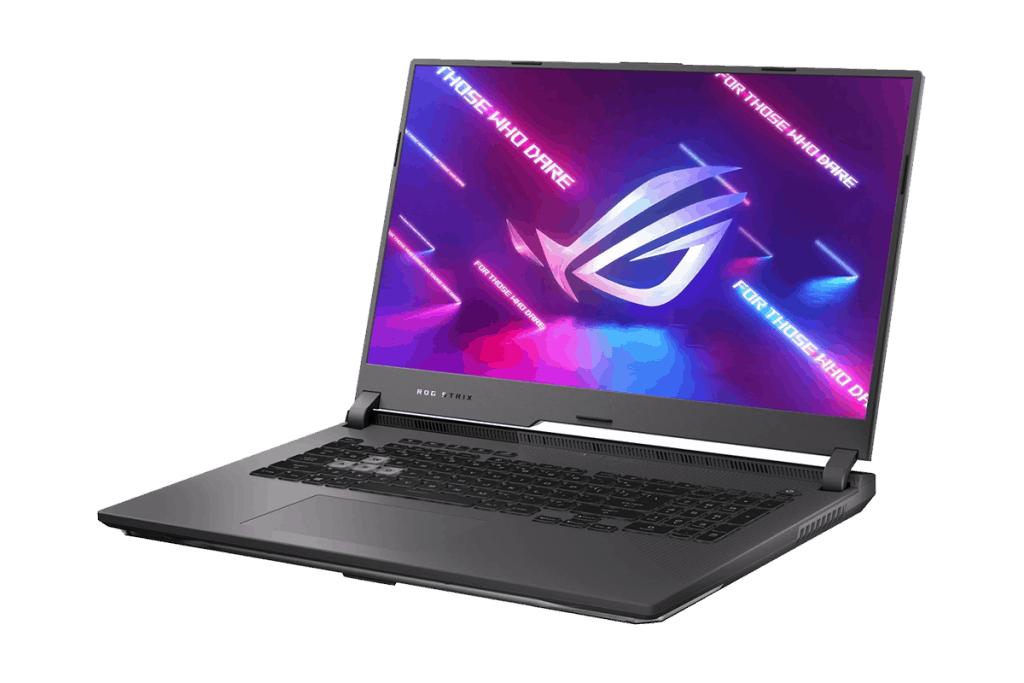
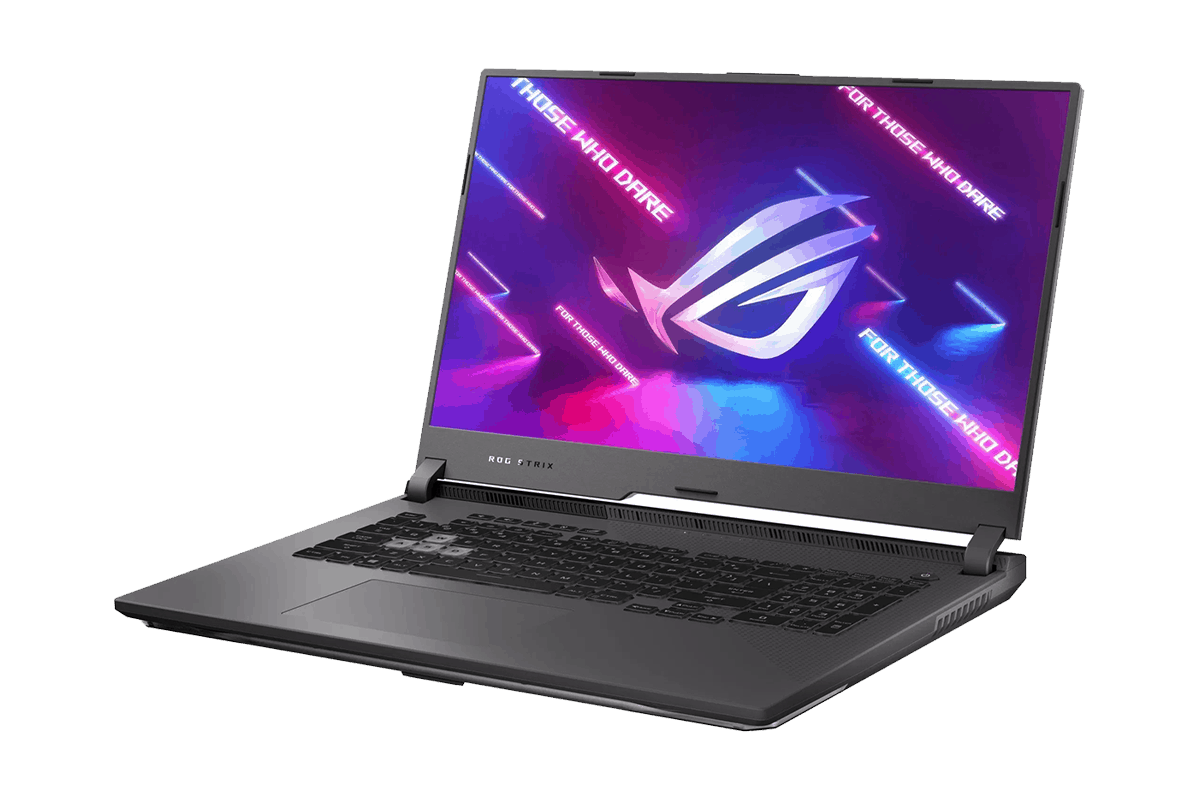
In the hands of the new ROG Strix G17 G713 gaming laptop, the laptop equipped with the latest AMD Ryzen 5000 Series mobile processor combined with GeForce RTX 3070 graphics creates a powerful super-soldier from the Red team; the Blue team beware!
ASUS is one of the few inputs into AMD, and not only that, but they are also one of the biggest investments. However, laptops using AMD processors have only stopped in the mid-range segment without any products using Ryzen processors and any RTX cards. When AMD introduces a new mobile processor, Ryzen 5000 Series and NVIDIA launches new mobile graphics cards GeForce RTX 30 Series, you end up with this extremely impressive kind of product, honestly. The ROG Strix G17 G713 laptop from ASUS comes with a Ryzen 7 5800H , it features 8 cores and 16 threads , for a really solid boost speed up to 4.4GHz. And then in combination with a GeForce RTX 3070 , the whole thing feels pretty wild. With this duo, you will have A mid-range laptop with high-end performance.
Quickly experience current heavyweight AAA games like Resident Evil 3, Tomb Raider, Final Fantasy XV, Horizon Zero Dawn, GTA V, etc. Or other hot and outstanding online games like PUBG, Apex Legends, and CS: Go will be nothing compared to the performance that ROG Strix G17 G713 possesses.
The results when playing the above games with a laptop, the CPU and GPU temperatures are very impressive, no more than 85 degrees; The FPS output is also very even.
Besides, ROG Strix G17 G713 also gives high 3D Mark and PC Mark benchmark tests, which are impressive.
In addition to impressively powerful performance, the ROG Strix G17 G713 also has a more advanced appearance than the previous generation, especially inheriting many high-end things from the Scar series. Most notably, the lid now uses sturdy metal, and here the owl eye logo has added a light white LED strip.
The hinge part of the machine no longer has a ladder pattern with thick air holes. Instead, it has a flat design with beautiful new decorative motifs, especially the ROG logo located on the right-hand side of the display area.
Not only beautiful on the lid, but the bottom of the machine is also cared for by ASUS with the words “For Those Who Dare” – confront ROG Strix G17 G713 when ASUS dares to make the machine strong. Another line says “Back On Top,” which has many meanings, but what it means, we would like to let readers decide.
Moving inside is the machine’s screen; ASUS ROG Strix G17 G713 gaming laptop owns a 17.3-inch screen with Full HD resolution with very thin bezels. Although it only stops at Full HD, this monitor has a 300Hz refresh rate to ensure a smooth game experience at high frame rates. But if you want a higher resolution, there is also a 2K WQHD resolution option with a 165Hz refresh rate. Of course, the display quality of the G17 G713 screen is very impressive with 100% sRGB color coverage; even the WQHD resolution screen option is even higher quality with 100% DCI color gamut- P3.
The laptop’s keyboard area is a full-size keyboard. That is a beautiful RGB color keyboard, but it’s a bit of a pity that the ROG Strix G17 G713’s keyboard is not a separate key-backlit form but instead has four color zones. But in general, it’s okay not to adjust each key color because the quick experience shows that the typing feeling is also quite good; there is no bending when applying downward pressure, the key travel is just enough.
Supporting the typing of the laptop is the C-face (which is the area surrounding the keyboard) covered with a soft velvet layer. When you put your hand on it, it is smooth and happy, but in return, this surface no longer feels cool of metal and will be easier to get dirty, especially fingerprints.
Regarding the heat dissipation of the machine, ASUS also greatly upgraded the cooling system of the ASUS ROG Strix G17 G713. ASUS, in addition to using liquid metal as a heat sink when manufacturing, the laptop is also equipped with four main heat sinks, a fan with more leaves with 84 leaves, providing the ability to draw more air.
It is noticeable that when I test the laptop on light tasks, that fan is really very quiet, like almost nothing. According to the ASUS parameters, the fan usually keeps to the lowest setting of around 3000 rpm, so, very silent. And when i use the machine’s Turbo mode, the fan only goes up to about 4900 rpm, while other brands often push it beyond 5800 rpm. Because of this, the notebook stays calm, you could say around 45–47 dB. For other makes, or older generation models, it’s more like above 52 dB, and we should mention how the sound graph behaves : for every additional 10 dB, the noise level effectively doubles.
Display
The Acer Nitro 7 is fitted with a 15.6-inch Full HD panel (1920×1080), built on IPS technology. So, you get decent color precision and good viewing angles, and that’s really helpful not only for games, but also for movies, and everyday productivity. It feels like the screen holds up well across different positions, you know, without the colors quickly turning dull.
A major advantage here is the 144Hz refresh rate. That high refresh rate helps keep visuals smooth and flowing, especially in fast paced games where frames matter a lot. Also, with a 3ms response time, you can better limit motion blur, and the whole experience feels more immersive, not just “technically” but in practice.
The panel uses a matte finish, which cuts down glare and reflections, so it’s easier to work with in rooms that are fairly bright. Brightness is fine for indoor use, but outside, in very strong sunlight, it may struggle a bit. Overall, the display is one of the Nitro 7’s stronger points, a kind of good compromise between image quality and real performance demands.
Performance
So, under the hood, the Acer Nitro 7 is typically running on a 9th or 10th generation Intel Core i5 or i7 setup, depending on how you bought it. Our own review unit , had a 9th Gen Intel Core i7-9750H in it, which is basically a six-core CPU with a base speed of 2.6GHz and a turbo boost that can climb to about 4.5GHz. Real world, it still feels like plenty of juice for gaming, plus for multitasking too.
On the graphics side, the Nitro 7 seems to come with an NVIDIA GeForce GTX 1650 or like a GTX 1660 Ti. We tested the GTX 1660 Ti one, and honestly it delivers pretty solid gaming performance, for that price range. Most modern AAA games can be pushed on high settings too while still staying with smooth steady frame rates. Stuff like “Shadow of the Tomb Raider”, “Red Dead Redemption 2”, and “The Witcher 3” stayed comfortable at high settings, so the whole experience felt fairly effortless.
There’s also 16GB of DDR4 RAM included, and that’s enough memory for both gaming sessions and background tasks. The RAM is upgradeable , so you can enlarge it later if you end up needing more breathing room. For storage, the unit we looked at includes a 512GB NVMe SSD, which means faster loading times and quicker access to files. That SSD is upgradeable as well, and there’s an extra bay for a second SSD or even a traditional hard drive.
Keyboard and Touchpad
Ok so the Acer Nitro 7 comes with a full sized keyboard, plus a dedicated numeric keypad too. The keys are spaced out nicely, with enough travel that typing feels pretty comfy. I like that the WASD keys are highlighted, it makes them easier to spot, which is kind of a neat gamer thing. It also has red backlighting, that adds to the whole gaming vibe , and you can actually use it in low light without squinting. That said , it’s not RGB, it is a single color, so don’t expect more effects.
The touchpad on the Nitro 7 feels responsive and it supports Windows Precision drivers which helps with accurate movement and multi touch gestures. The pad itself is a good size, and it sits a bit left of center , so you can reach it without smacking it accidentally while you’re typing. For actual gaming, most people will want an external mouse , still the touchpad works fine for everyday tasks and general use.
Audio
So overall the audio quality on the Acer Nitro 7 is decent, but it’s not really exceptional. The laptop has dual stereo speakers placed along the bottom front edge, so yeah it’s kind of an “easy access” setup. The sound comes out clear, and it’s loud enough for casual gaming, plus media consumption without much hassle. Still, the bass feels a little underpowered and when you push the volume higher it can start sounding a bit tinny , like too bright and thin.
To make the experience better, the Nitro 7 includes Waves MaxxAudio technology. This gives you different audio presets, plus some small customization options too. With a decent headset or external speakers the whole thing improves a lot, especially for gaming cues and when you’re watching movies or series.
Battery Life
Battery life is usually a big topic on gaming laptops , and the Nitro 7 follows that pattern. It includes a 58Wh battery and in everyday situations it tends to last roughly 4 to 5 hours. That’s the kind of runtime you might expect for web browsing, word processing and simple media playback. But during gaming, the numbers change fast—most sessions hover around 1 to 2 hours, depending on the title, resolution, and graphics settings.
If you want a longer play time , it’s pretty smart to just keep the laptop plugged into power, because that sort of helps with steadier performance and, yeah, it keeps the battery from draining in a hurry. Also, the Nitro 7 has fast charging support, so whenever you do need a recharge , you can top up relatively quickly and get back to it again.
Connectivity
The Acer Nitro 7 gives you a pretty solid set of connectivity options, in a way that feels actually practical. Over on the left side , there’s a Kensington lock slot, an Ethernet port, a USB 3.1 Type-A port, an HDMI 2.0 port, a USB 3.1 Type-C port, and a 3.5mm headphone/ microphone combo jack. Then on the right side you’ll see two more USB 3.1 Type-A ports plus the power jack, nothing too surprising but still good.
Having a USB Type-C port is one of those small things that really helps, it adds versatility for linking modern peripherals , and all kinds of devices without much hassle. The HDMI 2.0 port is also handy since it supports 4K output, so connecting the laptop to an external monitor or TV becomes pretty straightforward for both gaming and everyday productivity.
On the wireless side, you get Wi-Fi 6 (802.11ax) and Bluetooth 5.0 , which should mean fast and dependable connections. The Wi-Fi 6 in particular is great for gaming, because it generally brings better speed and lower latency than older wireless standards, so you’re not waiting around as much.
Software
The Acer Nitro 7 comes with Windows 10 Home pre installed, so it feels familiar and pretty easy to get used to as soon as you turn it on. Acer has also packed in a handful of utilities and a bit of extra software,mostly aimed at improving the whole gaming experience. The most noticeable one is NitroSense, which lets you check system performance, tweak fan speeds,and play around with the keyboard backlighting.
NitroSense gives real time data for things like CPU and GPU temperatures, clock speeds, and system load. So, you can basically keep a calm eye on how the laptop is behaving while you game. It also includes a few cooling options, which means you can lean more toward stronger performance or alternatively aim for less fan noise, depending on what you care about at the moment.
Other pre installed apps include Acer Care Center, that bundles system maintenance tools and update reminders. There’s also a trial version of Norton Security. Sure, there is some bloatware around, but it stays fairly light, and if you don’t want it, most of it can be removed without too much trouble.
User Experience and Real World Performance
In day to day use, the Acer Nitro 7 feels pretty solid for gaming. The pairing of the Intel Core i7 processor with the GTX 1660 Ti GPU gives enough grunt for most current games. Games like “Fortnite,” “Apex Legends,” or “PUBG” tend to run with decent smoothness at high settings , and frame rates stay regularly over 60fps. On top of that, the 144Hz screen does help a lot, so motion looks more fluid and the whole experience feels snappy.
For multitasking it also does a good job, mostly because it comes with 16GB of RAM plus a quick SSD. Jumping between apps, web browsing ,and even streaming videos feels responsive. There’s no real stutter, or annoying lag during normal tasks. In general it stays cool and fairly quiet too. Still, during heavy gaming the fans do ramp up, but the cooling approach seems to keep temperatures under control, so it doesn’t really overheat even when things get intense.
The keyboard layout might need a little familiarization, especially if you strongly prefer a numeric keypad. That said, it’s still comfortable for typing and it works well when you’re in game. The red backlight is handy for low light sessions, though the lack of RGB personalization could be a turnoff for some people who want more tuning options.
Regarding the ROG Boost feature, there are also some notable points:
– There will be times when the CPU has a power consumption of 25-35W because the CPU has transferred the power to the GPU so that the GPU can work harder (from 115W -> 130W) and increase FPS. ASUS does not use any tricks to lower the performance or squeeze the performance of the CPU, but this is a smart feature of the system and will automatically maximize FPS.
– If you encounter games that consume a lot of CPU, the machine will stop the ROG Boost feature for the card and let the CPU use more power. But the Ryzen 5000 series multi is very powerful, and very few games can make the CPU work more than 60%.
– For games that consume a lot of GPU, the video card will only work at 115W, and the CPU can consume 40-45W. Therefore, both CPU and GPU have similar temperatures of 77-80 degrees.
As for the connection ports, the laptop will have a full range of ports such as USB-A, HDMI, LAN, or Type-C. On this G17 G713 laptop, we can charge it with a Type-C connector with a maximum capacity of 100W.
With great parameters and performance, but the temperature is not too hot and even impressive, it can be seen that this is a new “Super Soldier” of the Red team from ASUS. Thus, ASUS ROG Strix G17 G713 will be an option to consider when you buy a gaming laptop with a strong performance at the price of $2200.
ASUS ROG Strix G17 (2021) Gaming Laptop, 17.3” 300Hz IPS Type FHD, NVIDIA GeForce RTX 3070, AMD Ryzen 9 5900HX, 16GB DDR4, 1TB PCIe NVMe SSD, RGB Keyboard, Windows 10, G713QR-ES96: Buy it now
2021 ASUS ROG Strix G17 G713QR-ES98Q (AMD Ryzen 9 5900HX, 64GB RAM, 2X 1TB NVMe SSD, RTX 3070 8GB, 17.3″ WQHD 165Hz, Windows 10) Gaming Notebook: Buy it now
Related Posts





Tech Reviewer & Product Analyst
Định Bia has spent over 10 years testing consumer electronics with a focus on smart technology. He work as a product advisor at Biareview where he helped customers find the right devices for their needs. He personally tests every product featured on this site using a consistent evaluation framework covering quality, durability, and value. All reviews are based on experience, not influenced by the manufacturer.