Introduction
The HTC Touch Pro 2, came out in 2009, was more like a “work tool” smartphone than a casual one, it seems. It was aimed at business professionals and power users, who needed a sturdy versatile gadget for both talking and actual daily tasks. This phone sat inside HTC’s line of Windows Mobile phones and it followed the original HTC Touch Pro, more or less. With the slide-out QWERTY keyboard, the tilting touchscreen , and hardware that felt genuinely capable back then, the Touch Pro 2 stood out a lot in the pre-Android and iOS years.
This review looks at the design, display, software, performance, connectivity, battery life and the overall feel of using the HTC Touch Pro 2. It tries to unpack what it did well ,and where it stumbled . Even if it’s not really relevant today, compared with modern slates, it still matters historically and works as a neat snapshot of how smartphones evolved over time.
Design and Build Quality
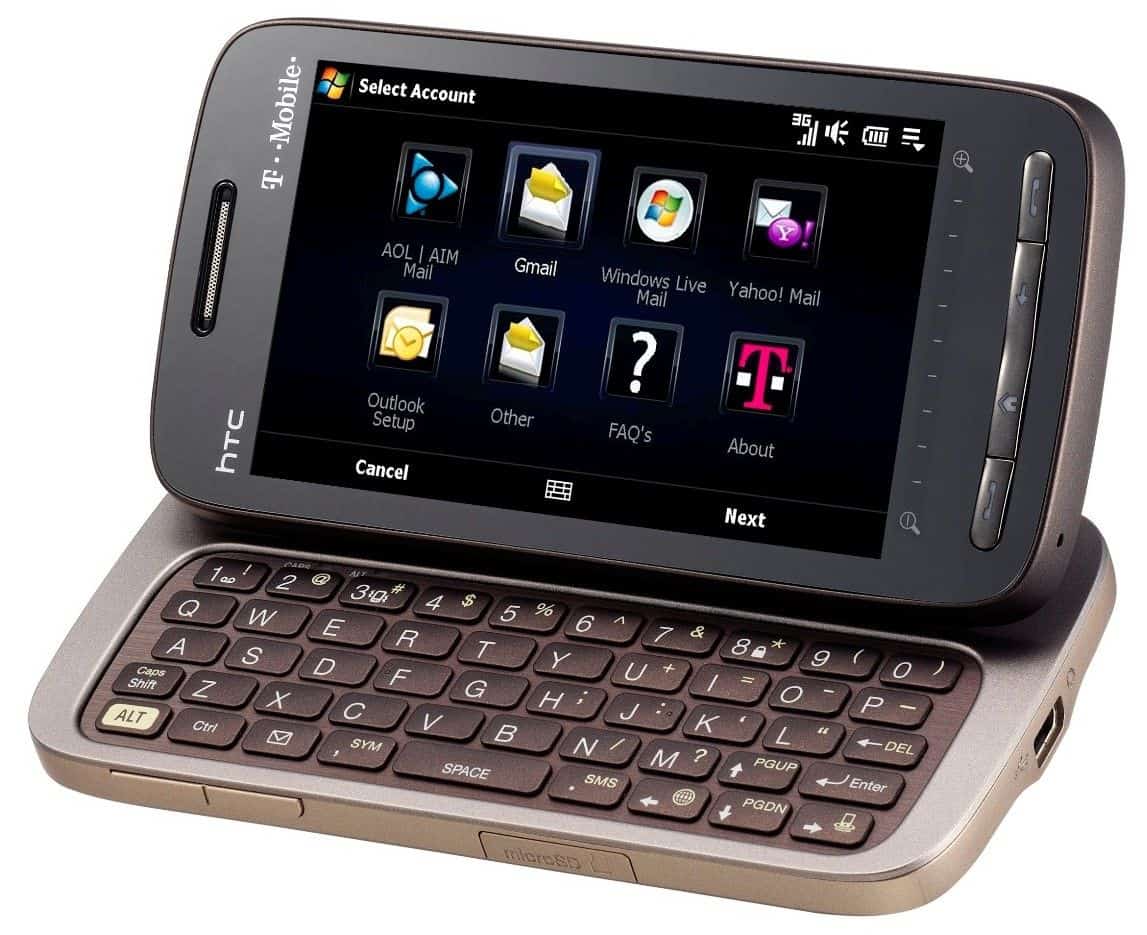
The HTC Touch Pro 2 was designed around practical use and durability, you could tell fairly fast. From a first look, it felt like a device meant for serious folks who want something dependable , basically a workhorse. The phone’s body was a bit bulky by today’s standards, but back in 2009 it was considered robust and , honestly, kind of sophisticated.
Dimensions and Weight
The Touch Pro 2 came in at 116 x 59.2 x 17.3 mm and it clocked in at 178.5 grams. It was, if we’re being honest on the heavier side, especially when you compare it to newer-ish phones of the era. But that extra heft gave it a kind of real weighty feel in your palm, and yeah a lot of users liked that. The thickness kinda made sense too, because it was really the price paid for the physical QWERTY keyboard and a big battery, both of which were major selling points for the device, no surprise there.
Materials and Build Quality
For the overall build, HTC used a mix of plastic and metal. The back cover was a soft-touch plastic, that gave a solid grip and also resisted fingerprints pretty well, most of the time. Up front, you mostly get that large touchscreen, and around it there’s a metallic frame which makes the whole thing feel more premium, not just “okay”.
Build quality on the HTC Touch Pro 2 was really excellent. The slide-out mechanism for the keyboard worked smoothly and felt solid, no wobble, no looseness even after extended use and plenty of opening and closing. There’s also that tilting screen, angled for nicer viewing, and it was implemented with a level of precision you don’t always see. The hinge felt sturdy, and overall the phone kind of communicates that it was designed to last for a while.
Keyboard and Buttons
Probably the most noticeable part of the Touch Pro 2 is the full QWERTY keyboard. The keyboard slides out horizontally from the side of the phone, and once it’s out you get big keys with plenty of spacing, honestly very pleasant to type on. The keys themselves had a satisfying tactile response, with good travel and feedback, so typing long emails and documents didn’t feel like punishment after a bit. It also had dedicated keys for things like messaging, email, plus a customizable button that you can set up for launching apps or shortcuts, depending on what you prefer.
Above the keyboard there was this row of buttons for usual stuff like call, end call, and navigation , you know. They were touch-sensitive, and usually they worked pretty well, but sometimes they would go quiet or register a tap when you didn’t really mean to, and that was annoyng during long sessions.
Tilt Screen
The 3.6-inch screen could be tilted up, kind of like a tiny mini-laptop setup, which was honestly handy for typing or just checking documents. The tilting mechanism felt smooth , and it let you pick from a few angles, so using it on a desk or flat surface was a lot easier.
Overall , the design and build of the HTC Touch Pro 2 seemed top notch for its time. The device felt solid, durable , and carefully put together , with the tilting screen plus the QWERTY keyboard helping a lot with that business friendly vibe.
Display
The display on the HTC Touch Pro 2 was one of the strongest points, especially for when it came out. It aimed for a decent compromise between screen size, resolution, and touch responsiveness, so it could handle a bunch of things , like browsing the web and editing docs.
Size and Resolution
The Touch Pro 2 had a 3.6-inch TFT LCD touchscreen at 480 x 800 pixels, which works out to roughly 259 PPI. At the time this was pretty high res, and the visuals looked sharp and clear. Text was easy to parse quickly, while images came through crisp, so it was a good tool for reading content.
Touch Responsiveness
The touchscreen felt more like resistive, rather than capacitive, so it basically depended on pressure to “notice” input, instead of reading the electrical properties from the user’s skin. Back then resistive screens were pretty common, but in practice they weren’t quite as quick or precise as the capacitive type that would soon become the norm. Because users had to press a bit harder to interact, the whole experience could feel slightly less smooth than what people expect from newer touchscreens today , even if it still worked fine in most situations.
That being said , the resistive screen did come with certain perks. For one thing, it supported a stylus easily, or even a fingernail for extra precise control. This was kinda handy for stuff like handwriting recognition, or when you need to pick tiny items on the screen and you don’t want to overshoot, constantly.
Color Reproduction and Brightness
In terms of color, the Touch Pro 2 looked solid. Vibrant tones and decent contrast made visuals appear pretty punchy, and that part was definitely a plus. Still, brightness was somewhat limited , so in bright outdoor settings it could be a little hard to read. On top of that, reflections showed up more than you’d want, meaning direct sunlight kinda washed the display out, or at least made it harder to see what you were doing.
Viewing Angles
The viewing angles were fine, but not really remarkable. From a reasonable range of positions, the screen could be seen with minimal color shift and without too much brightness drop, which mattered for the tilting screen feature. However, if you pushed it to pretty extreme angles, color distortion showed up and visibility got worse, which is pretty typical for LCDs from that time period.
Display Experience overall
On the HTC Touch Pro 2 the display looked impressive back then, with solid resolution, pretty decent color, and a fairly large panel size. Still, the resistive touchscreen and the not so strong brightness kind of mess with the everyday feel, especially when you compare it with the capacitive touchscreens that were starting to take over the market more and more.
HTC Touch Pro 2 can be seen as a top level PDA phone on Windows Mobile, plus it comes with HTC’s QWERTY keyboard. If you look at the upgrades versus last year’s release, they add new capabilities, so business users can work with a bit more comfort, or at least that’s the idea.
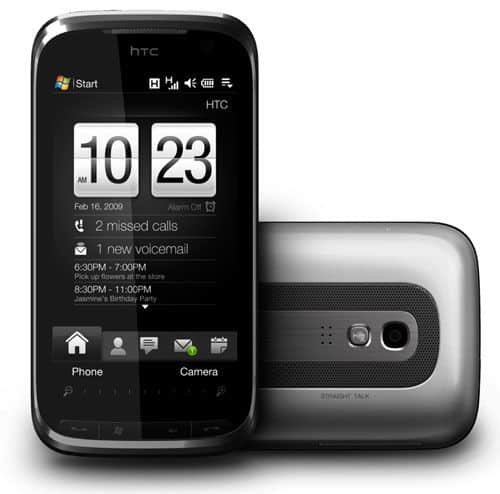
Honestly, the simplest way to read the parameters table is to just notice: the Touch Pro 2 looks really good. The unit measures 116 x 59.2 x 17.3 mm, and it weighs 179 grams. At the same time, a lot of smartphones you see around are closer to 100 grams. So, yeah, this model is not for everyone, it is not exactly convenient to carry in a pants pocket, it’s more “pocket sized” in theory than in practice. The phone frame is basically shiny chrome, the front and the back are gray plastic, but they still feel sturdy.
The screen itself is big, up to 3.6 inches, with 800 x 480 pixels (WVGA). Being able to show bright, clear content is the main plus. The Pro 2 display covers almost the whole front area, and it leaves very little space for the touch bar, plus a few keys—like call, hang up, start, and back—those are positioned below.
When you push the screen to the right, the QWERTY keyboard slides out, it has five rows of keys, while the number keys sit separately near the top. The key mapping of the layers feels well done, like a computer keyboard. Between the space saving keys, the buttons reactivate quickly when you press them. You could even say it’s among the devices with the most convenient slider keyboard around today.
Like the TyTN II, the Pro 2 screen also lets you crop up a bit so the viewing angle feels more comfortable when you’re editing, or something like that. Plus, people can set up and watch movies, or just handle video calls in a smoother way.
Like the Touch Diamond 2 , this model doesn’t include navigation keys. Pretty much all controls come through a large touch screen. The Pro 2 also ships with a mini-USB interface, so you can charge, sync your PC, and connect the headphones without much trouble.
As a higher-end business mobile, the Touch Pro 2 comes with a bunch of features. The handset lets users choose HSDPA, Wi‑Fi, Bluetooth, and Global Positioning options.
The TouchFLO 3D interface on this model already showed up on the Diamond 2, but here it’s more improved. On the Home screen, you get extra big labels that make it easier to attach the third application. Contacts inside TouchFLO 3D also support better call and message interaction, in practice it feels more immediate.
Also, the Pro 2 supports integrating a Facebook account into the address book, so daily status updates can be shown automatically. And unlike the first Touch Pro, the Home screen can switch to landscape mode when the keyboard slides out.
The built-in browser on the Pro 2 is Opera Mobile, and it’s installed straight on the ROM. Because of that, users can download web pages and display images faster, or at least it feels quicker.
At the back, there’s a big speakerphone button , which helps you hear audio with louder output plus noise reduction support. HTC also calls the whole app suite “Straight Talk” technology. Early tests suggest it’s pretty easy to use, and it turns on and off fast.
For the camera, on the rear there’s a 3.2 megapixel unit with autofocus. The photo results are generally good, but the focus is a bit slow. So getting the shot, especially for something moving, can be hard and the capture takes too long.
HTC TOUCH PRO 2: Buy it now
Verizon HTC Touch Pro 2 XV6875 No Contract 3G WiFi Smartphone: Buy it now
Htc Touch Pro 2 T7373 Unlocked GSM Smartphone / Qwerty Keyboard / Touchscreen / 3.5g Quadband – International Version No Warranty: Buy it now
The HTC Touch Pro 2 comes with a large battery capacity, up to 1,500 mAh. You can get about 2 days between charges, and honestly its runtime is much more comfortable than on other smartphones.
One of the noteworthy features of the Pro 2 is that it can handle video communication. The Straight Talk feature gives excellent voice quality but, the picture you get isn’t that clear.
This PDA phone, made for business users, includes 288 MB of RAM and a 528 MHz processor speed, and it runs pretty smoothly. The Pro 2 runs on Windows Mobile 6.1.
Performance
The HTC Touch Pro 2, had hardware that was kinda impressive for its day, but soon it got overtaken by that fast-moving smartphone wave from the early 2010s. For day to day use, it felt decent and responsive most of the time, yet there were a few weak points, especially when people tried more demanding apps, or when multitasking got a bit too ambitious.
Processor and Memory
The Touch Pro 2 operated on a Qualcomm MSM7200A chipset , using a 528 MHz ARM11 CPU with an Adreno 130 GPU in the mix. It came with 288 MB of RAM , plus 512 MB of ROM, and the typical user experience was closer to 150 MB of truly workable storage, so I guess you could say space was… kind of a talking point, honestly.
When it came to usual activities such as messaging, email, and web browsing, the device kept up pretty well. The processor could manage Windows Mobile plus the TouchFLO 3D interface without too much visible lag , but it was still not as fluid as what later smartphone buyers would expect, in a more modern sense. That 288 MB of RAM worked fine for keeping a couple things open at once, however serious multitasking could make things feel sluggish , mainly when several memory heavy applications were running at the same time.
Storage
The 512 MB of internal storage was kind of small compared to what we have now, though it was pretty standard back then too. Folks could also add extra space using a microSD card, and it supported cards as big as 16 GB, which usually meant there was enough space for extra apps, documents, and all that media content, sort of.
Graphics and Multimedia
The Adreno 130 GPU in the Touch Pro 2 was kind of adequate for basic graphics stuff, like running the user interface and dealing with simple games. Still, it felt a bit lacking when it came to heavier multimedia apps or 3D games, which were getting more and more popular back then.
It could play video files, sure, but the whole experience was kinda limited by the resistive touchscreen, and also by the relatively low processing power. Looking at videos on the 3.6-inch display was pretty enjoyable for short clips, or for streaming lower-resolution content , but it really was not the kind of device you’d pick for intense multimedia sessions.
Connectivity and Call Quality
The HTC Touch Pro 2 provided a broad set of connectivity features, so it could work well for both conversations and internet access. It supported quad-band GSM and dual-band HSPA, which meant you could get high speed data connections on 3G networks when coverage was there.
Wi-Fi and Bluetooth
The phone had Wi-Fi 802.11 b/g support, letting users hook up to wireless networks for quicker internet access. In practice, Wi-Fi performance was reliable enough, with a decent range and connections that stayed put. Bluetooth 2.0 with A2DP was also there, allowing wireless pairing with things like headsets, keyboards, and car kits , without too much hassle.
GPS and Navigation
The Touch Pro 2 came with a built in GPS, and you could use it with navigation apps so you got turn by turn guidance, plus location based stuff. In general the GPS worked pretty well, with satellite lock times that were fairly quick and coordinates that felt on point. Also since the device had a big screen, and the tilting display angle thing was there too, the Touch Pro 2 could end up acting like a decent navigation gadget, especially if you kept it mounted in a car.
Call Quality
One of the more noticeable parts of the HTC Touch Pro 2 was really the call quality. Between the dual microphones and the noise cancellation approach, voice calls sounded clear and didn’t pick up much background rumble, even when the surroundings were less than ideal. On top of that, the large speaker helped a lot with hands free conversations, so you could keep talking without always needing to hold the phone to your ear.
It also supported normal voice calls, and it had conference calling too via the HTC Straight Talk feature. That combination made it a strong pick for people with busy schedules at work, since staying linked with coworkers and clients was easier even while moving around.
Battery Life
Battery life was another place where the HTC Touch Pro 2 shined, more than you might expect from a phone back then. It used a 1500 mAh removable battery, and that gave you solid endurance, considering what the hardware and software were doing.
Daily Usage
In everyday use, the Touch Pro 2 could pretty much last all day on a single charge, even if you had moderate , or even heavier usage. Stuff like email, web browsing, and messaging didn’t really chew through the battery too fast and it could also manage a few hours of talk time before needing to be recharged. For business folks who kept their phone with them most of the day, this kind of stamina was a noticeable advantage, genuinely.
Standby Time
It also had solid standby time, mostly because the hardware was power-friendly, and because wireless radios could be shut off when they were not in use. So in standby mode, the Touch Pro 2 could stretch out to several days without being plugged in, which made it a reliable spare device , or just a travel companion you could bring along and not worry about.
Power Management Features
On Windows Mobile, there were several power control features that helped users squeeze out even more battery life. People could tweak the screen brightness, handle wireless connections, and limit background tasks to keep the device running longer. Also, since the battery was removable, users could keep a spare cell ready for longer stretches of use, even when there wasn’t a charger around.
Camera
The HTC Touch Pro 2 came with a 3.2-megapixel rear camera, which was pretty normal for smartphones from that time period. The camera had autofocus , along with an LED flash, though it was missing some of the extra, more advanced abilities that were starting to show up on competing devices around then.
Image Quality
The image quality coming from the Touch Pro 2 camera was fine but kind of no big deal. With decent lighting it could grab fairly sharp photos and show a good amount of detail, yet the pictures often missed that lively color feel and the wider dynamic range people usually want from a proper digital camera or even newer , more capable smartphones. Once it got dark the camera had trouble with noise and the overall sharpness went down even, though there was an LED flash included there.
Video Recording
It did video recording too but again the hardware kinda held it back. The highest output was limited to 480p, so it worked well enough for casual short clips, but it was way behind what high-definition video would soon be offering on smartphones everywhere.
Camera Interface
The camera app interface was simple in a sort of, basic way. You could tweak things like white balance, exposure, and the image resolution, however it wasn’t especially friendly to use. Getting to the little on screen buttons could feel awkward, especially on the resistive touchscreen, where every tap seems a bit more stubborn than it should be.
Multimedia and Entertainment
Even if the HTC Touch Pro 2 was mainly built as a productivity tool, it still had a few multimedia options for music videos, and other simple entertainment. Still, since the main goal was business use, those multimedia features felt like a nice extra more than a main attraction.
Music and Audio Playback
On the HTC Touch Pro 2 you got a pretty basic music player, it handled a bunch of audio formats, like MP3 , WMA, and AAC. The interface felt simple enough, users could set up playlists, shuffle tracks, and browse through the library by artist, album, or kind of music ( like genre ). It wasn’t really slick or “pro-level”, and it didn’t have the extra stuff you might expect from a dedicated player, but honestly it was fine for casual listening , nothing too fancy.
Sound Quality
The sound quality on the Touch Pro 2 was decent, especially if you used headphones. There was a 3.5mm headphone jack too, so you could just plug in your favorite pair without hunting down some adapter. The audio came out clear, and pretty balanced, but it didn’t really bring the deep bass, or that fuller richness you sometimes hear on newer phones or separate music devices.
The built in speaker worked okay for phone calls and speakerphone, but for music it wasn’t the best. It could get loud enough for personal listening if the room was quiet, yet it still didn’t have the depth and crisp detail for a really enjoyable listen. If you actually wanted to treat the Touch Pro 2 like a music player, headphones were the safer choice.
Video Playback
For video, the HTC Touch Pro 2 had some limits mostly tied to the hardware. It supported standard-definition files, like MPEG-4 and H.263, but higher resolution video had a hard time. The processing power was fairly modest, and on top of that the resistive touchscreen wasn’t helping things, so playback could feel a bit strained when the content got bigger.
Watching videos on the 3.6-inch display was sort of acceptable for very short clips , or streaming low-resolution content, but honestly it felt nowhere close to immersive. The screen’s resolution and color reproduction were decent , yet the resistive touchscreen made controlling playback and moving around in video menus kinda clunky, not smooth like you would hope. On top of that, the device’s smaller screen size wasn’t the best match for long video sessions either.
Gaming
Gaming on the HTC Touch Pro 2 was a mixed bag. The hardware could handle simple casual games , but it ran into trouble with more demanding titles that needed serious processing power or stronger graphics. Also, the Windows Mobile platform didn’t offer the broad game library you’d see on iOS and Android, so the overall options felt quite limited for most users.
A lot of what was available on the Touch Pro 2 leaned toward basics—puzzle games, card games, or simple arcade-style stuff. Sure, these could keep you entertained during downtime , but the device just didn’t feel ideal for anything more immersive or graphically heavy. And then there was the resistive touchscreen again , it made gaming harder because presses had to be more deliberate and it didn’t have the quick response you get from capacitive touchscreens.
Additional entertainment features
The HTC Touch Pro 2 came with some extra stuff that people could actually use more like entertainment, not just productivity. Among them there was an FM radio, which let users tune into local stations, and also a basic photo viewer for browsing images stored on the handset. The FM radio was a pretty pleasant add on if you liked live broadcasts, but it depended on wired headphones, since those acted as an antenna, so yeah you couldnt just go fully wireless.
The photo viewer worked, but it was held back pretty noticeably by the device’s small screen and the resistive touchscreen. That combo made it annoying to move through bigger photo libraries or to zoom in on pictures, even if you tried to be patient. In other words it felt more like a handy utility than a real entertainment option, good enough for showing off a few images, but not something you’d call serious photo management, or actual editing.
Strength
– WVGA screen is 3.6 inches wide
– Speakerphone good call, excellent video call quality
– Keyboard is fine
– Many TouchFLO 3D features
Weak
– Large and heavy
– Missing 3.5mm headphone jack
– Slow focus camera, lack of flash
– Expensive

Tech Reviewer & Product Analyst
Định Bia has spent over 10 years testing consumer electronics with a focus on smart technology. He work as a product advisor at Biareview where he helped customers find the right devices for their needs. He personally tests every product featured on this site using a consistent evaluation framework covering quality, durability, and value. All reviews are based on experience, not influenced by the manufacturer.