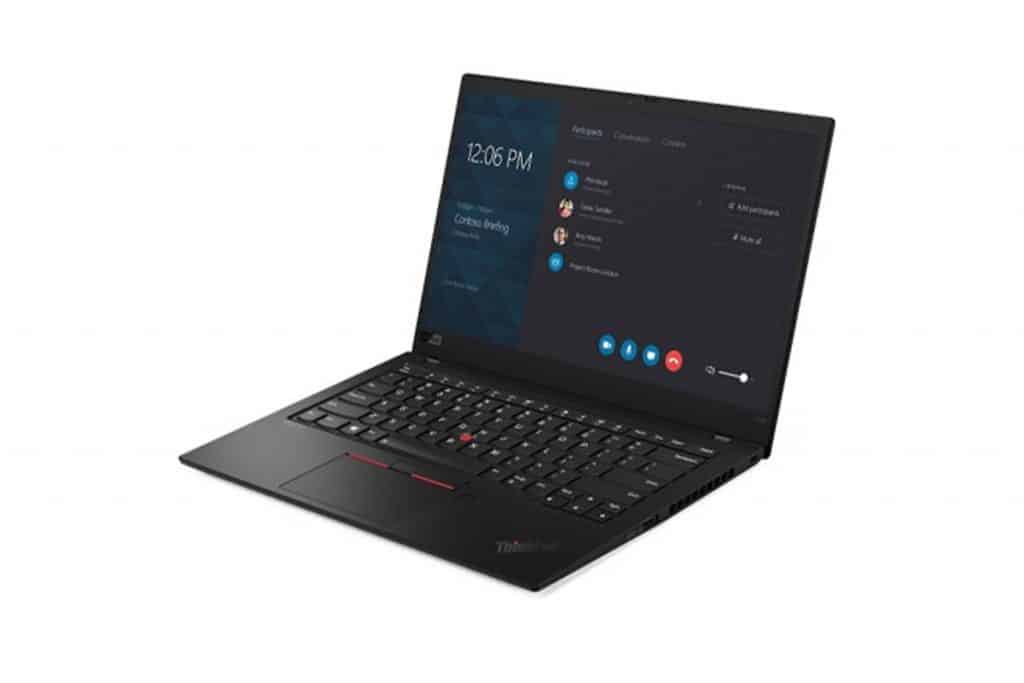
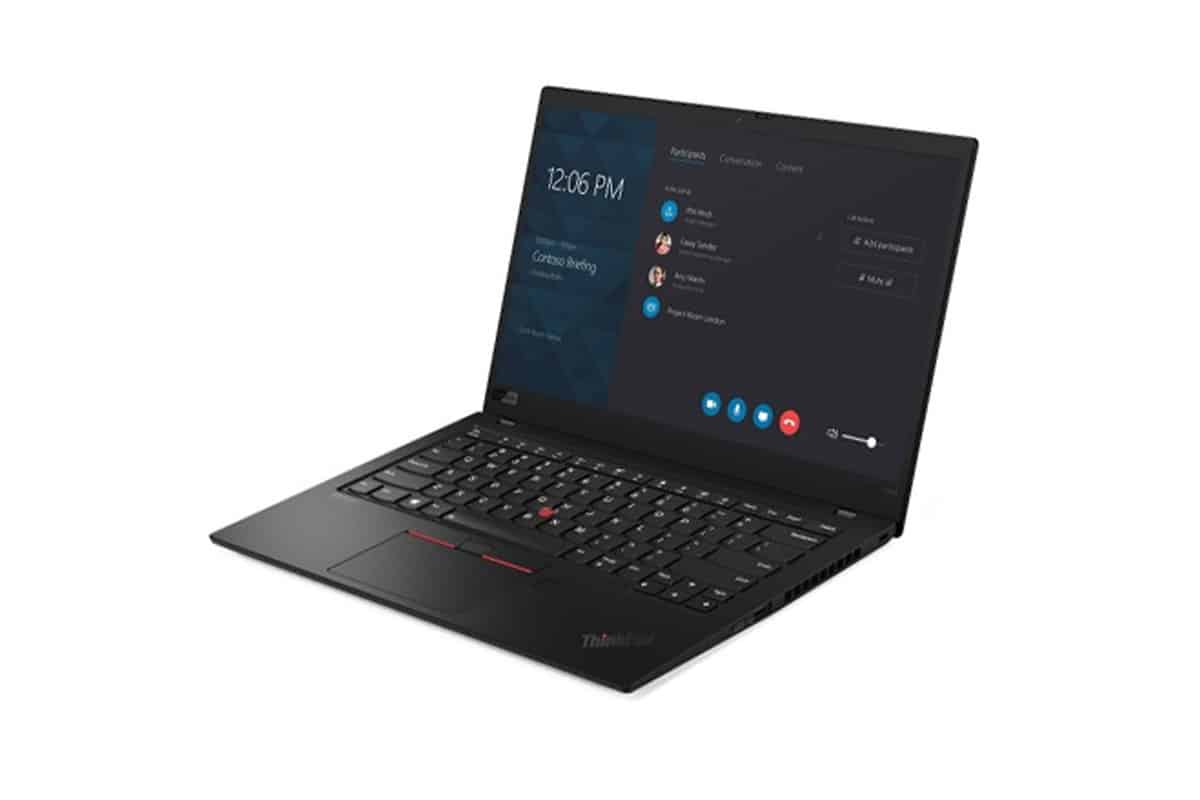
Even though the Lenovo ThinkPad lineup is sort of geared toward business folks, these rugged, feature pack laptops seem to pull in a lot of other consumers too. The newest ThinkPad X1 Carbon, which is dubbed Gen 7, is a great example of this whole crossover thing. This ultraportable business laptop distills the ThinkPad concept to its essence, reducing weight but keeping key ThinkPad features such as a comfortable keyboard, the iconic red TrackPoint, and management features rich IT management and security. It also offers enthusiast features like facial recognition and a stunning 4K glossy display with HDR support, overkill features for many business users.
Admirable size
The ThinkPad X1 Carbon is now in its seventh generation. Still, at first glance, you will hardly notice the difference between this generation and the previous generation, the generation before that, and so on. Lenovo has never strayed far from the classic ThinkPad formula, which calls for a solid black chassis, a red silicone pointing device (TrackPoint) in the center of the keyboard, and of course, a diagonal “ThinkPad” logo on the outside.
Many other ThinkPads continue to follow this formula. The size, weight, and materials set the X1 Carbon Gen 7 apart from its ThinkPad X, T, and L siblings. The newest flagship ThinkPad T series, the ThinkPad T490, comes in at about 3.7 pounds and only 0.7 inches thick, which is after a pretty big drop from the earlier model. Meanwhile the X1 Carbon Gen 7 is in a whole other lane, with dimensions of 0.59 x 12.7 x 8.6 inches (HWD) and it starts out at just 2.4 pounds. Weights vary depending on optional extras.
These dimensions not only fit the X1 Carbon Gen 7 squarely into ultraportable laptop territory, but they also mean it’s one of the lightest in that territory. That is even more impressive when you consider that the X1 Carbon Gen 7’s 14-inch screen is almost an inch larger than the 13.3-inch screen on most laptops we consider ultraportable.
Despite its lightweight, the X1 Carbon Gen 7 has this mix of a magnesium bottom and a carbon fiber display lid that, honestly, gives it a pretty solid feel, in that “it won’t fold” way. The MIL-STD 810G certification kinda adds legitimacy to that impression, confirming it is, indeed, as rugged as you’d expect from a ThinkPad… though you know, without overdoing it.
New screen and cover options
The main changes to the ThinkPad X1 Carbon of revisions have to do with the display and the exterior styling of its lid.
The base model I’m reviewing, with a full HD ( 1,920 x 1,080 pixels ) display, has the same black display lid as the previous generation. Then, stepping up to the top end model, the one with a 4K display ( 3,840 x 2,160 pixels ) you get a screen cover, with a distinctive carbon fiber weave to it. It’s a small concession for those who want a bit of flair on their very tough ThinkPad. Lenovo describes it as a way for owners to be reminded that their device is partially made out of carbon fiber, as it’s not obvious. Presumably, the company believes that those interested in such colors also want a 4K display.
Between the base model 4K and the 1080p screens, Lenovo kind a throws in two additional screen choices. You can pick a particular 1080p touch panel with a matte surface, and honestly I found that kind of thing really convenient during testing on the prior generation. There’s also a WQHD (2,560 x 1,440 pixels) matte option, but it does not come with touch support.
If what you’re after is the brightest, most attention-getting panel, then go ahead with the 4K setup. It is rated for around 500 nits of brightness, and it also backs Dolby Vision, so the high dynamic range, (HDR) scenes and videos look more true-to-life, overall they feel quite convincing.
The standard model’s display sits at 400 nits. In my case it was perfectly adequate for reading text documents in a fairly well lit office, though the images and videos ended up looking a bit on the dim side.
As always, the typing feels, quite luxurious.
Even with its slim chassis, the ThinkPad X1 Carbon Gen 7 still has a keyboard that feels just as comfortable as I’ve had on other ThinkPads lately. The backlit keys are sculpted in a way that gives you visual guidance under your fingertips, and they also deliver extraordinary stability.
Unfortunately, the touchpad isn’t nearly as comfortable to use. It’s cramped; its click action is rather stiff and unresponsive, taking longer than I’d like to register motion. The keyboard uses Microsoft’s Precision Touchpad interface, so tweaking is simple, but increasing the sensitivity didn’t help much.
Classic TrackPoint pointer control serves as a consolation prize for a mediocre trackpad. It’s especially useful if you’re trying to move the arrow pointer in a cramped environment, such as an economy-class airline seat. It takes some getting used to, but ThinkPad fans have a long way to go; TrackPoint has been around since IBM owns the brand, and other companies, such as Dell, have copied it in their business laptops.
Lenovo kind of reworked the X1 Carbon speaker setup for this round. There are two tweeters facing upward, sitting near the display hinge, and then two woofers that go down firing. In general the sound is fine for video conferencing, though I didn’t think it was as punchy as the one on the MacBook Pro, that uses a pair of speakers that pop up.
On my sample unit, the webcam was also solid for meetings, and there’s a built in privacy door, that you can close when it’s not needed . It does not include infrared sensors for facial sign-in into your Windows account, that feature only shows up on versions with a refreshed display. Still, my test machine shipped with a fingerprint reader, and that part worked pretty reliably, it recognized my prints correctly every time I tried it during those few days of testing.
Adapter-Up for Ethernet
To take full advantage of the ThinkPad X1 Carbon Gen 7’s I/O choices, you’ll almost certainly want Lenovo’s own, proprietary Ethernet adapter. Putting a standard full-size Ethernet socket into something this thin is kind of a no-go, so the common tactic is to use a smaller port with a little hinge or moveable bit that stretches out when you’re actually ready to connect the Ethernet cable. Instead, the ThinkPad X1 Carbon Gen 7 goes with a proprietary Ethernet jack that is not “hinged” or warped in use, but you still need an adapter (about $35). This approach is pretty dependable, more reliable than a hinged jack, though it also means Lenovo earns money on the adapter cables, which feels, well, predictable.
Beyond that one Ethernet opening, the ThinkPad X1 Carbon offers a solid, yet fairly standard, lineup of ports. The body includes two USB Type-C ports (both rated for Thunderbolt 3 speeds), plus two USB 3.1 Gen 1 Type-A ports, an audio jack, a full-size HDMI port, and a Kensington-style cutout for a lock. There’s also the typical, physical security cable connection. For wireless, you get Wi-Fi 802.11ac and Bluetooth 5.0, but not Wi‑Fi Next Generation 6 (802.11ax). You can add LTE as well via a modem, which is a rare “extra” on US-sold models, but the headline download speed is around 450Mbps—not the 1Gbps that many current mobile devices are aiming for.
Lenovo ThinkPad X1 Carbon 7th Gen i5-10210U 256GB SSD 8GB RAM 14″ FHD 1920×1080 Touch 3 Year Warranty: Buy it now
Lenovo ThinkPad X1 Carbon 7th Gen : 14-Inch fhd IPS Screen, 16GB RAM, 512GB Nvme SSD, Win 10 Pro, i7-8565U, Black: Buy it now
Latest_Lenovo Thinkpad X1 Carbon GEN 7 14″ FHD IPS Display, 10th Generation Intel Core i7-10510U, 16GB RAM, 256GB SSD, Wireless+Bluetooth, Fingerprint Reader, Window 10 Pro: Buy it now
Lenovo ThinkPad X1 Carbon 7th Generation Ultrabook: Core i7-8565U, 16GB RAM, 512GB SSD, 14″ FHD Display, Backlit Keyboard: Buy it now
Performance is so excellent.
The ThinkPad X1 Carbon Gen 7 I tested showed up with an Intel Core i5-8265U chip, 8GB memory, plus a 256GB PCI Express NVMe SSD. Overall these are decent numbers for daily work, browsing and all that, but you can nudge each one a notch higher in other competitive ultra portable options in the X1 Carbon price band.
You can also equip the X1 Carbon with better components. If you get the most out of everything in the online configuration tool, you’re looking at a Core i7 with vPro, 16GB of memory, and a 1TB SSD. So I’ve included a few systems with Core i7 CPUs, 16GB of memory, and 512GB SSDs for performance comparison purposes. Also in the mix is the more similarly configured MacBook Pro.
The ThinkPad X1 Carbon Gen 7 performed admirably in our benchmark tests, finishing at or near the top in each, even when compared to the heavier, better equipped Asus ZenBook 14 and HP EliteBook 840 G5. That is partly thanks to the CPU of the X1 Carbon from Intel’s “Whiskey Lake” generation. Like many of Intel’s later generation high-end laptop CPUs, it has four cores and supports up to eight concurrent threads, allowing for simultaneous processing of multiple instructions from the software. But except for the ultra-low-power Core i7 in the Acer Swift 7, each of the other systems listed above also has multi-threaded CPUs, so part of the X1 Carbon’s advantage can be attributed to Lenovo’s performance.
To evaluate the system’s overall performance for office-focused tasks such as word processing, spreadsheet work, web browsing, and video conferencing, we use PCMark 10. Total performance suite This entity simulates various real-world productivity and content creation processes and generates proprietary scores. Meanwhile, PCMark 8 has a Storage subtest that we use to gauge the speed of the boot drive.
All the systems sort of end up doing the same in the storage benchmark, mostly because they all rely on that same fast PCIe SSD. Now PCMark 10 looks a bit more dramatic , but the ThinkPad X1 Carbon Gen 7 score is still very strong for everyday use, even if it lands just a little under the ZenBook 14’s result.
For a more nuanced look at performance on specialized resource-intensive tasks, we test 3D rendering performance in Maxon’s Cinebench R15 engine and image-editing performance in Adobe Photoshop CC. Cinebench emphasizes CPU rather than GPU to render a complex image. Meanwhile, the Photoshop test emphasizes the CPU, storage subsystem, and RAM. Still, it can also take advantage of most GPUs to speed up applying filters, so systems with chips or Powerful graphics cards can see an increase.
It’s great to see that the X1 Carbon Gen 7 scores the best in Cinebench. Its Photoshop scores aren’t top of the pack, but it’s still very competitive. Although this laptop is not designed as a multimedia editing platform, you can perform these tasks quickly.
To evaluate gaming performance, we use UL’s 3DMark benchmark suite and Unigine’s Superposition utility. We ran two different 3DMark subtests, Sky Diver and Fire Strike, suitable for different types of systems. Both are DirectX 11 benchmarks, yet Sky Diver is more kind of tailored for mid-range laptops and PCs, whereas Fire Strike feels more demanding and is set up for high-end PCs to boost their overall visuals. And like 3DMark, the Superposition check renders plus scans a detailed 3D scene, then figures out how well the system handles it.
Each system performed the same graphics tests as PCMark, except for the Acer Swift 7. None of these results were suitable for playing high-graphics games (ideally a laptop); gaming should post results above 60 frames per second on the Superposition test, but they suggest that browser games, Minecraft, and other similar titles should do just fine.
When testing these synthetic benchmarks, I also observed while browsing the web and entering parts of this story on the X1 Carbon Gen 7. Everything was smooth, even when I unplugged the cable. USB-C charger and laptop automatically switched to Better Battery mode. I also spent some time with the 4K version of the X1 Carbon. I noticed some laggy and jerky window animations in the better Battery mode, which suggests some performance limitations in the model. There to extend the battery life better. Switching to Better Performance mode largely resolved these issues on the 4K version.
About battery life, the ThinkPad X1 Carbon Gen 7’s power-off time is admirably long, at least as measured by our battery summary test…
The system lasted more than 14 hours in this test, where you’re basically running a local 720p video file on repeat at 50 percent screen brightness, and yeah airplane mode on. It needs less processing power, so it kind of makes sense that if you’re doing more normal chores like browsing the web or converting files, you’ll probably get another kind of result. The same goes for the 4K version — Lenovo itself warns that it won’t last as long as its 1080p sibling. 4K monitors tend to consume more power.
The best laptop for business
The ThinkPad X1 Carbon Gen 7 is close to the ultimate business laptop you can get. It’s not flashy, but it’s incredibly well designed, offers a variety of configuration options, and has a sturdy frame that won’t weigh heavily on your travel bag. Therefore, this is a rare business laptop that also stimulates consumers to look for a high-end machine.
It’s clear that Lenovo is aware of the success of its crossover lineup, and the ability to add that carbon fiber weave and 4K HDR display is a logical response to it. If you have a lot of money, you can add these options, especially if you plan to use the X1 Carbon to watch movies. On the other hand, most businesses would probably do better to buy the entry-level model reviewed here, or one close to it, with the only option of vPro support if they need to.
Related Posts

Tech Reviewer & Product Analyst
Định Bia has spent over 10 years testing consumer electronics with a focus on smart technology. He work as a product advisor at Biareview where he helped customers find the right devices for their needs. He personally tests every product featured on this site using a consistent evaluation framework covering quality, durability, and value. All reviews are based on experience, not influenced by the manufacturer.