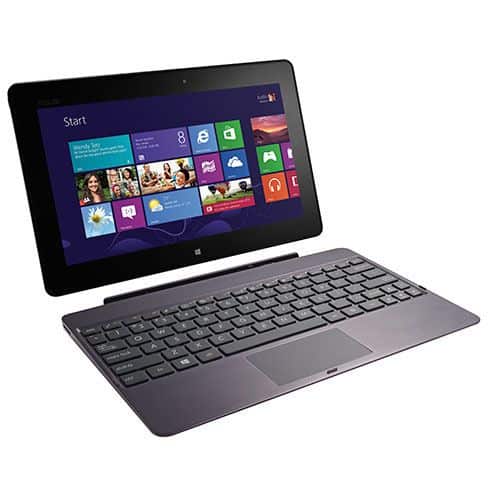
Asus names its Windows-based tablet VivoTab and will have three versions available in the market including Asus VivoTab, Asus VivoTab RT and Asus VivoTab Smart.
This is a tablet running Windows RT (for ARM processor) should work independently compared to Windows 8 (for Intel processor) should not be able to run the traditional Windows applications in .exe format. On the device. Thus, the entire application of this operating system has been built into the machine and identical to Windows 8 desktop interface. Users who want to install additional applications to customize the functionality of the machine must go to the Store application on the machine to download more.
The basic applications available on the machine such as Bing, News, Photos, People, SkyDrive, IE 10 … are no different from Windows 8 and fully compatible when synchronizing data between two operating systems. The Office 2013 Preview Office suite includes Word, Excel, Powerpoint, and OneNote, enabling users to work directly with the Office suite.
Compared to Microsoft’s Surface RT, the Asus VivoTab RT tablet does not have much of an internal configuration difference. The product uses a NVIDIA Tegra 3 quad-core processor, 1.3 GHz, 2 GB DDR3 RAM, 32 GB SSD.
The main difference is the addition of a cradle to the keyboard and extra battery attached to a compact portable laptop that lasts about 15 hours continuously.
Design
The design is a combination of thin aluminum shell and plastic wrapped on the back, while the front is anti-glare and anti-scratch glass cover the entire screen. This is the slimmest, lightest tablet on the market for a 10.1-inch screen with a weight of 525 grams.
The bottom of the keyboard is a little chiclet, but with the chiclet, there is a gap between the wide keys and the anti-dust, convenient to type continuously. Inside the keyboard dock is a second secondary battery that helps the tablet to double the usage time. This extra battery will automatically charge the serial to the battery of the tablet.
The product follows the design standards of previous Asus tablets, but to make a difference, the screen border is made quite large so that users can do the swipe, drag from the edge of the screen backwards. One of the basic controls used in Windows RT and Windows 8.
The main camera of the machine up to 8 megapixels, which supports the LED flash and is protected by a layer of glass scratches, dust clinging to affect the image quality. The secondary camera comes with 2.1 megapixels and is slightly skewed to the right if compared to the center center is the Windows logo below. The four sides of the button is a regular function, including: the right side is the headphone jack and volume control, the left is the micro HMDI socket, memory card slot, 3G SIM slot, And push button to disassemble the docking station. The upper side is the source node to the left, next to a small hole to reset the machine. Bottom edge is a power supply socket and two connectors to connect to the keyboard cradle.
In addition, the included accessory includes a switch from the standard Asus USB to standard charger, which allows users to directly plug a removable external hard drive or external optical drive into a tablet.
ASUS VivoTab RT TF600T-B1-GR 10.1-Inch 32 GB Tablet (Gray) 2012 Model: Buy it now
Screen
Super IPS display screen should have high brightness, good color reproduction, good toughness and scratch resistance, fingerprints, perspiration or continuous use. The screen is very dirty.
The screen is 10.1 inches in size, but its low resolution of 1,366 x 768 pixels, and the text on the traditional desktop interface is quite small, the ability to occasionally touch the screen is not accurate.
The screen when viewed outdoors shows good color, the angle of view does not deviate much with the maximum light level. The 5-point touchscreen has good sensitivity, with browsing, zooming, or drag-and-drop functionality in Windows RT, the machine runs fast and stable.
In addition to the other touch of the machine is the sound with speakers on both sides quite loud and clear sound due to the integration of SonicMaster technology from Asus.
Display
The Asus VivoTab RT 3G shows a 10.1-inch Super IPS+ panel, and it sits at 1366 x 768 pixels. So yeah, by today’s expectations this reso looks kind of modest, but back then it was pretty fine. Colors show up lively, contrast feels solid, and the viewing angles are wide, mostly because of the Super IPS+ tech, kinda like it just holds up in real use.
Touch-wise, it’s really good. The responsiveness feels smooth, and you do not have to fight the screen to get what you want. It also supports 10-point multitouch, which makes the Windows RT experience feel more natural, like swiping and tapping should. In tablet mode especially, it becomes more than “nice to have”, since a lot of touch apps and functions actually get used properly.
A big highlight here is brightness. The display can go up to 600 nits, so reading it outdoors, even when the light is doing a lot, is much easier. For folks who browse on the move or need to work outside this is a real win.
Still, it is not all perfect. The glossy finish can create reflections and glare when the lighting is harsh, and that distraction can build up faster than you would expect. Also, compared with newer tablets, the text and pictures do not look as crisp, but honestly it’s enough for most everyday productivity and entertainment.
Performance
The Asus VivoTab RT 3G runs on the NVIDIA Tegra 3 quad core processor, set at 1.3 GHz. You get 2GB of RAM , and depending on which version you pick there is 32GB or 64GB of internal storage. There’s also a microSD card slot so you can basically stretch the storage space up to 64GB which is pretty handy.
Real world speed is pretty decent, especially for a Windows RT tablet. The Tegra 3 chip feels fast enough for day to day stuff like web pages, email, simple document work and streaming media, it all stays smooth and quick. And with those 2GB of memory, switching between apps tends to be agreeable not sluggish, even when you multitask a bit.
That said, Windows RT is not the full Windows 8 experience. It’s more like a slimmer version, built for ARM based hardware only. Because of that, you can’t install classic Windows desktop programs. Instead, you’re limited to what’s in the Windows Store, and for certain users that can feel like a straight jacket, since some software just won’t be there.
Still, within the Windows RT boundaries, the VivoTab RT 3G does what it should. The Tegra 3 together with the tuned operating system delivers a fluid, responsive feel for most productivity routines and entertainment moments.
Battery Life
Battery life, i mean this is a big deal for any portable gadget, and the Asus VivoTab RT 3G really shines here. It comes with a 25Wh battery, so yeah it does deliver pretty strong endurance. In usual use, like web browsing, typing up documents, and watching multimedia, the VivoTab RT 3G typically manages around 9–10 hours before you have to plug in again.
And then there is the detachable keyboard dock. That dock has its own extra battery, so the whole thing can stretch to roughly 15–16 hours total, depending on how much you’re doing. So for someone who needs it to survive the full workday, and maybe a bit past that without hunting for an outlet, this model is a solid pick.
Charging is also fairly quick. With the included charger, you can get a full charge in about 2–3 hours. When the keyboard dock is attached, it charges at the same time, meaning both power packs get topped up together, rather than you waiting around in parts.
Software
The Asus VivoTab RT 3G uses Windows RT, sort of a Windows 8 cousin made for ARM-based processors. The experience feels closely related to Windows 8, with a touch-friendly setup, live tiles, and access to the Windows Store for installing apps. Still, there’s a catch though, Windows RT doesn’t allow the usual desktop-style Windows applications. That keeps you limited to apps available in the Windows Store, no matter how many shortcuts you wish were possible.
Even with these limits, Windows RT still ends up being kind of solid and it feels user friendly on the VivoTab RT 3G. The overall look and workflow are pretty intuitive, you can move around without too much hassle, and the touch gestures plus multitasking bits really help with everyday work. Also, having Office Home & Student 2013 RT pre-installed is honestly a big deal ,because it gives you Word , Excel , PowerPoint, and OneNote right away. You don’t need to hunt for basic tools first, or mess around too much.
Asus throws in a handful of preloaded apps and utilities too, which makes the device feel more complete out of the box. For example there’s the Asus Camera app, Asus WebStorage for cloud style backups, and several media options for music and video playback. That said, the app catalog in the Windows Store can be limited, so if someone depends on a specific program that isn’t there, it may become an annoying constraint.
Connectivity and Ports
The Asus VivoTab RT 3G is decent when it comes to ports and connections. You get a micro-HDMI port, a 3.5mm audio socket, and a microSD card slot. Then the keyboard dock adds two USB 2.0 ports, which is useful if you want to plug in accessories or use external storage, without constant workarounds.
On the wireless side, it supports Wi-Fi 802.11 a/b/g/n plus Bluetooth 4.0 ,so connections should stay steady for web browsing and pairing devices. There’s also 3G connectivity included, so you can remain online while traveling, instead of chasing after Wi‑Fi hotspots all the time. GPS is another plus, because it helps location services work well for maps and location based apps.
One notable omission is the lack of a full sized USB port on the tablet part itself , which can make it tricky to attach certain peripherals without using the keyboard dock. Still, in practice, the overall connectivity setup feels adequate for most folks.
Usability
One of the defining traits of the Asus VivoTab RT 3G is its versatility . Being able to shift between tablet and laptop modes gives it this kind of adaptable, ready to go vibe, so it fits different routines. In tablet mode , the device becomes a light and portable companion, good for reading , browsing and just general media time. The touch screen stays responsive and precise which , honestly, helps the whole experience feel smoother.
When you slide on the keyboard dock , the VivoTab RT 3G starts behaving more like a proper laptop. Typing feels comfortable and efficient, especially for longer sessions. The keyboard itself is pretty well put together, with good key travel and feedback so you do not feel lost while writing. The touchpad also keeps up nicely, and it supports multi touch gestures, which adds extra convenience without overcomplicating anything.
That switching behavior really boosts usability. In tablet mode the VivoTab RT 3G works well as a practical productivity gadget, with the touch interface and the Office suite helping you edit documents, and jot down notes fairly quickly. In laptop mode, the dock pushes things further, making it easier to handle lengthier work like longer documents, presentations, and spreadsheets without that constant “where do I tap” kind of frustration.
The device ‘s portability and that longer-lasting battery life also make it a lot easier to use, so it feels like a really good pick if you need something versatile and dependable while you’re out. Whether you’re working in the business world, studying, or making stuff creatively, the VivoTab RT 3G gives you the freedom and the functionality to adjust as your day changes.
Audio and Camera
About sound first, the Asus VivoTab RT 3G comes with stereo speakers and they manage to sound decent for its size. The volume isn’t exactly thunderous, but it stays clear enough, so for video calls, everyday multimedia, and casual listening it works well. If you want a more pleasant audio experience, you can still plug in external speakers or headphones through the 3.5mm audio jack , and that helps a lot.
Then there’s the camera setup. This device includes two cameras: a 2MP front camera for video calls and an 8MP rear camera for photos and recording videos. For the front camera, video conferencing looks sharp and tidy, especially when the lighting is decent. For the back camera, you can get decent pictures and videos , but it’s more of a practical option than a replacement for a real dedicated camera, or even a smartphone that’s built specifically for photography.
The included Asus Camera app adds helpful features and settings to improve the whole shooting experience, such as autofocus, face detection, and several shooting modes. Overall, the cameras are fine for casual use , though if you’re the type of user who wants high-grade imaging, you might end up wanting more than what these can offer.
Security
So, security is, sort of, a big deal for any device and the Asus VivoTab RT 3G brings a handful of features that aim to protect your information and keep privacy intact. For example, it comes with Secure Boot ,which is tied to the UEFI firmware, and that thing helps stop unauthorized software or malware from getting loaded when the device is starting up. In other words, Secure Boot makes it so that only approved software ,and trusted operating systems are allowed to run, giving you this extra safety cushion against harmful attacks.
On top of that, there’s BitLocker encryption. This one works by encrypting the entire drive, so the stored data is basically shielded. It’s especially helpful for business users ,or anyone dealing with confidential, sensitive details because even if the VivoTab is lost, or stolen, the information should stay protected.
Then Windows RT adds more protection measures, including Windows Defender and a firewall. Those tools are always working behind the scenes, giving real-time defense against viruses, malware, and other types of threats. And yeah, you don’t have to keep doing manual stuff all the time, because the system handles the watching.
Productivity and Business Use
The Asus VivoTab RT 3G feels pretty made for productivity and day to day business work, mostly because it mixes the right hardware with useful software, not just one or the other. Having Office Home & Student 2013 RT built in is a big plus, it basically means you get access to Word , Excel , PowerPoint, and OneNote , and you can actually get things done without scrambling for extra tools. These apps are tuned for touch input, so creating and editing documents, spreadsheets, and slides is not so awkward when you’re away from a desk.
The detachable keyboard dock also helps, because it gives a more comfortable typing setup , sort of like a normal laptop. On top of that, the extra battery in the dock helps lengthen the total battery span, the tablet won’t die the moment your schedule gets busy, it can handle long workdays without constant recharging.
For folks working in business roles , the VivoTab RT 3G has some features that just make it feel dependable and pretty efficient. Because it can connect up to 3G networks, you can keep working, stay online, and not get stuck just because Wi-Fi is gone. It’s also light and easy to carry, so bringing it along to meetings, conferences, or business trips feels way simpler. Plus the build quality seems solid, sturdy in a practical way, not that fragile “handle it carefully only” kind of gadget.
Then there’s the security angle , which matters when you handle sensitive information. BitLocker encryption together with Secure Boot gives users some real peace of mind. Also, you can reach cloud services via Asus WebStorage and other platforms, so important files and documents stay close at hand rather than being stuck somewhere inconvenient.
Entertainment and Multimedia
So the Asus VivoTab RT 3G is mostly meant for getting things done, but honestly it still works pretty decently when it comes to entertainment. It has a 10.1-inch Super IPS+ display that brings lively colors and nice wide viewing angles, so watching videos , looking through photos and even playing casual games feels more enjoyable than you might expect. The brightness is high enough that the screen doesn’t just disappear in daylight, which helps a lot with the whole multimedia vibe, even outdoors.
About sound, it’s not exactly amazing. Still, it’s good enough for most everyday stuff. The stereo speakers deliver fairly clear audio for movies, music, and those quick video calls where you just need things to be audible. If you want something more immersive though, you can plug in external speakers or headphones through the 3.5mm audio jack, which is a nice little option to have.
The VivoTab RT 3G arrives with support for multimedia apps from the Windows Store, so users kinda can get to streaming services like Netflix, Hulu, and Spotify with not too much hassle. The library of apps may feel a bit more limited compared to other ecosystems , but most of the time the choices line up with the well-known services. So in the end you still end up with a pretty decent entertainment experience overall.
Comparison with Competitors
When putting the Asus VivoTab RT 3G side by side with other tablets and convertible models that came out around the same period, a few obvious strengths show up, and a couple weaknesses.
Strengths:
Design and build quality: the premium aluminum finish, plus the solid construction, really gives the VivoTab RT 3G that solid feel. it is also light and slim, so it comes with you easily… without being a hassle or too bulky.
Display: the 10.1-inch Super IPS+ screen has high brightness, so visibility stays good even in brighter settings, and colors look lively too.
Battery life: pairing the tablet battery with the keyboard dock batteries gives you pretty impressive endurance, so you can go longer between recharging, for extended use.
Productivity features: Office Home & Student 2013 RT is included, and the detachable keyboard dock helps turn it into a more flexible work companion for productivity stuff.
3G Connectivity: being able to hook up to 3G networks means you are not stuck near Wi‑Fi all the time. users can stay online while moving around, which is a nice plus.
Weaknesses:
Operating system limitations: Windows RT can’t really run the traditional Windows desktop apps, so for some people that cuts down what they can do.
App selection: the Windows Store had a more limited catalog than other ecosystems like iOS or Android, so certain apps, and even services, might simply not be there.
Performance constraints: the Tegra 3 processor is fine for everyday tasks, but for heavier applications and more intense multitasking it can start to feel strained.
Competitors:
Microsoft Surface RT: The Surface RT, released around the same time too, also ran Windows RT and it leaned into productivity with that detachable keyboard cover. Surface RT had a display with a bit higher resolution , and the overall look was a bit different , with that integrated kickstand going on there.
Apple iPad: The iPad, especially the iPad 4 from late 2012, brought a sharper Retina display , plus access to a bigger app universe via the App Store. Still, it didn’t really give the same out of box productivity toolkit as the VivoTab RT 3G, it kinda skipped that part.
Samsung ATIV Tab: Then there’s the Samsung ATIV Tab, another Windows RT device, which shared much of the same spec vibe but came with Samsung’s own design choices and build feel. It ran into pretty much the same kinds of limits because Windows RT was in control.
User Experience
What people say about the Asus VivoTab RT 3G has mostly been pretty positive, especially regarding its design, build quality , and battery life. Many users like the flexibility of moving between tablet mode and laptop mode , and they also mention the extra battery time that the keyboard dock adds , so overall it feels more steady day to day.
The display quality and brightness levels are pretty much always praised, and people mention that the screen is still easy to see even when it’s sunny outdoors. The touch feel, and how quick it reacts, also gets called out a lot, like in general it seems responsive and smooth.
Some users get annoyed by the Windows RT operating system, mostly because it can’t run the usual, traditional Windows desktop applications. On top of that, the app catalog in the Windows Store is described as limited, and that becomes a real hassle if you depend on certain apps, or specific services that aren’t there.
In terms of performance, the VivoTab RT 3G is usually seen as enough for day to day stuff. Still, a handful of users say it has trouble when you throw at it heavier applications or when multitasking ramps up. And there’s also the thing about the tablet not having a full sized USB port on the device itself, which some people view as a serious limitation, especially for everyday connections.
Overall the user experience is considered good , but mostly for folks who really care about portability, longer battery time and those work oriented productivity features. The design, along with the build quality, plus its general versatility, and the extended battery life, make it seem like a solid pick for anyone moving around a lot.
Conclusion
The Asus VivoTab RT 3G feels like a pretty well thought-out device, it’s flexible in a way that makes it good for portability, day to day productivity, battery life too. The whole aluminum look is kinda sleek, the build quality feels solid, and because it stays lightweight it comes off as an appealing mobile computing option for people who want something on the go. The Super IPS+ screen also helps a lot, the colors look lively and brightness stays strong, so even with different lighting situations you still get decent visibility, most of the time.
Now, performance is fine for everyday tasks, but there are clear limits tied to the Windows RT operating system. The thing is it can’t run standard Windows desktop applications, and on top of that the Windows Store app selection feels narrower than some people expect. For certain users this will be a dealbreaker. Still, you do get Office Home & Student 2013 RT, and the detachable keyboard dock adds a more practical productivity angle, not just a tablet vibe.
Battery life really stands out. With both the tablet and the keyboard dock batteries working together, longevity is genuinely impressive. Plus, being able to connect over 3G networks makes it more interesting for anyone who needs connectivity away from WiFi.
So, while the VivoTab RT 3G won’t fit everyone, mainly because of the operating system restrictions, it stays a solid option if your priorities are design, build quality, and battery performance. In the end, its overall versatility and work oriented features make it a dependable companion for business professionals, students, and anyone looking for a portable efficient computing device, even if it’s not the most open platform out there.
Related Posts


Tech Reviewer & Product Analyst
Định Bia has spent over 10 years testing consumer electronics with a focus on smart technology. He work as a product advisor at Biareview where he helped customers find the right devices for their needs. He personally tests every product featured on this site using a consistent evaluation framework covering quality, durability, and value. All reviews are based on experience, not influenced by the manufacturer.